





Send webhooks to other services (Pro)
Simple Points and RewardsUpdated October 27, 2026
Webhooks send a notification to another service as soon as something happens in your rewards program, such as a customer earning points or claiming a reward. Set them up at Points & Rewards › API, Webhooks & AI › Webhooks. Webhooks need Pro, and the REST API must be switched on.
Add a webhook
- Make sure the REST API is switched on. See Set up the REST API and API keys.
- Open the Webhooks tab and click Add webhook.
- Enter a Name, such as “Slack notifications”.
- Enter the Delivery URL. It must use HTTPS and be reachable from the internet. Private and local addresses are refused.
- Tick the Events to send, or tick All events.
- Click Add webhook.
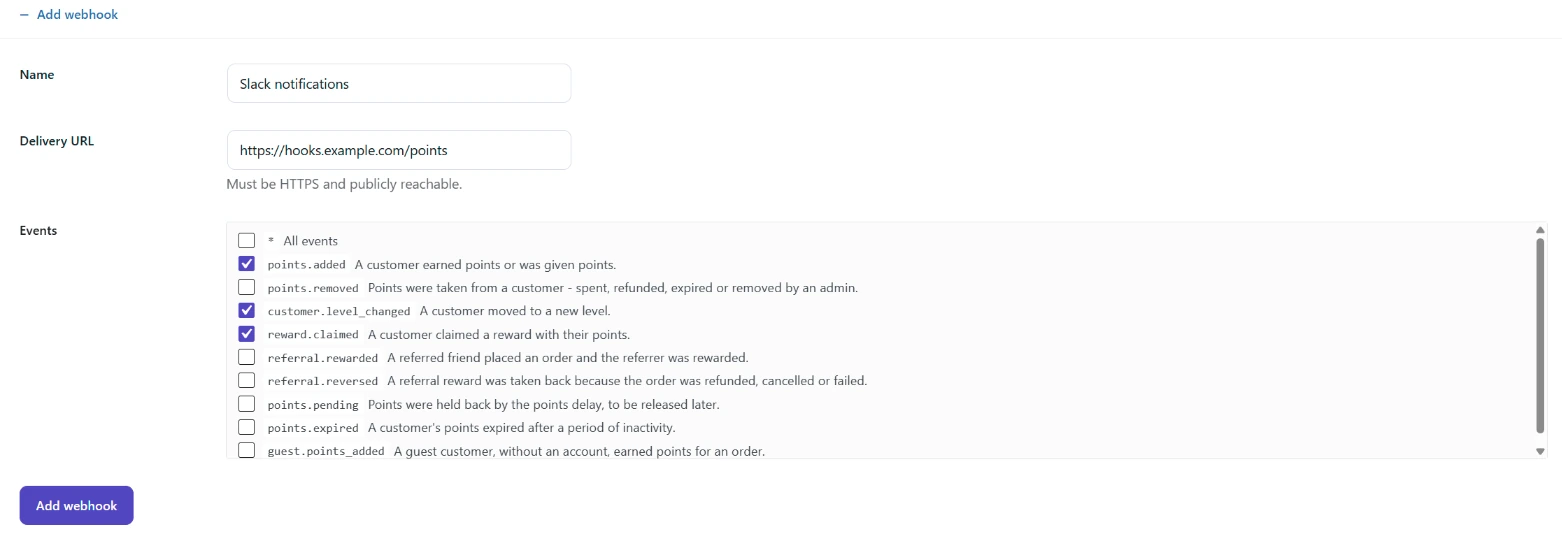
You cannot change the delivery URL later. If it changes, add a new webhook and delete the old one.
The webhook then appears in the list with its secret. Copy the secret into the receiving service so it can check each delivery. Administrators see the full secret. Shop managers see only the last 4 characters.
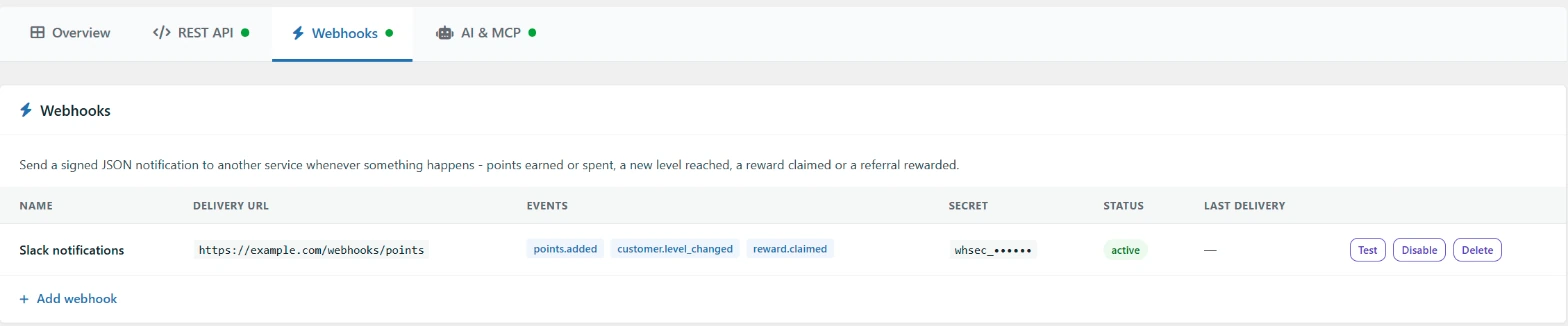
Events you can send
| Event | When it is sent |
|---|---|
points.added | A customer earned points or was given points |
points.removed | Points were taken from a customer: spent, refunded, expired or removed by an admin |
customer.level_changed | A customer moved to a new level |
reward.claimed | A customer claimed a reward with their points |
referral.rewarded | A referred friend placed an order and the referrer was rewarded |
referral.reversed | A referral reward was taken back because the order was refunded, cancelled or failed |
points.pending | Points were held back by the points delay, to be released later |
points.expired | A customer’s points expired after a period of inactivity |
guest.points_added | A guest customer, without an account, earned points for an order |
What each delivery contains
Each delivery is a JSON body with these fields:
id: a unique ID for the delivery. It stays the same on every retry, so use it to skip duplicates.event: the event name, such aspoints.added.created: when the event happened, in UTC.site: your store’s home URL.data: the details of the event. Most events include acustomerobject with the customer’s ID, email address, display name, balance, lifetime points and level.
Each delivery also has these headers: X-SPAR-Event (the event name), X-SPAR-Delivery (the delivery ID) and X-SPAR-Signature.
Check the signature
The X-SPAR-Signature header looks like t=1793030000,v1=5d41.... The v1 value is an HMAC-SHA256 hash of the timestamp, a full stop and the raw request body, using the webhook secret as the key. This PHP example checks it:
$secret  = 'whsec_your_webhook_secret';
$body    = file_get_contents( 'php://input' );
$header  = $_SERVER['HTTP_X_SPAR_SIGNATURE'] ?? '';

parse_str( str_replace( ',', '&', $header ), $parts );
$timestamp = $parts['t'] ?? '';
$expected  = hash_hmac( 'sha256', $timestamp . '.' . $body, $secret );

if ( ! hash_equals( $expected, $parts['v1'] ?? '' ) || abs( time() - (int) $timestamp ) > 300 ) {
	http_response_code( 401 );
	exit;
}

$event = json_decode( $body, true );
http_response_code( 200 );
Retries and automatic switch-off
A delivery succeeds when the receiving service replies with a 2xx status within 8 seconds. Redirects are not followed. A failed delivery is tried up to 5 times in total, waiting about 1, 4, 16 and 64 minutes between attempts.
After 25 failures in a row, where the first of them was at least a day ago, the webhook is switched off. Click Enable to switch it on again. This also resets the failure count.
The list shows the time of the last delivery and the number of failures. Hover over the failure count to see the last error. There is no full delivery log.
Test a webhook
Click Test to send a ping event straight away. A notice shows the HTTP status the service returned. Tests work even while the REST API is off, and they do not count as failures.