





Order Bonuses (Pro)
Simple Points and RewardsUpdated October 26, 2026
Order Bonuses award extra points on special order milestones, on top of the standard purchase points. They’re a powerful tool for encouraging both first purchases and repeat ordering. Configure them under Points & Rewards › Settings › Ways to Earn › Order Bonuses.
First Order Bonus
Award a one-time bonus the very first time a customer places an order. This is great for converting new sign-ups into first-time buyers.
- Enabled – Toggle the first order bonus.
- Points – How many bonus points to award on the first order.
- Action Name – Label shown in the customer’s history (e.g. “First Order Bonus”).
Give the bonus to new customers only
Turn on Only for customers with no earlier orders under Points & Rewards › Settings › Ways to Earn › First Order Bonus, in the Bonus details box. It is off by default.
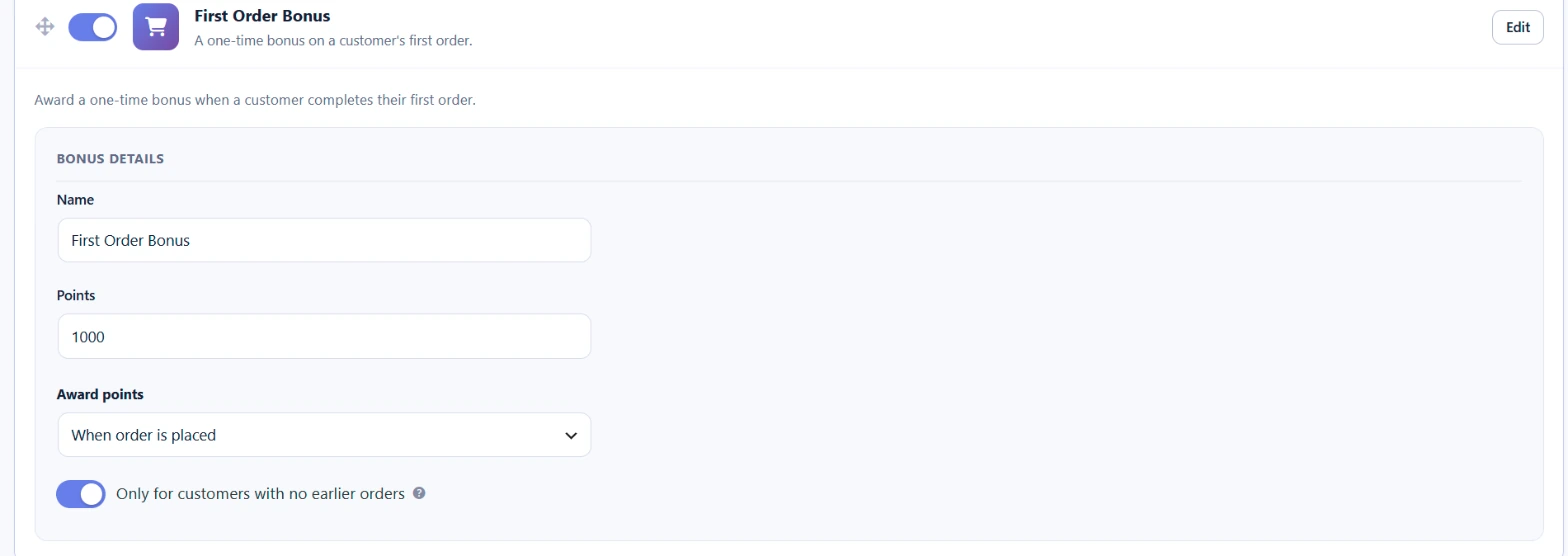
With this option on, a customer does not get the bonus if they already have a completed, processing or on-hold order from before, on the same account or the same billing email. Guest orders count. Subscription renewal orders never get the bonus.
Leave the option off if you want existing customers who have not had the bonus yet to get it on their next order, for example when you first launch the rewards program. Bonuses that were already paid are never taken back when you change this option.
Nth Order Bonus
Award a recurring bonus every time a customer reaches a specific order count. For example, award 200 bonus points on every 5th order to reward loyalty.
- Enabled – Toggle the nth order bonus.
- Order Interval – Award the bonus every N orders (e.g. every 5th order).
- Points – How many bonus points to award when the interval is reached.
- Action Name – Label shown in the customer’s history.
How Bonuses Stack
Order bonuses are awarded in addition to the standard purchase points. For example, if a customer earns 50 points for their order spend and it’s also their first order with a 100-point bonus, they receive 150 points total. Level multipliers may also apply.
Award Timing
Order bonuses follow the same award timing as your standard purchase points (on order placement or on order completion), as configured under Points for Purchases.
Use Cases
- Boost first-purchase conversion with a generous first order bonus.
- Encourage repeat orders with a recurring milestone bonus.
- Combine with email notifications to celebrate the bonus and reinforce the loyalty loop.