





Connect Claude, ChatGPT and other AI apps
Simple Points and RewardsUpdated October 27, 2026
AI & MCP lets AI apps answer questions about your loyalty program, such as “Which customers have the most points?” or “How many points does Jane Smith have?”. It uses the WordPress Abilities API and, when an MCP adapter is running, its own MCP server. Switch it on at Points & Rewards › API, Webhooks & AI › AI & MCP. It is off by default. Once on, AI apps can only read data, and only store managers can connect, until you allow more.
What your site needs
- WordPress 6.9 or later, which includes the Abilities API.
- An MCP adapter so AI apps can connect: the free WordPress MCP Adapter plugin, or WooCommerce’s experimental “WooCommerce MCP” feature.
- Application passwords. WordPress only offers these on sites that use HTTPS.
The AI & MCP tab shows a checklist with the status of each one.
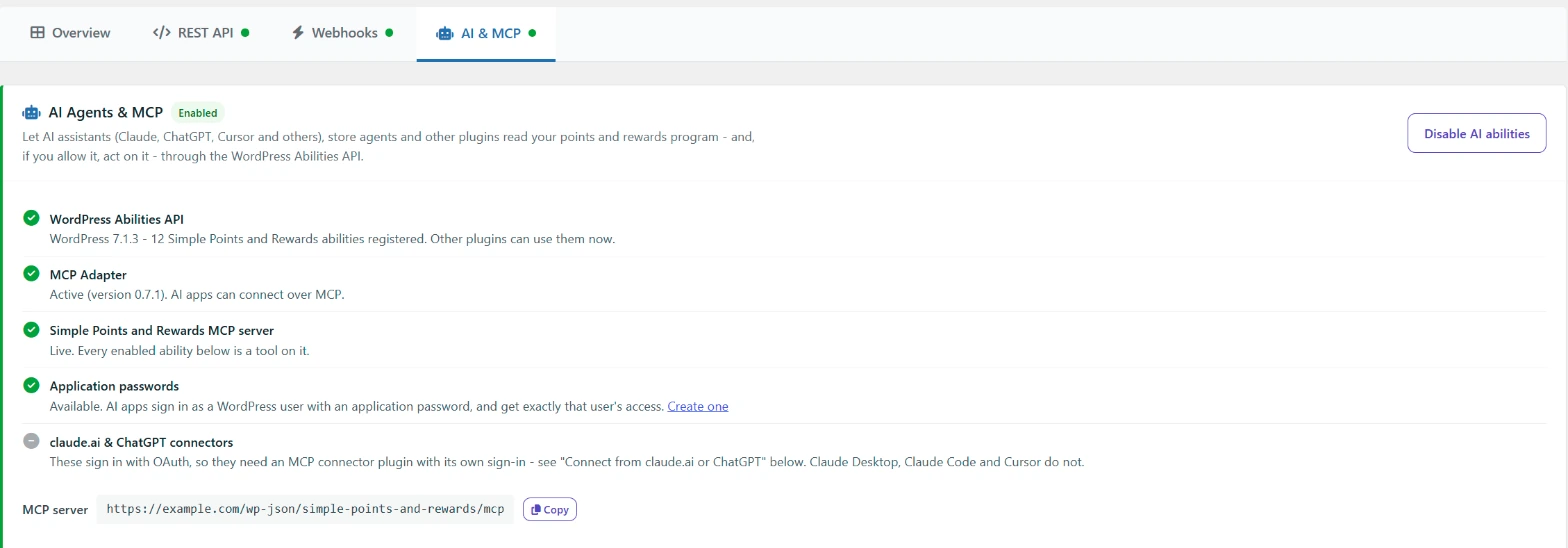
Switch on AI abilities
- Open the AI & MCP tab.
- Click Enable AI abilities.
- When Simple Points and Rewards MCP server shows “Live”, copy the MCP server URL. It looks like
https://example.com/wp-json/simple-points-and-rewards/mcp.
If an MCP adapter is already active, the plugin shows a notice on its admin pages with an Enable AI tools button. This does the same as step 2. Click No thanks to hide the notice.
Connect Claude Desktop, Claude Code or Cursor
- Create an application password for the user the AI app should act as, under Users › Profile › Application Passwords.
- Add the server to the app’s MCP settings. For Claude Desktop, that is
claude_desktop_config.json:
{
  "mcpServers": {
    "simple-points-and-rewards": {
      "command": "npx",
      "args": ["-y", "@automattic/mcp-wordpress-remote@latest"],
      "env": {
        "WP_API_URL": "https://example.com/wp-json/simple-points-and-rewards/mcp",
        "WP_API_USERNAME": "your-username",
        "WP_API_PASSWORD": "your-application-password",
        "OAUTH_ENABLED": "false"
      }
    }
  }
}
The Connect Claude Desktop, Claude Code or Cursor section of the tab shows this with your own URL and username filled in. The tools show up in the app as simple-points-and-rewards-get-customer and so on.
Connect from claude.ai or ChatGPT
claude.ai and ChatGPT connectors sign in with OAuth. The MCP Adapter and WooCommerce MCP do not provide OAuth, so these apps need an MCP connector plugin that adds its own sign-in. The Connect from claude.ai or ChatGPT section of the tab lists some third-party options.
Choose what AI apps can do
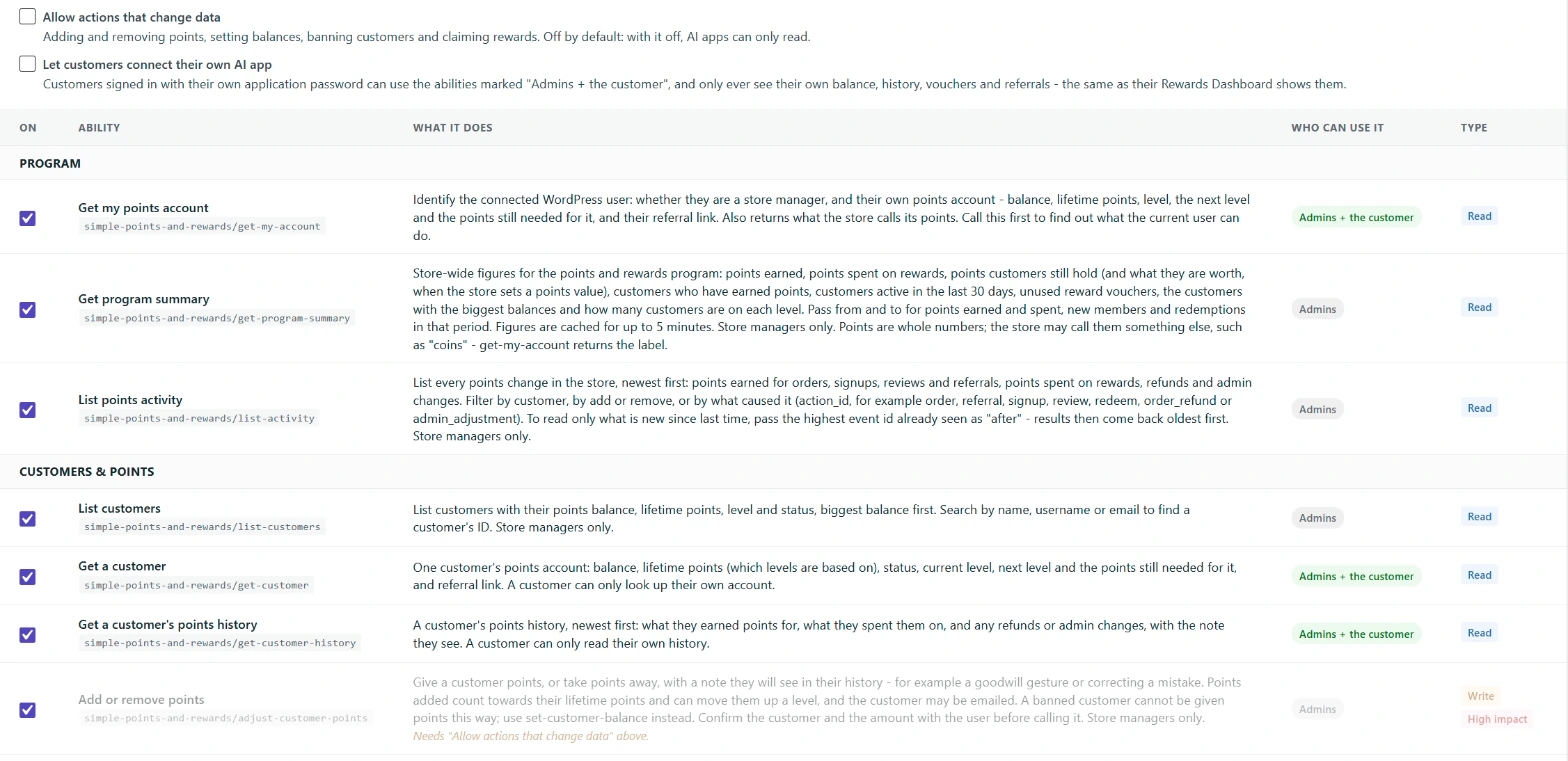
- Allow actions that change data: lets AI apps add and remove points, set balances, ban customers and claim rewards. It is off by default. Abilities marked High impact change balances or spend points, and AI apps are told to confirm with you first.
- Let customers connect their own AI app: customers who sign in with their own application password can use the abilities marked “Admins + the customer”. They only see their own balance, history, vouchers and referrals.
- To switch off a single ability, untick it in the On column and click Save AI settings.
Every ability checks the signed-in user’s permissions on each call, the same as the REST API.
Available abilities
| Ability | Type | Who can use it |
|---|---|---|
| Get my points account | Read | Admins + the customer |
| Get program summary | Read | Admins |
| List points activity | Read | Admins |
| List customers | Read | Admins |
| Get a customer | Read | Admins + the customer |
| Get a customer’s points history | Read | Admins + the customer |
| Add or remove points | Write, high impact | Admins |
| Set a customer’s balance | Write, high impact | Admins |
| Ban or unban a customer | Write | Admins |
| List rewards | Read | Admins + the customer |
| Claim a reward | Write, high impact | Admins + the customer |
| List reward vouchers | Read | Admins + the customer |
| List levels | Read | Admins + the customer |
| Get referral stats | Read | Admins + the customer |
| List pending points (Pro) | Read | Admins + the customer |
| List guest points (Pro) | Read | Admins |
Limits and recent activity
Each user can make 120 read calls and 20 write calls a minute. Recent AI activity lists the last 30 calls, with the time, ability, user, how it was called (MCP, REST API, WP-CLI or a plugin) and the result. It does not store anything else that was sent. Click Clear activity to empty the list.