





Award points for past orders
Simple Points and RewardsUpdated October 27, 2026
The Award Points for Past Orders tool gives customers the points they would have earned on older orders, for example orders placed before you installed the plugin or switched points on. Go to Points & Rewards › Tools and click Award Points on its card. Orders that have already earned points are skipped, so the tool is safe to run more than once.
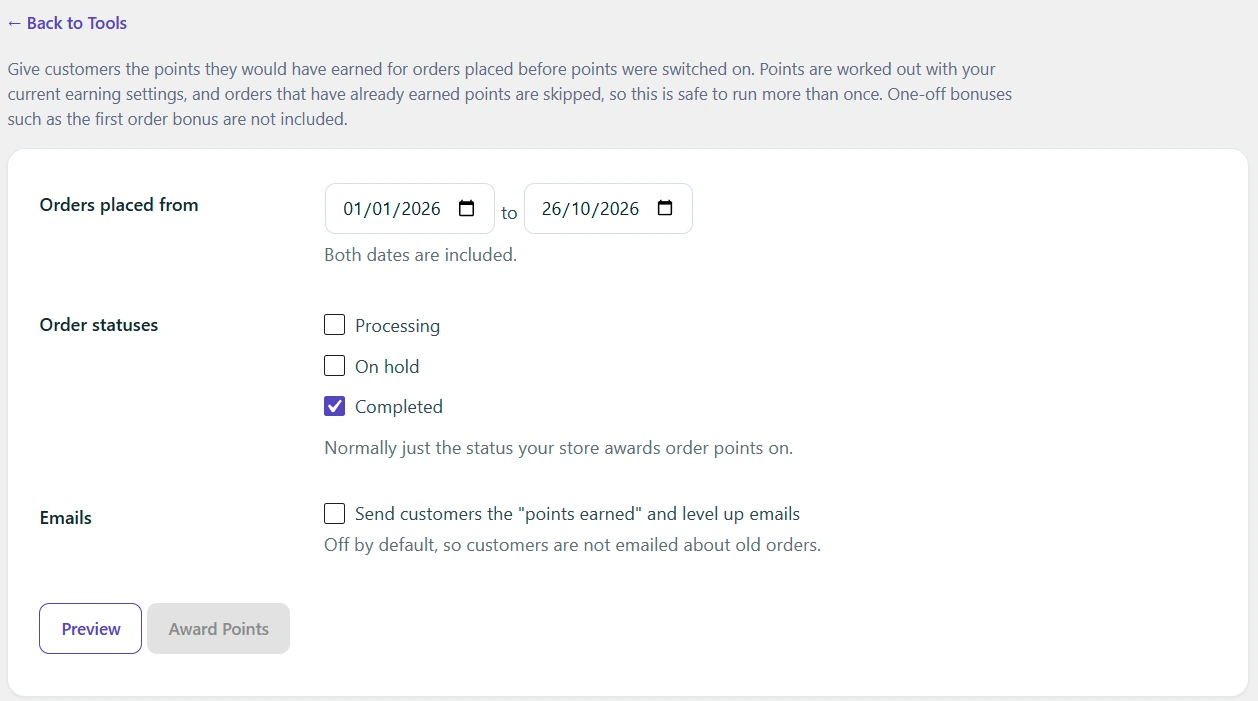
Choose the orders
- Orders placed from and to: the date range. Both dates are included, and the end date defaults to today.
- Order statuses: only the status your store awards points on is ticked at first, usually Completed. Pending, failed, cancelled and refunded orders are never included.
- Emails: tick Send customers the “points earned” and level up emails only if you want customers emailed about these orders. It is off by default.
Preview, then award
- Click Preview. You see how many orders were found, how many will earn points, the total points, how many customers are affected and how many orders will be skipped and why. The first orders to be awarded are listed, and Download full report (CSV) gives the full list.
- Click Award Points and confirm.
- Check the log and the results summary when it finishes.
There is no undo, so check the preview carefully. To change the points of one order afterwards, use Adjust points on the order screen.
How the points are worked out
Each order earns points with your current earning settings and the customer’s level multiplier, as a new order would. The preview allows for customers moving up a level as their lifetime points grow.
One-off bonuses, such as the first order bonus, Nth order bonus and order streaks, are not awarded.
Orders that are skipped
- Orders that already earned points, or had points taken back by a refund or cancellation.
- Guest orders with no customer account.
- Orders where points were redeemed, when your settings do not award points on those orders.
- Orders from banned customers.
- Orders that earn no points.
Points delay (Pro)
If you use the points delay, orders older than the delay are credited straight away. Newer orders wait out the rest of the delay, counted from the date the order was placed.
The tool awards points even while the rewards program is switched off, so you can prepare balances before launch.