





Reward Points Panel on the Order Screen
Simple Points and RewardsUpdated October 26, 2026
The Reward Points panel sits on every WooCommerce order edit screen (WooCommerce › Orders, then open an order). It shows who the order belongs to, what it has earned or stands to earn, and, since version 2.2.0, the specific reason it has not earned anything when that is the case.
The customer card
The panel opens with the customer the order belongs to: their avatar, name, email address and current points balance. Every action on the panel affects that customer, so it is shown once at the top rather than repeated by each section below.
Potential, awarded and deducted points
Potential points is what the order will actually credit if it is awarded. It comes from the same calculation the award itself uses, so the maximum points per order, the maximum percentage of total, the customer’s level multiplier, fixed points tiers and any conditional rules are all reflected in the figure on screen.
- Modify – Set the points for this order by hand. The order is then marked Custom and stops following the items on it.
- Reset – Clear a custom amount so the points are calculated from the order’s items again.
- Points awarded – Shown once the points have actually reached the customer’s balance.
- Points deducted – Shown when the points were returned because the order was refunded or cancelled.
Potential points update as you edit the order
Before the points are awarded, the potential points figure updates as soon as you add or remove items, coupons, fees or shipping, recalculate, or change the customer. You do not need to save the order first. Nothing is saved until you save the order.
Change an order’s points after they are awarded
Click Adjust points to change how many points the order earned. Enter the new total in Reward Points earned by this order and an optional Reason (up to 200 characters), then click Save.
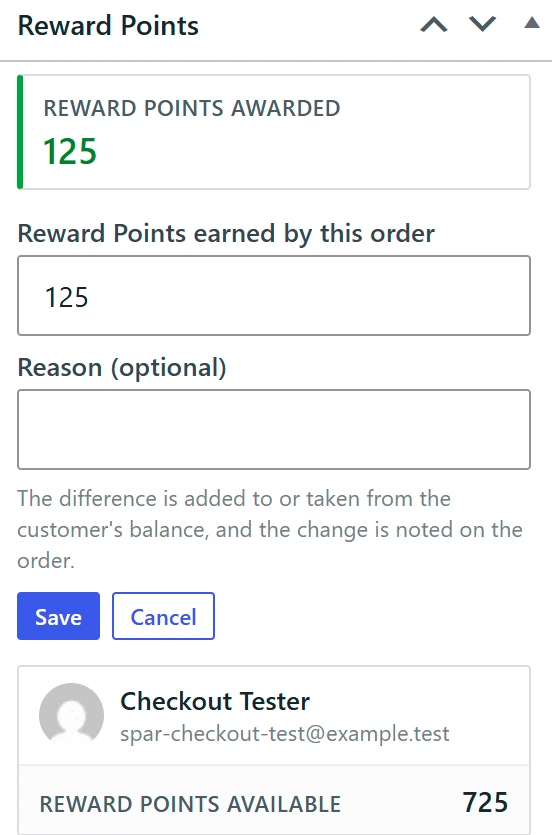
- The difference is added to or taken from the customer’s balance, and the change is noted on the order and in the activity log.
- A decrease also lowers the customer’s lifetime points.
- The total cannot go below 1. To take back all of an order’s points, refund or cancel the order.
- If part of the order was already refunded, the total cannot go below the points already taken back.
- Later partial refunds take back their share of the new total.
- With the points delay (Pro), a decrease comes off the order’s waiting points first, and an increase is added to them while the order still has points waiting.
The button appears once points have been awarded, as long as the order is not refunded, cancelled or failed and has a customer.
Why an order has not earned points
When nothing has been awarded, the panel names the reason and what to do about it. The message takes its colour from what it means: red when something needs attention, amber while the order is simply waiting.
- No customer account is assigned to this order – The most common cause on orders created by hand, where the Customer field is left as Guest. Points can only go to a registered account, so set the Customer field and save the order. With Guest Points Tracking enabled the order is instead tracked against its billing email.
- This customer is banned from earning points – Set their status back to Active on the Customer Points page.
- Points were redeemed on this order, so no points are earned – Controlled by “Do not award ANY points on orders where points were redeemed at checkout” under Ways to Earn › Place an Order.
- A custom amount of 0 has been set on this order – Use Reset to calculate the points from the items again, or Modify to enter a different amount.
- No points earned for this order – The order genuinely earns nothing at your current settings.
- The order status chosen for awarding points no longer exists – The status saved under Ways to Earn › Place an Order › Completed status came from a plugin that is no longer active, so no order can ever reach it. Choose a registered status.
- Points will be awarded when this order reaches “…” – Nothing is wrong; the order is waiting on the status you award points on, which the panel now names.
- Order is refunded, cancelled or failed – Points cannot be awarded on a terminal order.
Points held back by Points Delay (Pro)
When the Points Delay feature is holding an award back, the panel says so rather than leaving it looking like a failure. It shows how many points are waiting and the date and time they reach the customer’s balance. An order with more than one pending release shows the combined total and how many parts it arrives in.
The notice is hidden while an order is still unsettled – pending, on hold, cancelled, failed, refunded or a draft – because those points can still be cancelled before they are ever released.
Granting points by hand
A Grant points now button appears whenever awarding is still possible, so you can credit an order without waiting for its status to change. It also works while the rewards program is switched off, and adds the first order bonus (Pro) when the customer qualifies. If the award is refused, the button reports the same specific reason the panel would, rather than a generic failure.
An order is only recorded as awarded when the balance actually changed. If points were refused, for example because the customer was banned, the order is not stamped, so it can be granted later once the cause is fixed.