





for WooCommerce
Handle tax exempt customers without the
manual admin work.
Let customers declare their tax exemption eligibility, supply a VAT number, charity number or ABN, upload their certificate, and have tax removed automatically, with numbers checked against the official registers.
Simplify the way you manage tax exempt customers
Customers declare their eligibility on the cart, checkout or My Account page, submit the details you ask for and upload their certificate. Tax is then removed from their orders automatically. You get a clear admin area to review requests, approve exempt customers, track exempt orders and export everything to CSV for compliance.
They declare
A tax exemption checkbox appears on the cart, checkout or My Account page.
They submit details
Name, reason, your own custom fields and a PDF exemption certificate.
You approve
Optionally review and approve each request before exemption applies.
Tax is removed
Tax comes off their order automatically, with everything logged for compliance.
Currently the only plugin I found that will grant tax exemption for admin orders with automated tax calculations.
Jason Houge
Exemption Options
Fourteen ways to collect exemption details
Show the tax exemption form exactly where it makes sense for your store: classic checkout, block checkout, cart, My Account or registration. Then ask for exactly what you need.
Exemption on Checkout
Show the checkbox and fields on the classic checkout and the block checkout, automatically disabling tax on the order.
Exemption on Cart
Optionally show the same checkbox and fields on the cart page so customers can set it at an earlier stage.
Settings on My Account
Add a dedicated section to the WooCommerce My Account page where users set or edit their exemption details.
Exempt Name & Reason
Alongside the checkbox, customers submit the name of the person or organisation that is exempt, and the reason.
Custom Form Fields
Add your own fields to the exemption form: text, textarea, select, checkbox, radio, number and date.
Fields on Registration
Show the exemption fields on the WooCommerce registration form, ready to auto-apply on their first checkout.
PDF Certificate Uploads
Let exempt customers upload their PDF tax exemption certificate when submitting their details.
Choose the Location
Select exactly where the exemption form appears on checkout, so it fits your custom checkout layout.
Hide Fields on Checkout
Show only the checkbox at checkout, requiring customers to set their details on My Account first.
Expiration Date
Add an expiry date, or auto-calculate one from a default validity period. Lapsed exemptions are disabled automatically.
Remove Tax on Shipping
Choose whether tax is also removed from shipping costs, or only from the products themselves.
Notification Emails
Request, approval, decline, expiry reminder and expired emails, plus a daily admin digest. All fully customisable.
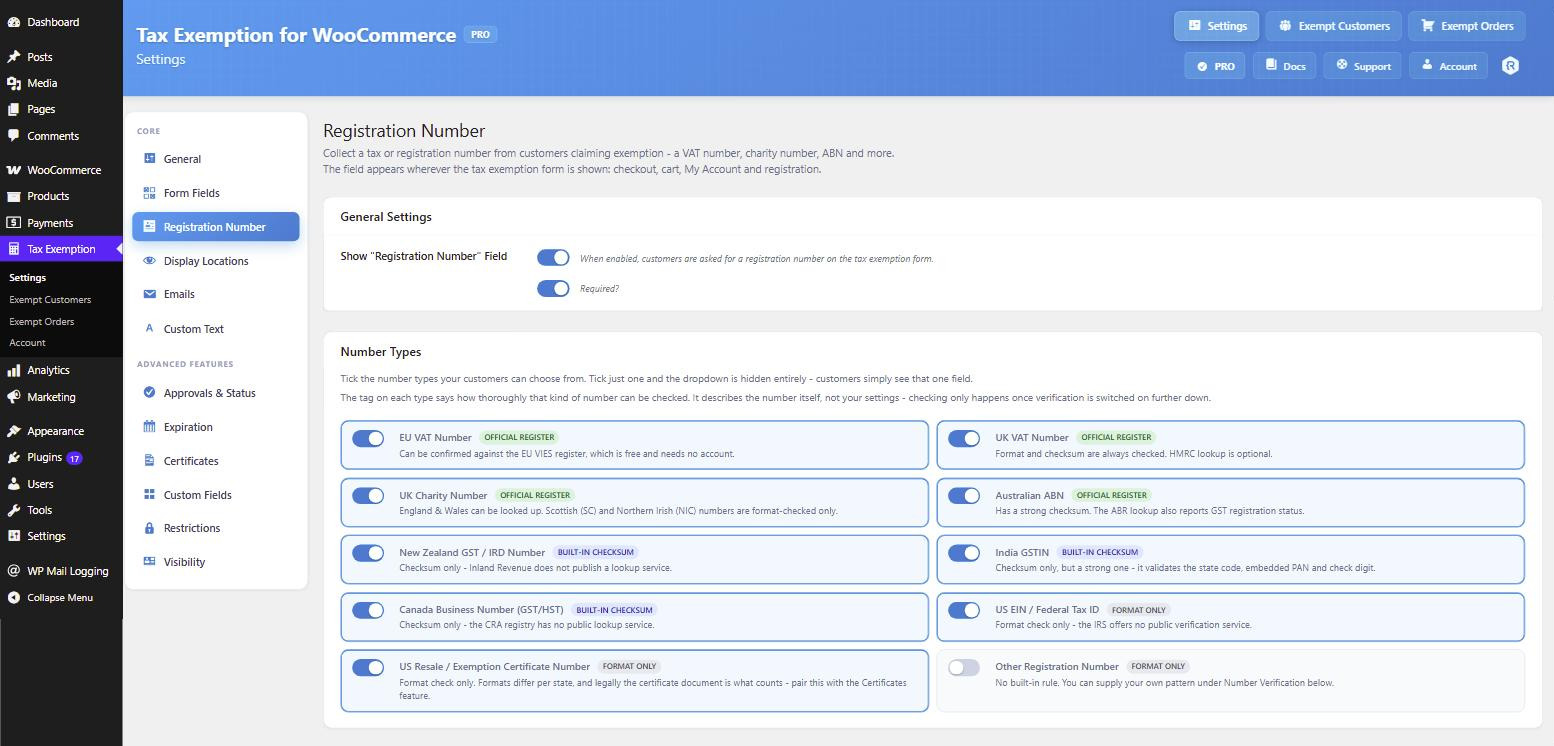
Registration Number
Collect a VAT number, charity number, ABN, GSTIN, EIN or resale certificate number, and pick which types you accept.
Exemption City / State
Add a city/state field, then only apply exemption when it matches the billing state entered at checkout.
Number Verification
Check registration numbers against the official registers
Every number is checked against its own format and check digit with no setup at all. Turn on a register and PRO looks the number up live, in real time.
VIES
EU VAT numbers confirmed against the European Commission’s register. Free, and no account needed.
HMRC
UK VAT numbers looked up through HMRC’s “Check a UK VAT number” API.
Business Register
Australian ABNs checked against the ABR, which also reports GST registration status.
Charity Commission
England & Wales charity numbers verified against the Charity Commission register.
Auto-approve on success
Customers whose number verifies are approved automatically. Numbers that fail are left pending for you to review, never declined outright.
Consultation references
Successful VIES and HMRC checks record a consultation reference against the customer and the order, which is your evidence that you verified the number.
Re-check any time
A Re-check button on the customer profile and Exempt Customers page re-verifies a stored number on demand, with a badge showing how and when it was checked.
Number types supported
Restrictions & Permissions
Decide exactly who can claim exemption
Restrict tax exemption to the right customers, products and locations, or require your approval before anyone can use it.
Approved Users Only
Require customers to submit the exemption form first and have an admin approve it before they can place tax exempt orders.
Selected User Roles
Make tax exemption available only to the user roles you choose. The form stays hidden for everybody else.
Logged In Users Only
Limit the tax exemption option on checkout to logged in customers, so every claim is tied to an account.
Specific Products Only
Only remove tax from eligible products. Edit any product and switch on “Tax Exempt Product” to include it.
Tax Class Per Customer
Set a custom tax class for exemption on specific customers, overriding the global tax class you have configured.
States or Countries
Limit the exemption fields to certain states or countries, based on the billing address entered at checkout.
Checkout & Cart
Declare exemption right where they buy
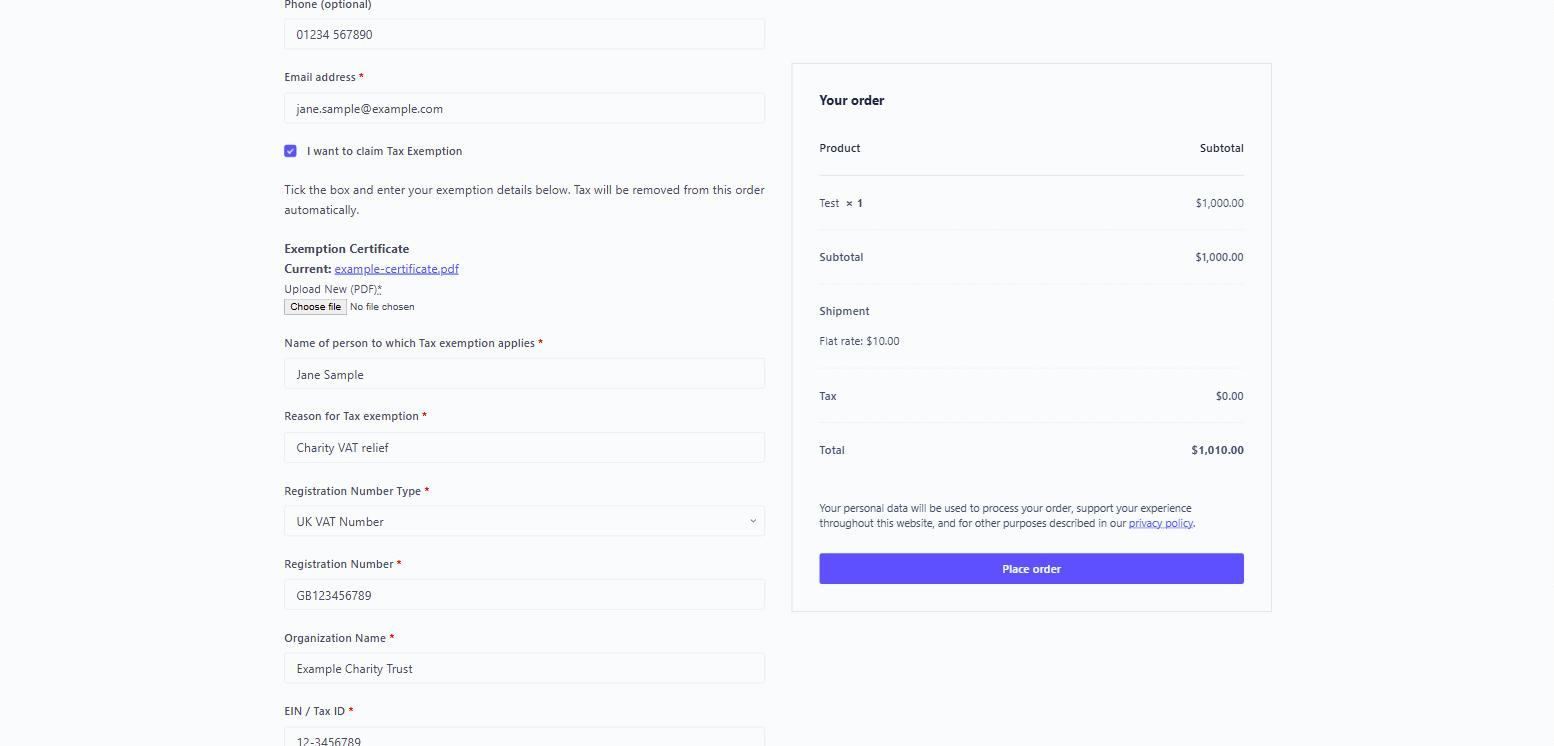
A tax exemption checkbox and form sit directly on your checkout page, and optionally the cart page too, so eligible customers can claim exemption without emailing you first.
Tax removed instantly
Tick the box and tax comes off the order total straight away, with no page reload needed.
Place it anywhere
Choose where the form renders on checkout so it fits neatly into your custom layout.
My Account
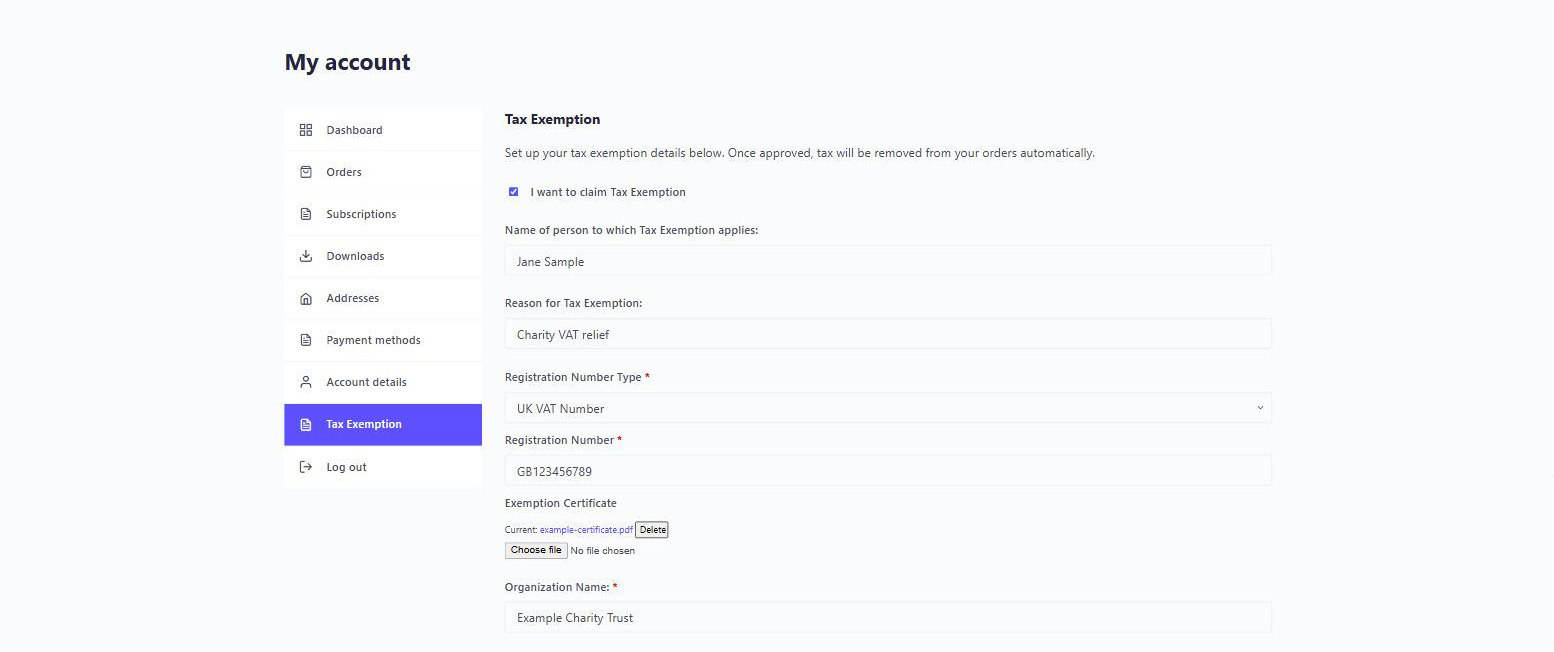
A dedicated exemption area under My Account
Add a tax exemption section to the WooCommerce My Account page where customers set up their details once, upload their certificate, and keep everything up to date themselves.
Certificate uploads
Customers attach their PDF exemption certificate, stored securely against their account.
Keep checkout clean
Hide the fields on checkout entirely and show just the checkbox once details are on file.
Custom Fields
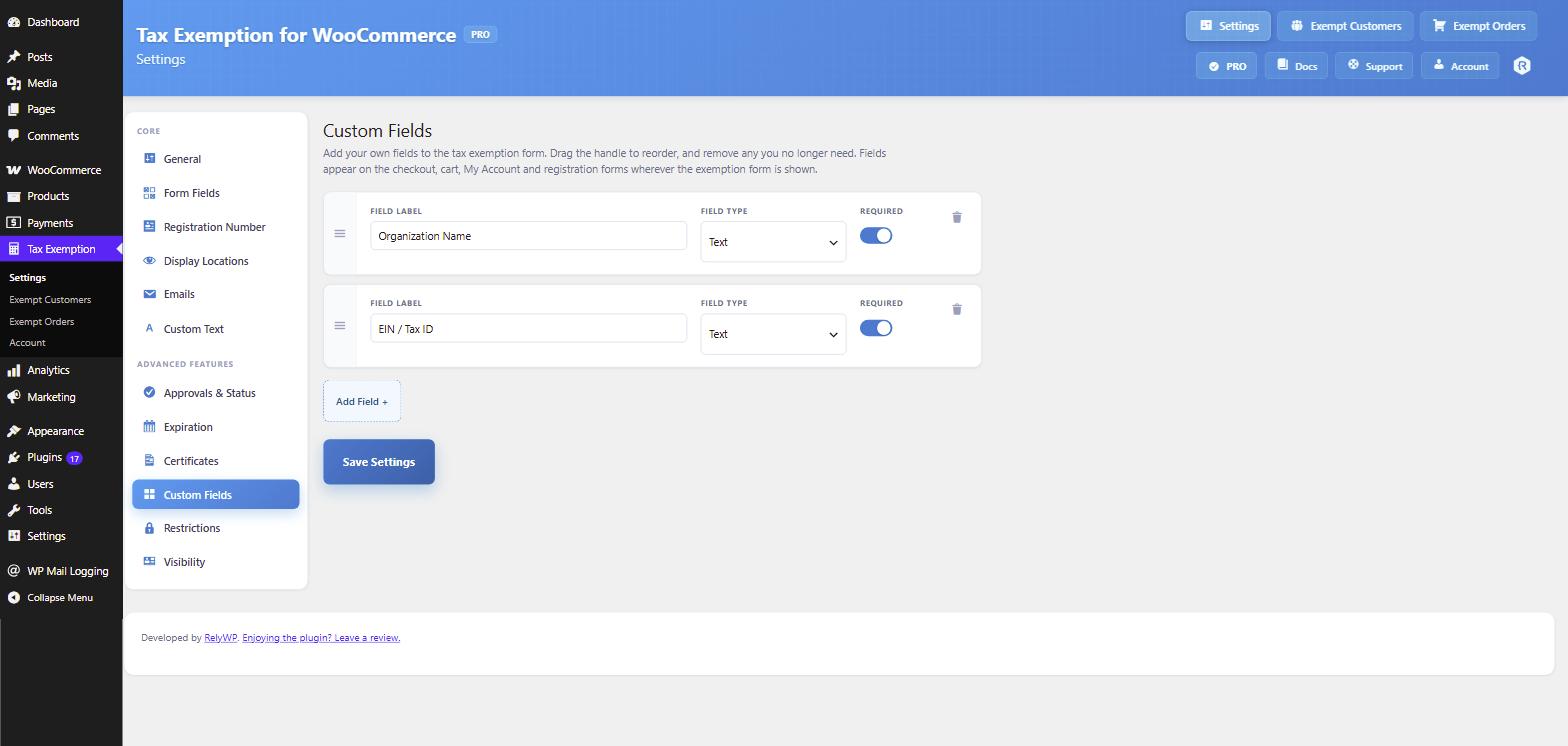
Build the exemption form your compliance needs
Beyond the built-in name and reason fields, add as many of your own as you like: text, textarea, select, checkbox, radio, number and date. Mark them required where it matters.
Seven field types
Capture registration numbers, categories, dates or anything else your tax authority asks for.
Expiry built in
Add an expiration date so lapsed exemptions are disabled until the customer renews them.
Exempt Customers
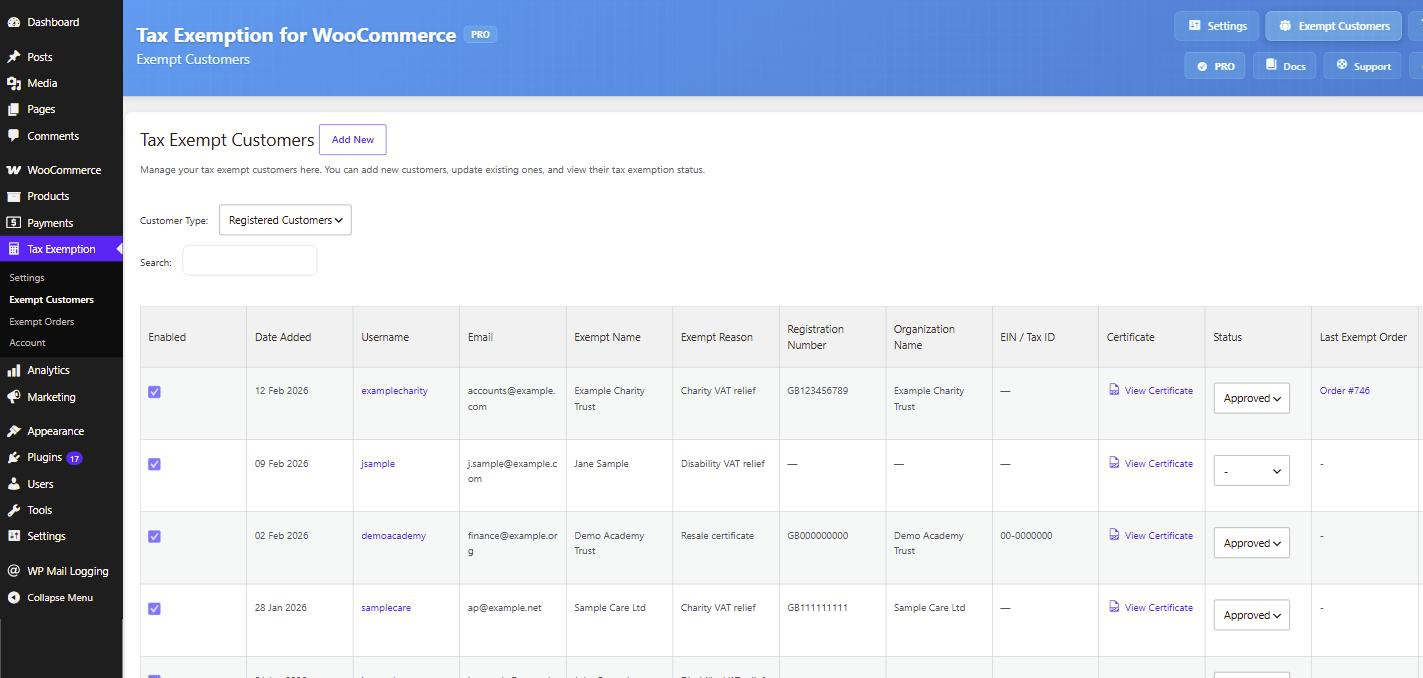
Every exempt customer on one admin page
Review incoming requests, approve or reject them, edit exemption details, download certificates and export the lot to CSV, without ever leaving your WordPress dashboard.
Approve in one click
Turn on the approval system and nobody claims exemption until you have signed it off.
Export to CSV
Pull your exempt customer data out whenever your accountant or auditor asks for it.
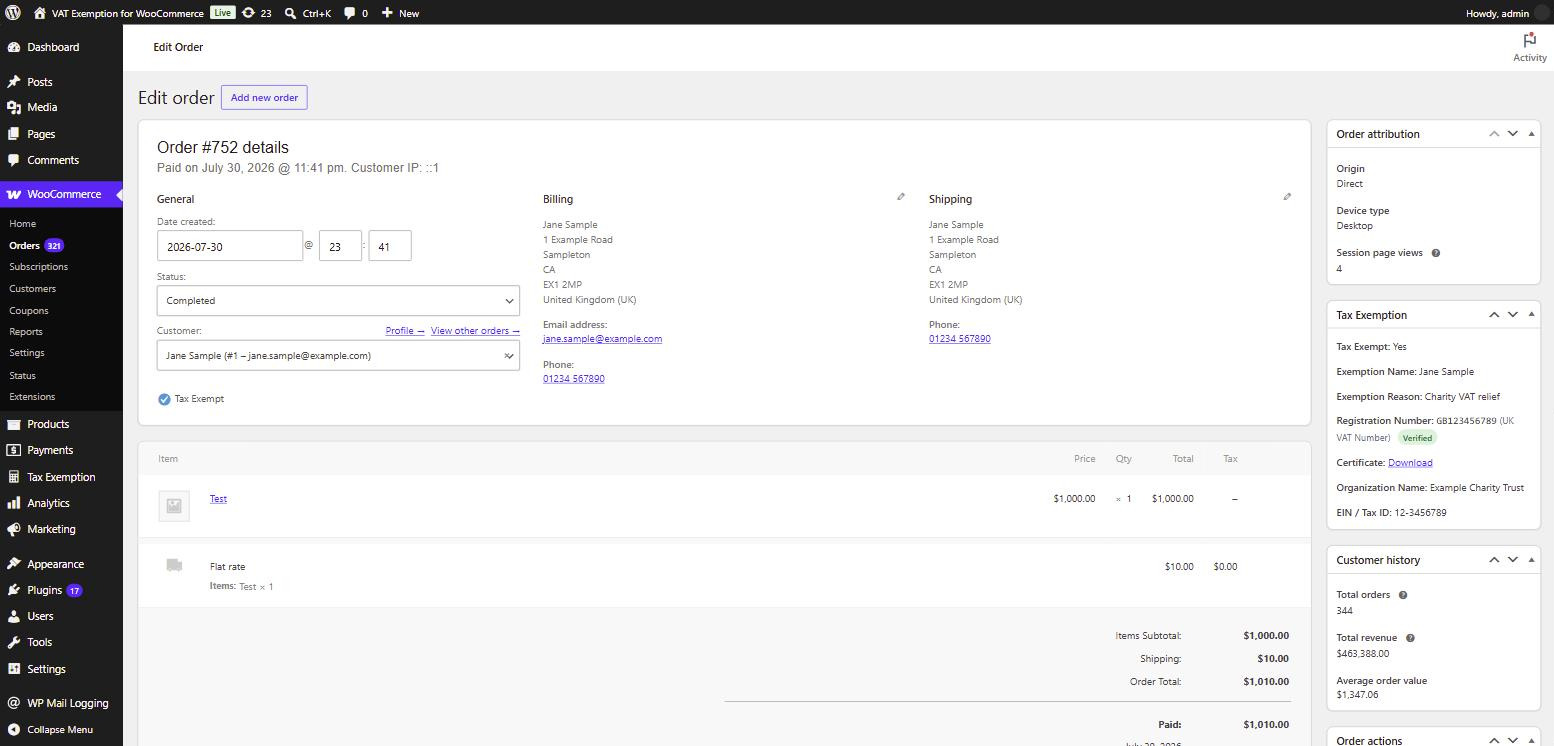
Order Records
Full exemption detail on every order
Each order gets a Tax Exemption meta box showing exactly what was claimed and by whom, plus a new column on the orders list with a certificate download link where one was supplied.
A record you can defend
Name, reason, custom fields and certificate are stored against the order permanently.
Spot exempt orders fast
An extra orders list column flags exempt orders at a glance, with the certificate one click away.
Per-Customer Control
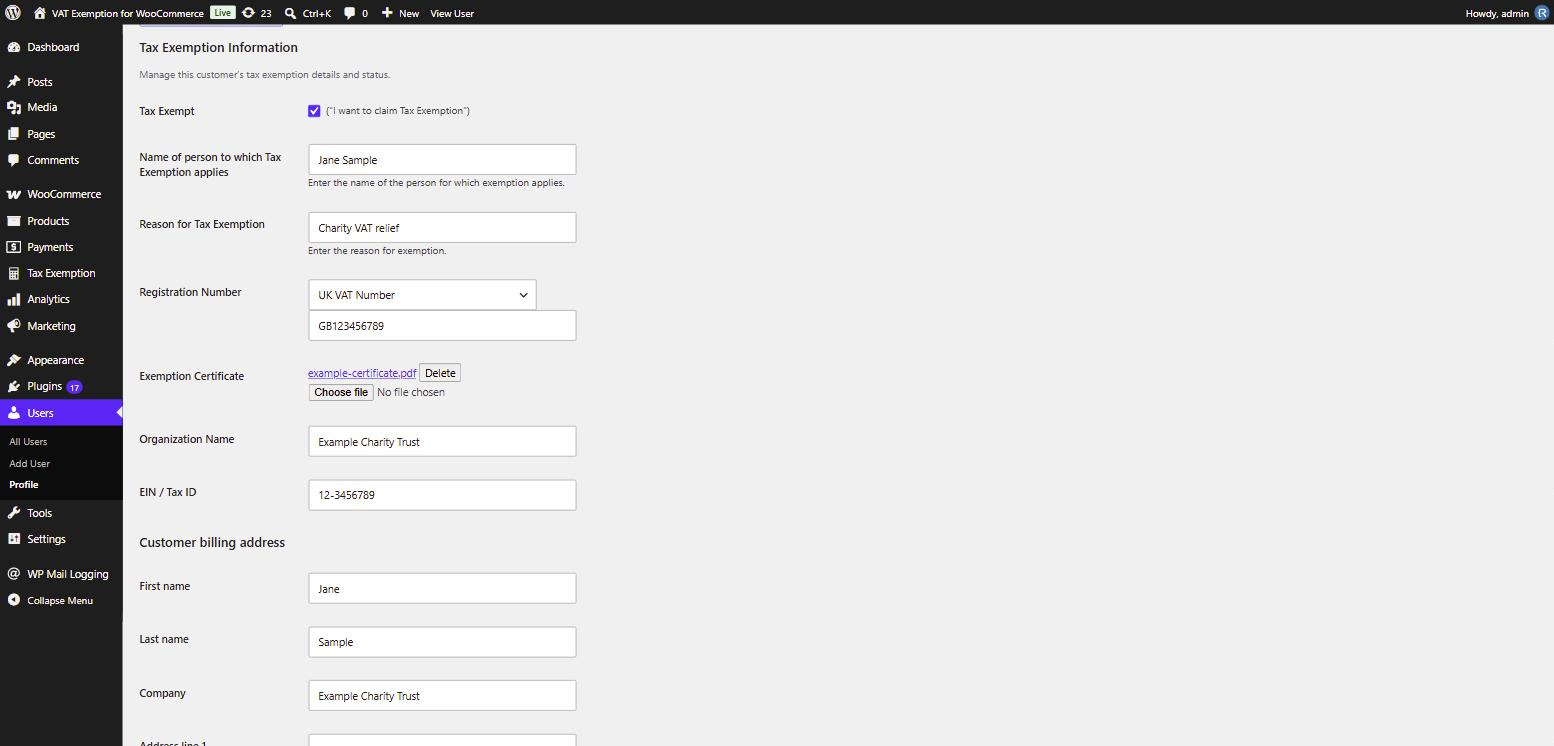
Manage exemption from the user profile
Open any user in WordPress and set their exemption status, edit their submitted details, or assign a custom tax class that overrides your global setting just for them.
Custom tax class
Apply a reduced or zero rate class per customer instead of removing tax altogether.
Edit anything, any time
Correct a typo, extend an expiry date or revoke exemption without asking the customer.
Quick & Easy Setup
Up and running in minutes
Install the plugin, open the Tax Exemption settings and switch on what you need. Sensible defaults mean a working exemption form on your checkout without touching a line of code.
Sensible defaults
The free version works out of the box. Enable it and the checkbox appears on checkout.
Emails included
Customer and admin notifications are ready to go, and fully customisable when you want them.
PRO Settings
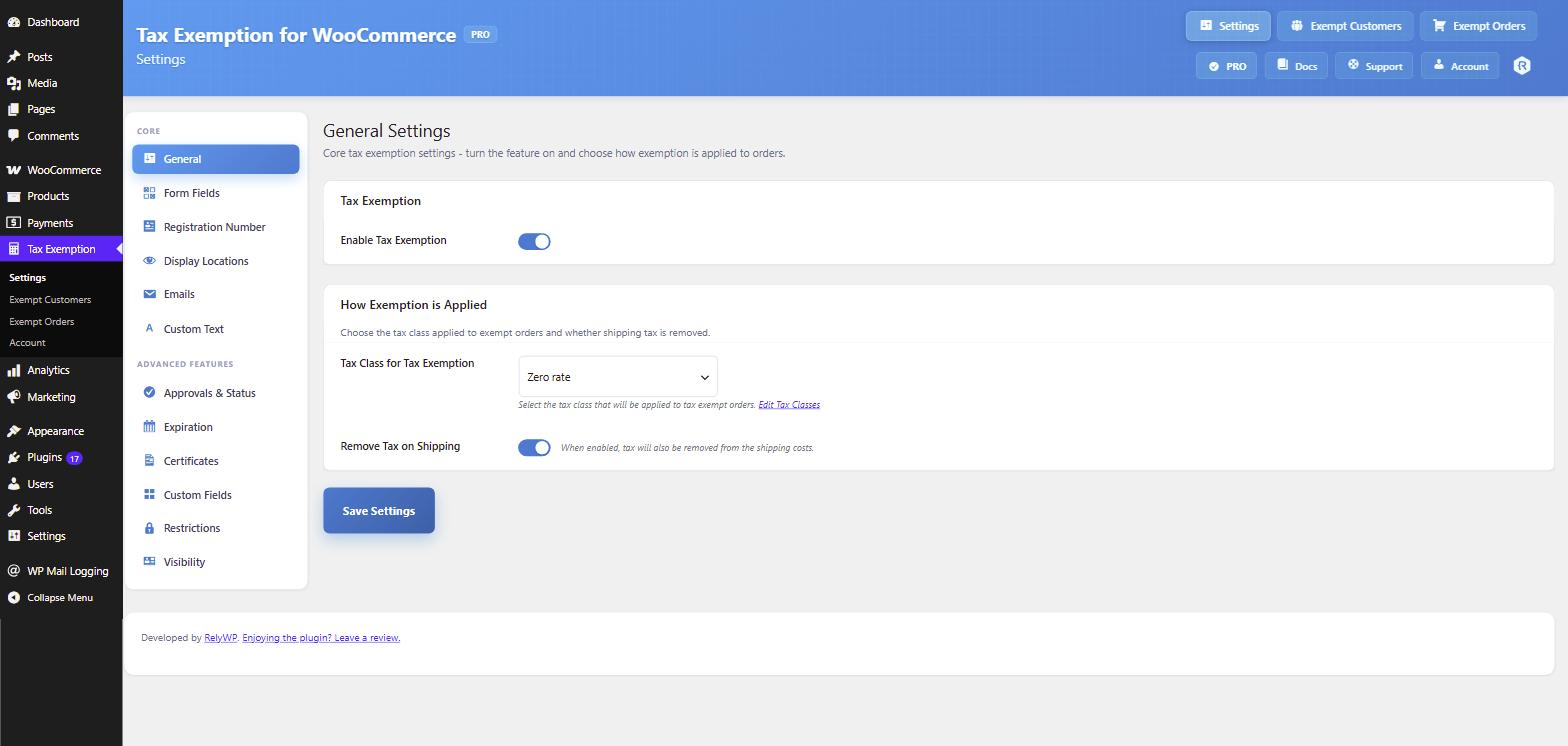
Powerful options when you need them
Upgrade and the PRO settings panel opens up approvals, certificate uploads, custom fields, role and country restrictions, per-product exemption and everything else, all in one place.
Everything in one panel
No add-ons to buy. Every PRO feature is included with a single licence.
Priority support
Stuck on a setting? Message our team directly and get a fast, human answer.
And so much more
Everything you need for tax exemption compliance
Simple to set up, easy to keep on top of, and built to give you a clean audit trail.
Exempt Customers Page
View every tax exempt customer in one list, manage their details and update their statuses.
Exempt Orders Page
A dedicated page listing every exempt order with full details, date filters and data export.
Export to CSV
Export exempt customer and exempt order data to CSV for cleaner, faster compliance reporting.
Single Order Details
A Tax Exemption meta box on every order shows exactly what was claimed and by whom.
Orders List Column
A new column on the orders list flags exempt orders and links to the certificate.
Admin Emails
Exemption details appear in admin new order emails, and admins get notified of new requests.
Tax Class Control
Choose the tax class applied to exempt orders globally, or override it per customer.
Shipping Tax Option
Decide whether shipping tax is removed too, or only tax on the products themselves.
Expiry & Renewals
Reminder emails before an exemption lapses, an expired notice, plus “Expiring Soon” filters and badges.
Secure Certificates
Uploaded PDF certificates are stored safely and only reachable from your admin area.
Simple & Easy To Use
A clean settings screen with plenty of options, and nothing you have to learn to code.
Block Checkout Ready
The checkbox and full form render natively on the WooCommerce block checkout, not just a link away.
Express Checkout
Exemption applies on Apple Pay, Google Pay and Stripe Link, where checkout fields never load.
Form Shortcode
Drop the exemption form anywhere on your site with the [tefw_exemption_form] shortcode.
Guests Too
Guest customers can claim exemption, and their orders are listed separately in the admin.
GDPR Ready
Exemption details are included in WordPress personal data exports and erasure requests.
Custom Text Everywhere
Rewrite every label, description and message the plugin shows, from one Custom Text tab.
Priority Support
Fast, friendly help from the developer whenever you need a hand.
Additional Integrations
Works with your tax calculation stack
Built to work perfectly with a default WooCommerce setup, plus free built-in integrations with the major automated tax plugins.

Compatible with Woo Tax
Fully compatible with the official WooCommerce Tax plugin, which calculates sales tax for you.
Free & PRO
Compatible with AvaTax
A built-in integration with Avalara AvaTax, with just a few small restrictions on two or three of the settings.
PRO feature
Compatible with Stripe Tax
A built-in integration with Stripe Tax as well, with just a single small restriction to one of the settings.
Free & PROAlso tested and working with
Pricing
Get started today, risk-free
Pro Yearly
$79.00
Per year
- 1 website license
- Access all PRO features
- Plugin updates for 1 year
- Premium support for 1 year
Pro Lifetime
$239.00
One-time payment
- 1 website license
- Access all PRO features
- Plugin updates forever
- Premium support included
The price you sign up at stays the same for as long as your subscription is active. Pricing is in USD and excludes applicable VAT. An active PRO subscription is required for ongoing updates and support.

Protected by our 14-day money-back guarantee
We look forward to helping you manage tax exemption for your WooCommerce store. But if things don’t work out, simply contact us within 14 days of upgrading and we’ll refund 100% of your money, no questions asked.

Elliot Sowersby
Founder & Lead Developer
Here to help
Questions? We’ve got you covered
Ask a Question
Have a pre-sale question, or already a PRO user? Send us a message directly.
Contact Us →Documentation
Our docs explain everything you need to know about setting up the plugin.
View Documentation →Take the admin out of tax exemption
Join 800+ WooCommerce stores handling tax exempt customers the easy way. Try it free, or upgrade risk-free with a 14-day money-back guarantee.