





Reports & Analytics
Simple Points and RewardsUpdated October 26, 2026
The reports page shows how your loyalty programme is performing: what is being earned, what is being spent, and what you still owe customers in unredeemed points. It is at Points & Rewards › Reports.
Choosing a date range
A dropdown at the top sets the period every figure is calculated over. Presets cover All time, the last 7, 30 and 90 days and the last 12 months, or you can set a custom range. Comparing the same length of period month to month is the quickest way to see whether engagement is moving.
The headline figures
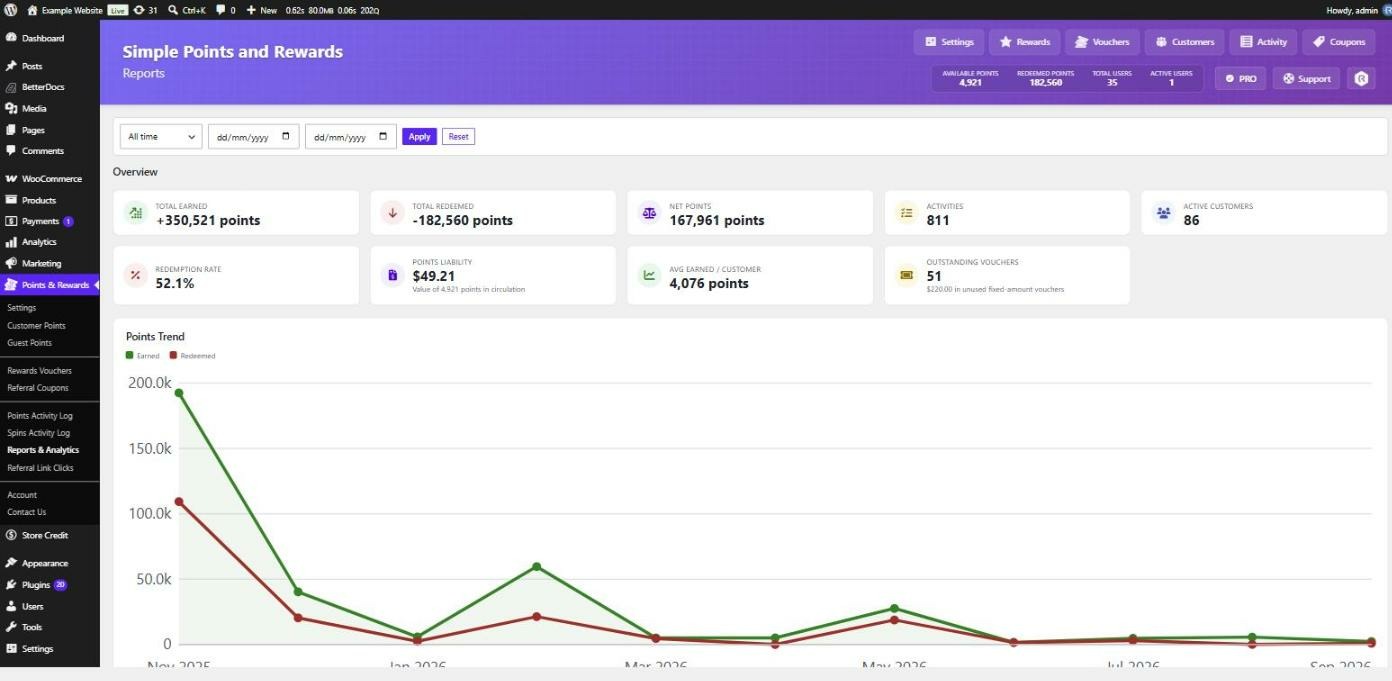
- Points earned and points redeemed in the range.
- Redemption Rate – the share of earned points that have been redeemed. A persistently low rate usually means rewards cost too much or are not attractive enough.
- Points Liability – the monetary value of every point currently in circulation, worked out from your points redemption rate. This is the figure to watch if you need to account for the programme.
- Avg Earned / Customer – average points earned per active customer in the range.
- Outstanding Vouchers – claimed reward vouchers not yet used or expired, including the combined value of the fixed-amount ones.
Points Trend
A chart plots points earned against points redeemed over the selected range, daily for shorter periods and monthly for longer ones. The gap between the two lines is your liability growing or shrinking.
Points Earned Per Method
A box per earning method showing how many points it awarded and how many times it fired. The count matters as much as the total: a method with a large total but few awards is being carried by a handful of customers.
Points Redeemed Per Method
The mirror image, breaking down where points went. It separates reward redemptions from order refunds and cancellations, points expiry, admin adjustments, referral clawbacks and prize wheel spin purchases, so a fall in the balance can be traced to a cause rather than guessed at.
Admin snapshot
A compact summary appears in the header across the Points & Rewards admin pages, showing points in circulation, redeemed points and how many customers hold a balance, so you have the basics without opening the reports page.
Transaction-level detail
For individual entries rather than totals, use the Points Activity Log, which records every earn and redeem event with its customer, action and order. It can be filtered and exported to CSV. See Export your points data.
Dashboard page
For a quick overview with a setup checklist, recent activity and top customers, use Points & Rewards › Dashboard. See The Points & Rewards Dashboard.