





Checkout Box & Cart Redemption Display
Simple Points and RewardsUpdated October 26, 2026
When the Points Discount at Checkout feature is enabled, customers can redeem points for a discount directly in the cart and checkout. The appearance of this redemption interface is fully customisable under Points & Rewards › Settings › Checkout Box.
What the Checkout Box Shows
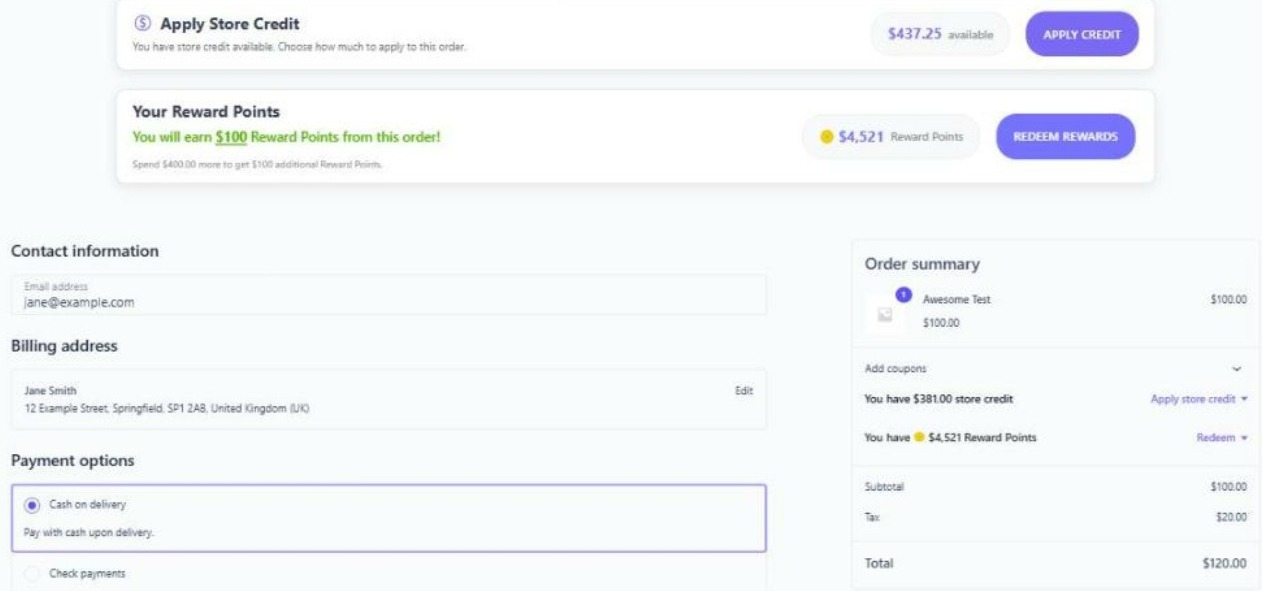
The checkout box displays the customer’s current points balance and a control to apply some or all of those points as a monetary discount on their order. It appears automatically in the cart and checkout totals areas.
Customisation Options
- Theme Style – Choose a light or dark visual style for the box to match your store.
- Colours – Customise the box’s accent and background colours.
- Button Text – Customise the label of the “Add Discount to Cart” button.
- Points Summary Tooltip – Show a tooltip explaining the points-to-currency conversion.
- Confetti Animation – Optionally trigger a celebratory confetti animation when a customer applies their points discount.
Use your own background and text colours
Under Theme Settings, turn on Use custom background and text colors and choose a Background Color and Text Color. They override the Theme Style for the box, its header, tabs and panels, for example to match a dark or coloured store. Reward and voucher cards inside the box keep their own styling.
Hide the “You will earn” message on checkout
Under Display Settings, turn on Hide the “You will earn” points message on the checkout page to remove that message from the checkout. It still shows in the cart and on the thank you page.
Store credit tab
With the Simple Store Credit plugin active, the box can include a store credit tab, so customers apply credit, vouchers and points in one place. See Simple Store Credit integration.
Classic vs. Block Checkout
The redemption interface supports both the classic WooCommerce cart/checkout shortcodes and the newer WooCommerce Blocks (Cart and Checkout blocks). The plugin detects which checkout type your store uses and renders the appropriate interface.
Placing the Box Manually
If you want to place the redemption interface somewhere other than the default location, you can use these shortcodes (see the Shortcodes Reference for details):
[spar_checkout_rewards_box]– The full rewards box.[spar_redeem_discount_tool]– The full redemption tool.[spar_redeem_discount_compact]– A compact redemption row for totals areas.
Enabling Redemption
The checkout box only appears when Points Discount at Checkout is enabled under Settings › Rewards and the customer has a redeemable balance. See the “Points Discount at Checkout” doc for details on the conversion rate and earning interactions.