





Conditional Earning Rules (Pro)
Simple Points and RewardsUpdated October 26, 2026
Conditional Rules change how many points an earning method awards, based on what is in the cart, who the customer is, or what they have already earned. They are a Pro feature, built under Points & Rewards › Settings › Conditional Rules.
Click Add New Rule to create one. Each rule is a card you can expand with Edit, and its heading summarises itself as label, condition type and multiplier, for example “Sale items – Cart: Product Category – 0.50x”.
The four parts of a rule
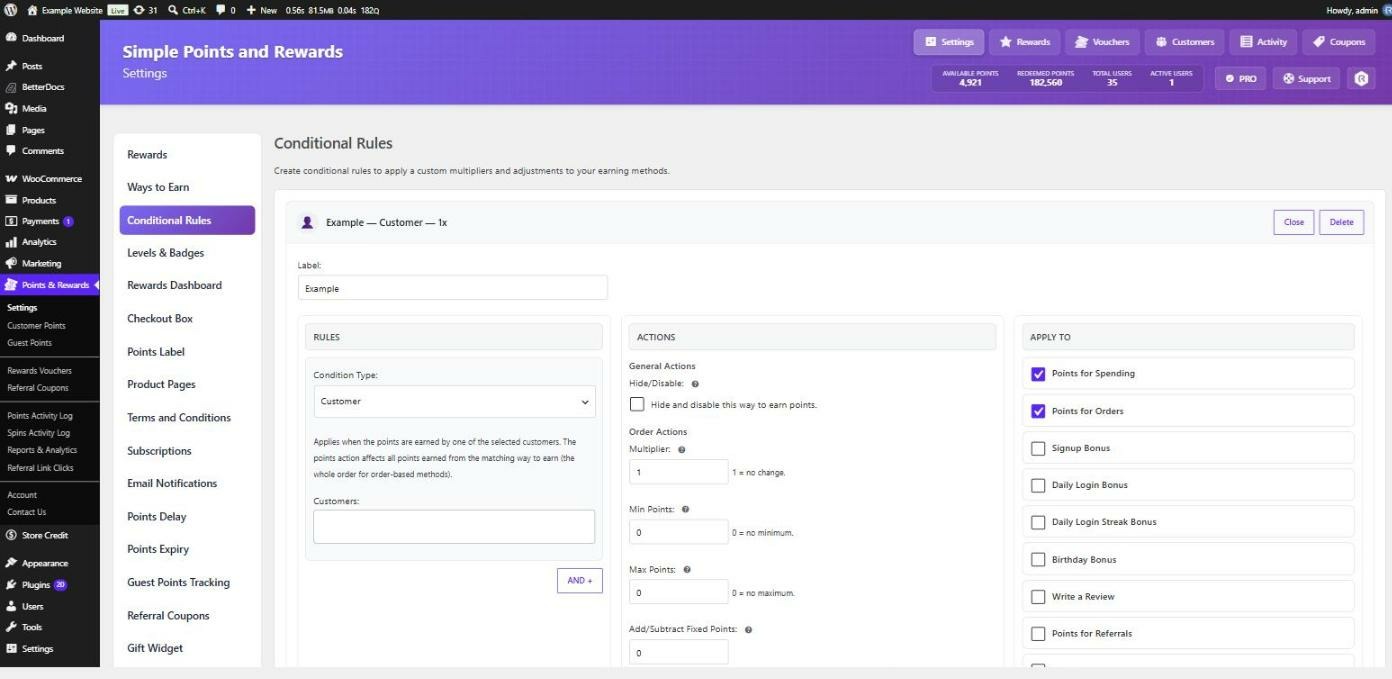
- Label – optional, and only for your own reference in the rules list.
- Rules – the conditions that must match. See Conditional rule conditions.
- Actions – what happens when they do. See Conditional rule actions.
- Apply To – which earning methods the rule affects.
Conditions combine with AND
A rule starts with one condition. Use the AND + button to add more, and every condition must match for the rule to fire. There is no OR – to express alternatives, build a separate rule for each.
Which methods a rule can apply to
The Apply To column lists your earning methods. Two are order-based – Points for Spending and Points for Orders – and the rest are bonuses such as Signup, Birthday, Write a Review, Referral, Social Share, Daily Login, First Order, Bonus after X Orders and Order Streak.
Which of them you can tick depends on your conditions. A rule built only from customer conditions (Customer, User Role, Total Points, Available Points) can apply to any method, because it can be judged without a cart. As soon as a rule uses a cart or product condition it can only apply to the two order-based methods, since there is no cart to inspect when someone writes a review or has a birthday.
Worked examples
Don’t give points on discounted orders
Condition Cart: Coupon Applied with the codes left blank so any coupon matches. Action: tick Hide and disable this way to earn points. Apply to Points for Spending.
Half points on sale items, full points on everything else
Condition Product: Category set to Is your Sale category. Action: multiplier 0.5. Because this is a product-scoped condition, only the points from sale items are halved – the rest of the order is untouched.
Double points for wholesale customers
Condition Customer: User Role set to your wholesale role. Action: multiplier 2. As a customer-only condition it can be applied to every earning method, not just orders.
A bonus on large orders
Condition Cart: Order Total, Cart is above 100. Action: Add/Subtract Fixed Points of 250.
Encourage customers to spend their balance
Condition Customer: Available Points, Available points is above 5000. Action: multiplier 0.5, so hoarders earn more slowly.
Double points at the weekend
Condition Date: Schedule (Campaign) with a start and end date, and Sat and Sun ticked. Action: multiplier 2. Tick Show a promo banner while this campaign is active to tell customers about it. See Run a scheduled points campaign (Pro).
Checking a rule is working
The Potential Points figure in the Reward Points panel on the order edit screen runs the same calculation as the actual award, so conditional rules are reflected there before points are granted. If a rule does not seem to fire, check the earning method is ticked under Apply To, and that every AND condition really matches.