





Store credit and credit vouchers explained
Simple Store CreditUpdated September 14, 2026
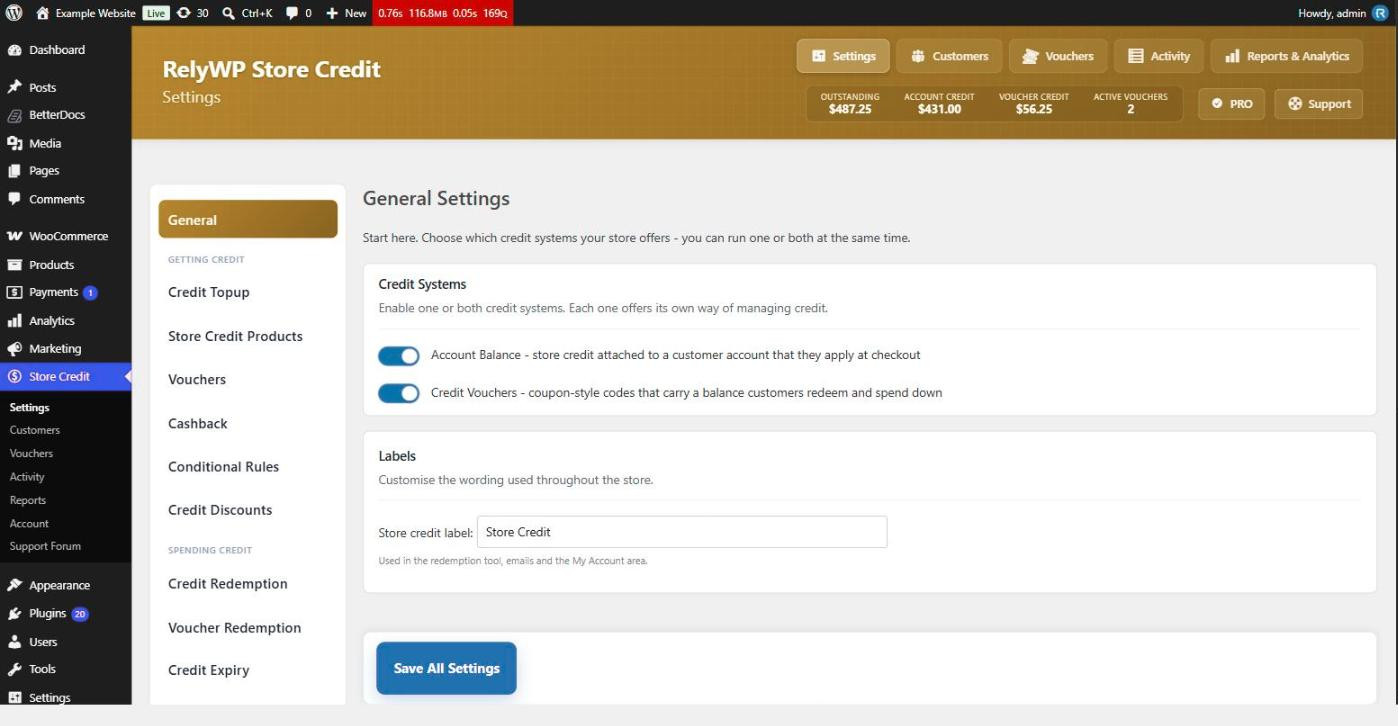
RelyWP Store Credit gives your WooCommerce customers a balance they can spend at checkout. It provides two independent credit systems, and you choose which of them to run from Store Credit › Settings › General. You can enable one, the other, or both together.
Account balance
An account balance is a single running figure attached to a customer’s user account. It goes up when they top up, earn cashback, or receive a refund as credit, and down when they spend it. Because the balance belongs to an account, a customer has to be logged in to apply it.
Balances are held as user meta and every movement is written to a separate activity log table, which is what powers the history timeline and the reporting screens.
Credit vouchers
A credit voucher is a redeemable code that carries a balance. Vouchers are stored as ordinary WooCommerce coupons, so you can also see and edit them under WooCommerce › Marketing › Coupons. Each one is created as a fixed cart discount and supports partial redemption: a customer can spend part of a voucher on one order and keep the remainder for a later one.
When a voucher is issued to a specific customer it is restricted to that customer’s email address, so nobody else can use it. A voucher created without a customer stays unassigned and can be handed to anyone.
Which should you use?
- Choose Account Balance for a wallet-style programme where credit simply accumulates and is spent without codes.
- Choose Credit Vouchers for gift cards, or wherever credit needs to be transferable or given to somebody without an account.
- Enable both if you want customers to hold a balance and also receive gift vouchers. Extra options then appear for combining the two on one order and converting between them.
At least one system always stays on. If you switch both off and save, the plugin turns one back on for you rather than leaving the store with no credit system at all.
Rename store credit
The Store credit label field on the same tab changes the wording used across the redemption tool, the emails and the My Account area. Set it to whatever suits your store – “Wallet”, “Rewards Credit”, “Account Balance” – and the rest of the interface follows.