





Configure the tax exemption emails
Tax Exemption for WooCommerceUpdated September 14, 2026
The Emails tab at Tax Exemption › Settings controls every notification the plugin sends. Each email has its own on/off switch, subject line and message body, and all of them are sent through WooCommerce’s own mailer so they inherit your store’s email template, header and colours.
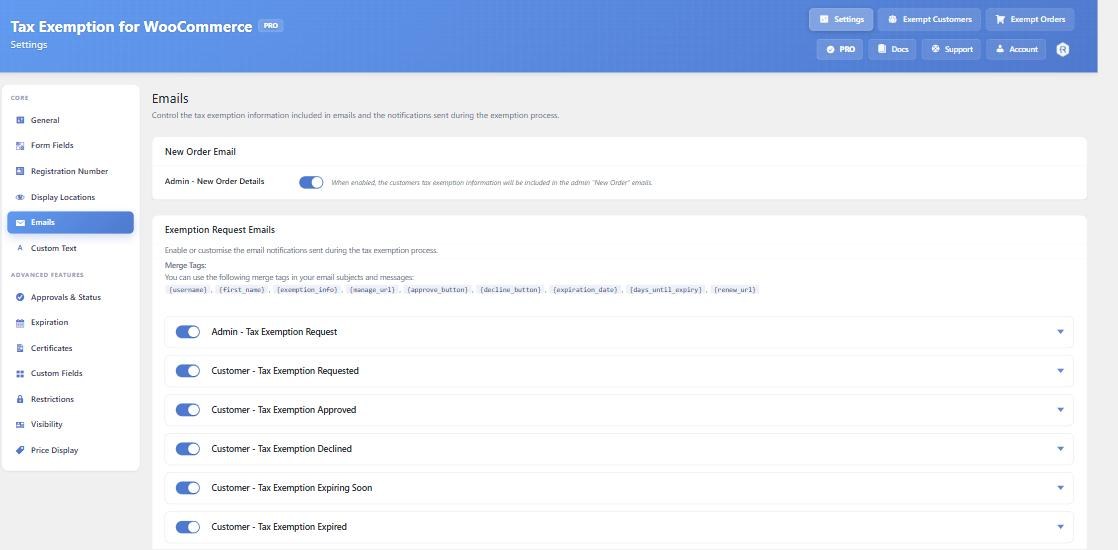
The emails
- Admin – Tax Exemption Request. Sent to you when a customer submits their details while manual approval is on. Enabled by default. It includes Approve and Decline buttons that change the customer’s status in one click.
- Customer – Tax Exemption Requested. Confirms their submission is being reviewed. Off by default.
- Customer – Tax Exemption Approved. Off by default.
- Customer – Tax Exemption Declined. Off by default.
- Customer – Tax Exemption Expiring Soon. The reminder sent ahead of an expiry date. Enabled by default, but nothing is sent until reminders are switched on under Expiration.
- Customer – Tax Exemption Expired. Sent once when an exemption lapses. Enabled by default, again subject to the Expiration tab.
Merge tags
These can be used in any subject or message:
{first_name}and{username}– the customer.{site_name}– your store name.{exemption_info}– a formatted table of everything the customer submitted, with your own field labels applied.{expiration_date}and{days_until_expiry}– for the expiry emails.{renew_url}– a link to the customer’s Tax Exemption tab in My Account.{manage_url}– an admin link to that customer on the Exempt Customers page.{approve_button}and{decline_button}– the one-click status buttons, for the admin email.
Safe HTML is allowed in message bodies, so links and basic formatting work.
Where admin notifications go
Admin Notification Email sets the recipient address. Leave it blank to use the WordPress admin email. This is worth setting if exemption requests should reach your finance or accounts inbox rather than the general site address.
Exemption details in the New Order email
Admin – New Order Details, at the top of the tab, adds the customer’s exemption information to WooCommerce’s own admin New Order email. That is separate from the notifications above and useful even if you never turn manual approval on.