





Collect exemption certificates from customers
Tax Exemption for WooCommerceUpdated September 14, 2026
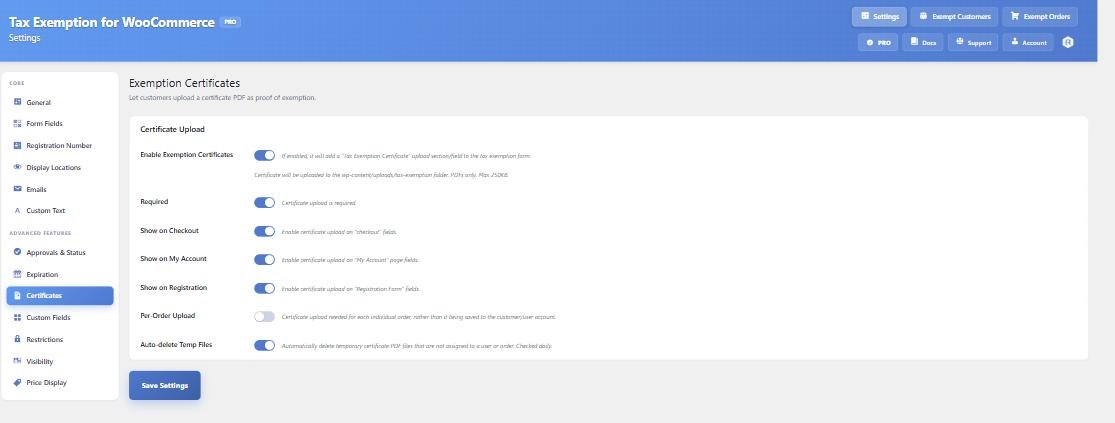
The Certificates tab at Tax Exemption › Settings adds a Tax Exemption Certificate upload field to the exemption form, so customers can attach documentary proof. This is a PRO feature. Only PDF files are accepted.
Turn it on and decide where it shows
Enable Exemption Certificates switches the feature on. Three separate options then control where the upload field appears: Show on Checkout, Show on My Account and Show on Registration.
Required makes the certificate mandatory. This is enforced on the cart and block checkout as well as the classic checkout, so an order cannot be placed with exemption claimed and no certificate on file. If a certificate is required but the page has no upload field, the customer is directed to their My Account tax exemption page instead.
Per-order uploads
By default a certificate is saved to the customer’s account and reused on future orders. Per-Order Upload changes that: a fresh certificate is requested for every order, including from returning customers, and is attached to that order rather than the account. Use this where the exemption is order-specific, such as US resale certificates.
Where the files are stored
Certificates go in wp-content/uploads/tax-exemption/. The maximum size is your WordPress upload limit. The plugin generates the stored filename itself using a random component, so a filename cannot be guessed or chosen by the visitor, and it writes protection files into the directory to stop it being browsed or served directly.
Every link the plugin renders goes through an access-controlled handler rather than a direct uploads URL, so a certificate is only served to someone entitled to see it. Uploading a new certificate deletes the customer’s previous one.
A note for stores on nginx
The directory protection the plugin writes is an .htaccess file, which nginx ignores – it has no per-directory configuration. The access-controlled handler still gates every link the plugin renders, but on nginx a direct request to a known file path is served by the web server before PHP is involved. If you run nginx, add a matching deny block for that directory:
location ^~ /wp-content/uploads/tax-exemption/ {
    deny all;
    return 403;
}
Temporary files
Certificates uploaded during checkout are staged in a temporary folder and moved into place when the order completes. Auto-delete Temp Files runs a daily cleanup (tefw_hook_clear_temp_files) that removes staged files not attached to a user or order.