





Connect VIES, HMRC, the ABR and the Charity Commission
Tax Exemption for WooCommerceUpdated September 14, 2026
Four registration number types can be looked up against their official register in real time. Each one is set up in its own row under Official Registers on the Registration Number tab at Tax Exemption › Settings. All are optional and all are off by default.
The section only appears once Verification Level is set to include live lookups. If none of the number types you accept has a register, the plugin says so rather than showing you empty rows.
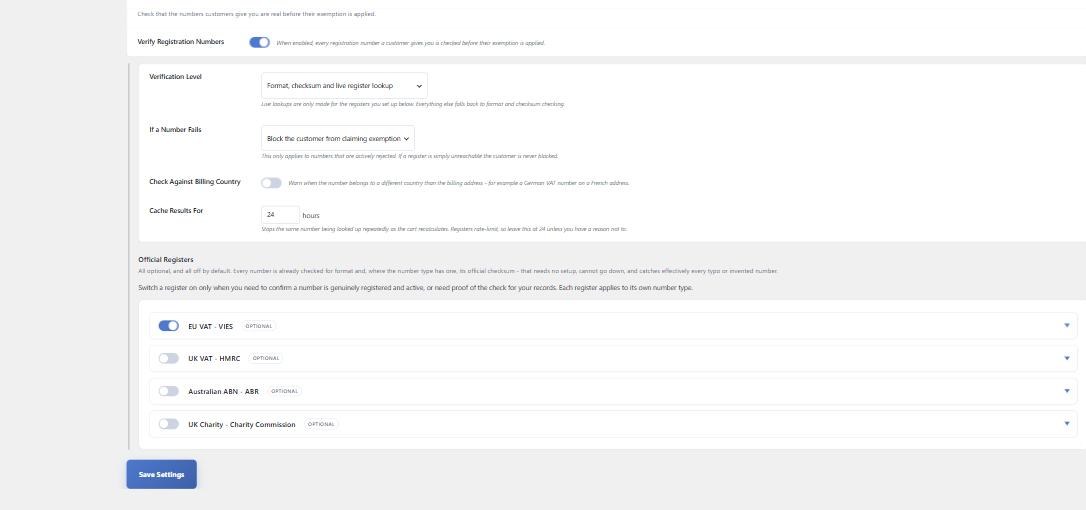
EU VAT – VIES
The European Commission’s VAT Information Exchange System. It is free and needs no account, so switching it on is all that is required.
There is one optional field, Your VAT Number. Supplying your own VAT number makes VIES return a consultation reference for every check – the evidence you need to show you verified a customer. The reference is stored against both the customer and the order.
UK VAT – HMRC
Leave this off unless you need it. UK VAT numbers carry a strong checksum that the plugin already applies with no setup, and that alone rejects effectively every typo and invented number. Switch HMRC on only if you also need to confirm the number is genuinely registered and active, see the registered business name, or record a consultation reference.
To set it up, register on the HMRC Developer Hub, add an application, then subscribe it to the Check a UK VAT number API. HMRC only issue Production credentials once you have applied for production access and accepted their Terms of Use, so allow time for that.
Paste the Client ID and Client Secret, and optionally your own VAT number for consultation references. The Developer Hub issues separate credentials for Sandbox and Production and they are not interchangeable – real VAT numbers only exist in Production, so use that pair. A Test Credentials button checks them and tells you specifically what is wrong if they fail.
Australian ABN – ABR
The Australian Business Register. Free, and it reports whether the business is actively registered for GST as well as whether the ABN exists. Register for a Web Services GUID – it takes a couple of minutes and the GUID is emailed to you, then paste it into the Web Services GUID field.
UK Charity – Charity Commission
This covers the register for England and Wales only. Scottish (SC) and Northern Irish (NIC) charity numbers use separate registers with no equivalent service, so those stay format-checked whatever you configure here.
Sign up to the Charity Commission developer portal, subscribe to the Charity Commission Register API, then copy one of the two subscription keys it issues into the Subscription Key field.
What is sent
Only the registration number itself is sent, together with the credentials you configured for that register and, optionally, your own VAT number. No other customer or order data leaves your site, and no register is ever contacted unless you have switched it on and supplied its credentials.