





Set exemptions to expire and remind customers to renew
Tax Exemption for WooCommerceUpdated September 15, 2026
The Expiration tab at Tax Exemption › Settings makes exemptions time-limited, so a certificate or declaration that is only valid for a year stops applying when it lapses instead of running indefinitely. This is a PRO feature.
Enable the expiration date
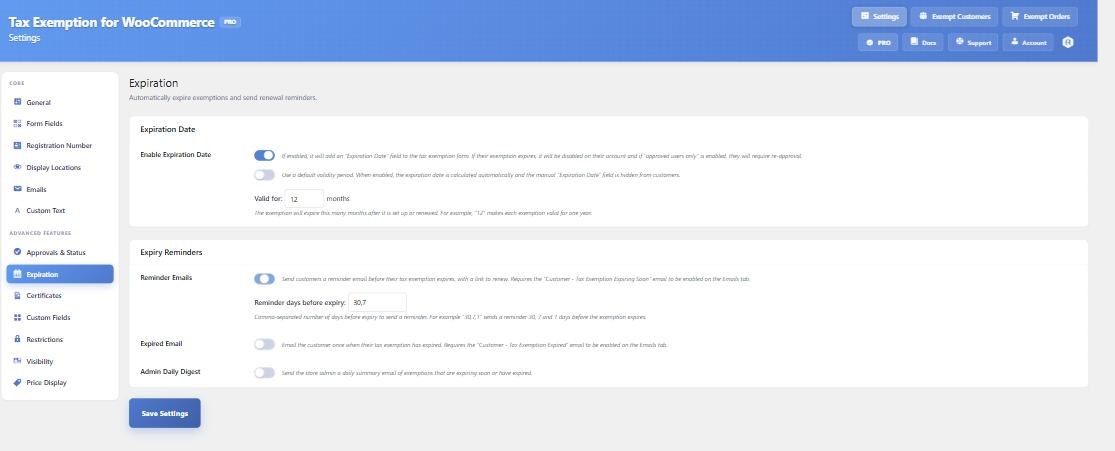
Enable Expiration Date adds an Expiration Date field to the exemption form. When the date passes, exemption is switched off on that account, and if manual approval is in use the customer needs re-approving.
Existing customers who have no date saved are not affected – an empty expiration date is treated as “no expiry”, not as expired.
Calculate the date automatically
Rather than asking customers to pick a date, turn on the default validity period and set Valid for to a number of months. Enter 12 and every exemption expires a year after it is set up or renewed. The manual date field is then hidden from customers entirely, which removes the obvious temptation to enter a date far in the future.
Reminder emails
Reminder Emails sends customers a warning before their exemption lapses, each with a link to renew their details in My Account. Reminder days before expiry takes a comma-separated list – 30,7,1 sends three reminders at those intervals.
This needs the Customer – Tax Exemption Expiring Soon email enabled on the Emails tab, which it is by default.
Expired email and admin digest
Expired Email notifies the customer once, after the fact. To stop switching this on emailing years of lapsed customers in one go, only exemptions that expired within the last 30 days are eligible; anything older is quietly marked as already notified.
Admin Daily Digest sends you a daily summary of exemptions expiring soon and those that have expired. Each section lists at most 100 customers and reports how many more were not shown.
The daily scan
A WordPress cron event, tefw_hook_expiry_scan, runs once a day. It sends the due reminders and reconciles each customer’s status with their date, marking lapsed exemptions as Expired, and moving renewed ones back to Approved.
That second half matters: a renewal restores the customer without you having to re-approve them by hand. Expiry is also re-checked live at checkout from the stored date, so a lapsed exemption cannot slip through on an express checkout between scans. All date comparisons use your site’s timezone.