





Choose which fields the exemption form collects
Tax Exemption for WooCommerceUpdated September 14, 2026
The Form Fields tab at Tax Exemption › Settings controls the two built-in fields on the exemption form. Both are shown and required by default, and each can be renamed.
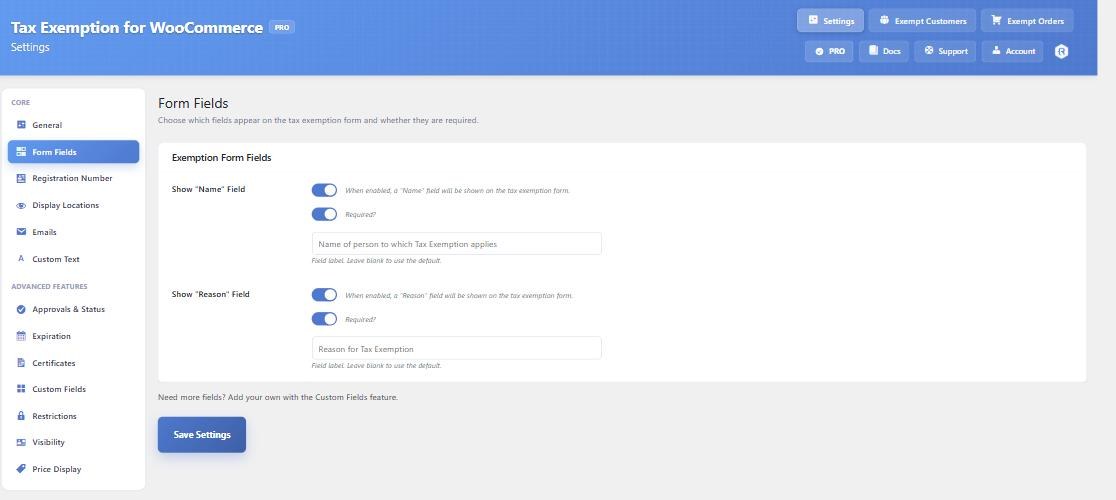
Name and Reason
Show “Name” Field collects the name of the person or organisation the exemption applies to. Its default label is “Name of person to which Tax Exemption applies”.
Show “Reason” Field collects why they are eligible – a disability, charitable status, resale, and so on. Its default label is “Reason for Tax Exemption”.
Each has its own Required? tick box and its own label box underneath. Leave a label blank to use the default wording. Turning a field off also stops it being required, so you will not get a validation error for a field the customer cannot see.
The other fields, and where they live
The Form Fields tab is deliberately short. Every other field is switched on from the tab that owns that feature, and only its label appears here once it is enabled:
- Registration Number – the Registration Number tab.
- Expiration Date – the Expiration tab. Once enabled, its label box appears on Form Fields.
- Tax Exemption Certificate – the Certificates tab.
- Exemption City/State – the Restrictions tab.
- Anything else – the Custom Fields tab.
Wording the rest of the form
Field labels are set here, but the surrounding text – the section title, the checkbox label, the description above the fields – is on the Custom Text tab.