





Show prices excluding tax to exempt customers
Tax Exemption for WooCommerceUpdated September 15, 2026
The Price Display tab at Tax Exemption › Settings changes the prices customers see while browsing, so an exempt customer is shown the price they will actually pay rather than a tax-inclusive figure that drops at checkout. This is a PRO feature. It changes display only – tax is still removed by the exemption form as usual.
Ex-tax prices for exempt customers
Show Ex-Tax Prices To Exempt Customers shows prices excluding tax across the shop, product pages and widgets to a customer whose exemption is already active. It only applies to logged in customers whose exemption is approved and has not expired.
Apply To has two options. Shop and product pages leaves the cart and checkout alone. Shop and product pages, plus cart and checkout totals also switches the cart and checkout to show tax separately rather than included in the line prices. The amount payable is identical either way.
Ex-Tax Price Label is shown after every ex-tax price, replacing your store’s usual price suffix. Explanatory Notice appears above the shop listing and on product pages so exempt customers understand why the prices look different; leave it blank to hide it.
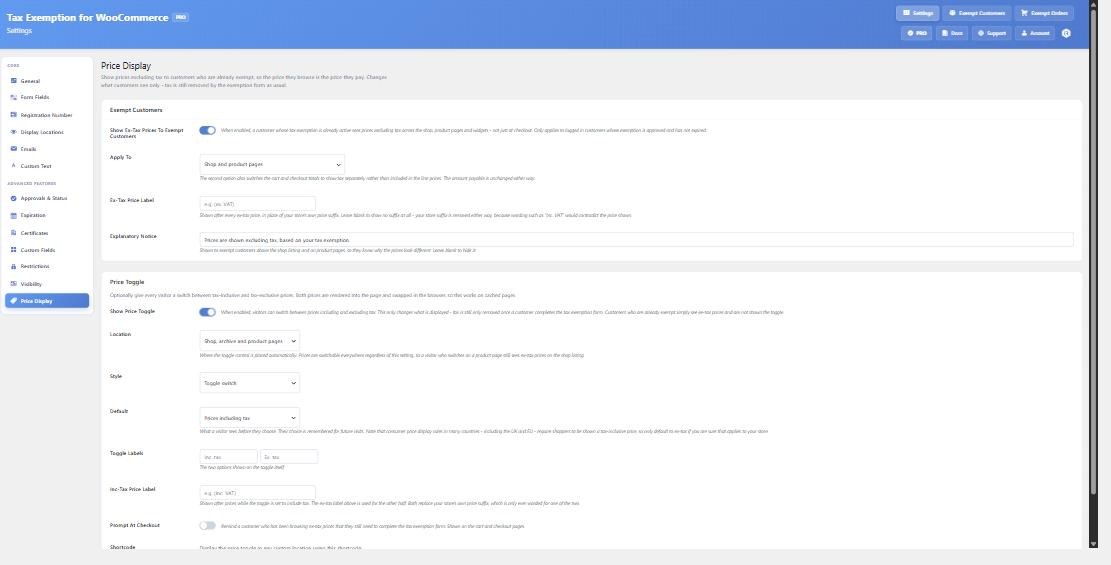
The price toggle
Show Price Toggle gives every visitor a switch between tax-inclusive and tax-exclusive prices, whether or not they are exempt. Customers who are already exempt simply see ex-tax prices and are not shown the toggle.
- Location – where the control is placed automatically: shop and archive pages, product pages only, both, or shortcode only. Prices are switchable everywhere regardless, so a visitor who switches on a product page still sees ex-tax prices on the shop listing.
- Style – a toggle switch or a pair of buttons.
- Default – what a visitor sees before they choose. Their choice is then remembered for future visits.
- Toggle Labels and Inc-Tax Price Label – the wording on the control and the suffix used while prices include tax.
- Prompt At Checkout – reminds a customer who has been browsing ex-tax prices that they still need to complete the exemption form. Shown on the cart and checkout.
Check your legal position before defaulting to ex-tax
Consumer price display rules in many countries, including the UK and EU, require shoppers to be shown a tax-inclusive price. That is why the default is tax-inclusive. Only change it if you are confident it applies to your store – a trade-only shop, for instance.
Place the toggle anywhere
[tefw_price_toggle]It works on cached pages
Both prices are rendered into the page and swapped in the browser, rather than the server deciding which to send. That keeps the HTML identical for every visitor, so full-page caching still works and prices do not flash before settling. It also means the toggle needs no cache variant keyed on a cookie, which most page caches will not do.