





Manage exempt customers
Tax Exemption for WooCommerceUpdated September 15, 2026
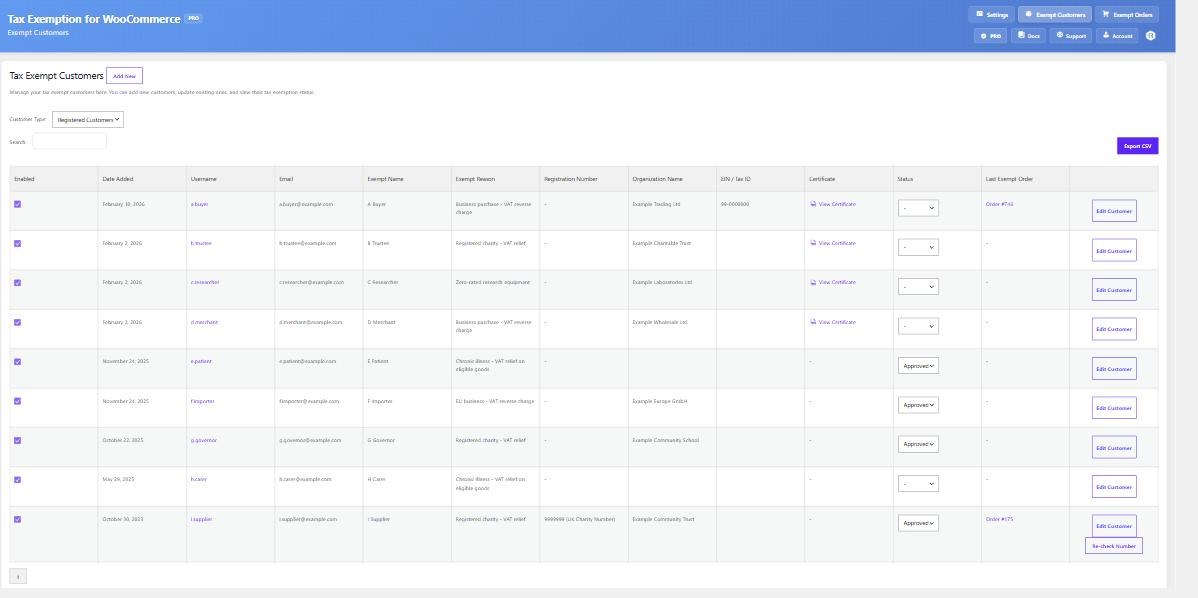
Tax Exemption › Exempt Customers is a searchable list of everyone claiming tax exemption on your store, with their details. You can review, edit, approve and add customers from here without going near the WordPress users screen.
Registered and guest customers
The Customer Type dropdown switches between two lists. Registered Customers shows people with a WordPress account and their saved exemption details. Guest Customers shows people who checked out as guests with exemption claimed, grouped by their billing email.
The guest list has to read orders before it knows who the customers are, so it scans a bounded number of recent exempt guest orders rather than your entire order history. On a store with a long history that means the guest list is recent rather than exhaustive – use the Exempt Orders page and its CSV export if you need the full record.
What the list shows
Alongside the customer’s username, name and email you get their exemption details – the exempt name and reason, registration number, expiration date, certificate link, tax class and current status, plus whether exemption is currently enabled on their account. The Search box matches across these, including the expiration date, so a lapsed customer stays findable.
Changing a customer’s status
Approve or decline a customer directly from their row; you are asked to confirm first. If expiration is in use, filters let you narrow the list to exemptions that are Expiring Soon or already Expired, and a Send Reminder button emails an individual customer a renewal prompt.
Where registration numbers are verified, a Re-check button re-verifies a stored number against its register on demand.
Adding or updating a customer yourself
The Add New / Update Customer form below the list sets an existing customer as tax exempt, or updates the details of one already there. This is how you grant exemption to a customer who arranged it by phone or email, and it is the main route in if you have hidden the checkbox from checkout entirely.
The same details are also editable from the customer’s WordPress user profile, if you prefer to work there.
Exporting
Export CSV downloads the current list with all the exemption fields, including any custom fields you have added. Useful for a tax return, an audit, or reconciling against your accounting system.
If the page will not load
The Exempt Customers list is loaded in the background after the page opens. If it sits on “Loading…” indefinitely, check that Enable Tax Exemption is still switched on in the General settings – the page renders either way, but the data behind it does not load while the feature is off.