





Collect a VAT, charity or other registration number
Tax Exemption for WooCommerceUpdated September 14, 2026
The Registration Number tab at Tax Exemption › Settings adds a tax or registration number field to the exemption form. It appears everywhere the form is shown – checkout, cart, My Account and the registration form. Collecting the number is part of the free version; verifying it is a PRO feature.
Turn the field on
Enable Show “Registration Number” Field. The Required? box next to it decides whether a customer can claim exemption without supplying one.
Pick the number types you accept
Under Number Types, tick each type your customers might use. The customer then picks their type from a dropdown and enters the number. Tick exactly one type and the dropdown disappears entirely – customers just see a single field named after that type, which is the right choice for most stores.
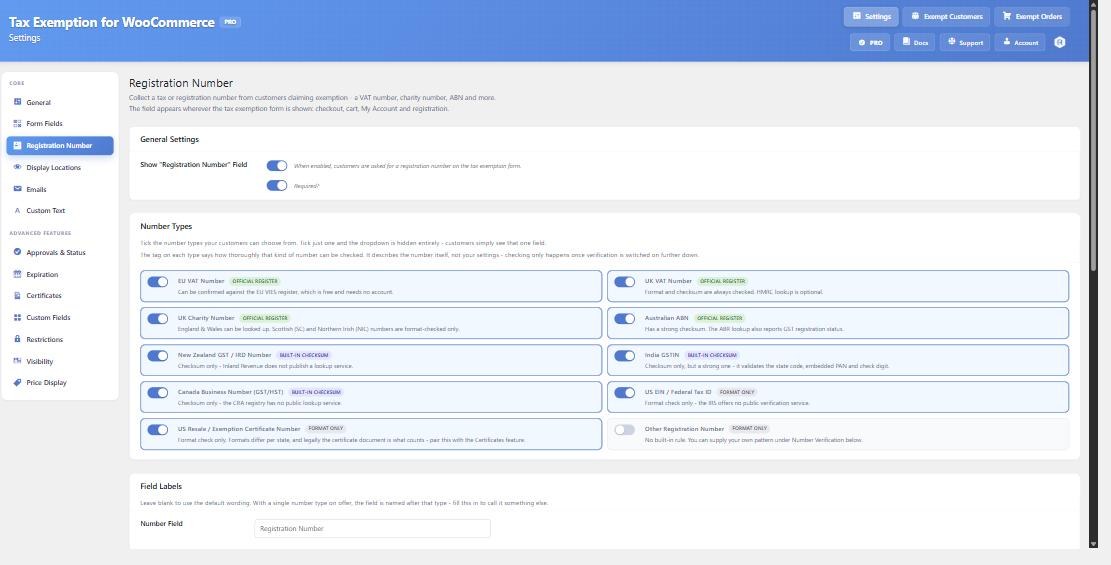
The types available are:
- EU VAT Number – e.g. DE123456789
- UK VAT Number – e.g. GB123456789
- UK Charity Number – e.g. 1234567
- Australian ABN – e.g. 51824753556
- New Zealand GST / IRD Number
- India GSTIN – e.g. 22AAAAA0000A1Z5
- Canada Business Number (GST/HST) – e.g. 123456789RT0001
- US EIN / Federal Tax ID – e.g. 12-3456789
- US Resale / Exemption Certificate Number
- Other Registration Number (PRO)
Each type carries a tag describing how thoroughly that kind of number can be checked. That tag describes the number itself, not your settings – a number type that carries a real check digit can be validated more confidently than one where only the shape can be checked. No checking actually happens until verification is switched on.
Rename the field
Under Field Labels you can set your own wording for the number field and the type dropdown. Leave them blank and, with a single type on offer, the field is named after that type automatically.
Where the number shows up
Once collected, the registration number appears alongside the other exemption details everywhere they already appear: the customer’s account page, the Exempt Customers and Exempt Orders admin pages and their CSV exports, the admin order screen, and the admin notification emails.