





Certificate uploads are failing
Tax Exemption for WooCommerceUpdated September 15, 2026
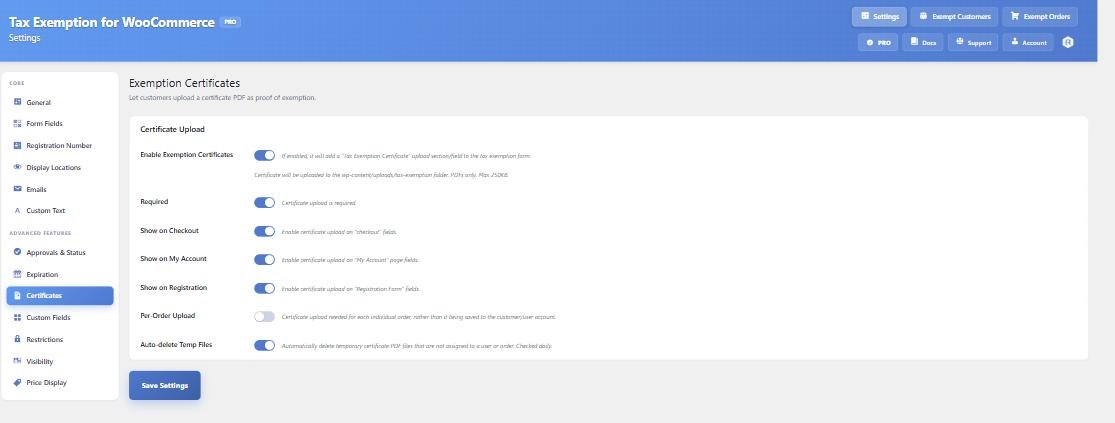
Certificate uploads have a few hard rules, and most failures come down to one of them. The upload field is configured on the Certificates tab at Tax Exemption › Settings.
Only PDF files are accepted
Anything else is rejected with “Only PDF files are allowed.” Customers photographing a paper certificate on their phone will produce a JPEG or HEIC and hit this immediately – it is worth saying so in the field description on the Custom Text tab.
The file is too large
The limit is your WordPress maximum upload size, and the error message names the actual figure. If that number is too low for scanned documents, raise upload_max_filesize and post_max_size in your PHP configuration, or ask your host to.
“Please wait a moment before uploading another file”
There is a short throttle between uploads from the same customer. If they are retrying quickly after a failure, a few seconds’ pause clears it.
A certificate is required but there is no upload field
If Required is on but Show on Checkout is off, or the customer is on the cart checkbox or the block checkout – there is nowhere to upload. The customer is pointed at their Tax Exemption page in My Account to complete it there. Make sure Show on My Account is enabled, or that route is a dead end.
A returning customer is asked again
That is Per-Order Upload working as intended – it requests a fresh certificate for every order rather than reusing the one on the account. Turn it off if a single certificate should cover future orders.
The certificate link does not open
Certificate links go through an access-controlled handler rather than a direct uploads URL, so they only work for someone entitled to view that file. If a link 404s, the file may have been superseded – uploading a new certificate deletes the customer’s previous one – or cleared by the daily temporary-file cleanup before it was attached to an order.
If you are on nginx
The directory protection the plugin writes is an .htaccess file, which nginx ignores. Links the plugin renders are still gated, but add a deny block for /wp-content/uploads/tax-exemption/ to your nginx configuration so a direct request to a known path is refused before PHP is reached.
Upgrading from an older version
Several certificate bugs were fixed in 3.1.0, including failed checkout uploads reporting success, the required setting not being enforced on the block checkout, and customers being unable to delete their own certificate. If you are on an earlier version, update before troubleshooting further.