





View and export tax exempt orders
Tax Exemption for WooCommerceUpdated September 14, 2026
Tax Exemption › Exempt Orders lists every order placed with tax exemption, along with the exemption details recorded against each one. It is the record to reach for at the end of a VAT period or when an auditor asks what you held on file at the time of sale.
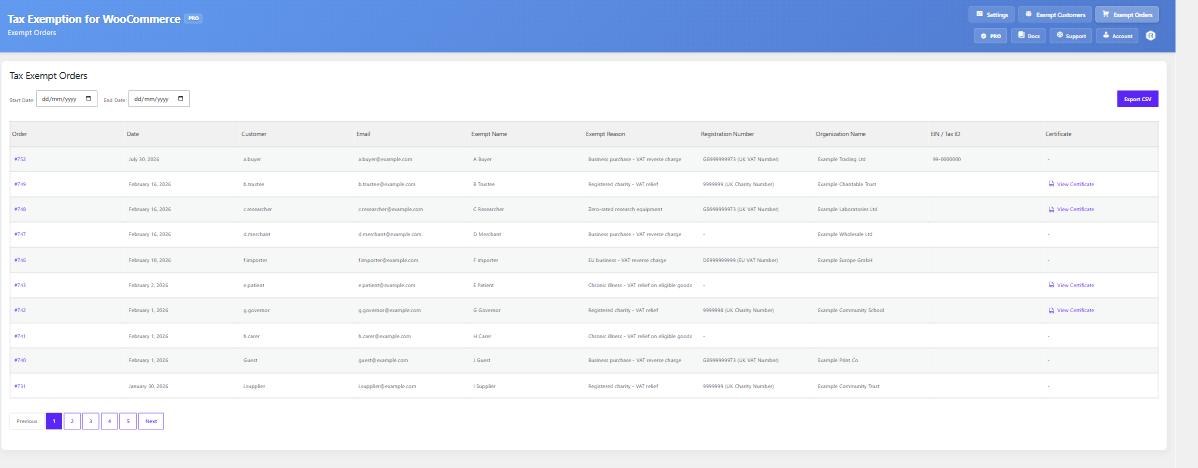
Filtering by date
Set a Start Date and End Date to narrow the list to a period – a quarter, a tax year, or the month you are reconciling. The list is paginated, so a store with a long history stays usable.
What is recorded
Each row shows the order, its date, the customer, and the exemption details as they were when the order was placed: exempt name and reason, registration number, certificate, expiration date and any custom fields.
This is deliberately a snapshot. The details are copied onto the order at checkout rather than read live from the customer’s account, so a customer who later changes their VAT number or lets their certificate lapse does not rewrite the history of orders you have already shipped.
Exporting
Export CSV downloads the filtered list. Combined with the date range, this gives you a per-period file of exempt sales with the supporting detail attached to each one.
Spotting exempt orders elsewhere
Two options on the Display Locations tab bring the same information into the screens you already use. Orders List Column adds an “Exempt” column to the main WooCommerce orders list. Edit Order Page adds a Tax Exemption meta box to each order, showing that customer’s details for that order.
High-Performance Order Storage
The plugin declares compatibility with HPOS, so these pages work whether your store uses the legacy post-based order tables or the newer custom order tables.