





Verify registration numbers automatically
Tax Exemption for WooCommerceUpdated September 14, 2026
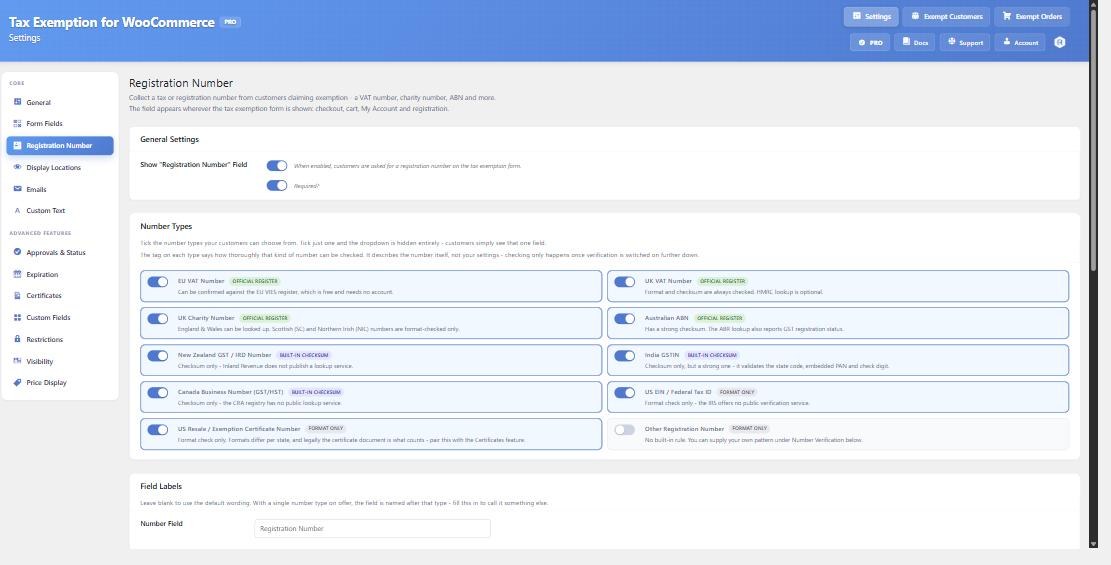
The Number Verification section, on the Registration Number tab at Tax Exemption › Settings, checks that the number a customer gives you is real before their exemption is applied. Collecting the number is free; verifying it is PRO.
Two levels of checking
Turn on Verify Registration Numbers, then choose a Verification Level:
- Format and checksum only – no external requests at all. The number is checked against its own shape and, where that number type carries a real check digit, its official checksum. UK VAT, Australian ABNs, India GSTIN, New Zealand IRD and Canadian Business Numbers all have one. This needs no setup, cannot go down, and rejects effectively every typo and invented number.
- Format, checksum and live register lookup – as above, plus a real-time lookup for the number types that have an official register and that you have configured. Anything else falls back to format and checksum.
For most stores the offline level is enough. Switch a register on when you need to confirm a number is genuinely registered and active, or need proof of the check for your records.
What happens when a number fails
If a Number Fails has two settings. Accept it and flag it for review lets the customer through and marks the number for you to look at. Block the customer from claiming exemption stops them.
This only applies to numbers a register actively rejects. A register that is simply unreachable never blocks a customer – VIES member state services go offline regularly, and a checkout should not fail with them. An unreachable register records the number as unverified rather than invalid.
Approving verified customers automatically
Auto-approve on Success approves a customer the moment their number verifies. Numbers that fail are left pending for you to review – they are never auto-declined. This requires Require Manual Approval on the Approvals & Status tab.
The other options
- Check Against Billing Country warns when a number belongs to a different country than the billing address – a German VAT number on a French address, for example.
- Cache Results For stops the same number being looked up repeatedly as the cart recalculates. Registers rate-limit, so leave this at 24 hours unless you have a reason not to.
- Pattern for “Other” takes a regular expression used to check the “Other Registration Number” type. Numbers are uppercased with spaces and punctuation removed before matching. A pattern that cannot compile is rejected when you save, with an error on screen, rather than failing silently later.
Reading the result
A verification badge appears next to the number wherever it is shown. Hovering it explains which register the number was looked up in, or that only its checksum or format could be checked, and why, along with the name the register holds for it, the consultation reference, and when it was last checked.
A Re-check button on the customer’s profile and on the Exempt Customers page re-verifies a stored number on demand.