





Require manual approval before exemption applies
Tax Exemption for WooCommerceUpdated September 14, 2026
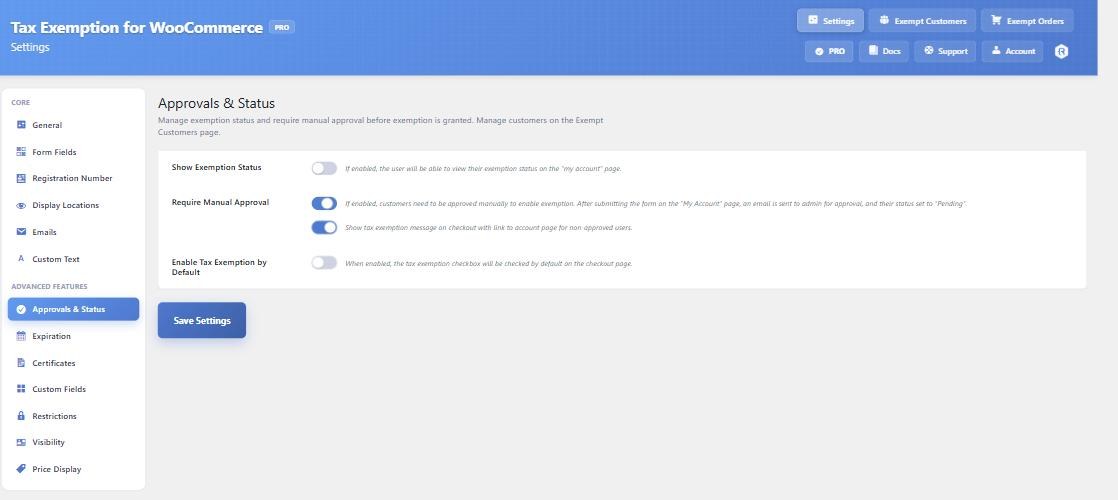
Require Manual Approval, on the Approvals & Status tab at Tax Exemption › Settings, stops tax being removed until you have approved the customer yourself. It is a PRO feature and it only works for logged in customers, since a guest has no account to hold a status.
How the flow works
- The customer fills in the exemption form on their My Account page.
- Their status is set to Pending and an email is sent to you, containing their details and one-click Approve and Decline buttons.
- No tax is removed while they are pending.
- Once you approve them, exemption applies to their orders from then on.
The four statuses
- Pending – submitted, awaiting your review. Tax is charged.
- Approved – the only status under which tax is removed.
- Declined – rejected. The exemption form is hidden from them.
- Expired – the expiration date has passed. Set automatically by the daily scan.
Statuses are changed from Tax Exemption › Exempt Customers, from the customer’s WordPress user profile, or from the buttons in the approval email.
Expired and Approved are the only two the plugin moves between on its own. A customer you have deliberately declined, or one still pending review, is never overwritten by the expiry scan. When an expired customer renews with a future date, their status returns to approved automatically – they do not need re-approving.
Telling customers where they stand
Show Exemption Status displays the current status on the customer’s My Account page, which cuts down on “has my application gone through?” emails.
There is also an option to show a message at checkout, with a link to the account page, for customers who are not yet approved. Its wording is set on the Custom Text tab.
Approving automatically instead
If you collect registration numbers, Auto-approve on Success approves a customer as soon as their number verifies against its register. Numbers that fail are left pending for you to look at – they are never declined automatically. This option needs manual approval to be switched on first.
Exemption on by default
Enable Tax Exemption by Default pre-ticks the checkbox at checkout. It is independent of approval – an unapproved customer with the box pre-ticked still pays tax.