





Limit WooCommerce coupons to only be used on certain products
Coupon AffiliatesUpdated September 28, 2026
This article is mirrored from couponaffiliates.com.
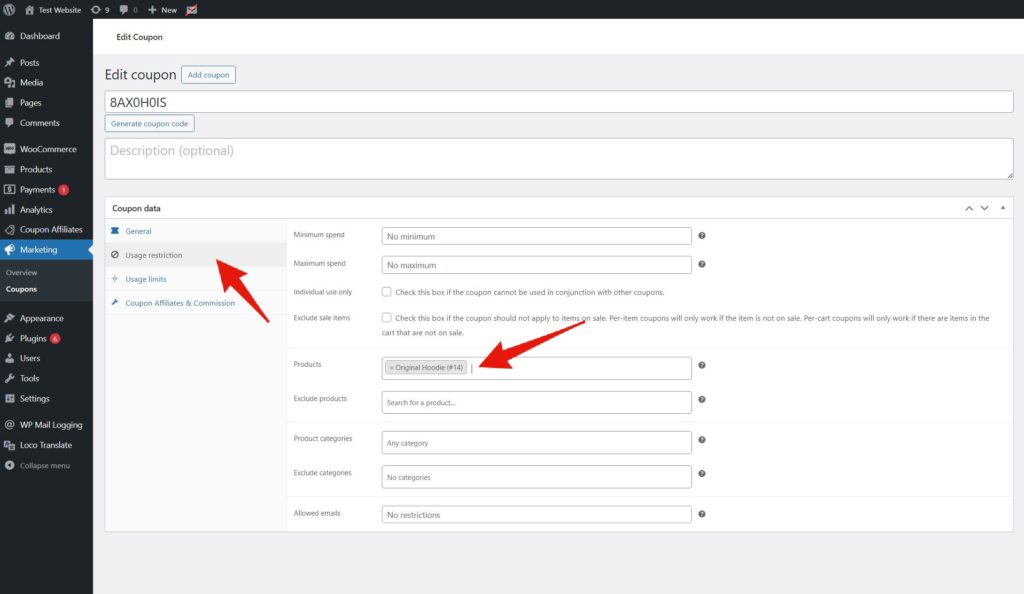
If you want to limit a WooCommerce coupon to only be used on certain products, you can do this by editing the coupon, then go to the “Usage restriction” tab under “Coupon data”, and then enter the products you want to limit it to in the “Products” field.
This will then make it so this coupon can only be applied to those products.
Note that this limits the discount. Commission is still calculated on every product in the order, unless you enable Exclude products the coupon does not apply to from commission in the “Commission” settings tab, under “Advanced Calculation Settings”. See Flexible Commission Settings.