





View and Manage Affiliate Users
Coupon AffiliatesUpdated October 20, 2026
This article is mirrored from couponaffiliates.com.
The “View Affiliate” admin page allows you to view comprehensive details about each individual affiliate at a glance.
You’ll see a summary of their coupons, key statistics (like total referrals and commission earned), recent referrals, payout history, and activity logs.
Plus, it includes options to edit the affiliate user directly from the page.
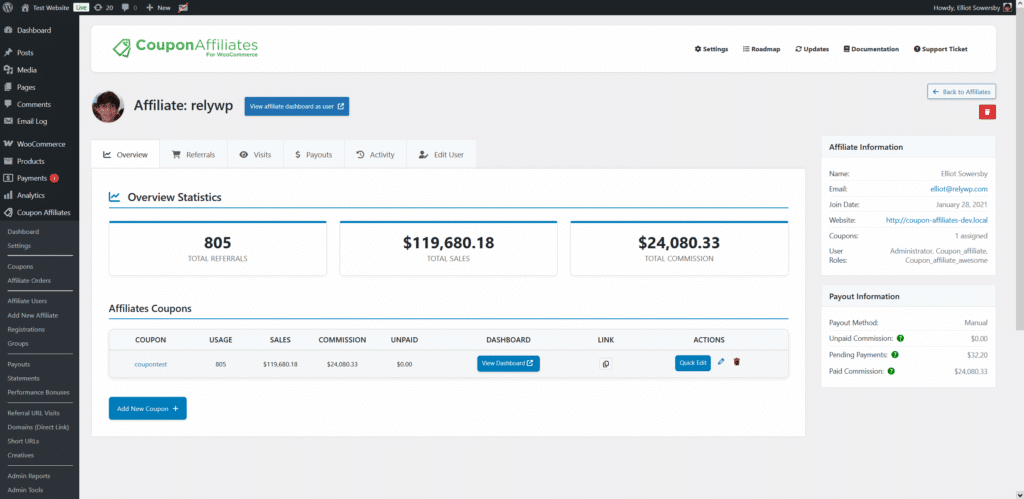
You can find “Edit affiliate” links throughout the plugin that redirect to this centralized page, making affiliate management intuitive and efficient.
“Coupon Affiliate Users” Page
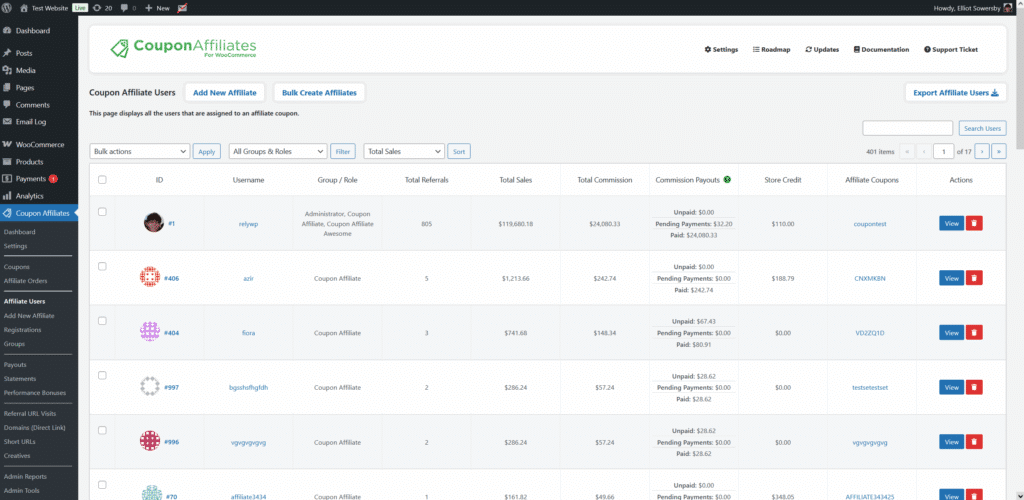
The “Coupon Affiliate Users” page displays all your affiliate users in a simple interface, with some key details for each affiliate, and a link taking you to the view affiliate page.
You can also filter affiliates by a specific user role/group, and sort the users by total referrals, sales, commission, or unpaid commission to prioritize your top performers or identify areas needing attention.
View Affiliate tabs
Open an affiliate from Coupon Affiliates → Affiliate Users, or any Edit affiliate link. The View Affiliate page is split into tabs (Overview, Referred Orders, Visits, Activity, Edit User, and others depending on which modules you have enabled).
Referred Orders
This tab lists the orders referred by that affiliate. You can:
- Filter by order status and by coupon.
- Search by order number, customer name, or email address.
- The To date is pre-filled with today’s date.
Lifetime (PRO)
The Lifetime tab is available from version 8.2.0. It is shown when the PRO licence is active on the site and “Enable lifetime commission features” is switched on under Settings → Commission; if that toggle is off, the tab is hidden. It lists every customer linked to that affiliate, under Lifetime Customers. For each customer you will see the linked coupon, expiry date, and status (Active, Expired, or Never Expires).
You can edit the linked coupon and expiry date from this list. From version 8.6.0, an expiry date you set by hand is kept when the customer uses the coupon again. Use Link a Customer to assign someone as that affiliate’s lifetime referrer by hand, without waiting for them to place an order on the coupon. This is also how you link customers who ordered before lifetime commission was enabled, since past orders are not back-filled. See (PRO) Lifetime Commission.
You can still set a lifetime referrer on the WordPress user profile under Coupon Affiliates – Lifetime Affiliate Settings. The Lifetime tab is the quicker place to do it.
Edit User
This tab lets you update the affiliate’s profile and payout details without leaving the page.
- There is a password field, and a button to send the affiliate a password reset email.
- If you use store credit (PRO), their Store Credit Balance is shown in its own section here (and on the WordPress edit-user screen), so it is not buried in payout method settings.
Suspending an Affiliate
From version 8.4.0, you can suspend an affiliate instead of deleting them. Suspending pauses their account: nothing is deleted, and you can lift the suspension at any time. This is available in the free version.
How to suspend an affiliate
- On the View Affiliate page, click the Suspend button.
- Or, on the Coupon Affiliates → Affiliate Users page, open the actions dropdown for the affiliate and click Suspend User.
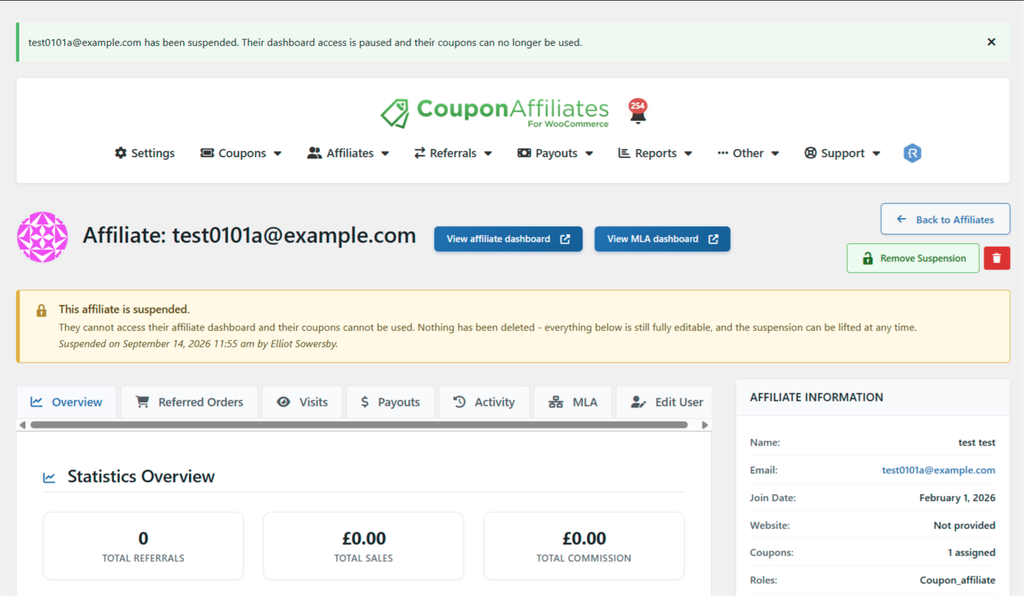
To lift the suspension, click Remove Suspension in the same places. The affiliate then carries on as before. You can’t suspend your own account.
What happens while an affiliate is suspended
- They can’t open their affiliate dashboard, the affiliate portal or the MLA dashboard. In its place they see a notice saying their account has been paused, their dashboard and coupons are temporarily unavailable, nothing has been deleted, and to contact you if they think it is a mistake.
- Pages built from the separate dashboard tab shortcodes show the same notice. The affiliate registration form and leaderboard shortcodes still display as normal.
- None of their coupons can be applied to the cart, auto-applied from a referral link, or used at checkout. A customer who tries one sees “Sorry, this coupon is no longer available.” The message does not mention the affiliate.
- No email is sent to the affiliate when they are suspended or when the suspension is lifted.
- Their user account, coupons, statistics, commission and payout history are all kept. You can still view and edit all of it, and admins can still preview their dashboard.
What a suspension does not stop
A suspension blocks the dashboards and the coupons. It does not change these PRO features, which still include a suspended affiliate:
- (PRO) Scheduled Payout Requests: a payout request is still submitted for them when they meet the payout criteria.
- (PRO) Affiliate Email Reports: they still receive their scheduled report.
Check the Payouts page for requests from a suspended affiliate before you pay them.
How to tell an affiliate is suspended
- A Suspended badge beside them on the Affiliate Users page. Hover over it to see when they were suspended and by whom.
- A banner on their View Affiliate page, with the date they were suspended and who suspended them.
- A padlock and a Locked label beside each of their coupon codes, on both the Coupon Affiliates → Coupons page and the WooCommerce Coupons list.
- “Affiliate Suspended” and “Affiliate Unsuspended” entries in the activity log, so you have a record of who did it and when.