





SMS Notifications
Coupon AffiliatesUpdated October 2, 2026
This article is mirrored from couponaffiliates.com.
SMS Notifications lets you send automatic text messages to affiliates and site admins when key events happen – such as a new referral sale, a payout being processed, or a registration being approved.
Messages are sent via Twilio, a third-party SMS delivery service.
You connect your Twilio account to the plugin by entering your API credentials in the settings.
Affiliates can:
- Receive instant SMS alerts for their own account affiliate activity
- Enter their phone number from their dashboard
- Opt out of SMS notifications at any time (if you allow it)
- Provide their phone number when registering (if the registration field is enabled)
As the site admin, you can:
- Choose exactly which events trigger an SMS (per-event toggles)
- Customise the message template for each event
- Receive your own admin SMS alerts on a separate phone number
Pricing:
You can view the pricing for Twilio SMS here: https://www.twilio.com/en-us/sms/pricing/us/
1. Get Your Twilio Credentials
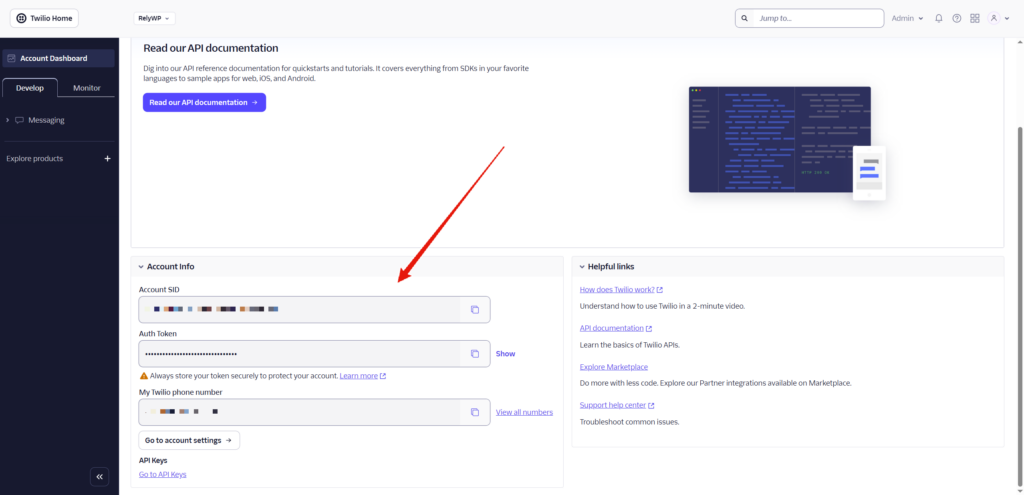
- Log in to console.twilio.com
- From the dashboard, copy your:
- Account SID
- Auth Token
- Go to Phone Numbers → Manage → Active Numbers and note your Twilio phone number (e.g.
+12345678901)- If you don’t have one yet, click Get a phone number (free on trial)
- Setup your billing details and credit notifications
2. Configure the Plugin
Go to Coupon Affiliates > Settings > PRO Modules and enable “SMS Notifications”.
Then go to the “SMS Notifications” settings tab.
| Field | Value |
|---|---|
| Enable SMS Notifications | Toggle on |
| Twilio Account SID | Paste from Twilio console |
| Twilio Auth Token | Paste from Twilio console |
| Twilio “From” Number | Your Twilio number in E.164 format, e.g. +12345678901 |
Once filled in, use the Send Test SMS button – enter any phone number and click it to confirm messages are delivering before enabling live events.
3. Affiliate Controls
Still on the SMS settings page, under Affiliate Controls:
| Option | Description |
|---|---|
| Show “SMS Phone Number” field on dashboard | Affiliates can enter their own phone number in their dashboard Settings tab |
| Allow affiliates to opt out | Adds an opt-out checkbox on the affiliate dashboard Settings tab |
| Show “Phone Number” field on registration form | Adds a phone field to the affiliate sign-up form – the number is saved automatically and used for SMS. This setting is synced with Registration > Extra Fields > “Phone Number” Field |
Phone number priority: If an affiliate has entered a number in their dashboard settings SMS field, that is used. If not, the number from their Account Details (or registration form) is used as a fallback.
4. Notification Events (Affiliate)
Under SMS Notification Events (Affiliate), enable any combination of the following.
Each has its own toggle and a customisable message template:
| Event | Trigger |
|---|---|
| New Referral Sale | Fires when an order is placed using the affiliate’s coupon |
| Referred Order Cancelled / Refunded | Fires when a completed referred order is cancelled, refunded, or failed |
| Commission Payout Paid | Fires when an admin marks a payout as paid |
| Affiliate Registration Approved | Fires when an admin approves an affiliate application |
| Payout Request Submitted | Fires when an affiliate submits a payout request |
Message Templates & Merge Tags
Each event has a default message. You can customise the text and use any of these merge tags:
| Tag | Replaced with |
|---|---|
{name} | Affiliate’s display name |
{coupon} | Affiliate’s coupon code |
{commission} | Commission amount earned |
{id} | Order or payout ID |
{amount} | Payout amount |
{status} | New order status (cancelled/refunded/failed) |
{site_name} | Your site name |
5. Notification Events (Admin)
Under SMS Notification Events (Admin), enter an Admin Phone Number (E.164 format) and enable any events to receive admin alerts. The same 5 affiliate events are available, plus:
| Event | Trigger |
|---|---|
| New Affiliate Registration | Fires when any new affiliate application is submitted |
Admin messages have the same merge tags available, plus {email} (affiliate’s email address) on the registration event.
6. Registration Form Phone Field
To collect affiliate phone numbers at sign-up:
- Go to Settings > Registration > Extra Fields
- Enable “Phone Number” Field
- Optionally set a custom label and mark it as Required
The submitted number is saved to the affiliate’s profile and automatically used as their SMS number.
7. Affiliate Experience
Dashboard Settings tab (if the phone field is enabled):
- Affiliates see a Phone Number for SMS Notifications field – they enter their number in international format, e.g.
+12345678901 - If opt-out is enabled, they also see an Opt out of SMS notifications checkbox
Registration form (if the registration phone field is enabled):
- A phone number field appears on the sign-up form
- The number is saved on registration and immediately available for SMS triggers