





(PRO) Affiliate Leaderboards
Coupon AffiliatesUpdated September 28, 2026
This article is mirrored from couponaffiliates.com.
The “leaderboards” feature lets you generate and view a leaderboard of your top affiliates for a certain date period.
When generating a leaderboard, you can set the number of affiliates to display, the time period to show the stats for, how the affiliates are ranked, which columns to display, and choose to highlight the logged in user if they are on the table.
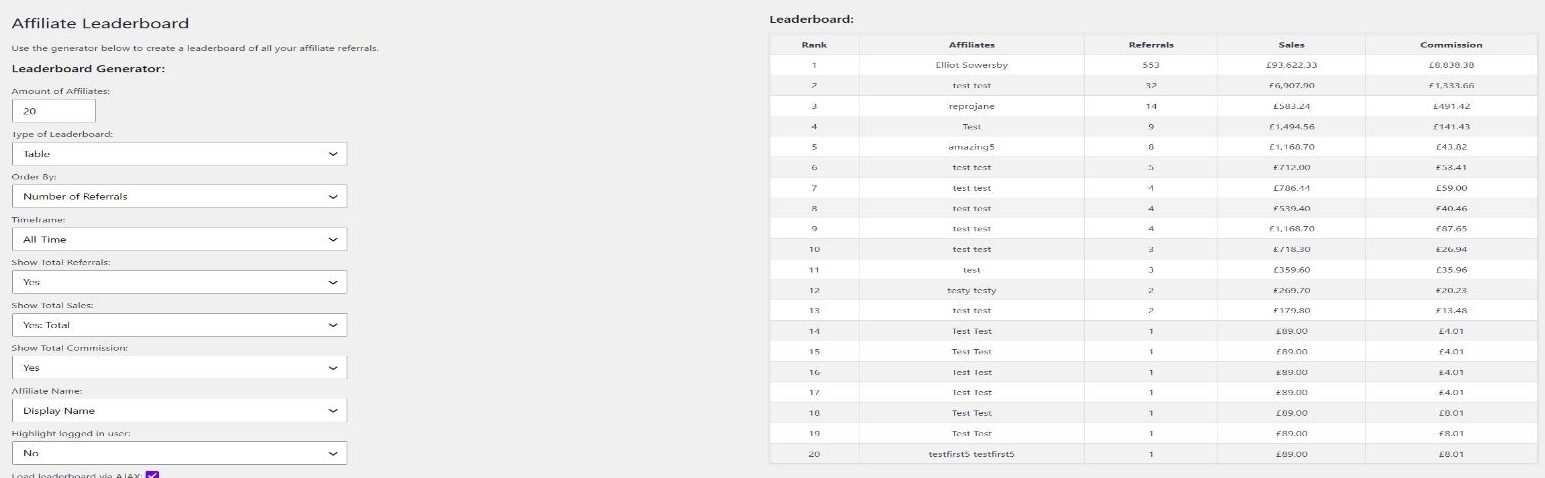
This will also generate shortcode which you can add to a post or page to display the leaderboard to your site visitors on the frontend.
Simply copy the shortcode provided and paste it into the post editor. The leaderboard content will update dynamically, so if any data is updated this will reflect on the leaderboard displayed to your users.
Affiliate leaderboards is a great way to add an element of competition to your affiliate program, and allow users to see how well they are doing compared to other affiliates.
To get started, simply visit the “Leaderboards” page under the “Coupon Affiliates” menu in your admin area, to generate your first leaderboard.
Generator Options
The leaderboard generator has the following options:
- Amount of Affiliates – How many affiliates to display.
- Type of Leaderboard – Table or List.
- Order By – Rank affiliates by Number of Referrals, Commission Earned, or Total Sales.
- Timeframe – All-Time, Current Year (Last 12 Months), Current Month, Specific Month, or Custom Date Range. Choosing a custom date range shows Start Date and End Date fields, plus a Cache Duration (minutes) field that controls how long the results are cached (set to 0 to disable caching). A small note is shown beneath the leaderboard telling visitors how often it updates (for example “Leaderboard updated every 60 minutes”).
- Show Total Referrals / Show Total Sales / Show Total Commission – Choose which columns are displayed.
- Affiliate Name – Show each affiliate’s Display Name or Username.
- Highlight logged in user – Highlights the current user’s row if they appear on the leaderboard.
- Load leaderboard via AJAX – Loads the leaderboard after the page has rendered, which helps if you use full-page caching.
Shortcode
The generated shortcode is [couponaffiliates-leaderboard]. You can also add it yourself. Use ajax="yes" (default) or ajax="no" to control whether the table loads via AJAX.
The leaderboard is built from the shortcode settings, not from values sent by visitors. After you update a leaderboard, clear any full-page cache so the frontend shows the new settings.
If you have customised the word “Affiliate” in Custom Terminology, that wording also applies on the leaderboard. See Shortcodes and Translations.