





Multi-Currency Support & Setup
Coupon AffiliatesUpdated September 28, 2026
This article is mirrored from couponaffiliates.com.
With Coupon Affiliates, you can enable multi-currency support and easily set conversion rates for all your store currencies.
This will then automatically convert the order totals, total stats, and commission earned, in the affiliate dashboard to your base store currency, no matter which currency each of the orders were made in.
Here’s an example of the settings.
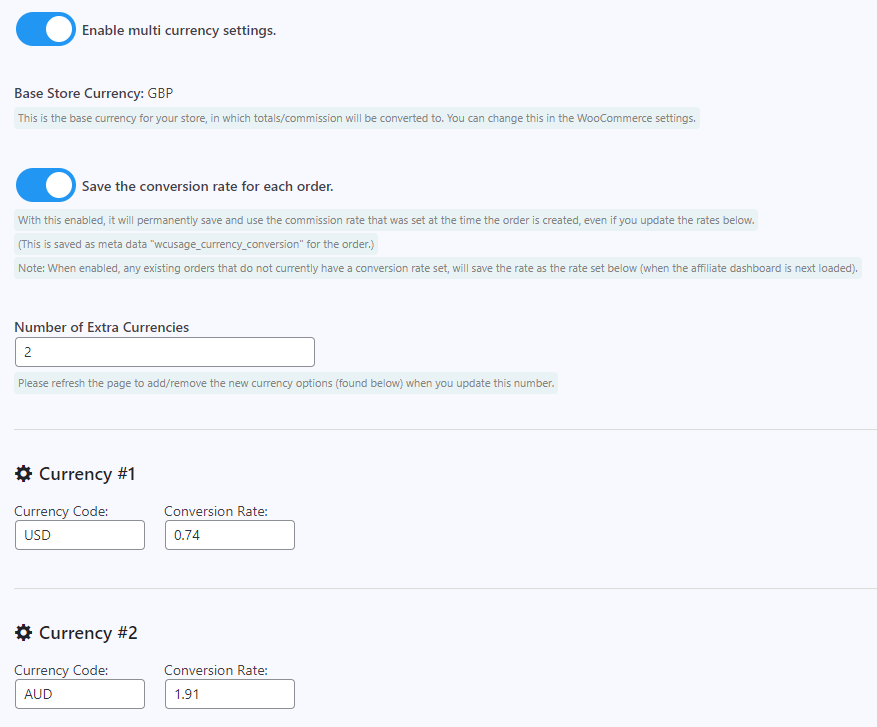
To get started, go to the “Commission” tab of the plugin settings page, scroll down to “Multi-Currency Settings” and enable “Multi-Currency” functionality. A new tab will then appear labelled “Currencies” where you can customise your currencies and conversion rates.
In the “Currencies” tab there is also an option to “Save the conversion rate for each order”. With this enabled, the plugin permanently saves and uses the conversion rate that was set at the time each order was created, even if you update the rates later.
Automated Conversion Rates
It is also possible to automatically update the multi-currency conversion rates every 12 hours.
This automatic update ensures you’re always working with the most current exchange rates, making your multi-currency transactions more accurate and hassle-free.
To enable this feature, go to the “Currencies” settings tab, with multi-currency enabled, and scroll down to the “Automated Conversion Rates” section. First select an API provider from the dropdown (either “apilayer.com”, which is recommended, or “exchangeratesapi.io”), then sign up for a free account with that provider, get your API key, and enter it into the settings.
You can then click “Get Rates” to get the new rates instantly, or this will be done automatically every 12 hours.
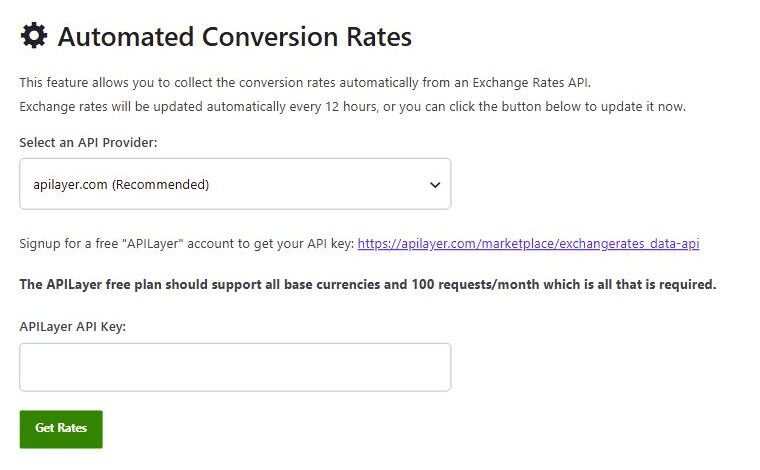
For step-by-step instructions for each provider, see (PRO) Automated Conversion Rates.