





How to edit an affiliates “unpaid commission”?
Coupon AffiliatesUpdated September 29, 2026
This article is mirrored from couponaffiliates.com.
To edit an affiliates “unpaid commission” amount for a coupon, simply edit the coupon in WooCommerce, then go to the “Coupon Affiliates & Commission” tab, then you can edit the “Unpaid Commission” amount there.
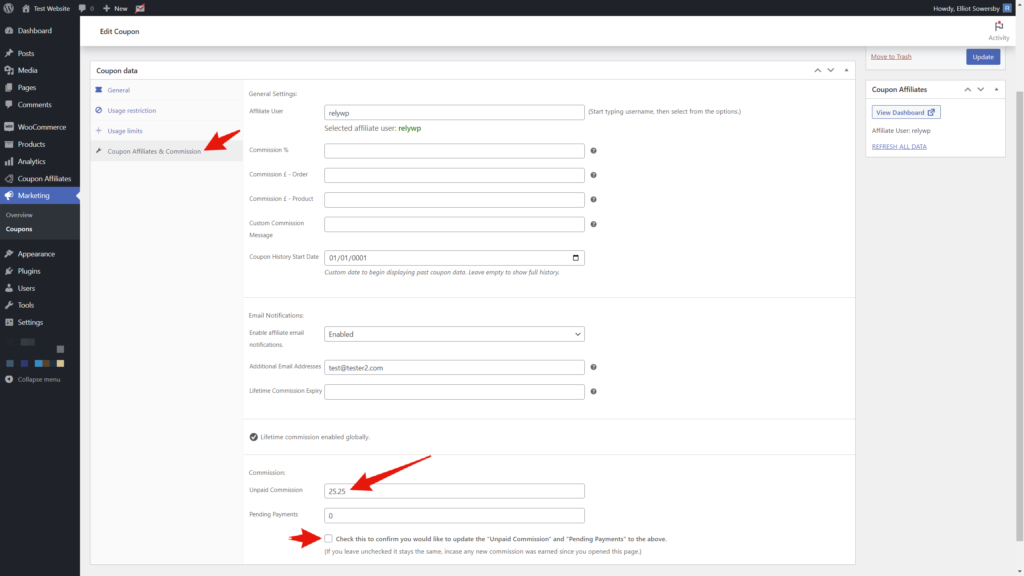
Underneath the field there is a confirmation checkbox. Tick it before saving, otherwise the amount is left unchanged — this is deliberate, so a figure that was on screen while new commission came in is not written back by accident.
Refreshing statistics does not recalculate this balance, so editing it here is the way to correct it. See How to refresh statistics for past orders.