





(PRO) Scheduled Payout Requests
Coupon AffiliatesUpdated October 20, 2026
This article is mirrored from couponaffiliates.com.
If required, you can set the plugin to automatically submit “payout requests” for your affiliates, every month, week, day or quarter, if they meet certain criteria. This will work in the same way as if the user had clicked on the “Request Payout” button in their affiliate dashboard.
To get started, go to the “PRO Modules” section in the plugin settings, go to “Scheduled Payout Requests” and toggle it on.
Click the “Settings” button, and you’ll be taken to the settings for this module.
Here you can choose how often payout requests are checked and submitted: monthly, weekly, daily or quarterly. You can also choose what time of the day it is done. Quarterly requests run on the first day of each quarter.
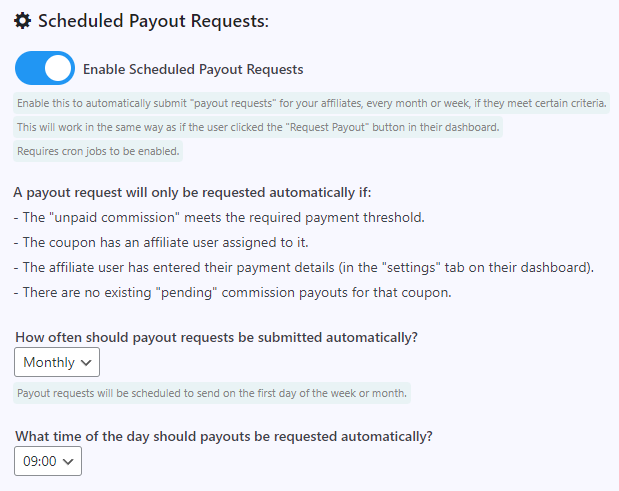
When frequency is set to Weekly, you can also choose which weekday the automatic payout requests run on. This defaults to Monday.
When frequency is set to Monthly, you can choose which day of the month they run on, with the “Which day of the month should payouts be scheduled for?” setting. Pick any date from the 1st to the 31st, or “Last day of the month”. This defaults to the 1st, and was added in version 8.4.0. If the date you pick does not exist in a month, such as the 31st in February, the last day of that month is used instead.
Which affiliates get a payout request
Each time the schedule runs, a payout request is submitted for an affiliate coupon when:
- Its unpaid commission is more than zero, and at least the payout threshold set in your payout settings.
- The affiliate has saved their payout details, unless payout details are not required or their payout method does not need any.
- The affiliate’s saved payout method is still enabled.
Suspended affiliates are not skipped. A request is still submitted for them if they meet these criteria. See Suspending an Affiliate.
Only schedule payouts for certain payout methods
To limit scheduled requests to certain payout methods, switch on “Only schedule payouts for specific payout methods.” and select the methods to use. Affiliates whose saved payout method is not selected are skipped.