





Browse and filter the customers list
Advanced Customer ReportsUpdated September 15, 2026
The customers list sits on the WooCommerce › Customer Reports screen below the search box, and is what you see before a report is generated. It lists every customer on the store with their order count and lifetime spend.
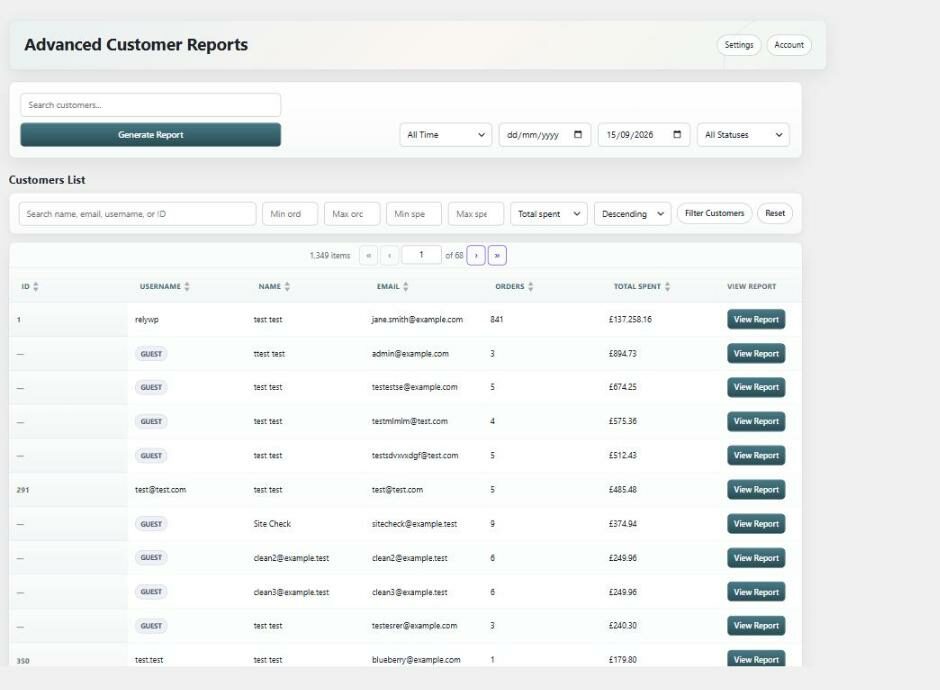
Columns
- ID – the WordPress user ID. Guests show a dash, because they have no account.
- Username – the account username, or a Guest badge for guest customers.
- Name – the customer’s name, taken from their WooCommerce customer record and falling back to their display name.
- Email – the account email, or the billing email for guests.
- Orders – how many paid orders they have placed.
- Total Spent – the value of those orders.
- View Report – opens the full report for that customer.
Every column except View Report is sortable. Select a column heading to sort by it, and select it again to reverse the direction.
Search and filter
The filter bar above the table narrows the list down:
- Search name, email, username, or ID – matches against all of those fields at once.
- Min orders and Max orders – only show customers whose order count falls in that range.
- Min spent and Max spent – only show customers whose total spend falls in that range.
- Sort by and Sort order – choose the column and direction to order by.
Select Filter Customers to apply, or Reset to clear everything and start again. Hovering over a field shows its full contents as a tooltip, which helps with the narrower boxes.
How the totals are worked out
Order counts and spend in this list come from the WooCommerce Analytics lookup tables and only count paid order statuses, which on a default store means processing and completed. Refunds are excluded, so a refunded order is not counted as an extra order.
This is why the figures here can differ from the totals inside a report: a report counts whatever statuses its own filter is set to, which is every status by default. If the two disagree, that is almost always the reason.
The default sort column can be changed in the plugin settings, and 20 customers are shown per page.