






To take an EIN from tax exempt customers in WooCommerce, turn on the free Registration Number field in Tax Exemption for WooCommerce and tick US EIN / Federal Tax ID. Customers tick a box at checkout, type their EIN, and the sales tax comes off the order.
The EIN on its own doesn’t prove anything, though. Sales tax exemption in the US is granted by each state, and what protects you in an audit is the buyer’s exemption or resale certificate. So this guide covers both parts: collecting the EIN, then getting the certificate and deciding who is approved.
To be upfront: we make Tax Exemption for WooCommerce. We’ve said below which parts are free and which need PRO, and when another tool would suit you better.
This article is general information, not tax or legal advice. Sales tax rules differ from state to state, so check with your accountant or the relevant state revenue department before you remove tax from any order.
Does an EIN make a customer tax exempt?
No. An Employer Identification Number (EIN, sometimes called a FEIN or federal tax ID) is a nine-digit number the IRS issues to businesses, nonprofits and government bodies. It identifies the organisation. It says nothing about whether it can buy without paying sales tax.
Sales tax is a state tax, and each state decides who is exempt. Federal 501(c)(3) status doesn’t carry over automatically either. Most states ask nonprofits to apply for their own sales tax exemption, and some don’t give charities a broad exemption at all. The Texas Comptroller says plainly that having a FEIN does not mean an organisation is exempt from state or federal taxes.
The multistate certificate forms show where the EIN fits. On the Streamlined Sales Tax certificate of exemption (accepted by its 24 member states), a buyer gives their state sales tax ID first. The FEIN is only a fallback for buyers who aren’t required to register for sales tax. The Multistate Tax Commission’s uniform resale certificate works in the same way for resale purchases in the states that accept it.
So for a US tax exempt customer, you’ll usually want three things on file:
- Their EIN, as a way to identify the organisation and look it up.
- A state-issued exemption or resale number, if their state issues one.
- A completed and signed exemption certificate (a state form, or the Streamlined or MTC multistate form where the state accepts it). This is the document that supports the tax-free sale.
For nonprofits, you can check an EIN yourself in the IRS Tax Exempt Organization Search. It shows whether the IRS lists the organisation and whether its exemption was revoked. It won’t tell you about state sales tax, but it catches made-up numbers.
What you need before you start
- WooCommerce with taxes switched on (WooCommerce › Settings › Tax) and your normal tax rates set up, or a tax service such as WooCommerce Tax, Stripe Tax or AvaTax.
- The free Tax Exemption for WooCommerce plugin from WordPress.org. The EIN field, the checkout form, block checkout support and the exempt customer and order lists are all free.
- PRO, only if you want certificate uploads, manual approval, expiry dates or restrictions. It’s $79 a year for one site, with a 7-day free trial.
How to add an EIN field to WooCommerce checkout
1. Install the plugin and check the exempt tax class
Install and activate the plugin, then open Tax Exemption › Settings in your WordPress admin. On the General tab, make sure tax exemption is switched on and the tax class for exempt orders is Zero rate. The plugin creates a Zero rate class if your store doesn’t have one. If that class charges anything, tax won’t come off, so check it has no rates.
On the same tab you can choose whether tax on shipping is removed too. Whether shipping is taxable varies by state, so set this to match how you already treat shipping.
2. Turn on the Registration Number field and choose US EIN
Open the Registration Number tab and switch on Show “Registration Number” Field. Then, under Number Types, tick US EIN / Federal Tax ID. Turn on Required? if nobody should be able to claim exemption without one.
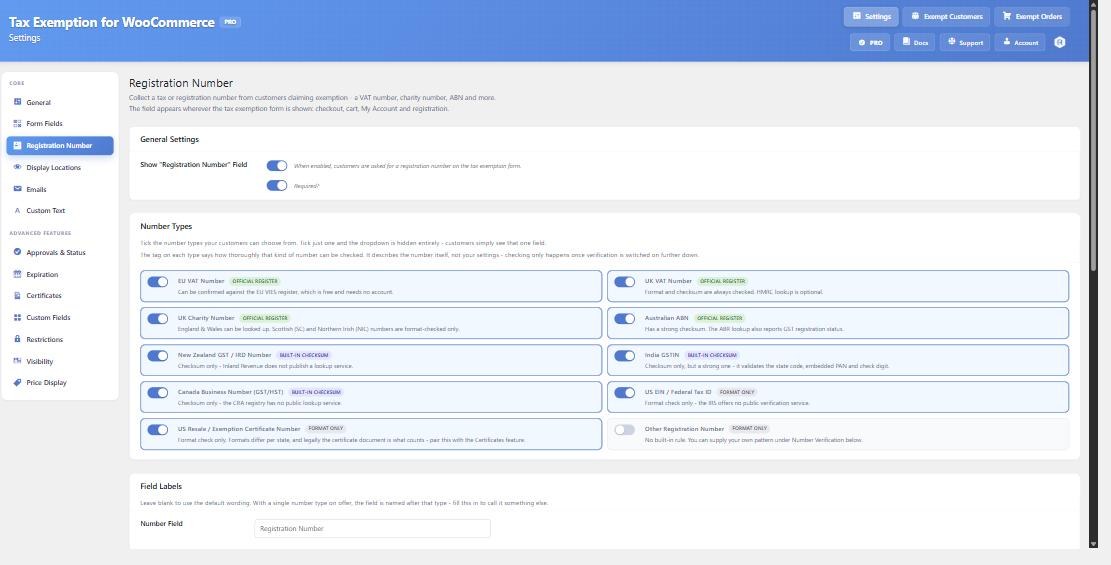
If you tick only one type, the type dropdown disappears and customers see a single field named after it. That’s the neatest option for a store that sells only in the US. If you also accept resale buyers, tick US Resale / Exemption Certificate Number as well, and customers pick which one they’re entering. The Field Labels section lets you rename the field, for example to “EIN (Federal Tax ID)”.
The number is saved against the customer and the order. It shows on their account page, the Exempt Customers and Exempt Orders admin pages, the admin order screen and the admin notification emails. Full details are in the docs on collecting a registration number.
3. Choose where the exemption form appears
By default the form shows on the checkout. It works on the classic checkout and the block checkout, and you can add it to the cart page and the customer’s My Account page too. There’s also a shortcode, [tefw_exemption_form], if you’d like a separate “Tax exempt purchasing” page. In PRO you can add the fields to the registration form, or hide them at checkout so customers fill them in once on My Account. See where the tax exemption form appears for each option.
The form also asks for the name of the exempt person or organisation and the reason for exemption. You can show, hide or require each of these. For US buyers, relabel the name field to something like “Organisation name” so you get the legal name that should match their certificate.
4. Test an order
Add a taxable product to the cart and go to the checkout with a US billing address. Tick I want to claim tax exemption, enter a test EIN in the 12-3456789 format and fill in the other fields. The tax line in the order summary should drop to zero straight away.
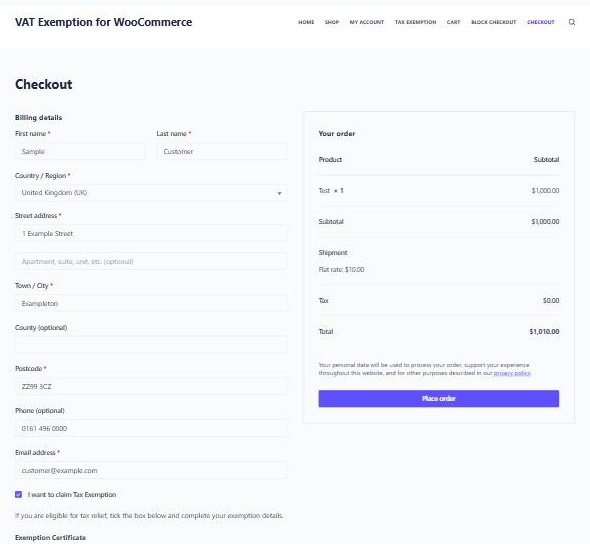
Test the express payment buttons too if you use them. Exemption also applies on Apple Pay, Google Pay and Stripe Link, where the normal checkout fields never load. In that case it uses the exemption saved on a logged in customer’s account.
Can the plugin verify an EIN?
Only its format. The IRS doesn’t offer a public service for checking EINs, so with PRO number verification switched on the plugin can confirm that an EIN has nine digits in the right shape, and nothing more. A number in the right format still proves nothing about exemption. US resale certificate numbers get a format check only too, and their format differs from state to state.
For comparison, UK and EU VAT numbers, Australian ABNs and England and Wales charity numbers can be looked up live against their official registers. That’s why the verification features suit UK, EU and Australian stores more than US ones. For US buyers, the manual review in the next two sections matters more.
Collect the exemption certificate (PRO)
The Certificates tab adds a Tax Exemption Certificate upload field to the form. Turn on Enable Exemption Certificates, then choose where the upload shows (checkout, My Account, registration form) and whether it’s Required. Only PDF files are accepted.
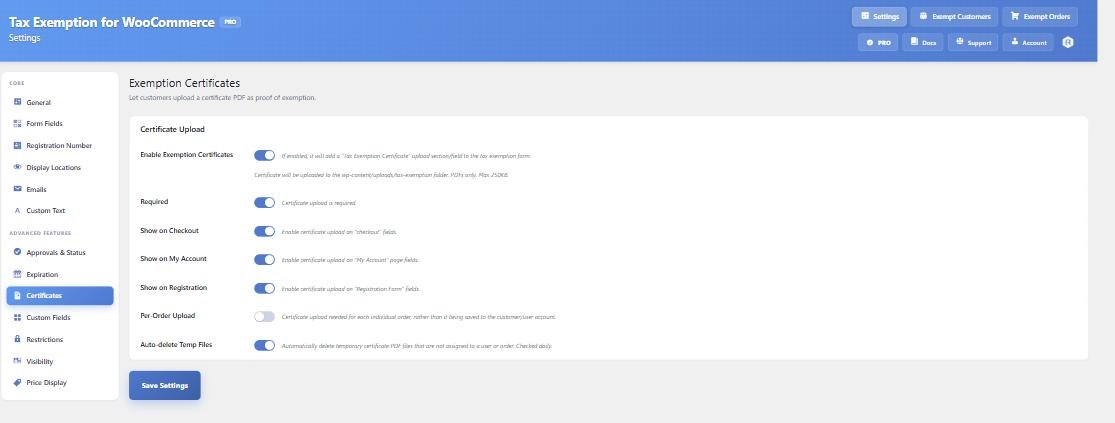
A certificate is normally saved to the customer’s account and reused on later orders, which suits a blanket exemption certificate. If a buyer’s exemption applies order by order, turn on Per-Order Upload and a new certificate is asked for each time.
Files are stored outside the public media library and only served through a link that checks who’s asking. If your host runs nginx, add the deny rule from the certificate docs, because nginx ignores the plugin’s .htaccess protection.
Approve customers before tax comes off (PRO)
With the certificate collected, you can check it before any tax is removed. On the Approvals & Status tab, switch on Require Manual Approval. The customer then fills in the form on their My Account page, their status is set to Pending, and you get an email with their details and Approve and Decline buttons. Tax is only removed once they’re Approved.
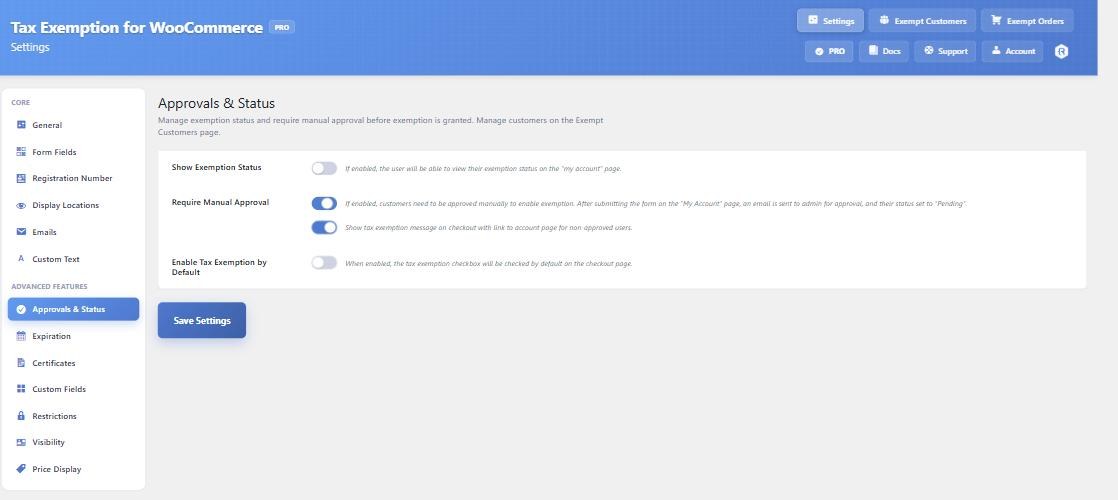
Approval needs a customer account, because a guest has nowhere to hold a status. For schools, nonprofits and other repeat buyers this works well, because they set up their details once and later orders are tax free while they stay approved.
There’s an Auto-approve on Success option for numbers that verify against an official register. US EINs can’t be checked against one, so for US customers plan on reviewing each certificate yourself. The docs explain the four approval statuses.
Keep certificates up to date (PRO)
Some states’ exemption and resale certificates expire, or have to be renewed after a set period. The Expiration tab adds an expiry date to the form, or works one out for you from a default validity period, such as 12 months or 36 months. When the date passes, the customer’s status changes to Expired and tax is charged again until they renew.
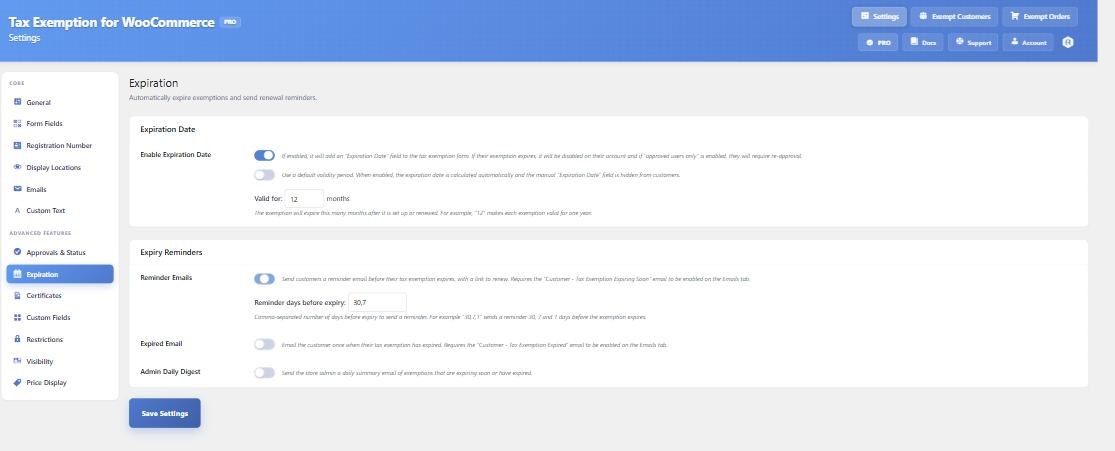
You can send reminder emails before the date (for example 30, 7 and 1 days before), an email when it expires, and a daily summary to yourself. The Exempt Customers page also has an Expiring Soon filter. More on this in setting exemptions to expire.
Limit who can claim exemption (PRO)
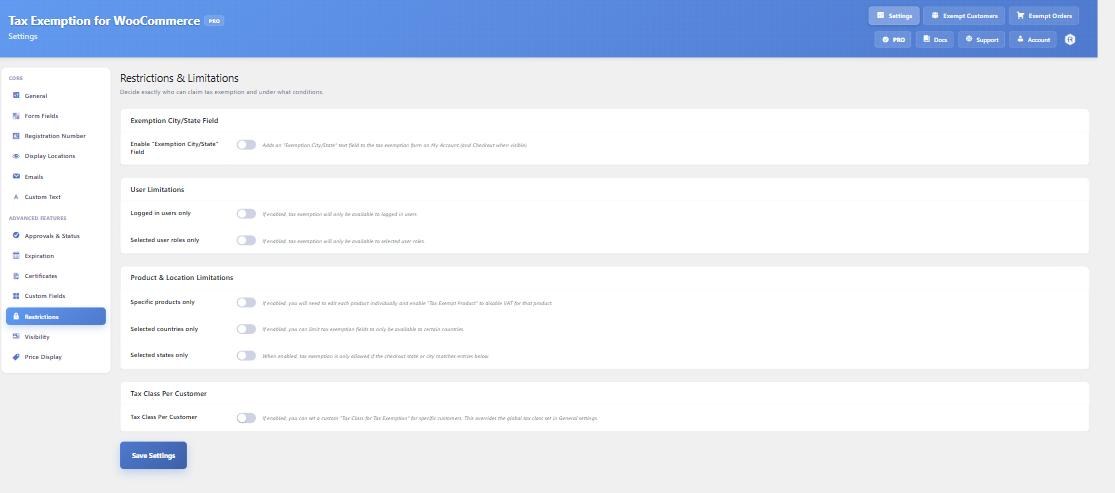
The Restrictions tab controls who sees the form at all. You can limit exemption to logged in customers, to chosen user roles, or to billing addresses in selected countries or states. That last option helps if you only accept exemption claims in the states where you collect tax. You can also make only certain products exempt, or give one customer a different tax class.
Keep records for an audit
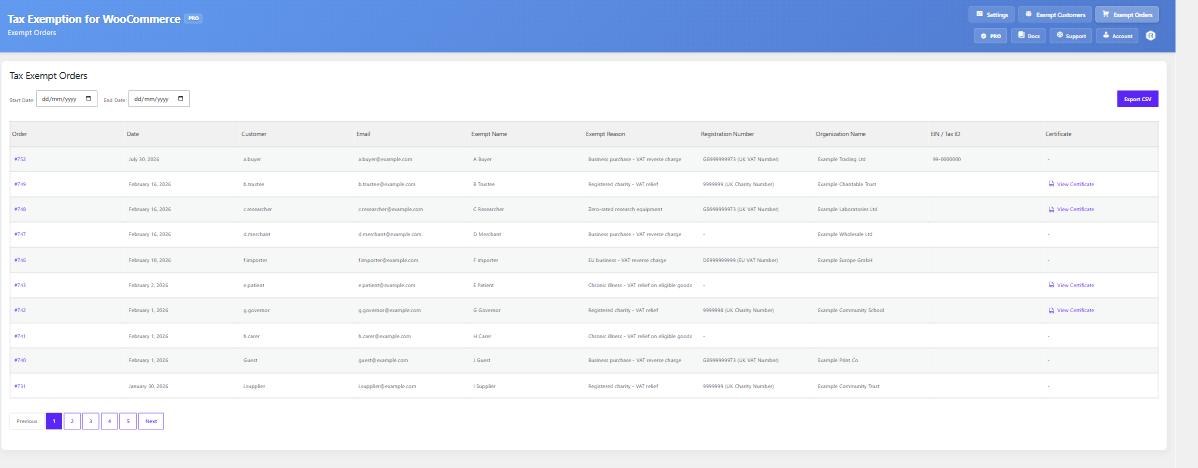
Every exempt order is listed on Tax Exemption › Exempt Orders, with the name, reason, registration number and a link to the certificate if there is one. You can filter by date, and PRO lets you export customers and orders to CSV for your accountant. Each order also has a Tax Exemption box on its edit screen, so the details stay with the order.
If you use Stripe Tax or AvaTax
If a tax service calculates your sales tax, the plugin works alongside it rather than replacing it. Stripe Tax works in the free version, with one limit: guest customers have to log in or create an account for exemption to apply. The AvaTax integration is in PRO and passes exempt customers to Avalara with an entity use code.
When this plugin isn’t the right fit
If you collect sales tax in many states and need each certificate checked against that state’s rules, a full tax service with its own certificate management (such as Avalara) will do more than we can. Our plugin collects and stores the certificate, but it doesn’t know each state’s rules or check that a form is filled in correctly.
If exemption simply follows a customer type, like wholesale buyers, a role-based plugin may be enough. We compare these in our roundup of WooCommerce tax exempt plugins.
Frequently asked questions
Can WooCommerce collect an EIN without a plugin?
You can add a custom checkout field with code or a checkout field editor, but WooCommerce won’t do anything with it. It won’t remove tax, and there’s nowhere to approve the customer or keep their certificate. To remove tax you’d also need custom code that marks the customer as exempt.
Is the EIN field free?
Yes. The Registration Number field, including the US EIN and US resale certificate number types, is in the free version. Checking numbers is PRO, as are certificate uploads and manual approval.
Does it work with the WooCommerce block checkout?
Yes. The checkbox and the full form, including the EIN field, show directly on the block checkout. The approval, user role and expiry rules apply there as they do on the classic checkout.
Can guests claim exemption?
Yes, unless you turn on manual approval or limit exemption to logged in users. For US B2B and nonprofit sales, requiring an account makes the records much easier to manage.
Summary
An EIN field is quick to add and free, and it gives you a reliable way to identify each tax exempt buyer. What makes the sale tax free is the state certificate behind it, so collect that, review it and keep it until it expires. Tax Exemption for WooCommerce handles the EIN field for free and the certificates, approvals and expiry dates in PRO. You can try the free version on your store first, and the full documentation covers every setting mentioned here.

Our plugins
Grow your WooCommerce store
Affiliates, loyalty points, store credit, tax exemption and more – trusted on 248,000+ sites.


Comments