





Track listening statistics
AI Text to SpeechUpdated September 15, 2026
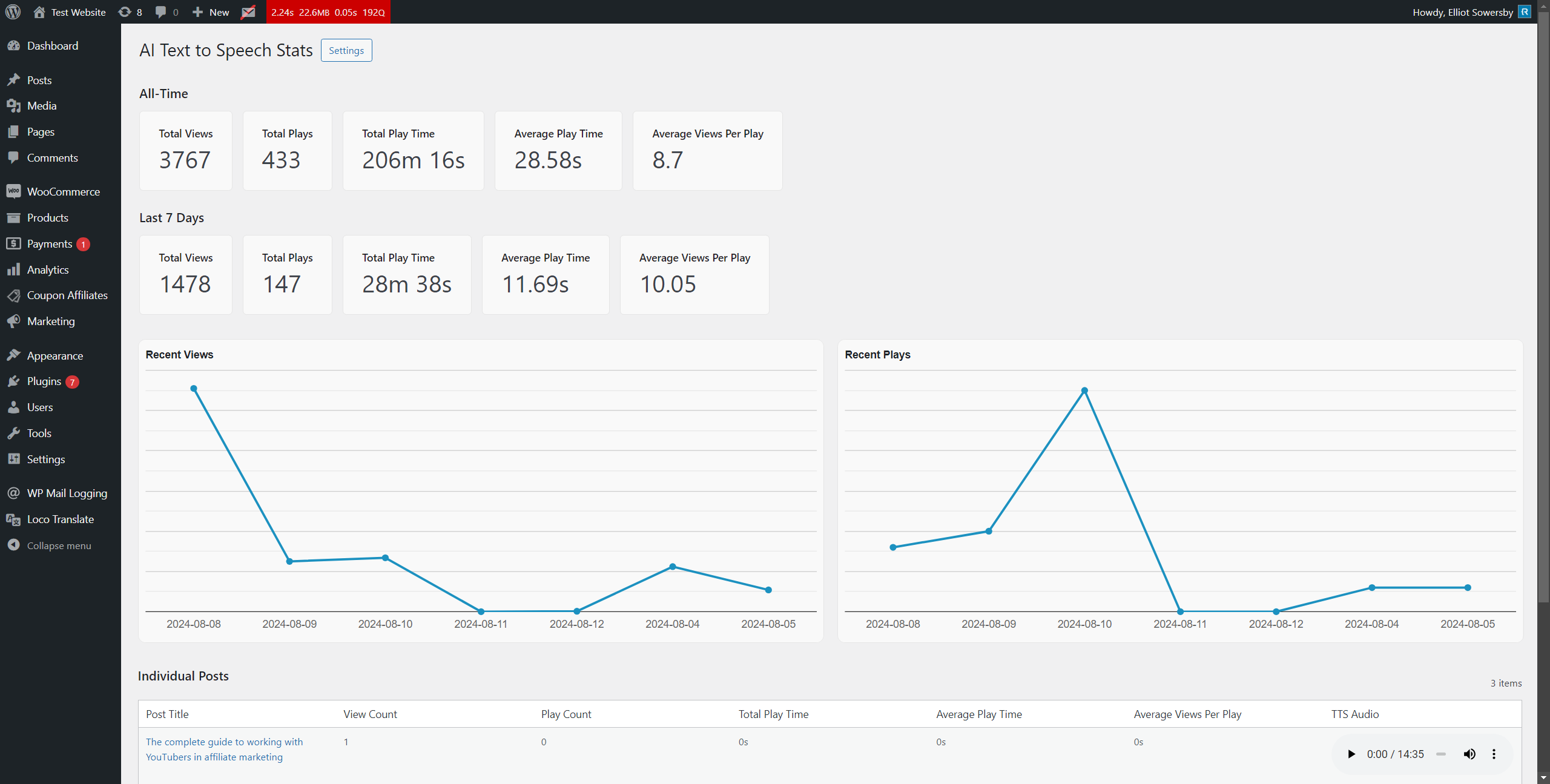
PRO records how often posts with audio are viewed and how much of the audio people play. Totals and charts are on AI Text-to-Speech › Statistics, and each post’s own numbers appear in its AI TTS box. Tracking is controlled by AI Text-to-Speech › Settings › Player Customisations › Enable TTS Statistics, which is on by default.
What is measured
- Views: counted each time a post that has an audio player is loaded.
- Plays: counted when a visitor pauses or finishes the audio after listening for at least one second. Pausing and resuming counts as another play.
- Play time: the seconds listened between pressing play and pausing or reaching the end, added up.
- Average play time and Average views per play: worked out from the totals.
No personal data, cookies or IP addresses are stored. Only counts and seconds are saved against each post.
The Statistics page
- All-Time and Last 7 Days boxes for Total Views, Total Plays, Total Play Time, Average Play Time and Average Views Per Play.
- Recent Views and Recent Plays line charts for the past week. The charts load from Google Charts, so they need an internet connection in your browser.
- Individual Posts: a table with each post’s counts and a player.
In version 3.2.0 the Statistics page includes the standard Posts post type only. Pages and custom post types are still tracked, and you can see their numbers in each item’s AI TTS box. The page also lists only as many posts as the Blog pages show at most value in Settings › Reading.
Statistics for a single post
Open the post in the editor. Under the audio in the AI TTS box, Text to Speech Statistics has three sections you can expand: All-Time, Past 7 Days and Today.
Reading the numbers accurately
- Views are counted by the server when the page is built. If your site uses page caching, cached visits aren’t counted, so views will be lower than your analytics tool shows.
- Views include your own visits, logged-in users and search engine bots.
- Plays are recorded in the browser, so they work on cached pages, as long as the cached page isn’t too old. See Statistics aren’t recording if numbers stay at zero.
- Daily figures keep only the last seven days. Generating a new audio file doesn’t reset a post’s statistics.
Turn statistics off
Untick Enable TTS Statistics and save. Tracking stops and the Statistics page is removed from the menu. Data already collected stays in the database and reappears if you turn it back on.