





Add a wishlist counter to your header
Simple WishlistsUpdated
The wishlist counter is a heart with a live count of saved items that links to the wishlist. You can add it to a theme menu or show a floating heart in the corner of the screen from Wishlists › Settings › Counter, or place it anywhere with a shortcode or block.
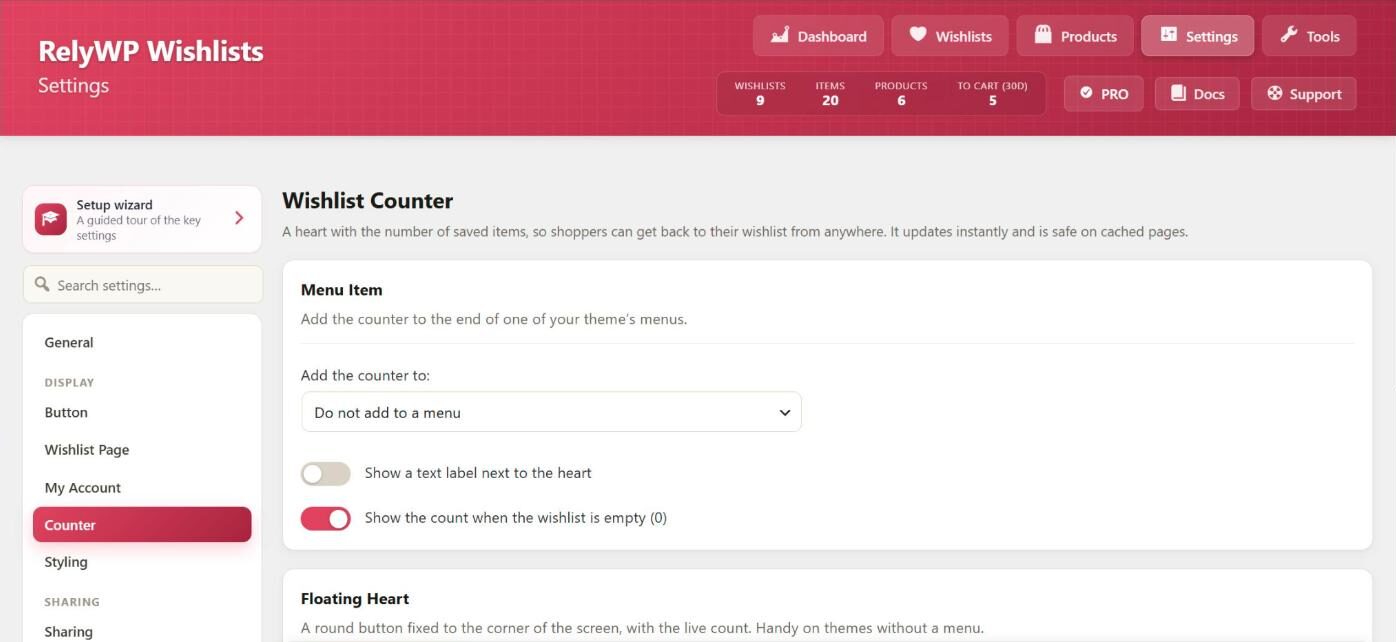
Add the counter to a menu
- In the Menu Item section, choose a menu location in Add the counter to:. The counter is added to the end of that menu.
- Optionally turn on Show a text label next to the heart and set the Label (default “Wishlist”).
- Show the count when the wishlist is empty (0) is on by default. Turn it off to hide the number until something is saved.
Block themes have no classic menu locations, so this list is empty. Add the Wishlist Counter block to your header in Appearance › Editor instead.
Show a floating heart
Turn on Show the floating heart for a round button fixed to a corner of every page, with the live count. It works well on mobile and on themes without a menu.
- Position: Bottom right (default) or Bottom left.
- Hide it until something has been saved: on by default.
Place the counter anywhere
Use the shortcode in a widget, page or template:
[swlp_counter show_label="yes" show_zero="no"]Both attributes are optional. When left out, they follow the settings on the Counter tab. In the block editor, the Wishlist Counter block has the same two options.
How the count stays correct on cached pages
The counter’s HTML is the same for every visitor, so pages can be cached. The count is filled in by a small request after the page loads, and only for shoppers who have saved something. In PRO, clicking the counter can open a slide-out wishlist drawer instead of going to the wishlist page.