






Version 3.3.0 of the AI Text to Speech plugin is now available!
This update is mainly for sites that publish in a language other than English, and for sites with long posts. You can now choose the language your audio is spoken in, so a post written in German or Spanish is no longer read with an English accent. Long posts are also turned into audio in several smaller requests, which fixes audio that stayed on “Generating audio file…” and never finished.
PRO users get a new Default Voice Instructions setting. There are also fixes for the spoken intro, for prices in non-English audio, for error logging, and for automatic generation when the WordPress admin is not in English.
Choose the Language of Your Audio
There is a new Audio Language setting on the General Settings tab, just below Voice Model. It tells OpenAI which language to speak.
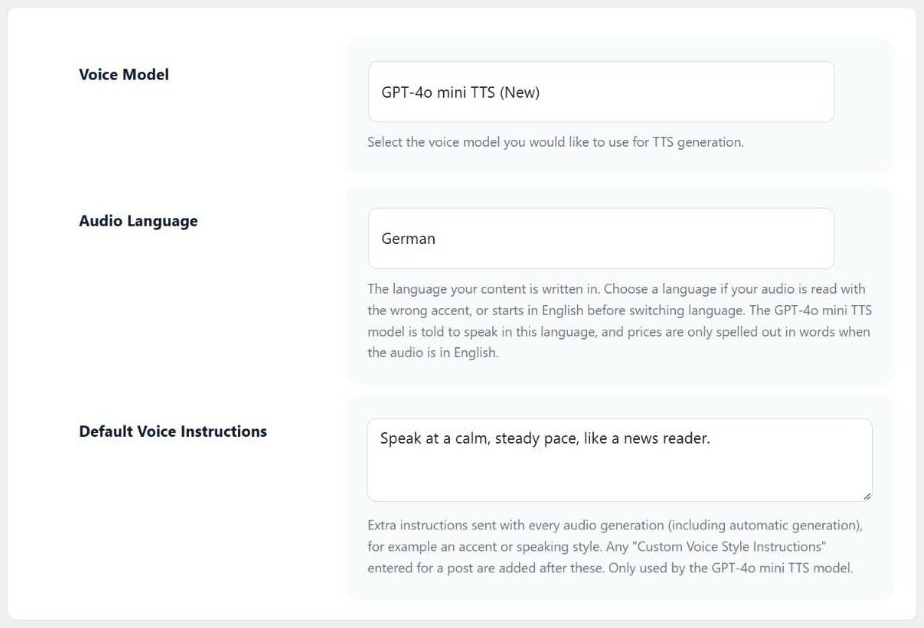
Until now, OpenAI had to work out the language from the text itself. On non-English sites this did not always work. The audio could start in English and then change language, or the whole post could be read with an English accent. When you choose a language, the GPT-4o mini TTS model is told to speak in that language from start to finish, with a native accent and pronunciation.
You can choose from these options:
- Automatic (detect from the text): the default. OpenAI decides the language, as it did before this update.
- Site language: uses the language set under Settings › General in WordPress. The option shows which language that is.
- A fixed language: pick one of the 57 languages in the list.
The setting also changes how prices are read. Prices are now only spelled out as English words when the audio is in English, so audio in other languages no longer has English words for prices in the middle of a sentence.
If you use the TTS-1 model, only the price change applies. TTS-1 does not accept voice instructions, so it can’t be told which language to use.
To set it, go to AI Text-to-Speech › Settings, open General Settings and choose a language under Audio Language. Then click Generate New on any post you want to redo in the new language.
For multilingual sites, developers can use the new ai_tts_audio_language filter to return the language of each post.
Default Voice Instructions for Every Post (PRO)
With PRO you can already add Custom Voice Style Instructions to a single post, for example to ask for a slower pace or a certain accent. The new Default Voice Instructions field on the settings page lets you write these instructions once for the whole site.
They are sent with every audio generation: from the post editor, from the Generator page, and when audio is created automatically on publish. If a post also has its own Custom Voice Style Instructions, those are added after the default ones.
This helps when every post should sound the same, for example read with a regional accent, and you don’t want to type the same text into each post.
The Custom Voice Style Instructions field in the post editor has changed as well. It is now always shown when you use the GPT-4o mini TTS model, and the text you enter is saved with the post. The next time audio is made for that post, including automatic generation on publish, the same instructions are used again.
Both fields only work with the GPT-4o mini TTS model.
Long Posts No Longer Get Stuck
On some servers, long posts could stay on “Generating audio file…” and never finish. The whole audio file was made in one server request, and on long posts that request could run past the PHP time limit.
Audio is now made in several smaller requests, one for each part of the text. The post editor and the Generator page show the progress, for example “Generating audio file (part 2 of 4)…”. When every part is done, the parts are joined into one MP3 file and saved.
If a part times out or the connection drops, the plugin tries that part once more. Parts that were already finished are kept, so a retry does not pay OpenAI for the same audio twice.
Problems are also easier to track down. If the server stops audio generation, for example because it hit the PHP time limit, the reason is now added to the Error Log on the settings page, and the editor shows a message asking you to have your host raise the time limit. Each OpenAI API request is also added to the API request logs as soon as it finishes, including requests that failed.
Spoken Intro Fixes for Non-English Sites
If you have the title, author or date read at the start of the audio, this intro had a few problems on non-English sites. These are now fixed:
- The words “by” (before the author name) and “Published on” can now be translated, and they are spoken in the site language.
- The intro is now read together with the start of the post content, so OpenAI hears the right language from the first word.
- The intro is no longer skipped when “Customise TTS content” is unticked but its type is still set to “Replace Content”.
The date works differently too. Audio made before a post is published no longer includes the “Published on” date, because the date can still change. If the date spoken in the audio doesn’t match the final publish date, the post editor shows a notice so you know to click Generate New.
Developers can change the intro with the new ai_tts_intro_text and ai_tts_intro_date_format filters.
Other Changes
- (PRO) Automatic audio generation on publish now works when the WordPress admin language is not English.
- Fixed an error when making audio for content with prices on servers that don’t have the PHP intl extension.
- The settings page now shows a warning if the OpenAI API key does not look like an OpenAI secret key. These keys start with “sk-“.
- Scripts and styles now use the plugin version number, so browsers load the new files after an update.
- The post editor scripts are now only loaded on post edit pages.
- A new
ai_tts_voice_instructionsfilter lets developers change the instructions sent to the GPT-4o mini TTS model.
After Updating
You don’t need to change anything after updating. A few things to keep in mind:
- Audio Language starts on Automatic, so audio is made the same way as before until you choose a language.
- Audio files you already have are not regenerated. Click Generate New on any post that was read in the wrong accent or language.
- (PRO) Versions before 3.3.0 did not save the Custom Voice Style Instructions for each post. If you used them, enter them again on the posts that need them so they are reused next time.
- If long posts still show the time limit message, ask your web host to raise the PHP max_execution_time and any proxy timeout, for example to 300 seconds.
You can see the full list of free and PRO features on the AI Text to Speech plugin page. The documentation has guides to the settings page, customising the audio for each post and fixing audio generation errors.
Full Changelog
- New: Added an “Audio Language” setting. It tells the GPT-4o mini TTS model which language to speak, so non-English content is no longer read with an English accent.
- New: (PRO) Added a “Default Voice Instructions” setting, which is sent with every audio generation, including automatic generation when a post is published.
- Fix: Long posts no longer get stuck on “Generating audio file…”. Audio is now generated in several smaller requests, with the progress shown in the post editor and on the Generator page.
- Fix: If the server stops audio generation (for example when the PHP time limit is reached), the reason is now added to the Error Log, and a clear timeout message is shown.
- Fix: Each OpenAI API request is now added to the API request logs as soon as it finishes, including failed requests.
- Fix: The spoken intro (“by” author, “Published on” date) can now be translated, is spoken in the site language, and is read together with the start of the content.
- Fix: Prices are no longer spelled out in English words when the audio is not in English.
- Fix: Fixed an error when generating audio for content with prices on servers without the PHP intl extension.
- Fix: The “Published on” date is no longer included in audio generated before a post is published, as the date can still change. If the date spoken in the audio doesn’t match the final publish date, a notice is shown in the post editor.
- Fix: The spoken intro is no longer skipped when “Customise TTS content” is unticked but the customisation type is set to “Replace Content”.
- Fix: (PRO) Automatic audio generation on publish now works when the WordPress admin language is not English.
- Tweak: (PRO) The “Custom Voice Style Instructions” field is now always shown on the post editor page (with the GPT-4o mini TTS model), and the instructions are now saved for each post.
- Tweak: Added a warning on the settings page when the OpenAI API key does not look like an OpenAI secret key.
- Tweak: Scripts and styles now use the plugin version number, so browsers load the latest files after an update.
- Tweak: The post editor scripts are now only loaded on post edit pages.
- Dev: Added the
ai_tts_intro_text,ai_tts_intro_date_format,ai_tts_audio_languageandai_tts_voice_instructionsfilters.

Our plugins
Grow your WooCommerce store
Affiliates, loyalty points, store credit, tax exemption and more – trusted on 248,000+ sites.
Comments