






Version 3.3.0 of the Tax Exemption for WooCommerce plugin is now available!
This update is mainly for stores that manage tax exemption from the admin. In PRO, you can now stop customers from claiming exemption themselves, so only the customers you mark as exempt are charged no tax. Any store can also exempt a single order from the Edit Order page, including guest orders.
The Exempt Customers and Exempt Orders pages have also been redesigned, with status tabs, bulk actions and better filters. On top of that there are fixes for orders edited in the admin, and for express payment buttons on the classic checkout.
Only Let Admins Grant Exemption (PRO)
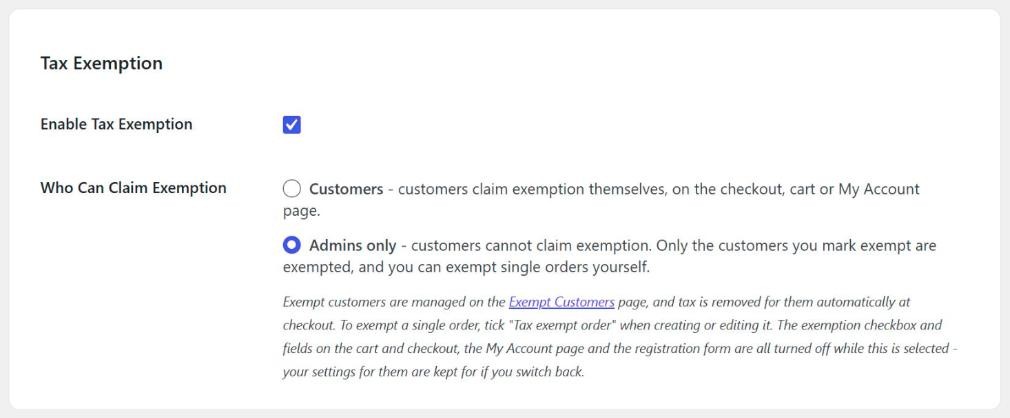
There is a new “Who Can Claim Exemption” option at the top of the General tab in Tax Exemption > Settings.
The default is “Customers”. With this choice nothing changes, and customers claim exemption themselves on the checkout, cart or My Account page.
Choose “Admins only” if you want to decide who is exempt. Customers can then no longer claim exemption at all. The exemption checkbox and fields are turned off on the cart, the checkout, the My Account page and the registration form, and any claim sent to the store is ignored.
Customers you add on the Exempt Customers page are then exempt automatically when they check out. In this mode the store makes the decision, so their exemption still applies if details such as a certificate, exemption number or expiry date have not been filled in. If you do set an expiry date, the exemption still ends when that date passes.
This option was added for stores that check each customer’s exemption before setting up their account, such as trade and wholesale stores, and don’t want an exemption form on the checkout.
Your settings for the checkout fields, the My Account page and the registration form are kept. If you switch back to “Customers” later, they work as they did before.
Exempt a Single Order
When you create or edit an order in the admin, the “Tax Exemption” box now starts with a “Tax exempt order” option. Set it to “Yes” to remove the tax from that order, or “No” to charge tax on it.
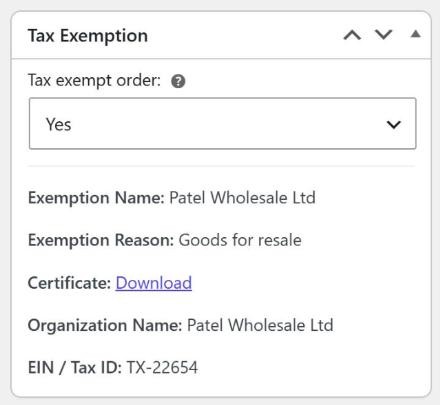
Use it for one-off orders, for example a phone order from a charity that has no account with you, or a guest order where the customer did not claim exemption at checkout. It only changes that one order. The customer’s own exemption stays as it is.
The taxes are recalculated as soon as you change the option, so the new total shows straight away. Until you change it yourself, the option follows the customer selected on the order. Pick an exempt customer and it switches to “Yes”. It can only be changed while the order can still be edited, such as when it is Pending payment or On hold.
This option is in the free version. The “Edit Order Page” setting on the Display Locations tab now only decides whether the customer’s exemption details are shown in the box. The “Tax exempt order” option is always there.
Admin Orders Keep Their Exemption
Before this update, saving or recalculating an order in the admin set its exemption to match the customer’s account at that moment, rather than what the order was placed with. If a customer’s exemption had ended since they ordered, their exempt order was marked as not exempt while the tax stayed removed. The reverse could happen too.
Orders now keep the exemption they were placed with, unless you change it with “Tax exempt order”. If the customer’s own exemption has changed since the order was placed, the Tax Exemption box shows a short note telling you so.
There are three more fixes for admin orders:
- Orders created in the admin are no longer tax exempt for customers whose exemption has expired, was declined or is still waiting for approval.
- Changing an order’s customer to a tax exempt customer now exempts the order on the first save. Before, it took a second save. Changing an exempt order’s customer to a guest now removes the exemption.
- The Tax Exemption box now appears on the Edit Order page when WooCommerce’s High-Performance Order Storage (HPOS) is enabled.
Redesigned Exempt Customers and Exempt Orders Pages
Both list pages have a cleaner layout and several new tools.
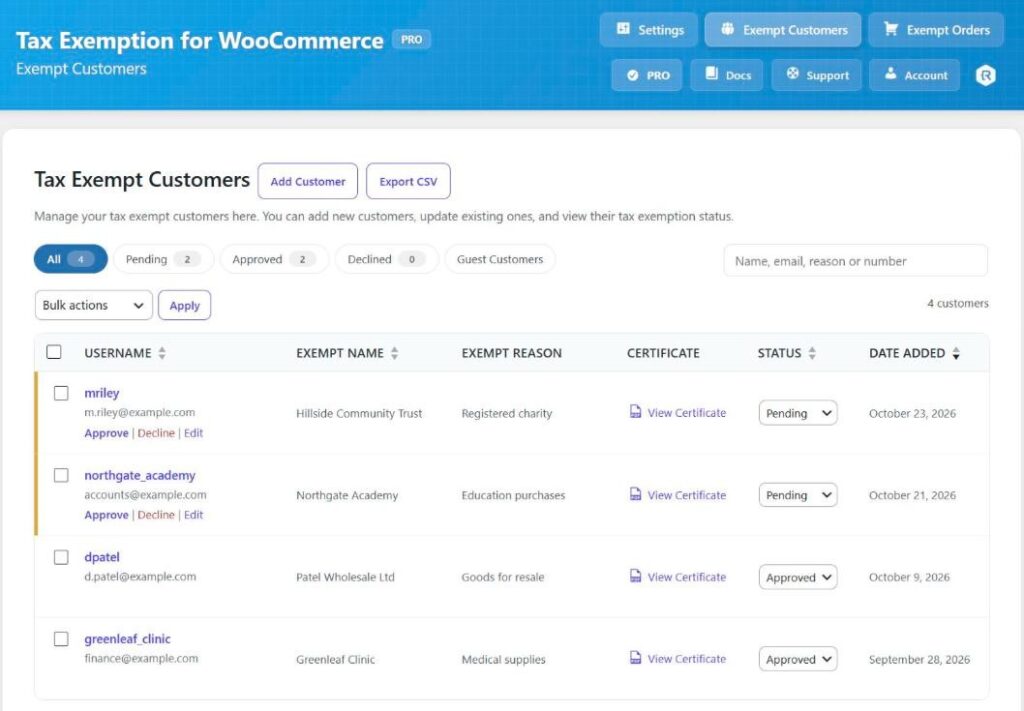
On the Exempt Customers page, tabs at the top filter the list by status and show how many customers have each one. Customers waiting for approval get Approve and Decline links under their username. If you use manual approval (PRO), the number of customers waiting also shows next to the Tax Exemption menu item.
You can now tick several customers and update them together with bulk actions, sort the columns, and search by exemption name, reason or registration number. The “Add Customer” form also has a customer search for finding the account you want to add.
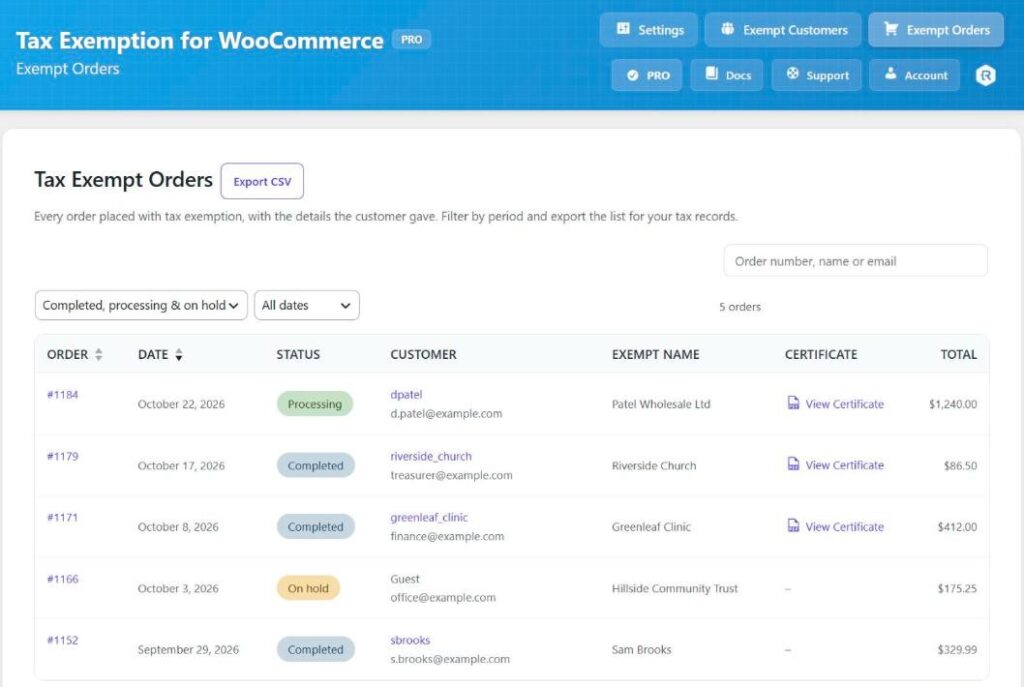
The Exempt Orders page now has an order status filter and date presets (such as “Last month” and “Last quarter”) as well as a custom date range. It also has new Status and Total columns, and the search box is back.
On both pages, Screen Options (top right) lets you choose which columns to show and how many rows to show per page. The CSV export (PRO) now follows the filters on screen. For example, if you filter to last quarter’s completed orders, the export contains only those orders.
A few problems on the customer list are fixed as well. Editing a customer no longer clears their expiration date, “Date Added” now shows when the customer was added, and a guest customer is no longer shown with another guest’s certificate and custom fields.
Classic Checkout and Express Payment Fixes
This release also fixes several problems on the classic checkout. Most of them affect stores that offer express payment buttons such as Apple Pay, Google Pay and Link.
- If a customer typed into the “Name” or “Reason” field and then clicked “Place Order” straight away, nothing happened and no error was shown. The fields are now saved shortly after the customer stops typing, instead of when they click away from the field.
- Clicking an express payment button while the order totals were updating, for example just after ticking or unticking the tax exemption box, could leave the page covered and unclickable. It could also charge the total from before the update. The buttons are now paused until the totals have updated, including the first update when the page loads, and an update that fails is tried once more.
- Express payment buttons could send an old “Name” and “Reason” with the order. An order could then go through with a required field the customer had just cleared, or be saved with the previous values.
- Ticking or unticking the tax exemption box could sometimes be undone by a second request sent at the same time. That request is now only made when Flux Checkout is active.
For developers, the new tefw_express_checkout_selectors filter sets which express payment button containers are paused while the classic checkout updates its totals. You can use it if your payment plugin places its buttons in a container the plugin does not already cover.
Other Changes
- Looking up a customer’s tax exemption when you select them on the Edit Order page now requires permission to edit orders.
- Fixed a possible “Cannot redeclare” fatal error with the Stripe Tax integration when tax was calculated more than once in the same request.
After Updating
You don’t need to do anything after updating, but two changes may affect how you handle orders in the admin:
- If you had turned off the “Edit Order Page” setting to hide the Tax Exemption box, the box now appears anyway with the “Tax exempt order” option. The setting now only hides the exemption details inside it.
- Saving or recalculating an existing order no longer changes its exemption to match the customer’s account. If you need to remove or add exemption on an older order, use “Tax exempt order” instead.
You can see the full list of free and PRO features on the Tax Exemption for WooCommerce plugin page. The documentation has guides on managing exempt customers, tax exemption on admin orders and exporting exempt orders.
Full Changelog
- New: (PRO) Added a “Who Can Claim Exemption” option to the “General” tab. Choose “Admins only” if customers should not be able to claim tax exemption themselves: only the customers you mark exempt on the “Exempt Customers” page are exempted, automatically at checkout, and the exemption checkbox and fields on the cart, checkout, My Account page and registration form are turned off. Their exemption is applied even if details such as a certificate, exemption number or expiry date have not been filled in, while an expiry date that has passed still ends it. Your settings for those are kept, for if you switch back to “Customers”.
- New: Added a “Tax exempt order” Yes/No option to the “Tax Exemption” box when creating or editing an order in the admin, to exempt (or stop exempting) that one order, including guest orders, without changing the customer’s own exemption. The taxes are recalculated as soon as it is changed. It follows the selected customer’s exemption until you change it. The “Edit Order Page” setting now only decides whether the exemption details are shown in the box.
- New: Added the “tefw_express_checkout_selectors” filter, to set which express payment button containers are paused while the classic checkout updates its totals.
- Tweak: Redesigned the “Exempt Customers” and “Exempt Orders” pages, with a cleaner layout and new tools: status tabs with counts (and the number of customers awaiting approval on the menu), Approve / Decline links on pending customers, bulk actions, sortable columns, search by exemption name, reason or registration number, an order status filter and date range presets, “Status” and “Total” columns on orders, Screen Options to choose the columns and rows per page, a customer search in the “Add Customer” form, a “Date Added” that shows when the customer was added, and CSV exports that match the filters on screen. Also fixes editing a customer clearing their expiration date, guest customers being shown another guest’s certificate and custom fields, and the missing search box on “Exempt Orders”.
- Tweak: Looking up a customer’s tax exemption when they are selected on the admin Edit Order page now requires permission to edit orders.
- Fix: Fixed an issue where the “Tax Exemption” box was not shown on the admin Edit Order page when WooCommerce’s High-Performance Order Storage (HPOS) is enabled.
- Fix: Fixed an issue where saving or recalculating an order in the admin changed its tax exemption to match the customer’s account as it is now, rather than what the order was placed with, so an exempt order for a customer who was no longer exempt was marked as not exempt while its tax stayed removed, and the reverse. Orders now keep their exemption unless it is changed with “Tax exempt order”, and the “Tax Exemption” box notes when the customer’s own exemption has changed since.
- Fix: Fixed an issue where orders created in the admin were tax exempt for customers whose exemption had expired, been declined, or was still awaiting approval.
- Fix: Fixed an issue where changing an order’s customer in the admin to a tax exempt customer, from a guest or a customer who was not exempt, took a second save to exempt the order. Changing an exempt order’s customer to a guest now also removes the exemption.
- Fix: Fixed an issue on the classic checkout where typing into the “Name” or “Reason” field and then clicking “Place Order” straight away did nothing: no order was placed and no error was shown. The fields are now saved shortly after typing stops, rather than as soon as they lose focus.
- Fix: Fixed an issue on the classic checkout where clicking an express payment button (Apple Pay, Google Pay, Link) while the order totals were updating, such as straight after ticking or unticking the tax exemption box, left the page covered and unclickable, or could charge the total from before the update. The buttons are now paused until the totals have updated, including the first update when the page loads, and an update that fails is tried once more.
- Fix: Fixed an issue where express payment buttons on the classic checkout used an outdated “Name” and “Reason”, so an order could go through with a required field the customer had just cleared, or be saved with the previous values.
- Fix: Fixed an issue where ticking or unticking the tax exemption box on the classic checkout could sometimes be undone by a second request made at the same time. This request is now only made when Flux Checkout is active.
- Fix: Fixed a possible “Cannot redeclare” fatal error with the Stripe Tax integration when tax was calculated more than once in the same request.

Our plugins
Grow your WooCommerce store
Affiliates, loyalty points, store credit, tax exemption and more – trusted on 248,000+ sites.
Comments