






Version 2.3.0 of Simple Points and Rewards is now available!
This release connects the plugin to Simple Store Credit, our new store credit plugin, so points can be turned into spendable credit. Customers can claim a fixed amount of credit as a reward, or convert whatever balance they have at a rate you set.
Alongside that there is work to stop points and credit rewarding the same order twice, a cashback multiplier on levels, and a long list of fixes for the rewards dashboard on phones.
Points for Store Credit
Install Simple Store Credit, free or PRO, and a Simple Store Credit tab appears in the plugin settings. Everything in it is switched on by default, so the integration works from the moment both plugins are active.
The tab is there even without the store credit plugin installed. In that state it describes what the integration does rather than hiding until you have already committed to it, so you can read through the options first and decide.
There are two routes from points to credit, and they suit different programmes. A reward is a fixed swap you set up in advance. A conversion lets the customer pick the amount. You can run both, or neither.
The Store Credit Reward Type
A Store Credit option has been added to the reward types in the Rewards tab, next to vouchers, free products and custom rewards. You set the number of points it costs and the amount of credit it hands over, and it sits on the Claim Rewards tab with everything else.
Credit can be delivered two ways. Straight to the customer’s account balance, which they spend at checkout without doing anything, or as a credit voucher, which is a coupon code they apply themselves. Vouchers can carry their own expiry, or fall back to whatever Simple Store Credit is configured to use.
If Simple Store Credit is not installed, the reward type is listed but cannot be selected, so nobody sets up a reward that has nowhere to deliver.
Converting Points Into Credit
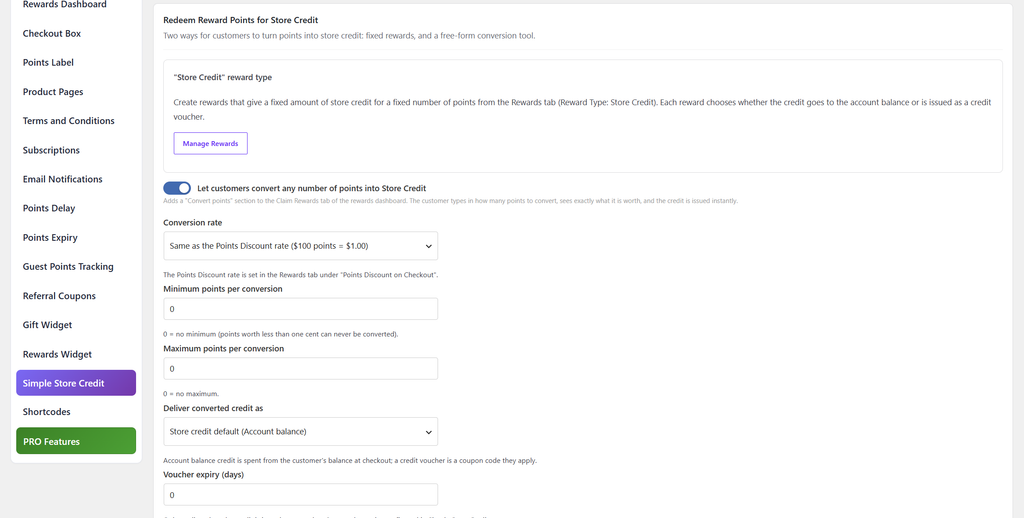
The other route is a Convert points section on the Claim Rewards tab of the rewards dashboard. The customer types in how many points to convert, sees what that is worth as they type, and the credit is issued straight away.
The conversion rate follows your Points Discount rate by default, so a customer gets the same value converting points as they would spending them at checkout. Set a custom rate instead if you want converting to be worth more or less than redeeming.
Minimum and maximum points per conversion are both available, and both accept 0 for no limit. Points worth less than one cent can never be converted, whatever the minimum says. The heading and description on the section can be rewritten, and the delivery choice (account balance or voucher) works the same way it does on the reward type.
For stores that want the tool somewhere other than the dashboard, it is also available as the [spar_points_to_store_credit] shortcode.
Keeping Points and Cashback Apart
Running two reward systems on one store creates a problem the plugins have to solve between them: an order can end up rewarded twice, or a customer can earn points for spending money they were given.
Several things are now kept out of the points earning base. Store credit spent on an order does not earn points, whether it came through the redemption tool, a credit voucher or the Store Credit payment method. Nor do purchases of store credit itself, so topping up an account or buying a gift card no longer earns points on the way in. The cart and checkout preview follows the same rules, so the figure a customer is shown matches what they get.
It works in the other direction too. Points discounts and reward vouchers can be taken out of the cashback base, so a discount funded by points does not then earn cashback on top. Both are switches in the Cashback section of the tab.
Where you would rather customers were rewarded one way or the other, there is a setting for that: When an order could earn both points and cashback. It defaults to earning both, and the alternatives are no cashback on orders where points were redeemed, or no points at all while cashback is switched on.
Cashback (Shop & Earn) is a Simple Store Credit PRO feature, so these settings only do anything on stores running that.
Cashback Multipliers on Levels
Levels have had a points multiplier for a while. They now get a Cashback Multiplier as well, under Levels & Badges, so a customer at a higher tier earns more Shop & Earn cashback on the same order. The multiplier is listed as a level benefit on the dashboard, in the same place the points multiplier is shown.
Referral Bonuses and Prize Wheel Prizes
Store credit can now be paid as a referral bonus. It can go out alongside the referral points, or replace them entirely, which is useful if you would rather a referral produced something immediately spendable than a points balance the referrer has to grow before it is worth anything.
Store credit has also been added as a prize type on the Prize Wheel, so a wheel can mix credit in with the voucher and points prizes it already offers.
Emails, Admin Screens and Conditional Rules
Redeeming points for credit sends its own email, with its own subject and body, edited from the Email Notifications tab. Simple Store Credit’s generic credit email is suppressed for these redemptions so the customer is not emailed twice about the same thing.
Every points email can now include a {store_credit_balance} placeholder, so a points earned or level up email can show both balances together.
On the admin side, the customer page shows the store credit balance next to the points balance, and the order edit screen shows how much credit was used on the order. PRO stores get a Customer: Store Credit Balance condition in Conditional Rules, for building rules around how much credit someone is sitting on.
Where the Balance Shows Up
By default the store credit redemption tool and the rewards box were two separate boxes stacked on the cart and checkout. The redemption tool can now sit inside the rewards box as its own tab, so credit, vouchers and points are applied from one place. Simple Store Credit’s own placement is hidden on pages where the rewards box is showing. The compact “apply credit” row in the order totals is left alone.
The available credit balance also appears in the checkout box header, on the rewards dashboard and in the floating rewards widget. Going the other way, the store credit account page now lists “Redeem points” as one of the ways to get credit, so a customer looking at an empty balance is pointed at the points they already have.
A Missing Cent on Points Discounts
Redeeming points for a cart discount could apply one cent less than the preview promised. At 100 points per 1.00, redeeming 29 points announced 0.29 and took 0.28 off the cart. Small, but it is the kind of thing a customer notices and writes in about.
The discount is now worked out in whole cents, and the cart, checkout, dashboard and admin order previews all use that same rounding, so there is one figure rather than four calculations that can disagree.
Dashboard and Widget Fixes
The Earn Points tab of the rewards dashboard was cut off on phones. The ways-to-earn list was being sized to its widest content, usually the birthday date field or the Product Offers boxes, so every card ran past the right edge of the tab. The list now fits the screen, and the tab has been reworked for small screens throughout: less nested padding, buttons that drop onto their own line instead of overflowing, referral stats two per row rather than four stacked cards, full width referral link and coupon fields with the Copy button beneath, and share buttons that stay two per row. Each row of the referral click log now shows its column names beside the values, because the table header is hidden on phones and was leaving bare dashes with nothing to explain them.
On PRO stores, the floating rewards widget could pick up styling from the theme and come out looking wrong: the wrong font, oversized or uppercase text, stray bullet points, mis-sized buttons. It now shields itself from theme and page builder styling, including rules marked !important, so it renders the same on every store. Its tabs stay on one line however many are showing, the header and tabs keep their size at every Widget Size setting, and the Regular size is 20px wider and taller. The points discount panel inside the widget still uses your store’s own button styling, as before.
PRO stores get three fixes to the Product Offers & Bonuses section. It follows dark mode now, where it was the last section left with light backgrounds and dark text. It no longer draws an empty box when every product rule is outside its dates, and each rule in the settings carries an “Expired” or “Scheduled” tag explaining why it is not showing. Its offer boxes also sit inside the section card rather than below it, so the section reads as one block like the other ways to earn.
Smaller dashboard corrections: the “Current level” card lines up with the cards beside it, a custom badge image in that card is sized to match the built-in icons instead of rendering at full size, and the dark mode toggle lines up with the first line of the heading on phones so a long title no longer runs underneath it.
Full Changelog
- New: Simple Store Credit integration. When our Simple Store Credit plugin (free or PRO) is installed, a “Simple Store Credit” tab appears in the settings with everything switched on by default. Customers can redeem points for store credit in two ways: a new “Store Credit” reward type in the Rewards tab (a fixed amount of credit for a fixed number of points, delivered to the account balance or as a credit voucher), and a “Convert points” tool on the rewards dashboard (also available as the [spar_points_to_store_credit] shortcode) where the customer chooses how many points to convert, at the points discount rate or a custom rate. Points and store credit no longer double up: store credit spent on an order (redemption tool, credit vouchers, or the Store Credit payment method) and purchases of store credit itself (top-ups and gift cards) are kept out of the points earning base and the cart/checkout preview, points discounts and reward vouchers are kept out of the cashback base, and an earning mode can make an order earn points or cashback but not both. Levels gain a cashback multiplier, so higher levels earn more Shop & Earn cashback. The store credit redemption tool can sit inside the checkout rewards box as its own tab instead of a second box, the checkout box header, the rewards dashboard and the floating rewards widget show the available store credit balance, and the store credit account page lists “Redeem points” as a way to get credit. Store credit can also be a referral bonus (in addition to, or instead of, the referral points) and a Prize Wheel prize. A dedicated “store credit claimed” email is sent for points redemptions (with the store credit plugin’s generic email kept quiet so customers are not emailed twice), every points email can use a {store_credit_balance} placeholder, the admin customer page shows the store credit balance, the order edit screen shows store credit used on the order, and (PRO) Conditional Rules gain a “Customer: Store Credit Balance” condition. Without the plugin installed, the “Simple Store Credit” tab is still there and describes what the integration does, so you can see what it offers before deciding to install it.
- Tweak: (PRO) The “Product Offers & Bonuses” section on the rewards dashboard now keeps its offer boxes inside the section card, beneath the heading, rather than listing them as separate boxes underneath it, so the offers read as one section in the same way as the other ways to earn.
- Tweak: Improved some styling for the rewards dashboard on mobile devices.
- Tweak: The rewards dashboard shortcode under Account > Display on Custom Page is now a field with a “Copy” button next to it, rather than text to select by hand.
- Fix: Redeeming points for a cart discount could apply one cent less than the preview showed for certain point amounts (for example 29 points at 100 points per 1.00 applied 0.28). The discount is now worked out in whole cents, and the cart, checkout, dashboard and admin order previews use the same rounding.
- Fix: Saving the Rewards settings raised an “undefined variable” warning in the debug log for every reward, because the icon colour mode was never read from the form. It is now saved correctly.
- Fix: The “Voucher Amount”, discount type and free shipping fields no longer appear on rewards that are not vouchers. On a saved Free Product, Free Product Bundle or Custom reward they were shown alongside the fields that do apply, suggesting a voucher value that was never used. They now appear only on voucher rewards, as they already did on a reward being added.
- Fix: (PRO) The “Product Offers & Bonuses” section on the rewards dashboard now follows the dashboard’s dark mode. It was the only section left with light backgrounds and dark text when dark mode was on, so the offer boxes, product images, descriptions and progress bars stood out against everything around them.
- Fix: (PRO) The “Product Offers & Bonuses” section on the rewards dashboard no longer appears as an empty box once every product rule is outside its start and end dates. A rule whose end date had passed, or whose start date was still to come, was correctly kept off the dashboard, but the section heading was still drawn above the empty space. The section is now left out until at least one rule is live. In the settings, each product rule now shows an “Expired” or “Scheduled” tag in its header when its dates are keeping it off the dashboard, so it is clear why an offer is not showing.
- Fix: (PRO) The floating rewards widget could pick up styling from the theme and end up looking wrong – the wrong font, oversized or uppercase text, stray bullet points and link arrows, mis-sized buttons and inputs, or labels pushed out of line. It now shields itself from theme and page builder styling, including rules marked !important, so it renders the same on every store, and its own layout has been tightened up: the tabs along the top stay on one line however many of them are on show (opening History or Terms could previously squash or clip them), the header and tabs keep their size at every Widget Size setting, and the “Regular” size is now 20px wider and taller. The points discount panel inside the widget still uses your store’s own button styling, as before.
- Fix: The “Current level” card in the rewards dashboard header now lines up with the cards beside it. The level badge made its row taller than the number rows on the other cards, so the level name and “Current level” text sat a few pixels lower than the neighbouring labels. A custom badge image in that card is also now sized to match the built-in badge icons instead of showing at its full size.
- Fix: The “Earn Points” tab of the rewards dashboard was cut off on phones. The ways-to-earn list was being sized to its widest content (the birthday date field, the Product Offers boxes), so every card ran past the right edge of the tab and was clipped. The list now always fits the screen, and the tab has been tidied up for small screens: less nested padding so the cards get more of the width, the “View Products” and “Spin Wheel” buttons drop onto their own line under the card title instead of overflowing, the birthday date field fills its column, referral stats show two per row rather than four stacked cards, the “How it works” box is rounded to match the cards around it, the referral link and coupon code fields take the full width with the Copy button beneath them, share buttons stay two per row (three on tablets) instead of stacking into one tall column, each row of the referral “Link Clicks” log now shows its column names beside the values (the table header is hidden on phones, which left bare dashes and “No” with nothing to explain them), and (PRO) each Product Offers & Bonuses box is laid out for phones and tablets – the product image sits beside the offer name and points, the description and requirement run the full width beneath, the progress bar and its “x / y purchased” label share a row with the Add to cart button, and on phones the button spans the box – instead of squeezing the name, points and button into a one-word-per-line column, which happened at any width under about 700px.
- Fix: The dashboard’s dark mode toggle now lines up with the first line of the heading on phones, and the heading keeps clear of it, so a long dashboard title no longer runs underneath the button.

Our plugins
Grow your WooCommerce store
Affiliates, loyalty points, store credit, tax exemption and more – trusted on 248,000+ sites.
Comments