for WordPress
Turn your posts into audio, in one click.
Automatically generate an audio version of your WordPress posts with realistic, human-like voices, powered by OpenAI’s Text to Speech API. Write your post, click generate, and a player appears for your readers.
The simplest way to add audio to your posts
AI Text to Speech creates a realistic, AI-generated audio version of your posts using OpenAI’s Text to Speech API. Once the audio has been generated, a player is displayed automatically at the top of the post for visitors to listen to. Perfect for bloggers, news sites, content creators and any business that wants to make its content more accessible and engaging.
Write your post
Publish content as normal, in any of the 50+ languages OpenAI TTS supports. No special formatting needed.
Pick a voice
Choose one of 13 natural voices and a style preset that matches your brand’s tone.
Click generate
Hit the button in the post sidebar (or let it run automatically on publish) and the audio is created in seconds.
Readers listen
An audio player appears at the top of the post so visitors can listen instead of read, on any device.
This is a brilliant tool. It’s cheap to run and I’ve had good feedback from my readers around the pacing and quality of the AI text-to-speech. – Dom Sacco, Esports News UK
AI Voices
Thirteen natural-sounding voices to choose from
Pick the voice that best matches your brand’s tone and audience, then fine-tune it with voice styles.
Marin New
Natural and conversational
Cedar New
Rich and grounded
Alloy
Balanced and clear
Ash
Warm and confident
Coral
Bright and friendly
Echo
Smooth and calm
Fable
Expressive storyteller
Onyx
Deep and authoritative
Nova
Energetic and upbeat
Sage
Soft and thoughtful
Shimmer
Light and cheerful
Ballad
Gentle and melodic
Verse New
Versatile and expressive
Press play to hear a sample of each voice. Marin, Cedar and Verse were added in version 3.2.0 (samples coming soon). Voice samples provided by OpenAI.
Voice Styles
Make it sound exactly how you want
Go beyond the default voices with styles, instructions and pronunciation controls.
Voice Style Presets
Choose from a range of voice style presets that change how the voice sounds, including Conversational, Narration, News Report, Storytelling, Excited, Calm, Dramatic, Whispering and more.
Custom Style Instructions
Or write your own voice instructions. Ask for a certain accent, pitch, speed, emotion or delivery to get exactly the sound you want.
Multi-Voice Audio
Switch voices for different pieces of text within a single post using the simple [voice] shortcode, ideal for interviews and dialogue.
Custom Pronunciations
Tell the AI exactly how to pronounce brand names, acronyms and tricky words, globally in settings or inline with a shortcode.
One-Click Generation
Generate audio right from the post editor
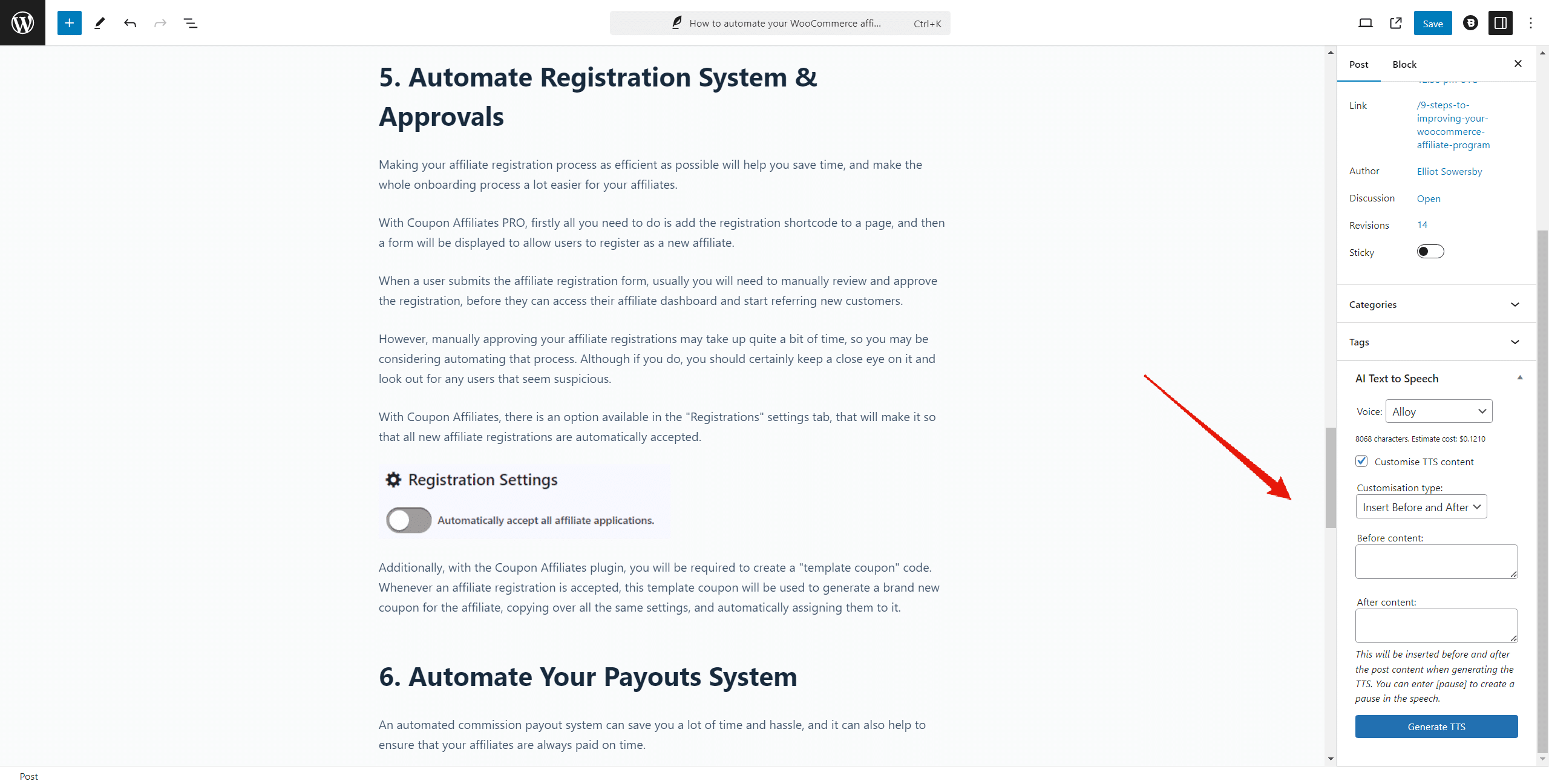
A simple panel in the post sidebar lets you pick a voice, choose a style and generate the audio for the post in a single click. Regenerate any time after you edit.
Effortless one-click generation
Click a button in the post editor sidebar and the TTS audio is generated and attached to the post in seconds, with an estimated OpenAI cost shown before you generate. You can also upload your own audio file instead.
Auto-generate on publish
Optionally trigger generation automatically every time you publish a new post, so you never forget.
Content customisations
Add custom text before or after the content, globally or per post, or replace the TTS content completely for a post.

Audio Player
A beautiful audio player, displayed automatically
Once audio has been generated, a clean, responsive player appears at the top of the post. Visitors simply press play to listen while they browse.
Displayed on every post
The player is added automatically at the top of your posts, or place it anywhere in the content with the [ai_tts_player] shortcode.
Customise the design
Match the player to your brand with custom accent and background colours, three sizes, a default playback speed and an optional AI-generated audio label.
Intro details
Optionally include the post title, author name and publish date at the start of the audio.
Statistics & Analytics
See how readers engage with your audio
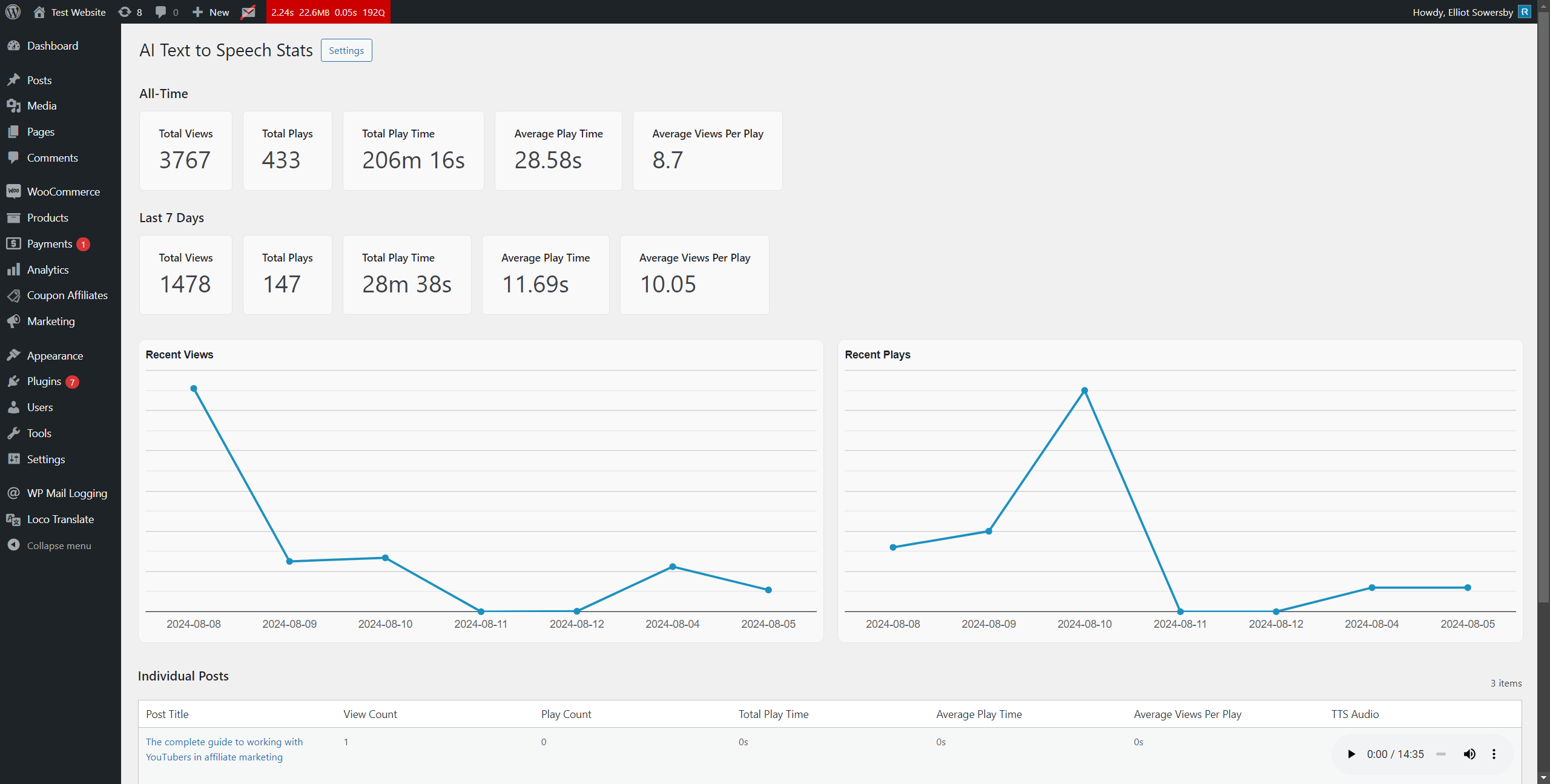
Track statistics and view analytics for all of your posts’ TTS audio players, so you know exactly which content your audience is listening to.
Views, plays and play time
Track player views, total plays and total play time across all of your posts.
Per-post breakdown
Drill into the stats for any individual post to see how its audio is performing.
And so much more
Everything you need, all in one plugin
A complete text-to-speech toolkit for WordPress, with unlimited usage and no add-ons to buy.
Powered by OpenAI TTS
Uses OpenAI’s Text to Speech API with your own API key. Choose the new GPT-4o mini TTS model or the classic TTS-1 model.
50+ Languages
Write your posts in any of over 50 supported languages and generate natural-sounding audio.
Admin Generator Page
Generate audio files for any text, not just posts, from the AI text-to-speech generator admin page.
Customisation Shortcodes
Fine-tune the audio with [tts ignore] to skip text, [tts say=""] to override it, [pause] for pauses, and [ai_tts_player] to position the player.
Dropbox Storage
Optionally store generated audio files in Dropbox instead of locally, saving storage space and improving performance.
Auto-Generation on Publish
Automatically generate TTS audio every time a new post is published, saving time and effort.
Player Customisation
Customise the player’s accent and background colours, size, default playback speed and label to suit your site.
Default Voice & Multi-Voice
Set a default voice for all new posts, and switch voices mid-post with the [voice] shortcode.
Custom Pronunciations
Specify how certain words should be pronounced site-wide with pronunciation settings or shortcodes.
Request Log
View a log of your recent audio generation API requests to keep an eye on usage and troubleshoot easily.
TTS Files Manager
Browse every generated audio file in one place. Play, download, view the voice and style used, or delete files you no longer need.
Upload Your Own Audio
Prefer a human narration? Upload a custom audio file for any post and it is displayed in the same player.
Post Types & User Roles
Enable text-to-speech for all or specific post types, and control which user roles can generate audio in the editor.
Simple & Easy to Use
Super easy to set up. Add your API key and start generating audio for your posts in minutes.
Priority Support
Fast, friendly help from the developer whenever you need it.
Loved by publishers
Don’t just take our word for it
Here’s what publishers and WordPress users are saying about AI Text to Speech.
This is a brilliant tool. It’s cheap to run and I’ve had good feedback from my readers around the pacing and quality of the AI text-to-speech.
Dom Sacco
Esports News UK
I have tried several plugins. This is the simplest and offers all the functions I need.
@monika21
WordPress.org review
Easy to use AI text to audio plugin with fantastic support. Highly recommend it!
@paywall
WordPress.org review
This is a great plugin, it does exactly what it describes. Easy to set up and works out of the box.
@kevv431k
WordPress.org review
Pricing
Get started today, risk-free
Pro Yearly
$59
Per year
- 1 website license
- Access all PRO features
- Plugin updates for 1 year
- Premium support for 1 year
- Unlimited usage. No limits
- Use your own OpenAI API key
Pro Lifetime
$149
One-time payment
- 1 website license
- Access all PRO features
- Plugin updates forever
- Premium support included
- Unlimited usage. No limits
- Use your own OpenAI API key
OpenAI API usage fees
The plugin uses your own OpenAI API key, which has its own small usage fees: around $0.012–$0.015 per 1,000 characters depending on the model, or roughly $1 per hour of audio generated. OpenAI fees may vary or change. View OpenAI’s terms of service →
Easily cancel or switch plan any time. Pricing is in USD and excludes applicable VAT. An active PRO subscription is required for future updates and support. The money-back guarantee covers your payment to us for the plugin and does not cover any OpenAI usage costs incurred. This plugin is developed and supported by RelyWP and is not affiliated with or endorsed by OpenAI.

Protected by our 14-day money-back guarantee
We look forward to helping you easily generate text-to-speech audio for your WordPress posts. But if things don’t work out, simply contact us within 14 days of upgrading and we’ll refund 100% of your payment (excluding OpenAI’s fees), no questions asked.

Elliot Sowersby
Founder & Lead Developer
Here to help
Questions? We’ve got you covered
Ask a Question
Have a pre-sale question, or already a PRO user? Send us a message directly.
Contact Us →Documentation
Our docs explain everything you need to know about setting up the plugin.
View Documentation →Give your readers a listen
Join 90+ WordPress sites turning their posts into audio with AI Text to Speech. Try it free, or upgrade risk-free with a 14-day money-back guarantee.