






Version 3.0.0 of Simple Points and Rewards is now available!
This is a big update. There is a new Dashboard page for keeping an eye on your program, a setup wizard with a live preview of your store, a Tools page that brings the import, export and bulk points tools together, and (in PRO) scheduled points campaigns with countdown banners. The rewards dashboard your customers see also has a new card design, and almost every part of it can now be renamed, hidden or added to.
Underneath all that is a long list of fixes to how points are counted when orders are refunded, cancelled or paid for with points. If you have been running the plugin for a while, it is worth running the new Repair Lifetime Points tool after you update (more on that below).
A New Dashboard
Points & Rewards now opens on a Dashboard page. It shows how your program is doing over the last 7, 30 or 90 days, 12 months or all time: points earned and redeemed, active and new members, and a chart of points activity, each compared with the period before.
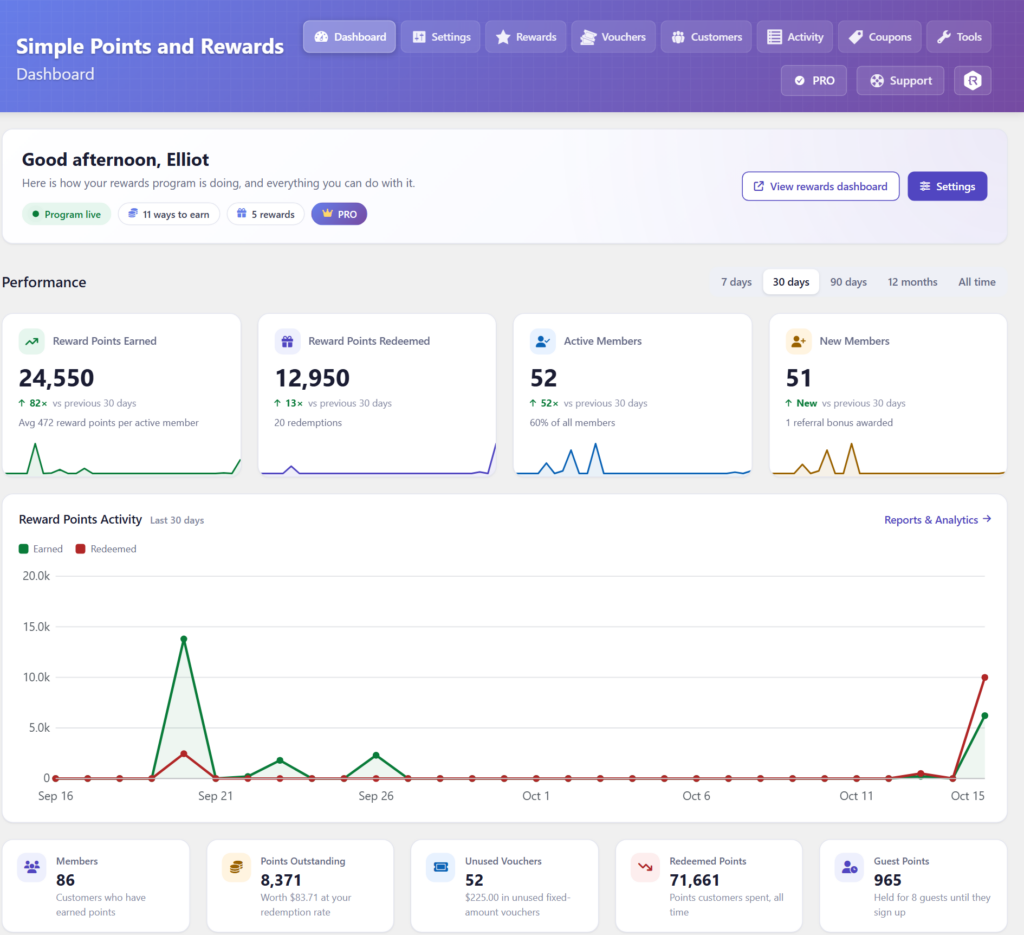
Further down are your outstanding points and what they are worth at your redemption rate, unused vouchers, recent activity, where points are coming from, your top members, and which ways to earn and rewards are switched on, with links to manage them. Until your program has the essentials in place, the page also shows a setup checklist.
The other admin pages (customers, vouchers, activity logs, reports, tools and more) have been redesigned to match, with the same header and navigation along the top of each one.
Setup Wizard with a Live Preview
New stores are now taken through a setup wizard when the plugin is first installed. It walks through the main settings one step at a time: your points label and icon, ways to earn, rewards, levels and badges, colours and where points are shown, and emails, before you switch the program on.
As you go, a live preview panel shows your real store pages with the settings you have chosen so far, before anything is saved. You can switch between the rewards dashboard, the cart and a product page, and between desktop and mobile.
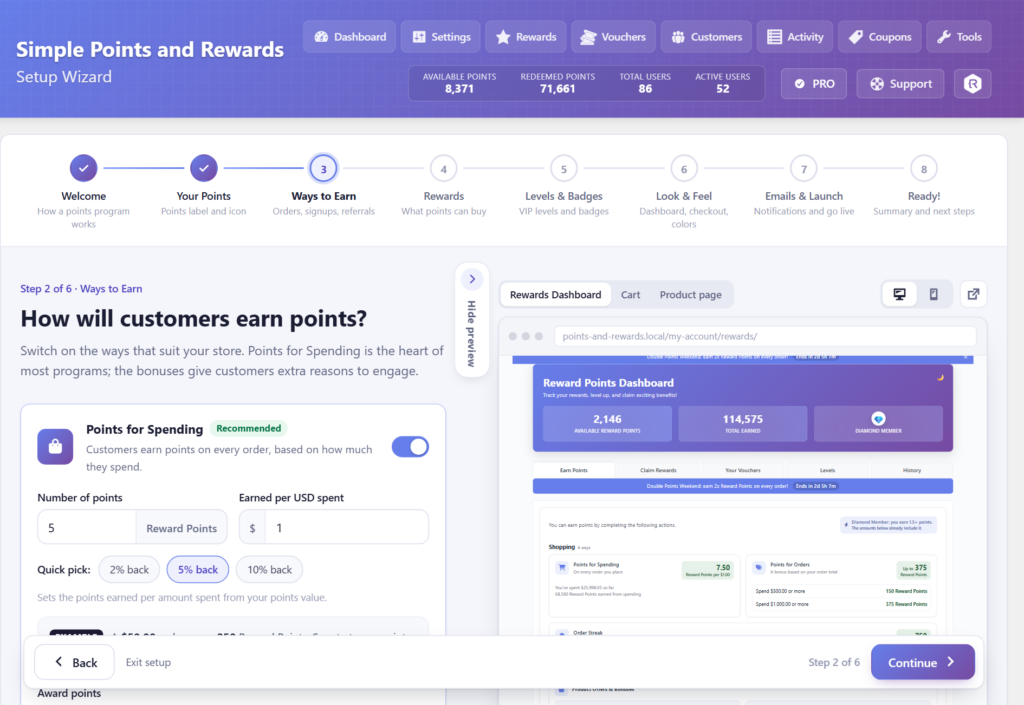
Each step is saved when you continue, and you can leave the wizard at any point and finish the setup on the Settings page instead. Existing stores can open it from the Settings page too, where every step starts filled in with your current settings. It replaces the old “Quick Setup Guide” box.
A New Tools Page
Points & Rewards > Tools brings everything that works on lots of customers or orders at once into one place: importing and migrating points, exporting customer points and the activity log, importing and exporting your settings (moved here from the bottom of the Settings page), bulk points changes and maintenance.
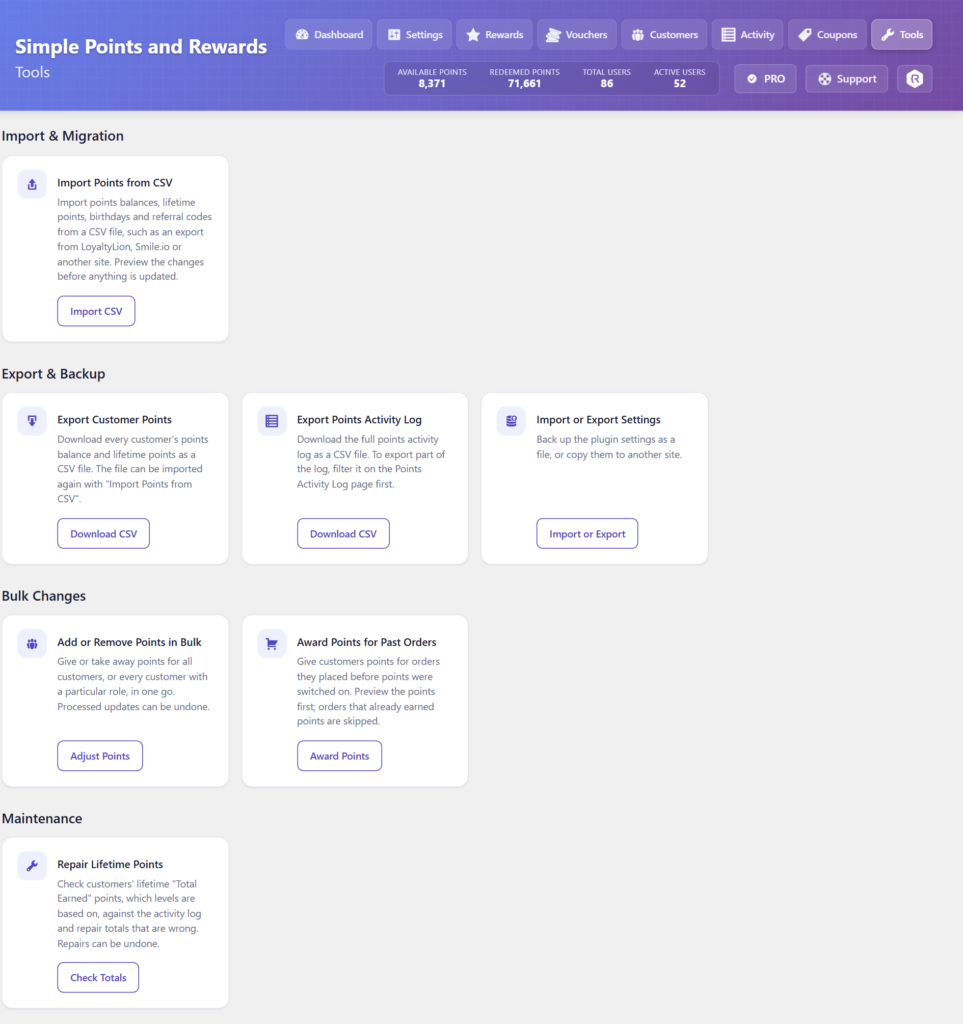
There are three new tools on it:
- Import Points from CSV updates points balances, lifetime points, birthdays and referral codes from a CSV file, such as an export from LoyaltyLion, Smile.io or another site. It can also be run from the command line with WP-CLI, for example
wp spar import-points file.csv --dry-run. - Award Points for Past Orders gives customers points for orders they placed before points were switched on. Orders that already earned points are skipped.
- Repair Lifetime Points checks each customer’s lifetime “Total Earned” points, which levels are based on, against the points activity log, and fixes any that are wrong.
Each one shows you a preview of exactly what would change before anything is updated. Award Points for Past Orders and Repair Lifetime Points also give you a CSV report to download, and a repair can be undone.
Scheduled Points Campaigns (PRO)
Conditional Rules have a new Date: Schedule (Campaign) condition for time-limited offers such as a “Double Points Weekend”. Set a start and end date and time, and optionally the days of the week it runs on, then choose the multiplier and which ways to earn it applies to. Once the campaign is over, points go back to normal by themselves.
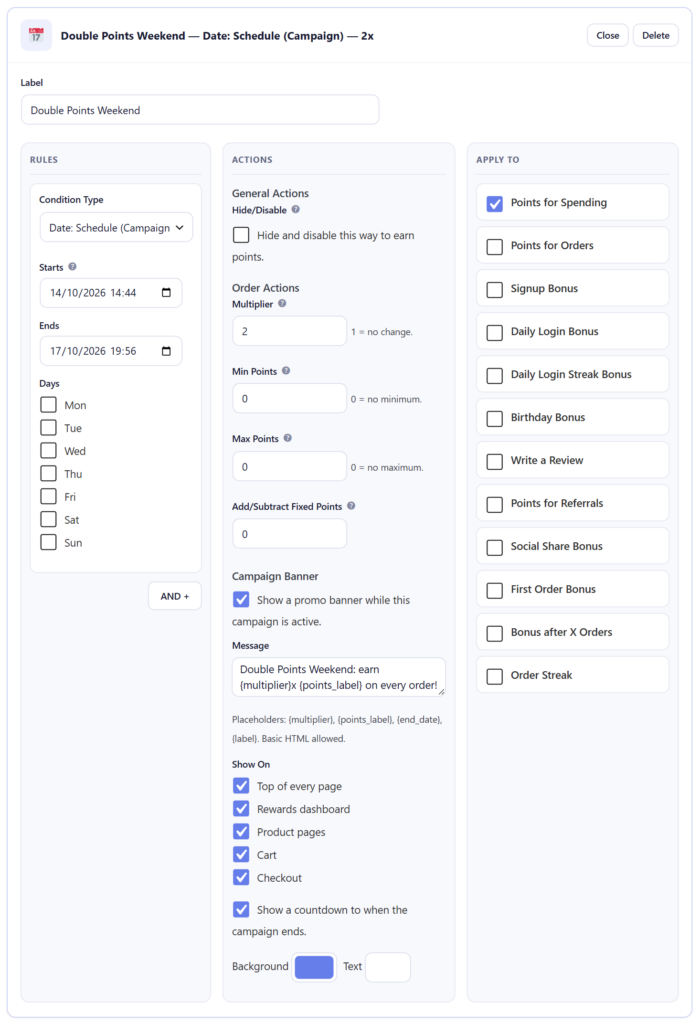
A campaign can also show a banner while it is running, with an optional countdown to when it ends. Choose where it appears (the top of every page, the rewards dashboard, product pages, the cart and the checkout), write your own message using placeholders such as {multiplier} and {end_date}, and pick its colours. Customers can close the banner at the top of the page.
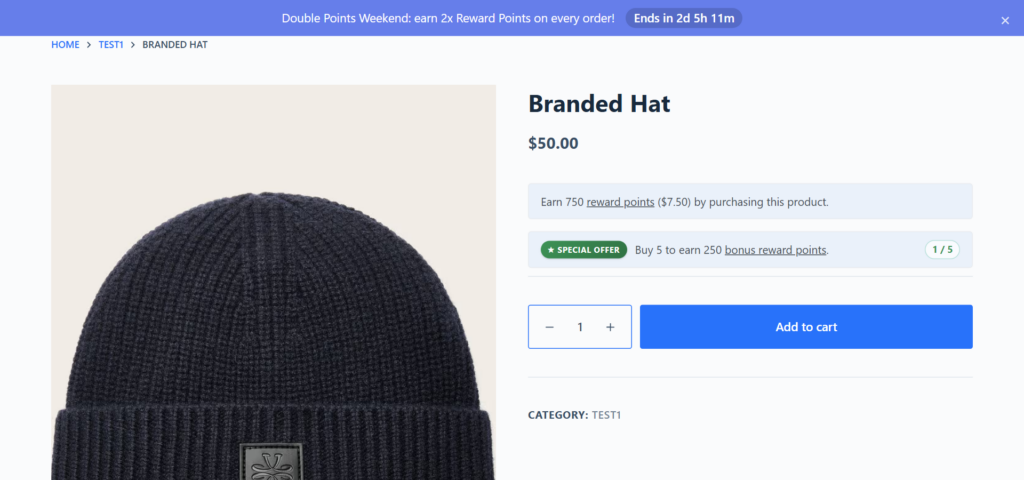
Campaigns go by the time an order was placed, so an order placed during a campaign still gets the extra points if they are awarded after it has ended, for example when the order is marked completed.
A New Look for the Rewards Dashboard
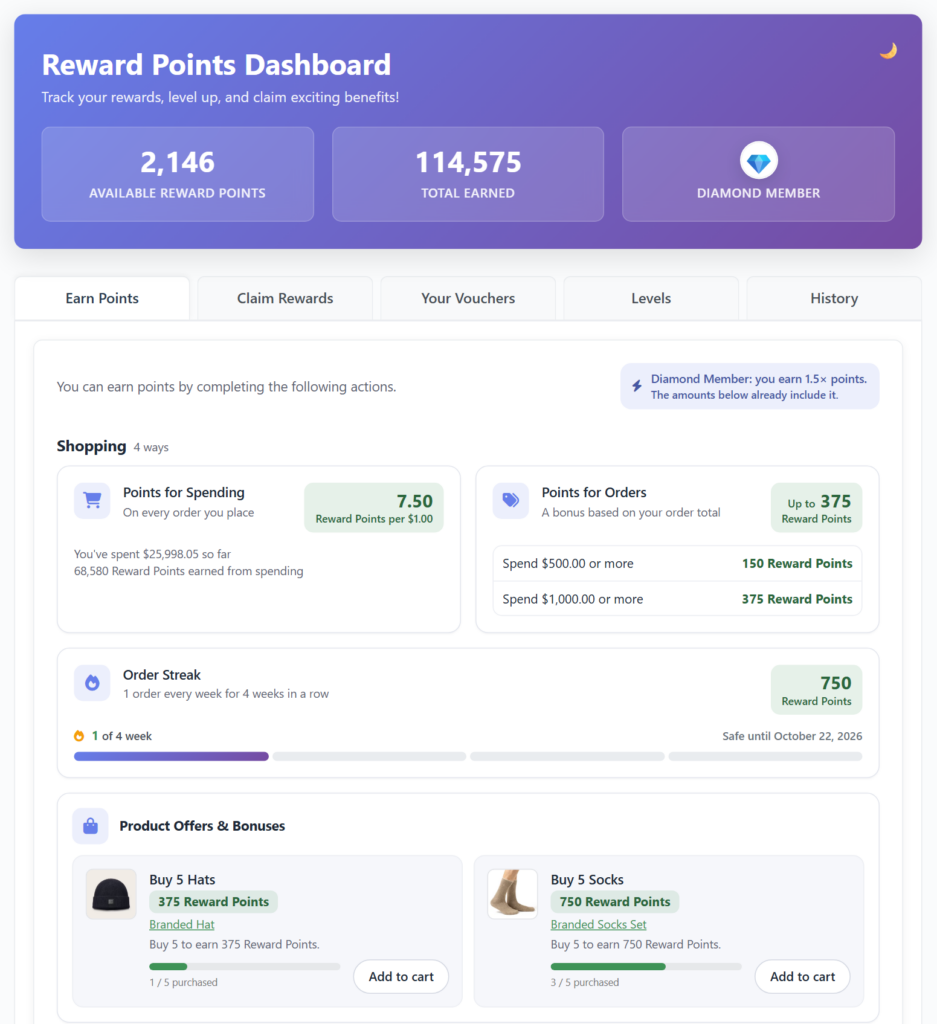
The Earn Points, Claim Rewards and Your Vouchers tabs of the rewards dashboard have a new card design. Ways to earn are grouped into sections such as Shopping, Refer friends and Activities, and each card shows what the customer earns at a glance, along with their progress where there is some to show.
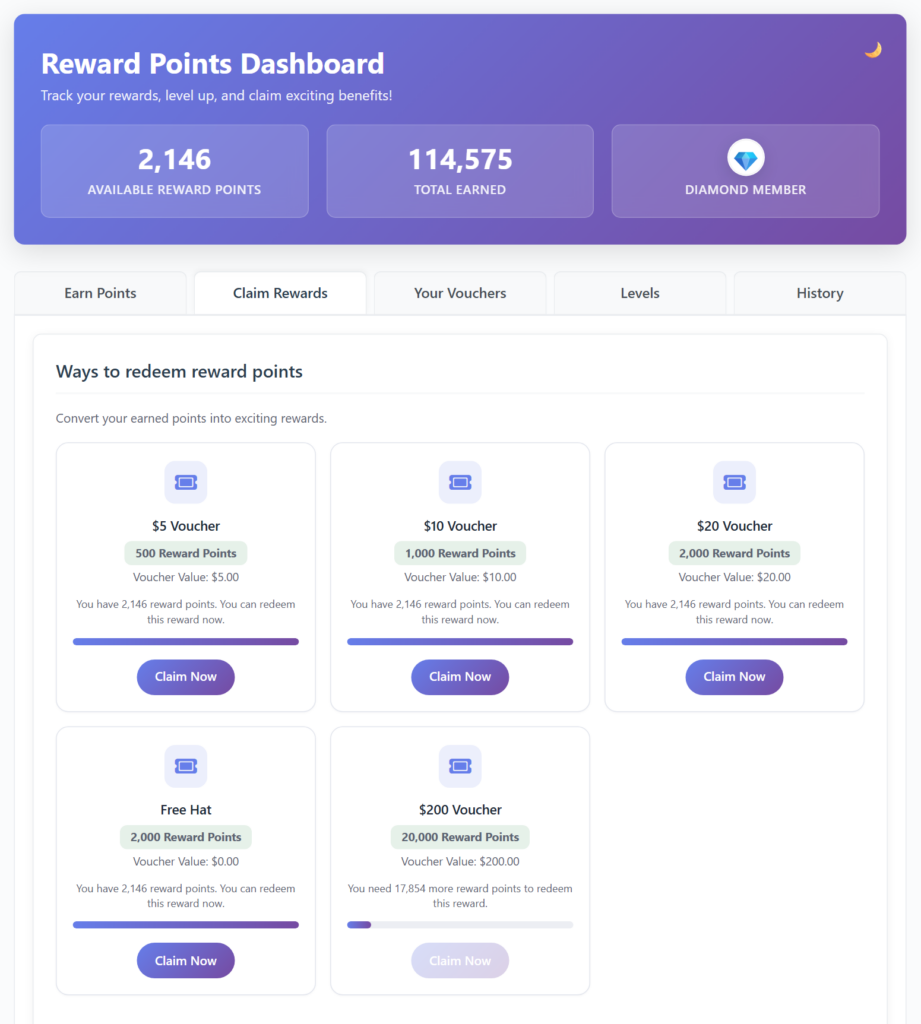
On the Claim Rewards tab, each reward now shows a progress bar and how many more points the customer needs to claim it.
The referral stats on the Earn Points tab are shown as cards too, and on PRO stores the floating rewards widget has been restyled to match the dashboard, using the same icons instead of emojis. If you would rather keep the previous design, you can switch back under Dashboard Customisation > Earn Points > Layout.
Customise Every Part of the Dashboard
Settings > Rewards Dashboard now ends with a Dashboard Customisation section, with a sub-tab for each part of the dashboard: the header, the tabs, Earn Points, Claim Rewards, Your Vouchers, Levels and History, plus Custom Content and Style.
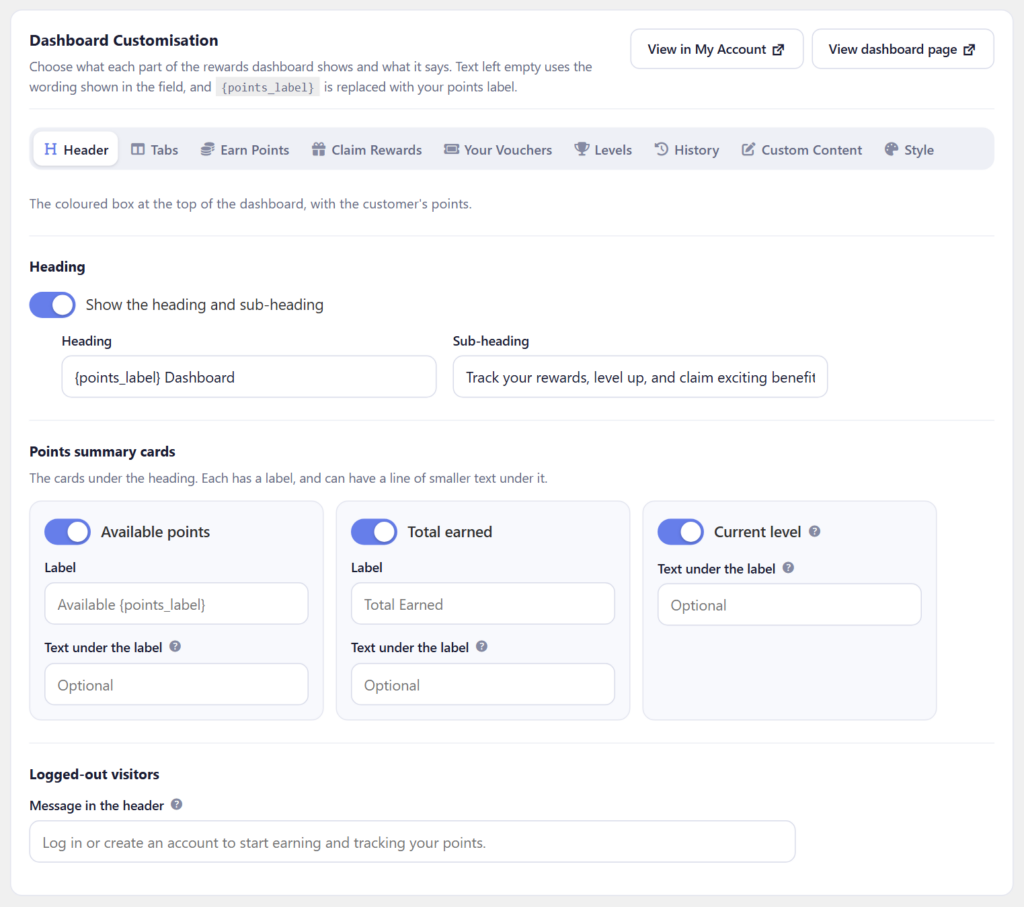
From here you can rename or hide the header cards, change the headings and button text, choose which tab opens first, and hide the parts of each tab you do not need. Any text you leave empty keeps the built-in wording. You can also add your own content to the dashboard, including two custom tabs for things like “How It Works” or “FAQs”.
Tabs you switch off or reorder now apply to logged-out visitors as well.
New Settings
There are also several new options in the settings:
- Enable Rewards Program: a switch at the top of the Settings page, so you can set everything up before launching the program.
- Points discount includes tax (Settings > Rewards > Points Discount on Checkout), so the order total drops by exactly the value of the points.
- Also deduct points when part of an order is refunded (Settings > Earn > Place an Order), with a matching option for referral points when part of the referred order is refunded (Settings > Earn > Referral).
- Let the balance go below zero when points taken back were already spent (Settings > Earn > Place an Order).
- Use custom background and text colors for the checkout rewards box (Settings > Checkout Box > Theme Settings).
- Hide the “You will earn” points message on the checkout page (Settings > Checkout Box > Display Settings).
- Hide points from logged-out visitors on product pages and shop listings (Settings > Product Pages).
Variable products also now show an “Earn up to X points” message before an option is chosen.
Adjusting Points on an Order
The Reward Points panel on the order edit screen has a new Adjust points button, for changing the points an order earned after they were awarded. Enter the new amount and an optional reason, and the difference is added to or taken from the customer’s balance, with a note added to the order.
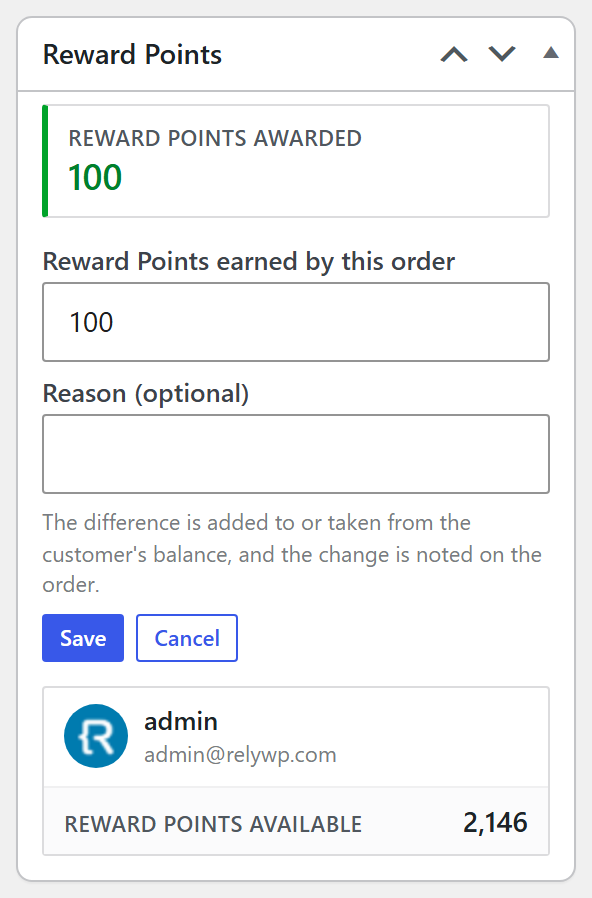
The “Potential Points” figure on the same screen now updates as you change the order, without having to save it first.
More Accurate Points
Most of the work in 3.0.0 went into how points move when an order is refunded, cancelled or paid for with points, and fixing the cases where the numbers could end up wrong. Among them:
- Cancelling or refunding an order now takes back exactly the points it gave, from the customer who received them, including level multipliers, Conditional Rules bonuses and first order bonuses.
- Points spent on an order are returned correctly when it is cancelled or refunded: never twice, not for a shipping-only refund, and taken back again if the refund is deleted.
- At checkout, only the points the discount actually uses are taken, retrying a declined payment keeps the discount, and the discount is rounded to the nearest cent instead of always down.
- (PRO) The “Maximum percentage of the cart” and “Minimum cart total” limits for points discounts are now enforced when the points are applied.
- Rewards can no longer be claimed when they should not be, for example when the reward is switched off or by a banned customer.
- WooCommerce Subscriptions renewals no longer copy the points discount from the original order.
Some of these fixes affect customers’ lifetime “Total Earned” points, which levels are based on. To correct totals recorded before the update, run Tools > Repair Lifetime Points. It shows you what would change before anything is updated, and the repair can be undone.
For developers, the rounding of the points discount can be changed with the spar_redemption_amount_rounding filter.
Full Changelog
- New: Dashboard page, now the first page of the Points & Rewards menu, showing your program’s stats, recent activity, top customers, a setup checklist and quick links.
- New: Setup wizard that walks you through the main settings step by step, with a live preview of your store. It opens after first install and from the Settings page.
- New: “Tools” page (Points & Rewards > Tools) that brings the import, export, migration and bulk points tools together. Import / Export Settings has moved here.
- New: “Award Points for Past Orders” tool, to give customers points for orders placed before points were switched on.
- New: “Repair Lifetime Points” tool, to check and fix customers’ lifetime “Total Earned” points against the points activity log.
- New: Import customer points from a CSV file (Points & Rewards > Tools), or with WP-CLI using “wp spar import-points”.
- New: (PRO) Scheduled points campaigns: a “Date: Schedule (Campaign)” condition in Conditional Rules for time-limited offers such as a “Double Points Weekend”.
- New: (PRO) Campaign banners with a countdown, shown on your store while a scheduled campaign is running.
- New: “Points discount includes tax” option (Settings > Rewards > Points Discount on Checkout), so the order total drops by exactly the value of the points.
- New: “Also deduct points when part of an order is refunded” option (Settings > Earn > Place an Order).
- New: “Also deduct referral points when part of the referred order is refunded” option (Settings > Earn > Referral).
- New: “Use custom background and text colors” option for the checkout rewards box (Settings > Checkout Box > Theme Settings).
- New: “Adjust points” button on the order edit screen, to change the points an order earned after they were awarded.
- New: “Hide the ‘You will earn’ points message on the checkout page” option (Settings > Checkout Box > Display Settings).
- New: “Hide points from logged-out visitors” option for product pages and shop listings (Settings > Product Pages).
- New: “Let the balance go below zero when points taken back were already spent” option (Settings > Earn > Place an Order).
- New: “Enable Rewards Program” switch at the top of the Settings page, so you can set up the program before launching it.
- New: “Dashboard Customisation” section in Settings > Rewards Dashboard, with a sub-tab for each part of the dashboard.
- New: More rewards dashboard options: rename or hide the header cards, change the headings and button text, choose the opening tab, and hide parts of each tab.
- New: Add your own content to the rewards dashboard, including two custom tabs such as “How It Works” and “FAQs”.
- New: New card design for the Earn Points, Claim Rewards and Your Vouchers tabs of the rewards dashboard. The previous design can still be chosen under Dashboard Customisation > Earn Points > Layout.
- Tweak: Refreshed the design of every admin page (customers, vouchers, activity logs, reports, tools and more) to match the new Dashboard.
- Tweak: Variable products now show an “Earn up to X points” message before an option is chosen.
- Tweak: (PRO) Prize Wheel prize chances are no longer sent to the browser when the probabilities tooltip is turned off.
- Tweak: The “Potential Points” figure on the order edit screen now updates as the order is changed, without saving first.
- Tweak: Removed the “Quick Setup Guide” box (replaced by the setup wizard) and the help boxes from the Settings page.
- Tweak: Rewards dashboard tabs you switch off or reorder now apply to logged-out visitors too.
- Tweak: (PRO) The floating rewards widget’s Earn tab now uses the same icons as the rewards dashboard instead of emojis.
- Tweak: (PRO) Restyled the floating rewards widget to match the rewards dashboard.
- Tweak: The referral stats on the Earn Points tab are now shown as cards.
- Tweak: Removed the small text under the points summary card labels on the rewards dashboard. You can add your own under Dashboard Customisation > Header.
- Tweak: Redesigned the PRO feature, Simple Store Credit and PRO Features tabs in the settings to match the other tabs.
- Tweak: Simpler “Upgrade to PRO” box beside the settings, with one trial button and the feature list collapsed.
- Tweak: (PRO) Tidier Prize Wheel settings, with the options grouped into cards and a clearer prizes table.
- Fix: Points discount at checkout: only the points the discount actually uses are taken when the cart shrinks or more points are applied than the cart is worth, retrying a declined payment keeps the discount, and an order that is cancelled or fails and is then paid takes its points again.
- Fix: Points spent on an order are now returned correctly when it is cancelled or refunded: never twice, also when an order paid entirely with points is marked Refunded, not for a shipping-only refund, and taken back again if the refund is deleted.
- Fix: The points discount is now rounded to the nearest cent (or your currency’s smallest unit, such as whole yen) instead of always down. Developers can change this with the “spar_redemption_amount_rounding” filter.
- Fix: (PRO) The “Maximum percentage of the cart” and “Minimum cart total” limits for points discounts are now enforced when the points are applied, and the minimum includes tax on stores that show prices with tax.
- Fix: The “Show points discount on” setting had no effect, the points discount “Remove” link was hard to read on dark themes, and on the classic cart and checkout the points discount in the order totals disappeared after the first update.
- Fix: Rewards could be claimed when they should not be: switched off or unfinished rewards, while reward vouchers or WooCommerce coupons were switched off, and by banned customers (who could also spend points at checkout). A “Free Product” reward that could not be added to the cart also still took the points.
- Fix: (PRO) “Free Product Bundle” rewards did not add the bundle to the cart, could be claimed without an active licence, and could make a product the customer had already added free instead of the bundle’s own.
- Fix: Cancelling or refunding an order now takes back exactly the points it gave, from the customer who received them, even if the order’s customer was changed. This includes (PRO) level multipliers and Conditional Rules bonuses, first order and “bonus after X orders” bonuses, and guest orders after the guest creates an account.
- Fix: An order whose payment failed, or that was cancelled or refunded, could earn points on the order received page, and cancelling an order paid with points could leave extra points when the points it earned had already been spent.
- Fix: (PRO) Referral bonuses: a referrer could lose points for a delayed bonus they never received, and a percentage bonus ignored refunds made before it was paid.
- Fix: (PRO) Points delay: Conditional Rules were applied twice to delayed bonus points, guest order points skipped the delay when the guest created an account, and delayed Order Streak or Product Offers bonuses stayed pending after their order was cancelled.
- Fix: Lifetime “Total Earned” points could be wrong: first points were counted twice when levels use the available balance, guest points twice on sign-up (PRO), points given back after a cancellation or failed claim counted as earned, and migrations in “override” mode or totals rebuilt from the points history ignored refunds. Run Tools > Repair Lifetime Points to correct existing customers.
- Fix: (PRO) Guest points: other guests’ order history could be added to a new account’s points history, and guest orders did not get the campaign and Conditional Rules points shown in the cart.
- Fix: (PRO) Conditional Rules using the “Customer: Store Credit Balance”, “Customer: Total Points” or “Customer: Available Points” conditions were not applied, or not to every way to earn and to product page points.
- Fix: Order screen: “Grant points now” could leave out the first order bonus (PRO) or its level multiplier and worked on cancelled, failed or refunded orders, and the points panel said earning was off on stores that only use “Points for Orders” tiers.
- Fix: Points earned: variable product points included tax when “Include taxes in calculation total” was off, “Points for Orders” tiers earned spending points on top while “Points for Spending” was off, multi-currency stores could use the wrong currency, totals such as 19.99 + 1.61 earned one point too few, and the checkout box’s points summary counted the first order bonus as product points and left out its level multiplier.
- Fix: WooCommerce Subscriptions: points discounts are no longer copied to renewal orders or taken off every renewal, and paying an older renewal with points now takes the points.
- Fix: On stores not using WooCommerce’s High-Performance Order Storage, the customer page’s “Referral Revenue” was always 0 and the classic Earn Points list counted none of the customer’s orders.
- Fix: Rewards dashboard: several Claim Rewards settings had no effect (rewards now show a progress bar and the points still needed), the heading could be empty, a renamed tab lost its name when switched off, and amounts of 1,000 or more showed wrongly with a level multiplier.
- Fix: “1 points” now shows as “1 point”, voucher values such as “10% Off” are translated as one phrase, and dates, times and prices (including the floating widget’s referral line) follow your store’s settings.
- Fix: Styling: themes such as Hello Elementor could override the rewards dashboard and checkout rewards box, the plugin’s Font Awesome could break Font Awesome 4 icons, long checkout box buttons could overflow on phones, and (PRO) floating widget level badges did not match the dashboard. The checkout box also no longer reloads twice on every classic checkout update.
- Fix: Settings: “Save All Settings” showed on PRO feature tabs with nothing to save, the Product Pages settings now only show when “Points for Spending” is on, saving without an active licence switched off the Referral Coupons and Gift Widget settings, and (PRO) the “Referral Gift Coupons” page could fail to load on stores with lots of coupons.
- Fix: Emails: placeholder links such as {rewards_url} broke after editing with the Visual editor’s link button, and the default “points earned” subject showed “You've” instead of “You’ve”.
- Fix: (PRO) Social sharing set to reward once in total paid for each network, a share whose points were refused (for example for a banned customer) was still counted as rewarded, and custom ways to earn registered from code were switched off unless told otherwise.
- Fix: (PRO) A birthday bonus refused while the rewards program was switched off was still counted as given for the year, and the daily prize wheel spin used the UTC date instead of your store’s date.
- Fix: Customer Points: sorting by referrals left the table empty, “Set” counted towards lifetime “Total Earned” points, adding points to a banned customer reported success, and on sites with an object cache a search could show an earlier search’s customers.
- Fix: (PRO) “Grant Now (Pending)” on the Points Activity Log could not select any pending points.
- Fix: Order links on the Referrals and customer pages did not open the order on stores using High-Performance Order Storage.
- Other: Updated translations.

Our plugins
Grow your WooCommerce store
Affiliates, loyalty points, store credit, tax exemption and more – trusted on 248,000+ sites.
Comments