





Customise the wishlist page
Simple WishlistsUpdated
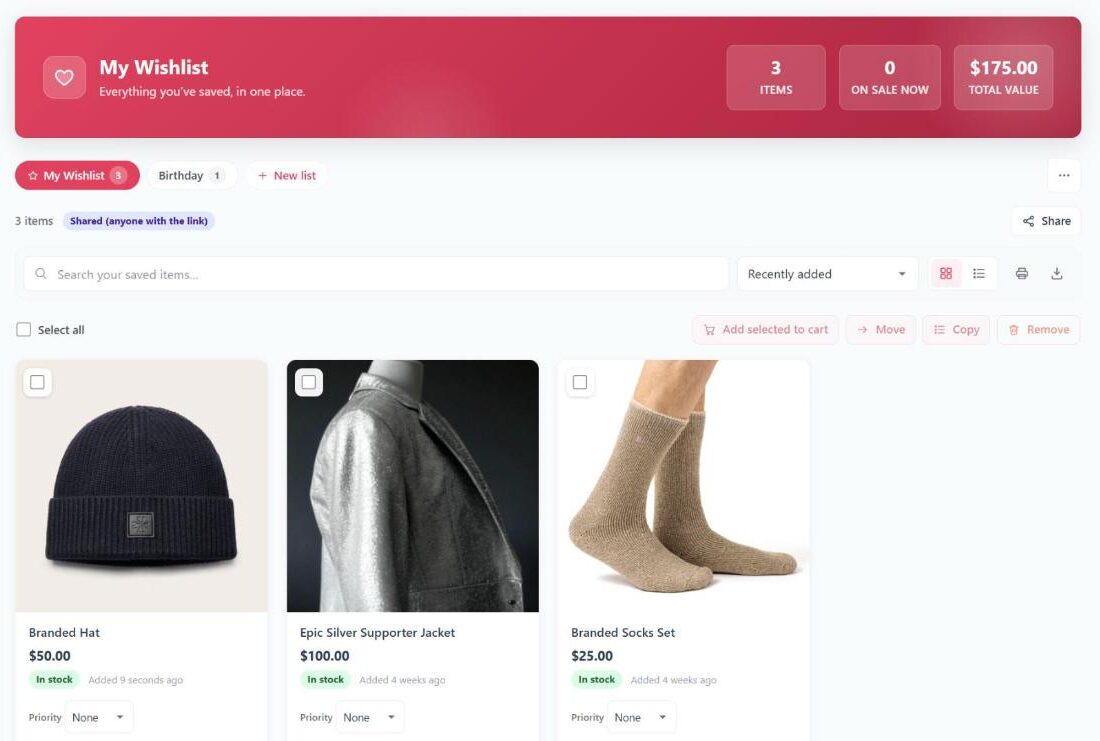
The Wishlists › Settings › Wishlist Page tab controls how saved items are shown on the wishlist page and in the Wishlist tab of My Account. The same settings apply to both, and to shared lists that other people open with a link.
Layout
- Default view: Grid (default) or Table. Shoppers can switch between the two with the view buttons; this sets the view they start with.
- Items per page: how many items load at first (default 24, from 4 to 100). Longer lists show a Load more button.
- Show the search, sort and view toolbar: adds a search box, the view buttons and a Sort by menu with Recently added, Oldest first, Price: low to high, Price: high to low and Name: A to Z.
Choose what each item shows
All of these are on by default:
- Show the price change since the item was saved (↓ 15%): compares the current price with the price when the item was saved.
- Show the stock status
- Show the date the item was added
- Show a quantity selector next to “Add to cart”
- Show “Add all to cart” and “Add selected to cart”: shoppers can tick items and add them in one click, or add the whole list.
Products that were deleted or are no longer for sale stay on the list marked No longer available, so the shopper can remove them.
Change the empty wishlist message
In the Empty Wishlist section, the Message box sets the text shown before a shopper has saved anything. Leave it empty to use the default: “Your wishlist is empty. Tap the heart on any product to save it here.” Turn on Suggest the store’s most wishlisted products to show a Popular right now row of products under the message.
Guest notice
When guest wishlists are on, Show guests a “Log in to save your wishlist across devices” notice reminds guests that their list is kept on one device only, with a Log in link.
Change the page itself
The page used for the wishlist is set on Wishlists › Settings › General. Colours, the header style and card corners are on the Styling tab. For deeper changes to the layout, you can override the plugin’s templates in your theme.