





Let customers share their wishlists
Simple WishlistsUpdated
Customers can share any wishlist with a link, on social networks or by email. Sharing is on by default and is set up under Wishlists › Settings › Sharing. Each list gets its own long, random share link, and the owner can reset it at any time.
Turn sharing on and set the default privacy
- Let customers share their wishlists: shows the Share button on the wishlist.
- Privacy of new lists: the privacy each new list starts with. The default is Private. Customers can change it for each list.
There are three privacy levels:
- Private: only the owner can see the list.
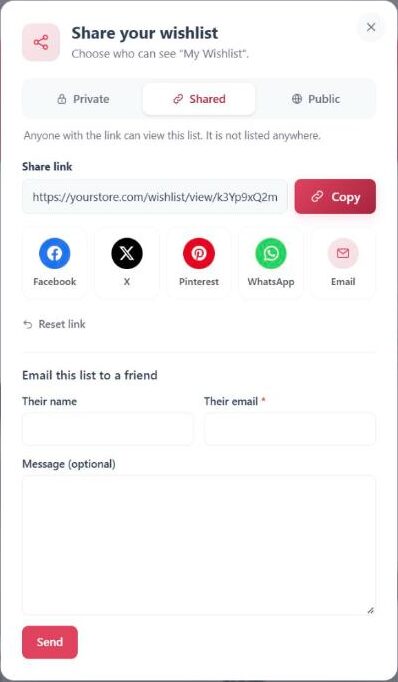
- Shared (anyone with the link): anyone with the link can view the list. It is not listed anywhere.
- Public: anyone can view the list. If you allow it, search engines may show it.
How customers share a list
The customer clicks Share on their wishlist. The share window lets them choose who can see the list, copy the link with Copy, or post it with a share button. If the list is Private, the window asks them to choose Shared or Public first. Reset link creates a new link, and the old link stops working.
Share links look like https://yourstore.com/wishlist/view/AbC123.../, using your wishlist page address.
Choose the share buttons
In the Share Buttons section, turn each network on or off: Facebook, X (Twitter), Pinterest, WhatsApp and Email. The email button opens the shopper’s own email app. On phones, the device’s own share menu is offered as well. The buttons are plain links, so nothing is loaded from the social networks until a shopper clicks one.
What visitors see on a shared list
- A read-only copy of the list. Visitors can add items, or the whole list, to their own cart.
- Show the owner’s first name, e.g. “Sarah’s Wishlist”: on by default. When off, the header says “Shared wishlist”.
- When the owner opens their own share link, a note says “This is how other people see your list.” with a link to edit it.
Shared lists are hidden from search engines (noindex) by default. Turn on Let search engines index public lists to allow indexing of lists set to Public. Lists set to Shared are never indexed.
If a visitor opens a link to a list that is now Private, or whose link was reset, they see “This wishlist is private or no longer exists”.