






Conversion tracking in WooCommerce means recording which ad, link, email or code led to each order. WooCommerce now does part of this on its own: since version 8.5 it saves the source of every new order, such as a Google ad or an Instagram link, and shows it on the order screen. To see those sales in Google Analytics, or to report them back to Google Ads and Meta, you add a plugin that sends a purchase event to each platform.
Affiliate and influencer sales need separate handling. A customer who types a creator’s discount code at checkout usually arrives with no link and no tracking tags, so WooCommerce and Google Analytics both record the order as a direct visit. Below we go through each option, what it costs, and why the numbers from different tools almost never agree.
Disclosure: we make two of the plugins mentioned here, Advanced Customer Reports and Coupon Affiliates. Links to Conversion Bridge are affiliate links, so we earn a commission if you buy through them. Prices and install counts were checked on 4 November 2026, and the screenshots come from our own test store.
In this guide
- What counts as a conversion in a WooCommerce store
- Summary of conversion tracking options
- Start with WooCommerce’s built-in order source tracking
- Tag your own links with UTM parameters
- Send sales to Google Analytics 4
- Report conversions to Google Ads, Meta and other ad platforms
- Track affiliate and influencer sales
- See which channels bring repeat customers
- Why the numbers never match
- Cookies, consent and Chrome
- Which setup should you use?
- FAQ
What counts as a conversion in a WooCommerce store
A conversion is any action you decide to count. For a store, the main one is a completed purchase, but most tracking tools can also record steps before it, like viewing a product, adding to the cart and starting checkout, plus actions that aren’t purchases at all, such as creating an account, joining a mailing list or signing up as an affiliate.
Counting the action is the easy part, because WooCommerce already knows every order you take. Conversion tracking is about linking each order back to how the customer found you. Once you have that, you can compare channels, for example whether last month’s Meta ads paid for themselves or how much revenue a podcast sponsorship brought in.
If you’re trying to improve how many visitors buy rather than measure where they came from, see our guide to increasing your WooCommerce conversion rate instead.
Summary of conversion tracking options
These are the tools covered below. Most stores only need two or three of them.
| Tool | What it does | Free version | Paid plans from |
|---|---|---|---|
| WooCommerce Order Attribution | Saves the source of each order in WooCommerce | Built in | Not needed |
| Google Analytics for WooCommerce | Sends store events and purchases to GA4 | Yes | Free only |
| Site Kit by Google | Sends add to cart and purchase events to GA4 and Google Ads | Yes | Free only |
| Google for WooCommerce | Google Ads conversion tracking and enhanced conversions | Yes | Free (you pay for ads) |
| Meta for WooCommerce | Meta Pixel plus server-side Conversions API | Yes | Free only |
| GTM4WP | WooCommerce data for Google Tag Manager | Yes | Free only |
| Pixel Manager for WooCommerce | Pixels for Google, Meta, TikTok and other platforms | Yes | $149 a year |
| PixelYourSite | Meta Pixel with Conversions API, plus GA4 | Yes | $199 a year |
| Conversion Bridge | Sends events from WooCommerce and other plugins to analytics and ad platforms | No | $79 a year |
| Coupon Affiliates (ours) | Credits orders to affiliates by coupon code or referral link | Yes | $179.99 a year |
| Advanced Customer Reports (ours) | Shows where each customer’s orders came from | Yes | $39 a year |
Start with WooCommerce’s built-in order source tracking
WooCommerce 8.5, released in January 2024, added a feature called Order Attribution. It was switched on by default for new and existing stores, so if your store is up to date it is probably running already. You can check under WooCommerce › Settings › Advanced › Features › Order Attribution.
When a visitor arrives, a small script records how they got to your site, and WooCommerce saves that information with the order when they check out. Open any recent order and you’ll see an Order attribution box with:
- Origin, a short label such as “Source: Google”, “Referral: facebook.com”, “Organic: Google” or “Direct”. Orders you create yourself in the admin show “Web admin”.
- Source type, Source, Medium and Campaign, filled in from the UTM tags on the link the customer clicked, if there were any.
- Device type and Session page views, the number of pages the customer looked at before ordering.
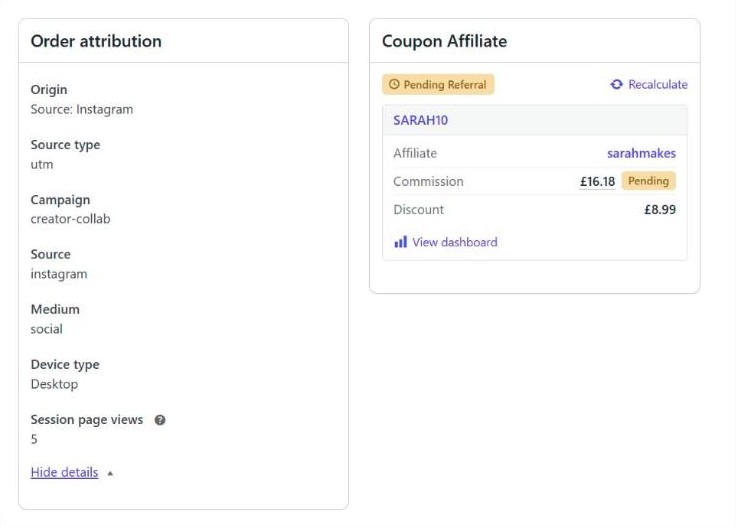
The same order screen also has a Customer history box with that customer’s total orders, total revenue and average order value. On the Orders list there’s an Origin column, so you can scan where recent sales came from without opening each one.
It’s free and needs no setup, which makes it the best place to start. It does have limits:
- It only sees the visit in which the order was placed. If someone first found you through an ad and came back days later by typing your address, the order will usually say Direct.
- Orders placed before your store ran WooCommerce 8.5 have no source, and they never will.
- Core WooCommerce has no report that adds the data up. The free WooCommerce Analytics extension, which WooCommerce describes as an early access beta, adds reports such as Orders by Channel, Orders by Source and Orders by Campaign. It needs WooCommerce 9.5 or later.
On privacy, the script uses the open source sourcebuster.js library and stores what it finds in cookies beginning with sbjs_, set on your own domain. If you use a consent plugin that supports the WP Consent API, WooCommerce waits for consent to marketing cookies before tracking. Without the WP Consent API plugin installed, it tracks every visitor. The full list of cookies is in the WooCommerce documentation.
Tag your own links with UTM parameters
UTM parameters are tags you add to the end of a link so analytics tools know where a click came from. WooCommerce and Google Analytics both read them, and they cost nothing to use. For example:
https://example.com/winter-sale/?utm_source=newsletter&utm_medium=email&utm_campaign=winter-sale
Use utm_source for the site or sender (newsletter, instagram, google), utm_medium for the type of traffic (email, social, cpc) and utm_campaign for the promotion. Pick a spelling and stick to it. “Instagram”, “instagram” and “IG” will show up as three separate sources in most reports.
Tag every link you control: emails, social posts, QR codes on packaging, and links you give to partners. Google Ads adds its own click ID to ad links, so a linked GA4 property recognises Google ad traffic without UTM tags. Adding them anyway makes those orders easier to read in WooCommerce.
Send sales to Google Analytics 4
Google Analytics (GA4) shows your orders next to everything else visitors did on the site: how they found you and where they gave up. To get purchases into GA4, you need a plugin that sends a purchase event with the order value when an order is placed. Pick one of these, not several, or each order will be counted more than once.
- Google Analytics for WooCommerce is the official extension from WooCommerce. It’s free, has 100,000+ active installs, and sends product views, add to cart, remove from cart, checkout started and purchases. Settings are under WooCommerce › Settings › Integration › Google Analytics. Its wordpress.org rating is 2.8 out of 5.
- Site Kit by Google is Google’s own plugin, with more than 5 million active installs. If you already use it, turn on Plugin conversion tracking in the Analytics settings and it will send add to cart and purchase events from WooCommerce. It sends fewer events than the official extension, and if both are active Site Kit leaves the WooCommerce events to the extension.
- GTM4WP is for stores that manage tags in Google Tag Manager. It is free, builds a GA4 ecommerce data layer for WooCommerce, and lets you send that data wherever your GTM tags go. The ecommerce option is off by default, and you’ll need to set up the tags in GTM yourself.
Analytics plugins such as MonsterInsights and Analytify can also send WooCommerce purchases to GA4. They’re useful if you want reports inside the WordPress dashboard, but the data they send to GA4 is much the same.
Report conversions to Google Ads, Meta and other ad platforms
If you pay for ads, the ad platform needs to know which clicks turned into orders. It uses that data to report your cost per sale and to decide who to show your ads to. Without conversion data, a campaign set to maximise sales has nothing to learn from.
There are two ways the data can travel. A pixel is a script in the visitor’s browser that fires on the order confirmation page. Server-side tracking sends the event from your server instead, which still works when an ad blocker stops the browser script. Meta calls its server-side method the Conversions API. Google’s closest equivalent for ads is enhanced conversions, which sends a hashed copy of the customer’s email address so Google can match the order to an ad click.
Official plugins for one platform
- Google for WooCommerce connects your store to Google Merchant Center and Google Ads. It’s free and adds the Google tag with purchase conversion tracking for you. Enhanced conversions take two steps: tick Send Enhanced Conversions data to Google Ads in the extension, then turn on enhanced conversions for web in your Google Ads account. It has 800,000+ active installs and a rating of 2.7 out of 5 on wordpress.org.
- Meta for WooCommerce (still listed on wordpress.org under its old Facebook slug) syncs your catalog with Meta and sends purchases through both the Meta Pixel and the Conversions API. It’s free, with 400,000+ active installs, but it is rated 2.1 out of 5, and its changelog includes a fix for duplicate purchase events. Check your Events Manager after installing it.
Plugins that cover several platforms
If you advertise on more than one network, a single plugin that handles all of them is easier to keep consistent than four separate ones.
- Pixel Manager for WooCommerce by SweetCode covers Google Ads, GA4, Meta, TikTok, Microsoft Ads, Pinterest, Reddit, Snapchat and more in its free version, including Consent Mode v2 and dynamic remarketing. Server-side tracking, Google Ads enhanced conversions and the GA4 Measurement Protocol need Pro, from $149 a year. It has 40,000+ installs and a 4.9 out of 5 rating.
- PixelYourSite has 400,000+ installs. The free version includes the Meta Pixel with the Conversions API and GA4. Google Ads, TikTok and multiple pixels need Pro, from $199 a year, and its refund terms only cover cases where the plugin doesn’t work as described.
- Conversion Bridge by WP Sunshine takes a different approach. Instead of focusing on WooCommerce, it collects events from WooCommerce, form plugins, membership plugins and others, and sends them to 19 analytics tools and 11 ad platforms, with server-side sending for some of them. Plans are $79 a year for one site, $179 for 10 and $499 for 50, all with the same features. There’s no free version, and the 14-day refund doesn’t apply to renewals.
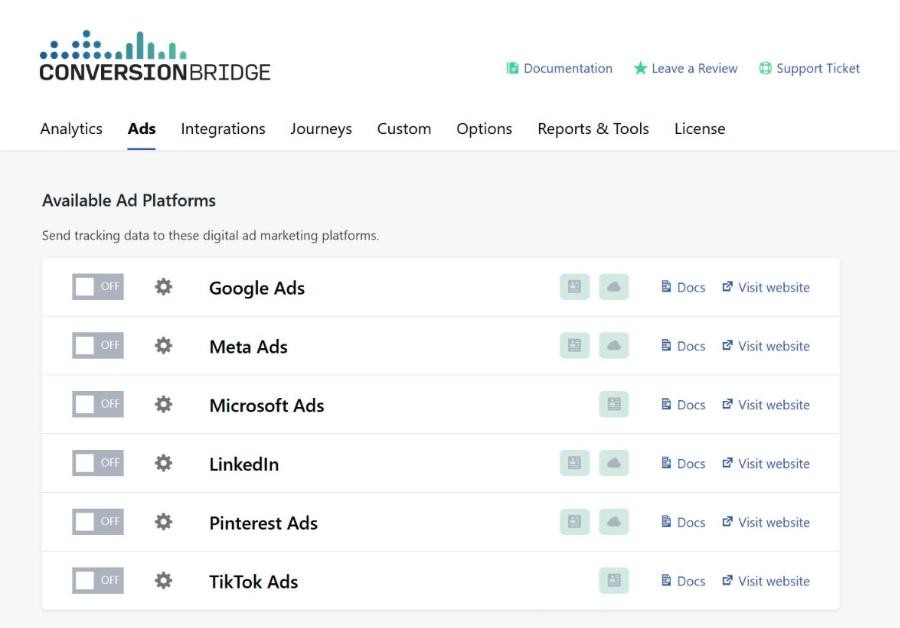
Whatever you choose, use one plugin per platform. Running Google for WooCommerce and Pixel Manager with Google Ads switched on in both will report each sale twice, and Google Ads will bid as though you sold twice as much.
Track affiliate and influencer sales
Everything above relies on the customer arriving through a link. That works for ads, emails and most social posts. It doesn’t work well for sales driven by people, such as a podcast host who reads out a discount code or a YouTuber who mentions one in a video. Those customers often type your address or search your brand name, then enter the code at checkout.
Here’s how that looks on our test store, with three orders placed over two days:
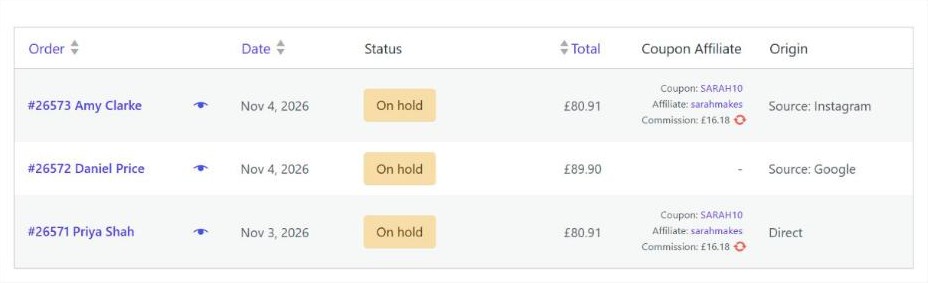
- Order #26573 came from a creator’s Instagram link with UTM tags and their code. WooCommerce records it as Instagram, and the affiliate is credited.
- Order #26572 came from a Google ad. There’s no affiliate involved.
- Order #26571 used the same creator’s code, but the customer arrived with no link or tags. WooCommerce calls it Direct. The affiliate is still credited, because the code is saved on the order.
Affiliate programs track by coupon code as well as by link because of orders like #26571. Coupon Affiliates, which we make, gives each affiliate their own code and referral link, credits every order where either was used, and works out the commission. Code-based sales don’t depend on cookies at all. Our guide to WooCommerce coupon tracking covers how to see which codes bring in sales, and the WooCommerce affiliate plugins comparison covers other options, most of which rely on links.
Affiliate plugins keep this data inside WooCommerce, so Google Analytics still can’t tell an affiliate sale from any other. Conversion Bridge has an integration for Coupon Affiliates that adds the referring affiliate to each purchase event, so you can compare affiliate revenue with your other channels in GA4. It can also count each new affiliate signup as a conversion, which is handy if you run ads to recruit affiliates. The setup is covered step by step in how to track affiliate sales and signups in Google Analytics.
See which channels bring repeat customers
Channel reports show where orders came from, but not whether those customers came back. A coupon site might bring in lots of first orders from people who never buy again, while a smaller channel brings in customers who order every month.
Advanced Customer Reports, another of our plugins, has an Attribution tab in each customer’s report. It reads the source data WooCommerce already saves and shows how the customer was first acquired, where their latest order came from, the landing page, and their orders and spend grouped by origin. Those parts are in the free version. A table of their orders by UTM campaign, source and medium, and a breakdown by device, need PRO, which costs $39 a year or $99 once for one site.
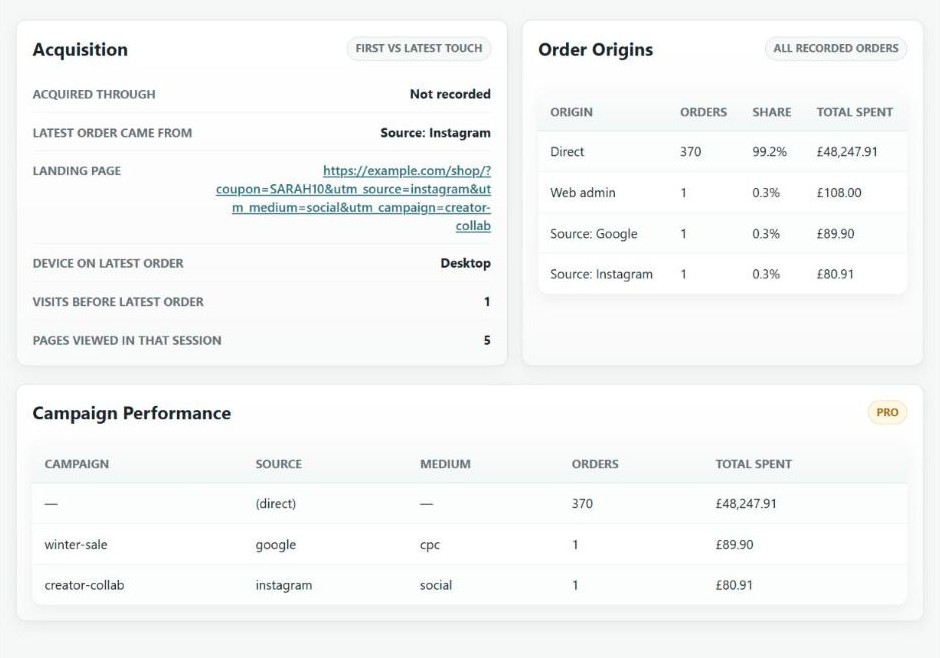
The downside is that it can only show what WooCommerce recorded. For customers whose first orders were placed before WooCommerce 8.5, “Acquired through” will say Not recorded, as it does on our test customer above. It’s also a report about one customer at a time, so use it alongside the channel reports in GA4 or WooCommerce Analytics. It has 50+ active installs, and the documentation explains why some orders show no source.
Why the numbers never match
Set up two or three of these tools and you’ll get two or three different totals for the same week. That’s expected. The main reasons:
- Consent. If a visitor declines cookies on your banner, Google Analytics and the ad pixels don’t record them. Google’s own help page says Analytics will be missing data for users who decline. WooCommerce still records the order.
- Ad blockers. Many block Google Analytics and ad pixels in the browser. Server-side tracking recovers some of these orders, but not all.
- The confirmation page. Browser-based purchase events fire when the customer reaches the order received page. If they pay on an external page and never come back, the order exists but the browser event is never sent.
- Different rules for credit. WooCommerce records the source of the visit that ended in the order. Ad platforms count a conversion for any order within their own time window after a click or view of an ad, so Google and Meta can both claim the same sale.
- Codes without links. As shown above, a coupon used without a tracked link looks like Direct to every tool except your affiliate or coupon reports.
Go by your WooCommerce orders for revenue, refunds and commission, and use GA4 and the ad platforms to compare channels and spot changes over time. Expect GA4 to show fewer sales than WooCommerce does.
Cookies, consent and Chrome
If you sell to customers in the UK or EU, most of this tracking needs their consent first. Google’s EU user consent policy covers the European Economic Area, the UK and Switzerland, and since March 2024 Google has left EEA visitors out of your ad audiences unless your site passes their consent choices through Consent Mode v2. Most consent banner plugins and the multi-platform tracking plugins above support Consent Mode v2. We’re not lawyers, so check what applies to your store.
Third-party cookies in Chrome are no longer going away. In April 2025 Google announced that Chrome would keep its current third-party cookie settings and would not add a new prompt, and in October 2025 it retired most of its Privacy Sandbox technologies. This makes little difference to store tracking either way. WooCommerce’s order source data, GA4 and affiliate referral cookies are set on your own domain, and coupon codes need no cookies at all.
Which setup should you use?
It depends mostly on how you get your customers.
If you don’t run paid ads, keep WooCommerce’s Order Attribution switched on, add UTM tags to your emails and social links, and install one GA4 plugin. That gives you a free channel report in GA4 and a source on every order. Add the WooCommerce Analytics extension if you’d rather see channel totals in WordPress.
If you run ads on Google or Meta, add conversion tracking for each platform you pay for, with server-side events or enhanced conversions if you can. The official plugins are free. A paid multi-platform plugin is easier to manage once you advertise on three or more networks.
For stores that sell through affiliates, creators or sponsorships, track partners with codes as well as links, because many of their customers will never click anything. Then decide whether you also want that data in GA4.
Whichever setup you pick, place a test order afterwards and check it appears once, with the right value, in every tool. Then cancel the test order so it doesn’t count as a sale.
FAQ
Does WooCommerce track conversions on its own?
Partly. Since version 8.5, WooCommerce saves the source of each order (such as a Google ad or a referral site) and shows it on the order screen and in an Origin column on the Orders list. It doesn’t send anything to Google Analytics or ad platforms, and core WooCommerce has no report that totals sales by source.
Why does an order say Direct or Unknown?
Direct means the customer arrived without a referring site or UTM tags, for example by typing your address or clicking a link in an app that hides where the visit came from. Unknown usually means WooCommerce had no data for the order, which is normal for orders placed before Order Attribution existed or created by another plugin or an import.
Can I track conversions without Google Analytics?
Yes. WooCommerce’s own order source data, plus the free WooCommerce Analytics extension for reports, covers the basics without sending data to Google. If you want visitor analytics as well, privacy-focused tools such as Plausible and Fathom can also record WooCommerce purchases through a plugin like Conversion Bridge.
Will two tracking plugins count each order twice?
They can. If two plugins both send a purchase event to the same GA4 property or ad account, each order is counted twice. Check the settings of anything you install and switch off the duplicate platform in one of them.
How do I track sales from a discount code without a link?
Give each partner their own code and use a plugin that credits orders by coupon, such as Coupon Affiliates. WooCommerce’s own Analytics › Coupons report shows how many orders used each code, even without a plugin. Neither Google Analytics nor WooCommerce’s order source tracking will link those orders to the partner by themselves.
Is server-side tracking worth it for a small store?
If you spend a meaningful amount on Meta or Google ads, it usually is, because ad blockers and browser privacy settings hide a share of your purchases from browser pixels. Meta’s Conversions API is included free in Meta for WooCommerce and PixelYourSite. If you don’t run ads, a browser-based GA4 setup is enough.
Summary
Start with what WooCommerce already records: check that Order Attribution is on, and tag your own links with UTM parameters. Add one plugin to send purchases to GA4, and one conversion setup for each ad platform you pay for. If people rather than links drive your sales, track them by code too, because no analytics tool will link those orders to the partner otherwise. When the totals disagree, trust your WooCommerce orders for revenue and use the other tools to compare channels.
If you want to see how each customer found you and whether they came back, Advanced Customer Reports has a free version on WordPress.org.

Our plugins
Grow your WooCommerce store
Affiliates, loyalty points, store credit, tax exemption and more – trusted on 248,000+ sites.

Comments