for WooCommerce
Know every customer, grow every order.
Generate advanced reports to view detailed analytics and data for each of your WooCommerce customers. Orders, spend, products, coupons, attribution and health scores, all in one clear report.
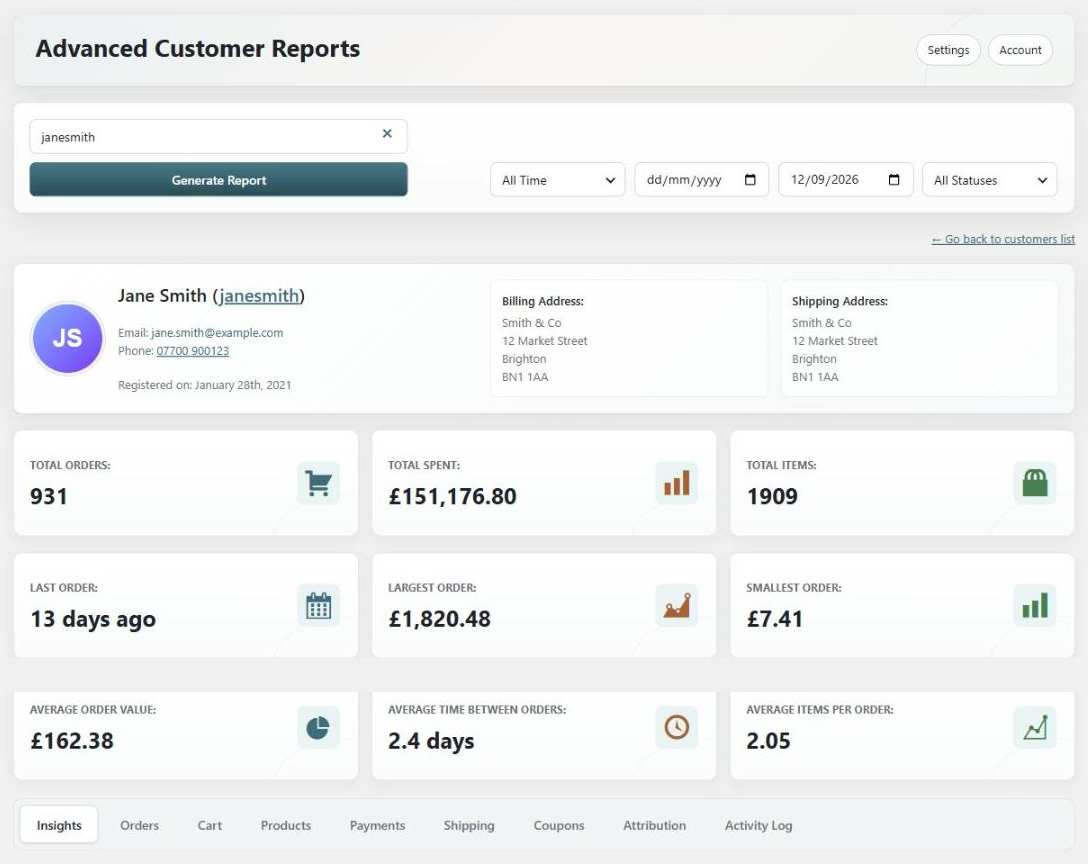
Everything you need to know about your WooCommerce customers
Advanced Customer Reports makes it easy to view advanced analytics and data for every one of your customers. See their total orders, order averages, full order history, recent activity, totals for each product, product affinity, coupons used, where they came from and much more. Filter any report by date range or order status, or leave the customer field empty to run the same report across your whole store.
Pick a customer
Search by name, email, username or ID, or choose one from the sortable customers list.
Generate the report
One click compiles every order, product, coupon and payment into a single customer report.
Explore the tabs
Dig into insights, orders, products, payments, shipping, coupons, attribution, cart and activity.
Take action
Spot at-risk and VIP customers, then send a coupon or follow-up email straight from the report.
Report tabs
Nine report tabs, one complete customer view
Every report is organised into clear tabs so you can find the data you need in seconds.
Insights
A summary of the customer at a glance: revenue breakdown, purchase timeline, discount behaviour, first vs latest order, and refund and status risk.
Orders
Every order the customer has placed with date, time, status, totals and origin, plus a recent order activity log and status totals.
Products
Every product they have bought with quantities and spend, the categories they buy from most, stock levels and product affinity.
Payments
Which payment methods the customer uses, how many orders were placed with each, and how much each is worth.
Shipping
Every shipping address the customer has ordered to, along with the shipping methods they choose and totals for each.
Coupons
Every coupon the customer has redeemed, how many times they used each one, and the total discount received.
Attribution
Where their orders came from: first and latest touch, referrers, landing pages, devices, and orders and revenue by source.
CartPRO
What the customer has in their cart right now, what it is worth, coupons applied, and whether it is active, idle or abandoned.
Activity LogPRO
A log of everything the customer has done on your store, such as new orders, payments, logins and password changes.
Customer Insights
Understand each customer at a glance
The Insights tab summarises the numbers that matter, so you know who is worth nurturing.
Revenue Breakdown
See gross sales, net retained revenue, discounts given, refunded amounts, shipping charged and tax collected for each customer.
Purchase Timeline
A monthly spend chart covering the last 12 months, with the orders, gross revenue, discounts and refunds for each month.
First vs Latest Order
Compare the customer’s first order against their most recent one, to see whether their order value is growing or shrinking.
Refund & Status Risk
See how many of their orders were refunded, cancelled or failed, and what percentage of their orders that represents.
Order Analytics
Every key metric for every customer
Generate a report and instantly see total orders, total spent and items purchased, alongside the averages that tell you how each customer really shops.
Totals and order range
Total orders, amount spent and items purchased, plus their largest and smallest orders and last order date.
Averages that matter
Average order value, average products per order and the average time between orders, so you know how often they return.
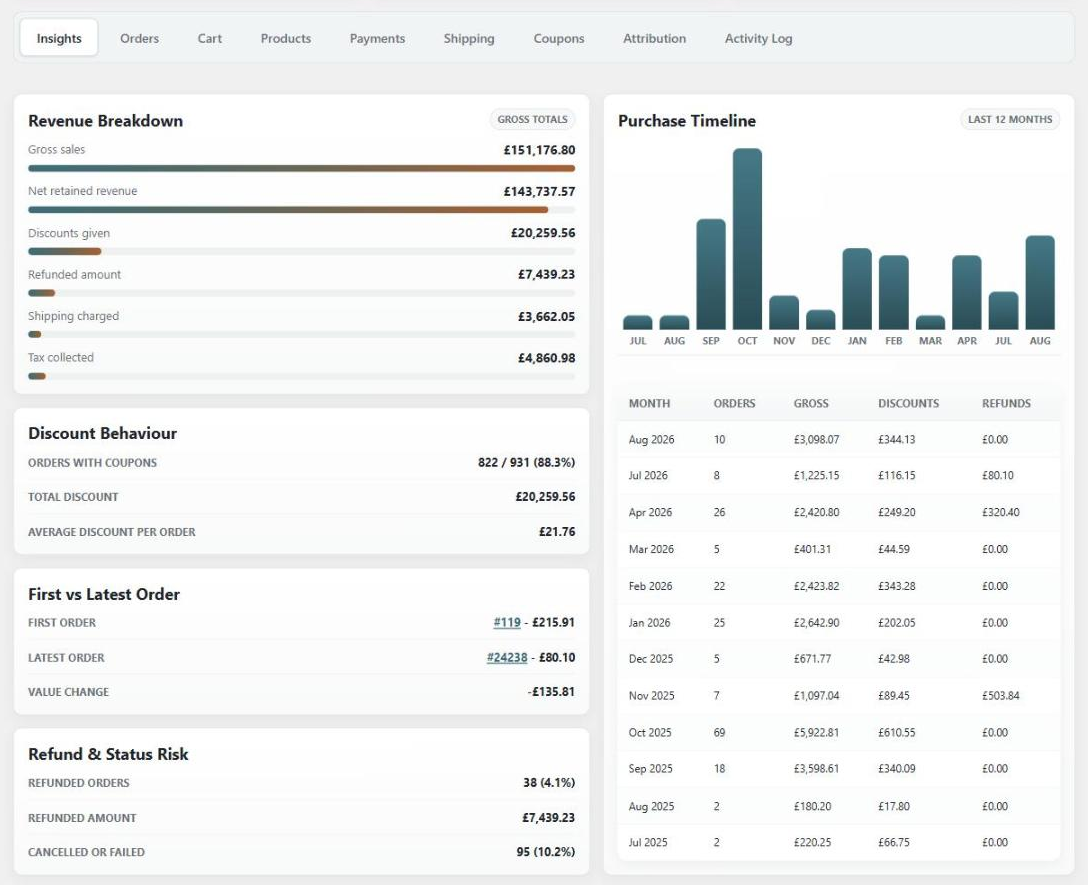
Insights Tab
Revenue, timeline and risk in one view
The Insights tab summarises the customer at a glance: a full revenue breakdown, a 12-month purchase timeline, discount behaviour, first vs latest order and refund and status risk.
Revenue breakdown
Gross sales, net retained revenue, discounts, refunds, shipping and tax, each with a simple visual bar.
Purchase timeline
A monthly spend chart for the last 12 months, with orders, gross revenue, discounts and refunds per month.
Orders & Activity
A complete order history for each customer
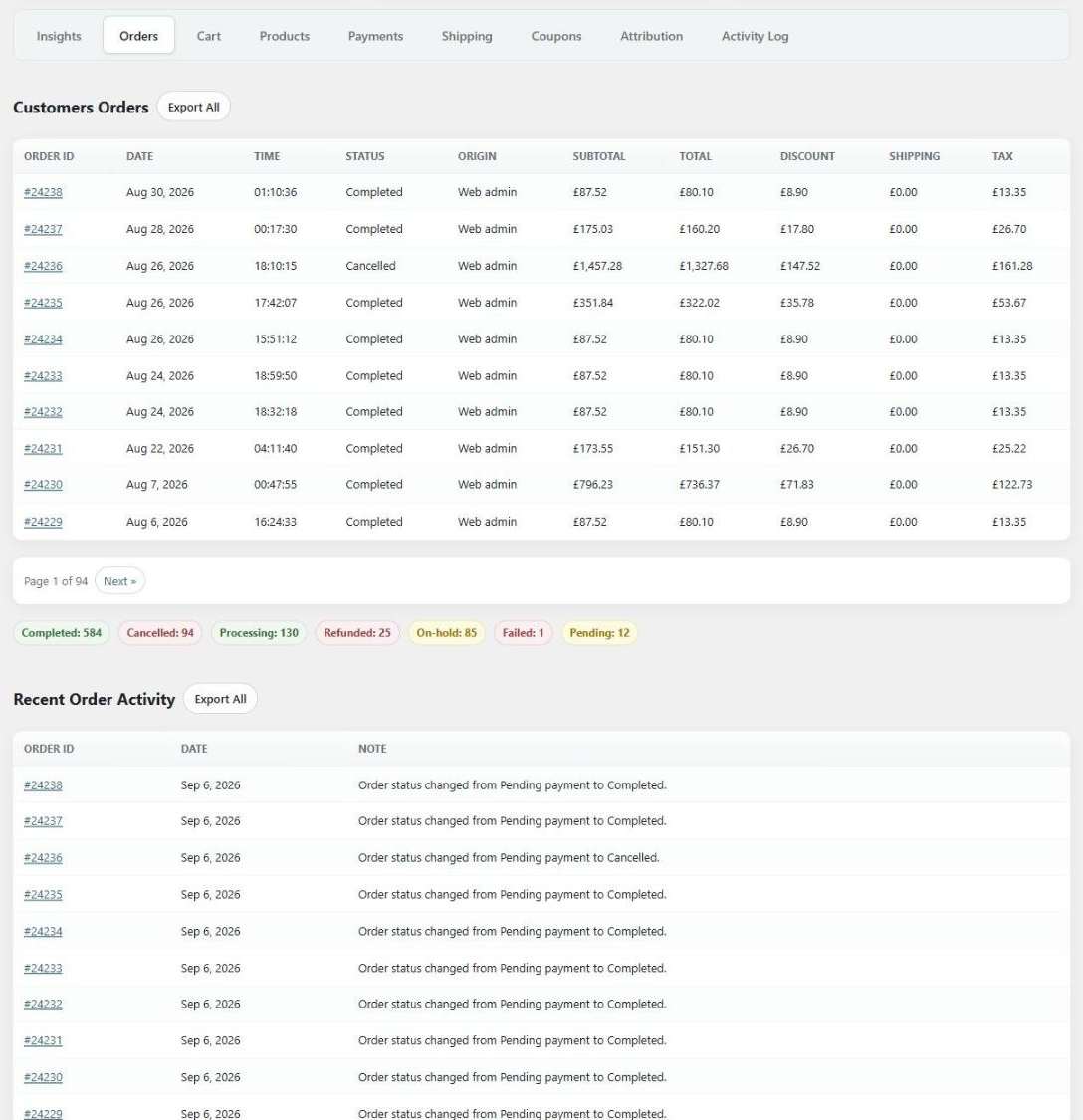
View a full, detailed list of every order the customer has placed, with order status totals, then follow each one through a recent order activity log.
Detailed orders list
Every order with its date, time, status, origin, subtotal, discount, shipping, tax and total, plus one-click CSV export in PRO.
Recent order activity
See the progress and log updates for all their orders, such as status changes, notes or payment errors.
Products Purchased
See exactly what they buy
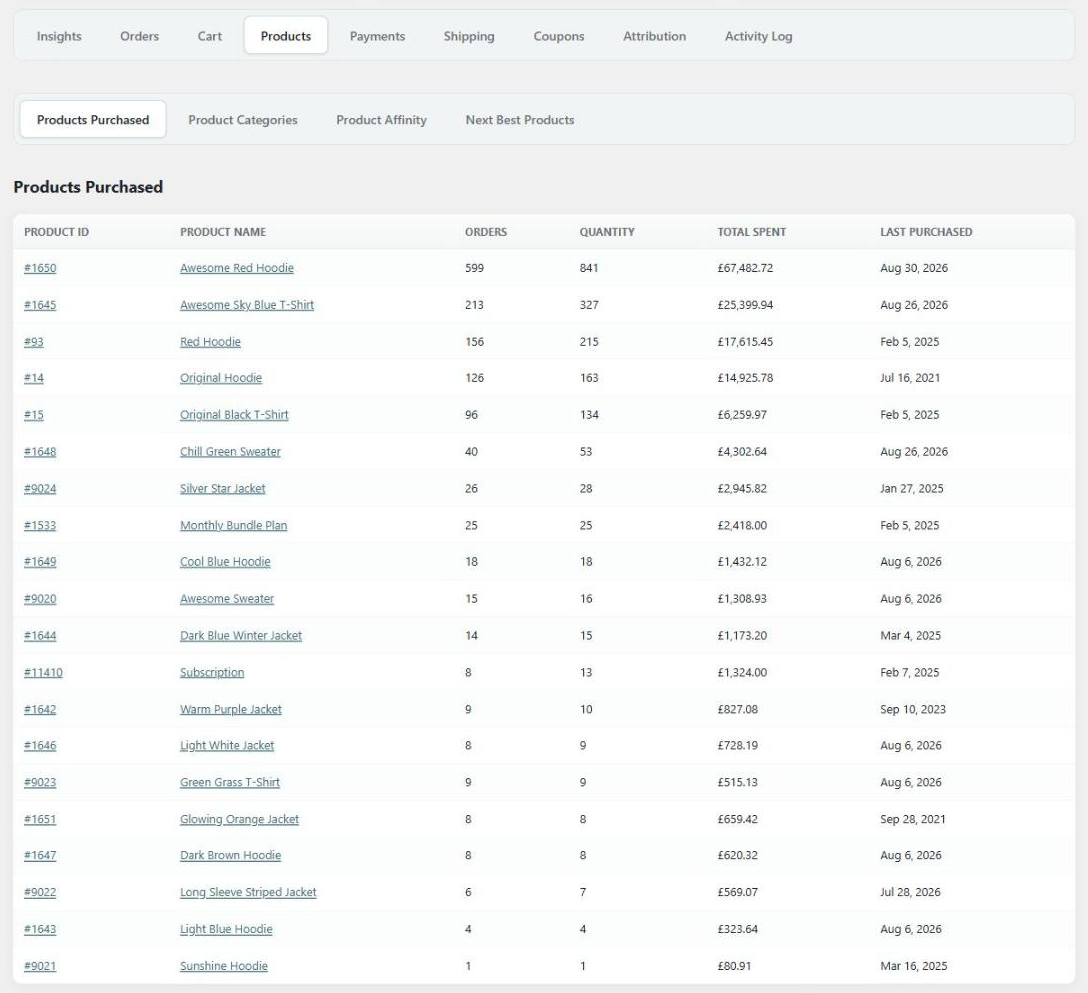
A full list of the products the customer has purchased, with orders, quantity, total spent and last purchased for each, plus the categories they buy from most.
Products and categories
Totals for every product and product category the customer buys, with current stock levels for products they purchase.
Next best productsPRO
Get cross-sell and upsell suggestions for each customer based on what they have already bought.
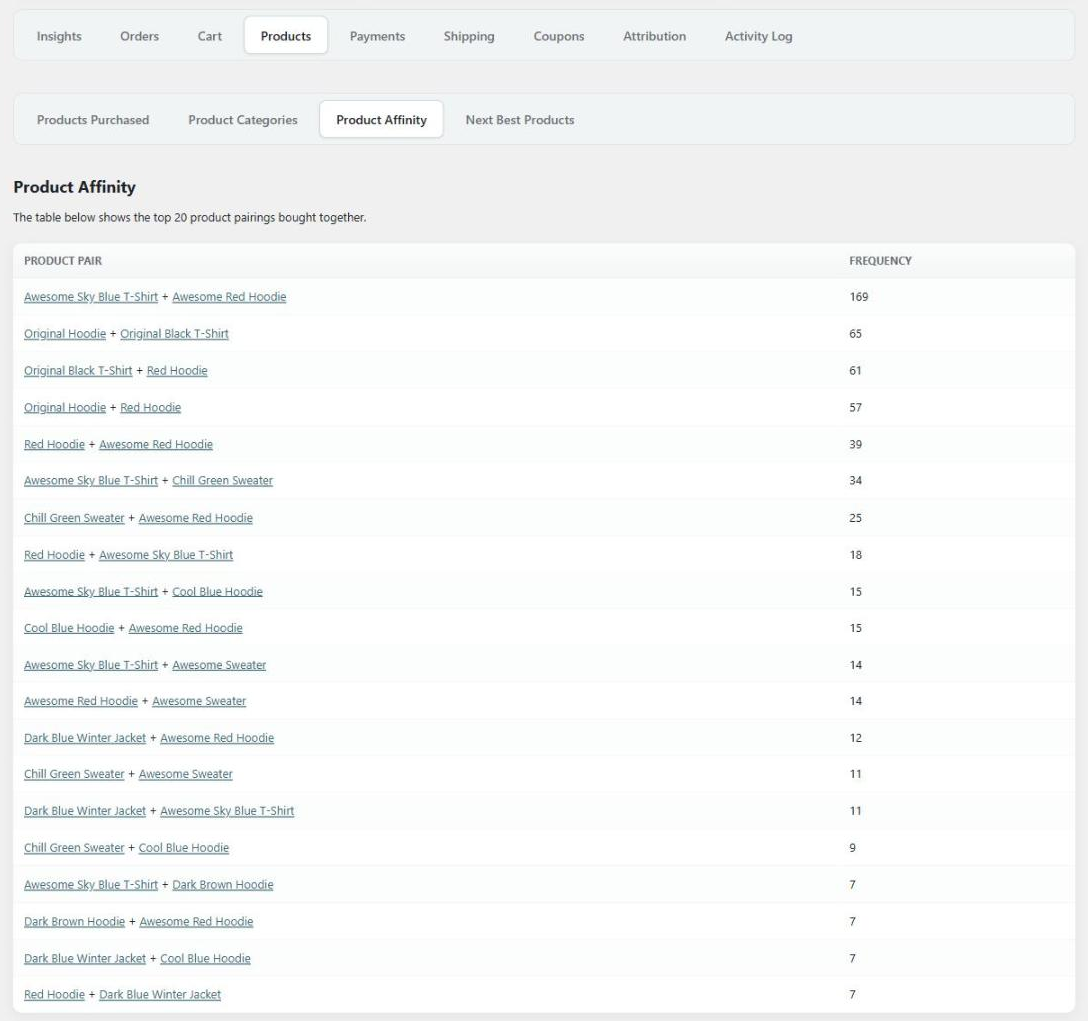
Product Affinity
Discover what is bought together
The product affinity table shows you which products are frequently bought together by that particular customer, or by all of your customers store-wide.
Frequently bought togetherPRO
See the strongest product pairings with how often each combination appears in their orders.
Per customer or store-wide
Run the affinity report for one customer, or leave the customer empty to analyse pairings across your whole store.
Health & Actions
Know who to nurture, and what to do next
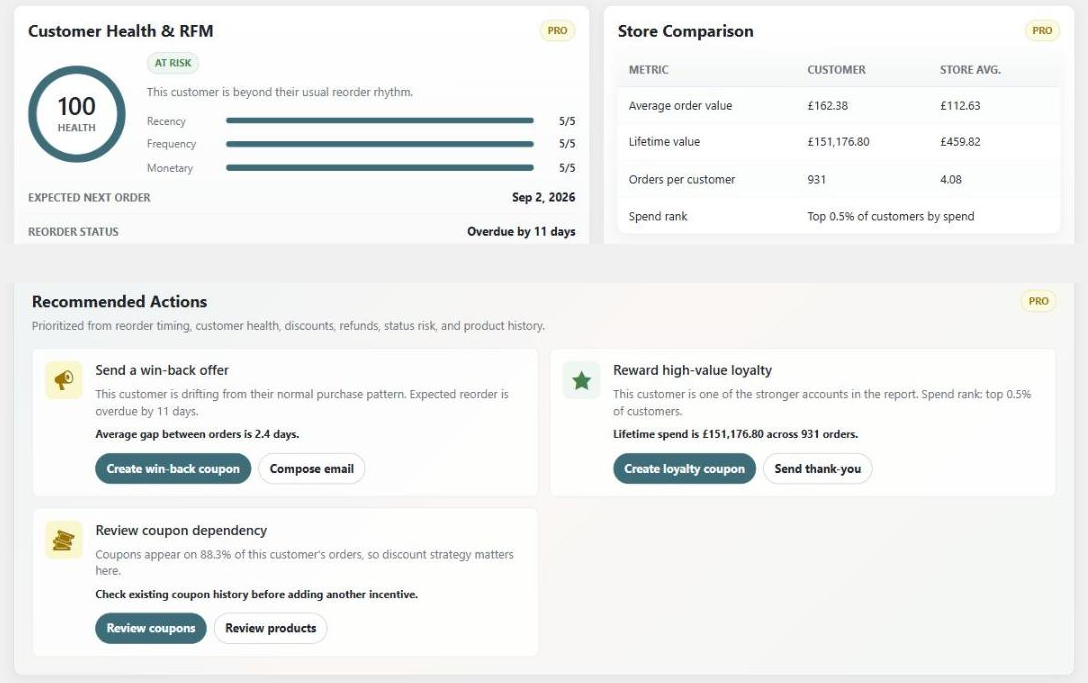
PRO gives every customer a health score and segment, benchmarks them against your store averages, and turns the numbers into a prioritised list of recommended actions.
Customer health & RFMPRO
A health score, a named segment such as VIP, loyal or at risk, an expected next order date and reorder status.
Recommended actionsPRO
Send a win-back offer, reward loyalty or nurture a second order, with one-click coupons and follow-up emails from the report.
Upgrade to PRO
Go further with Advanced Customer Reports PRO
Unlock deeper filters, customer health scoring, recommended actions and one-click follow-ups.
Filter by Date
Filter the customer reports to get all the analytics for only a specific date range, plus extra “This Year” and “Last Year” presets.
Filter by Status
Filter the customer reports to get all the analytics for only a specific order status. Completed orders are available in the free version.
Customer Health & RFM
Give every customer a health score and a named segment, such as VIP, loyal, at risk or dormant, based on recency, frequency and spend.
Reorder Predictions
See when the customer is expected to order again, and whether that reorder is due or already overdue.
Store Comparison
Compare the customer against your store averages for order value, lifetime value and orders per customer, and see where they rank by spend.
Recommended Actions
Turn the customer’s metrics into a prioritised list of next steps, such as sending a win-back offer, nurturing a second order or rewarding loyalty.
One-Click Coupons
Generate a win-back, second-order or loyalty coupon for the customer in one click, without leaving the report. Existing coupons are detected so you never create duplicates.
Email Your Customers
Compose and send a follow-up email to the customer straight from the report, using a pre-written template for each recommended action.
Product Affinity
See which products are frequently bought together by that particular customer, or by all customers.
Next Best Products
Get cross-sell and upsell suggestions for each customer, based on the products they have already purchased.
Current Cart & Cart Status
See what a customer has in their cart right now, what it is worth, any coupons applied, and whether the cart is active, idle or abandoned.
Customer Activity Log
View a log of all activity the customer has done on your store, such as new orders, payments, logins and password changes.
Campaign & Device Attribution
See which UTM campaigns, sources and mediums the customer buys through, what each is worth, and which devices they order on.
Export Data
Export customer orders, including attribution columns, and order activity notes to a CSV file to use in a spreadsheet or other software.
And so much more
Everything you need to know your customers
A complete customer analytics toolkit, built right into your WooCommerce dashboard.
Guest Customers
Customers who checked out without an account are included too, matched by billing email, so guest orders are never missing.
Order Attribution
See how each customer was first acquired, what brought them back, and a breakdown of orders and revenue by source.
Customers List
Browse every customer in one sortable list with their orders and total spent, and filter by order count or amount spent.
Store-Wide Reports
Leave the customer field empty to run the same report across all of your customers at once.
Shareable Report Links
Every customer report has its own web address, so it can be copied, shared with your team or bookmarked.
Report Filters
Filter any report to view analytics for all time, this month or last month, with date ranges and statuses in PRO.
Payment Methods
See which payment methods the customer uses, how many orders were placed with each, and how much each is worth.
Shipping Details
Every shipping address the customer has ordered to, along with the shipping methods they choose.
Coupons Used
Every coupon the customer has redeemed, how many times they used each one, and the total discount received.
Discount Behaviour
See how many of the customer’s orders used a coupon, the total discount given, and the average discount per order.
Fast & Lightweight
Reports compile their figures from the WooCommerce Analytics tables, so even large stores open reports in a fraction of a second.
Priority Support
If you ever need any help, send a message to our expert team any time and we’ll be glad to help out.
Pricing
Get started today, risk-free
Pro Yearly
$39
Per year
- 1 website license
- Access all PRO features
- Plugin updates for 1 year
- Premium support for 1 year
Pro Lifetime
$99
One-time payment
- 1 website license
- Access all PRO features
- Plugin updates forever
- Premium support included
Your trust is important to us. We provide clear and fair pricing, and the price you sign up at stays the same for as long as your subscription is active, with no sudden cost hikes after the first year. Easily cancel or switch plan any time. Pricing is in USD and excludes applicable VAT. An active PRO subscription is required for future updates and support.

Protected by our 14-day money-back guarantee
We look forward to helping you understand your WooCommerce customers. But if things don’t work out, simply contact us within 14 days of upgrading and we’ll refund 100% of your money, no questions asked.

Elliot Sowersby
Founder & Lead Developer
Here to help
Questions? We’ve got you covered
Ask a Question
Have a pre-sale question, or already a PRO user? Send us a message directly.
Contact Us →Documentation
Our docs explain everything you need to know about setting up the plugin.
View Documentation →Start understanding your customers today
Join 50+ WooCommerce stores using Advanced Customer Reports. Try it free, or upgrade risk-free with a 14-day money-back guarantee.