





Set up gift registries (PRO)
Simple WishlistsUpdated
Gift registries let customers turn any wishlist into a registry for a wedding, baby shower or birthday. Gifts that people buy from the registry are marked as bought, so nobody buys the same thing twice. Turn registries on under Wishlists › Settings › Gift Registry. This is a PRO feature.
Settings
- Let customers create gift registries: adds a Registry tab to the customer’s wishlist dashboard in My Account.
- Let owners add a delivery address for gifts: off by default.
- Hide gifts that have already been bought: when off, bought gifts stay on the registry marked as purchased.
- Email the owner when a gift is bought: on by default.
- Let visitors find a registry by name or email: adds a registry search to your wishlist page.
How a customer creates a registry
- The customer saves some products, then opens the Registry tab in My Account.
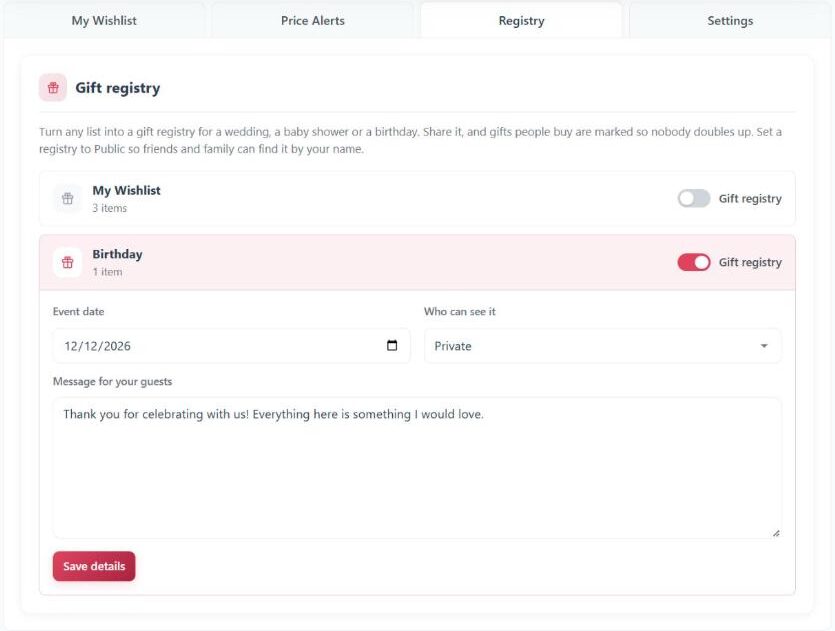
- They turn on the Gift registry switch next to the list they want to use, then fill in the Event date, Who can see it, an optional Message for your guests and, if allowed, a Delivery address for gifts.
- They click Save details, then share the registry link.
The registry shows a countdown to the event. The delivery address is shown only to people who open the registry link while it is set to Shared (anyone with the link). It is never shown on Public registries or in registry search.
How bought gifts are tracked
- A guest buying a gift adds it to the cart from the registry page. At checkout they can add a Gift message for the registry owner.
- When the order is Processing or Completed, the item is marked as bought, for example “Purchased 1 of 2”, and the owner gets the Registry gift purchased email.
- If the order is cancelled or fully refunded, the gift is marked as wanted again.
The owner sees the gifts bought so far, with the buyer’s name and message, in their Registry tab.
Add a registry search
With registry search on, a Find a gift registry form appears under the wishlist on your wishlist page. Visitors can search by the registry title, the owner’s name or the owner’s exact email address. Only registries set to Public appear in the results. To place the search on another page, use the shortcode:
[swlp_registry_search title="Find a gift registry"]