






Version 1.1.0 of Simple Store Credit is now available!
The biggest addition is a WooCommerce Subscriptions module in PRO. Customers can pay for a subscription from their store credit balance, put their credit towards renewals they pay by card, or buy a subscription that adds credit to their balance every month. All of it is off until you switch it on.
For everyone, including the free version, there is a new setup wizard, a search box for the settings, privacy tools for GDPR requests and a more useful Activity log. There is also an important fix for stores that sell subscriptions, which is explained under Fixes.
Store Credit with WooCommerce Subscriptions (PRO)
There is a new Subscriptions tab under Store Credit > Settings, in the Spending Credit group, with four separate parts. You can use any one of them without the others.
All of these features use the account balance, so Account Balance has to be enabled on the General tab. The settings only take effect while WooCommerce Subscriptions is active.
Pay for subscriptions with store credit
Turn on Allow customers to pay for subscriptions with their store credit balance and the Store Credit payment method can be chosen at checkout for a subscription. After that, every renewal is charged to the customer’s balance automatically, with no card involved.
A renewal is only paid when the balance covers the full renewal total. If it doesn’t, the renewal fails, the subscription goes on hold and the customer gets an email asking them to top up or pay another way. The usual WooCommerce Subscriptions payment retries then try again.
To stop that happening in the first place, you can also email customers a few days before a renewal when their balance is too low to pay it. The email tells them the renewal date, the renewal total, their balance and how much they need to add. It goes out 3 days before by default, and you can change this to anything from 1 to 30 days.
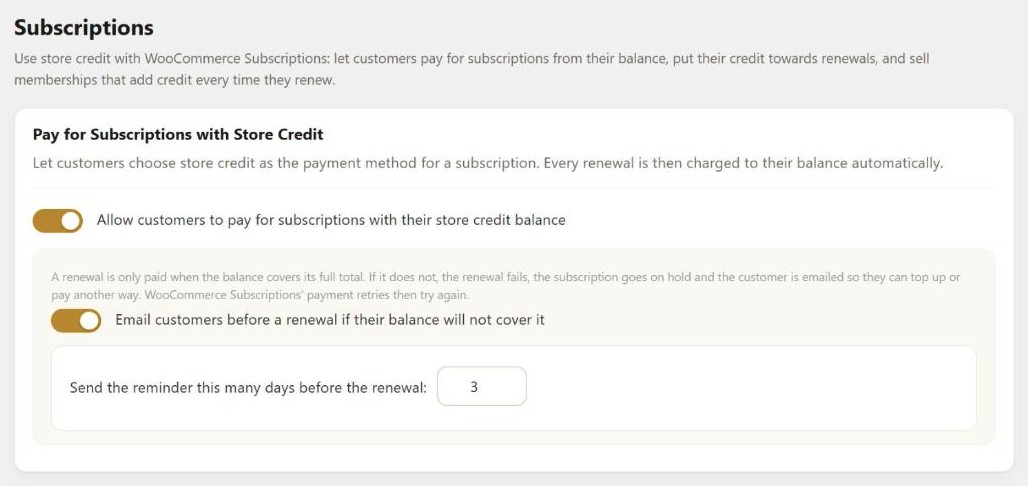
This uses the Store Credit payment method, so “Offer store credit as a payment method at checkout” must also be on, under the Credit Redemption tab. The settings page shows a warning if it is off.
Use credit on renewals paid another way
Most subscribers will still pay by card. With Apply store credit to renewals, their store credit is taken off each renewal first, when the renewal order is created, and only the rest is charged to their card or other payment method. There are three options:
- Off (the default).
- Always use available credit on renewals for every subscriber.
- Let each customer choose per subscription. Customers switch it on or off for each subscription from My Account > Subscriptions, and you can change it for them on the Edit Subscription screen. A separate setting decides whether it starts on or off for customers who have not chosen.
You can limit the share of each renewal that credit can pay (100% by default) and set a fixed maximum per renewal. The store-wide limit on the Credit Redemption tab, and any spending rules you have, apply too. Manual renewals, where the customer pays the renewal themselves, get credit as well unless you turn that off.
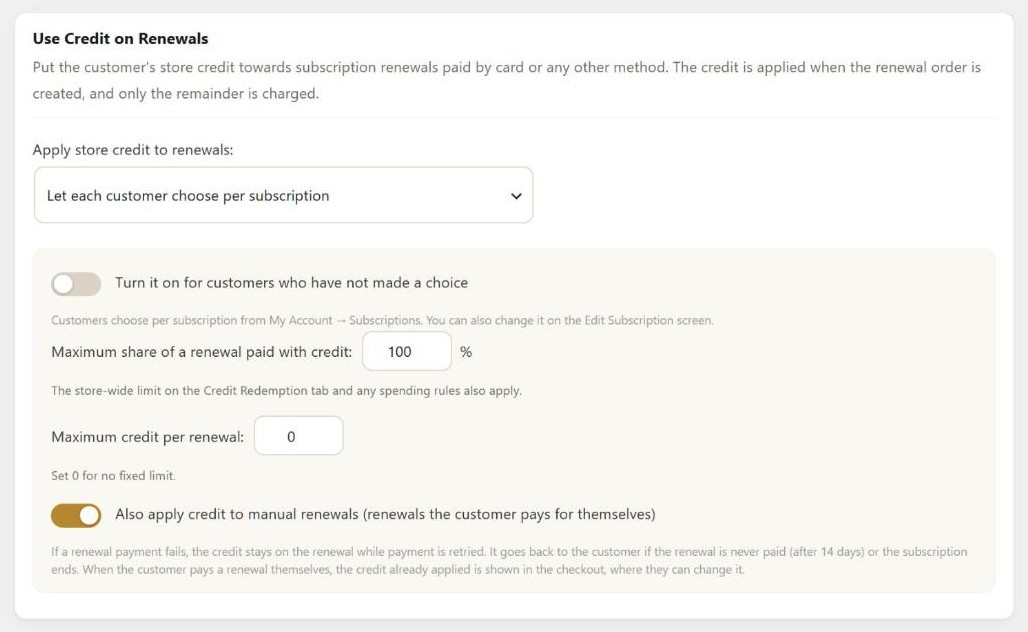
If the card payment for a renewal fails, the credit stays on that renewal order while WooCommerce Subscriptions retries the payment. The customer gets it back if the renewal is still unpaid after 14 days, or if the subscription is cancelled or expires. If the customer then pays the renewal themselves, the credit that was already applied appears in the checkout, and they can change it there.
Store credit memberships
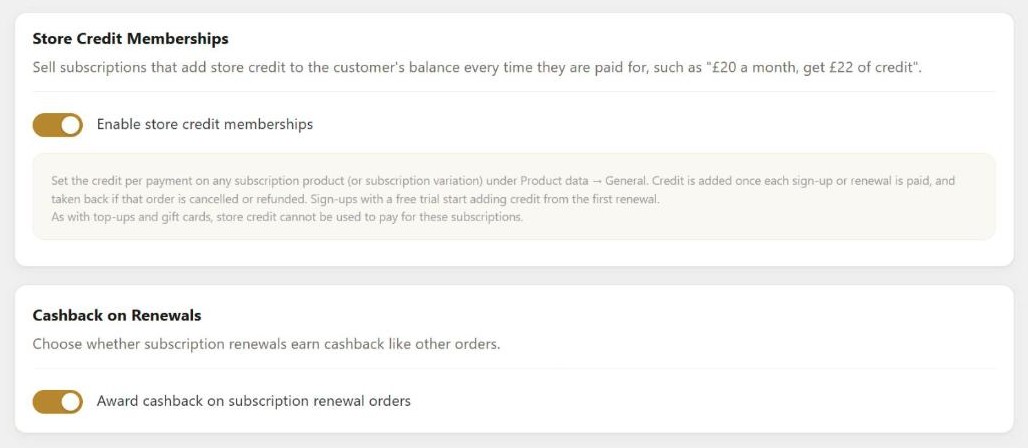
This one works the other way round. A subscription product can add store credit to the customer’s balance every time it is paid for. For example, you could sell a plan at £20 a month that adds £22 of credit each month.
Once Enable store credit memberships is on, edit a subscription product (or a subscription variation) and fill in the new store credit per payment field under Product data > General. The amount is per unit, so a customer who buys two gets twice the credit.
Credit is added once each sign-up or renewal order is paid, and taken back if that order is cancelled or refunded, with a partial refund taking back part of it. A sign-up with a free trial starts adding credit from the first renewal. As with top-ups and gift cards, customers can’t use store credit to pay for these subscriptions.
Renewal emails and cashback
Three new PRO emails are on the Email Notifications tab, with their own subject and message you can edit:
- Renewal paid with credit, sent when store credit pays for all or part of a renewal. It shows how much was used and the customer’s new balance.
- Renewal failed: not enough credit, sent when a renewal can’t be paid from the balance, with a link to the subscription.
- Low balance before renewal, the reminder described above.
If you give cashback, a new Award cashback on subscription renewal orders option lets you stop renewals from earning it. It is on by default, so renewals keep earning cashback as they did before unless you turn it off.
A New Setup Wizard
The new setup wizard goes through the decisions every store has to make, one step at a time, in plain language:
- Credit types: an account balance, credit vouchers or both, and what to call your credit.
- Getting credit: refunds to credit, top-ups, gift cards and cashback.
- Spending credit: the cart and checkout tool, and any limits.
- Look & feel: colours for the checkout tool and the customer’s Store Credit page.
- Emails & extras: which emails to send, plus the PRO features.
Each step has a preview that changes as you pick options, so you can see what customers will see.
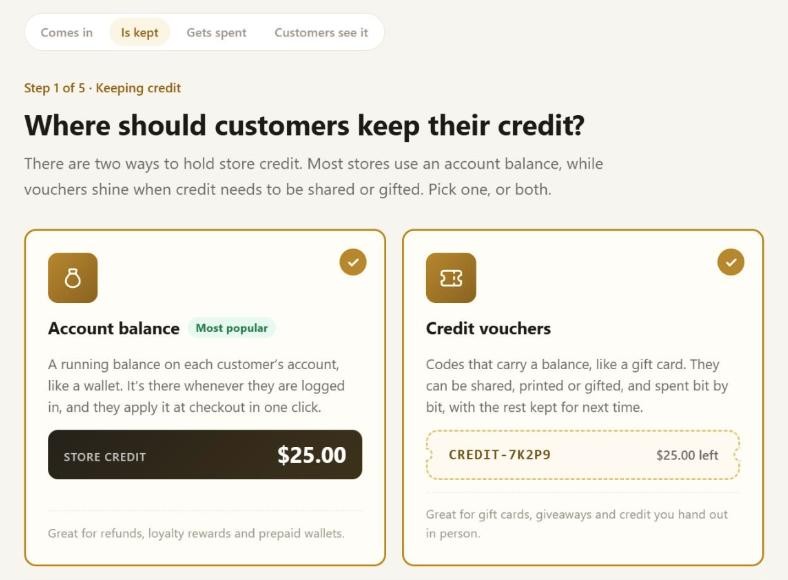
Along the way, the wizard can create a “Buy Store Credit” page with the top-up form on it, and your first gift card product. Each step saves when you move on, so if you leave part way through, your choices so far are kept.
The last step lists everything you set up, with an Edit link next to each line. You can also add some test credit to your own account and go to your shop to try the checkout as a customer. The test credit appears in the Activity log like any other credit, and you can remove it from Store Credit > Customers when you are done.
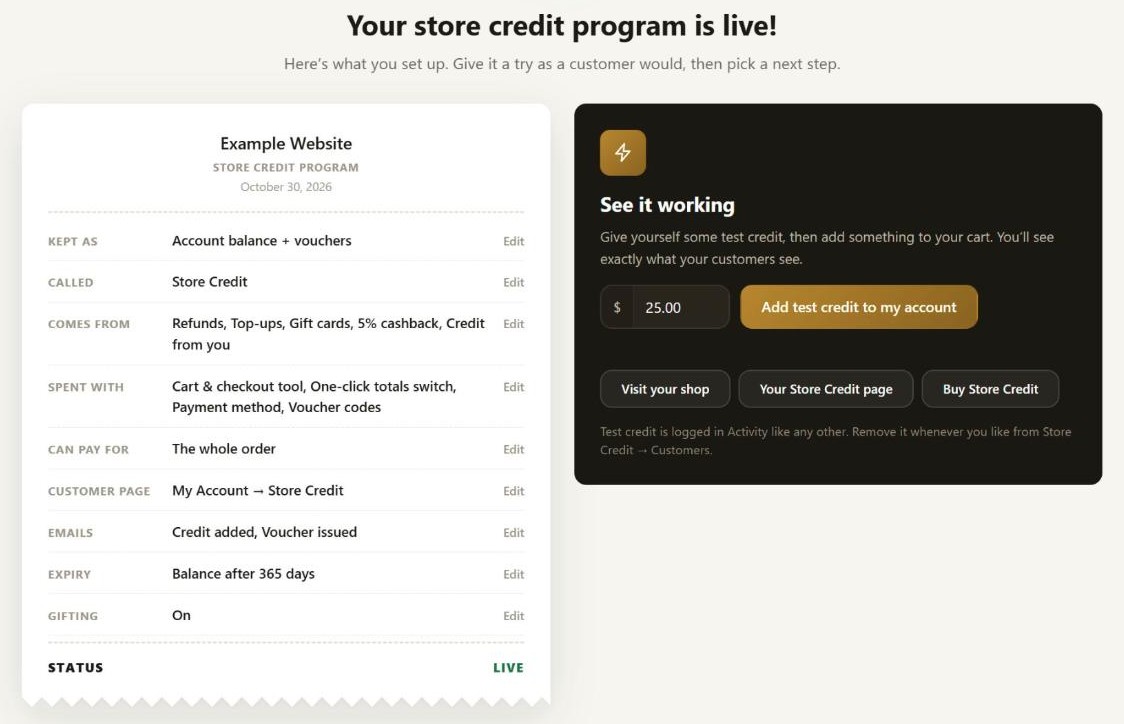
The wizard opens by itself only on a new install, the first time the plugin is activated. Existing stores are not sent to it after updating. You can open it at any time from the Setup wizard link above the settings tabs on the Settings page.
Search the Settings
There is now a search box above the settings tabs. Start typing and it lists every setting whose name or description matches, along with the tab it is on. Click a result to go to its tab (or the sub-tab or email it belongs to), where the setting is highlighted.
Some settings only appear after you turn on another setting. These are marked “Hidden until a related setting is turned on” in the results, so you know why you can’t see them yet.
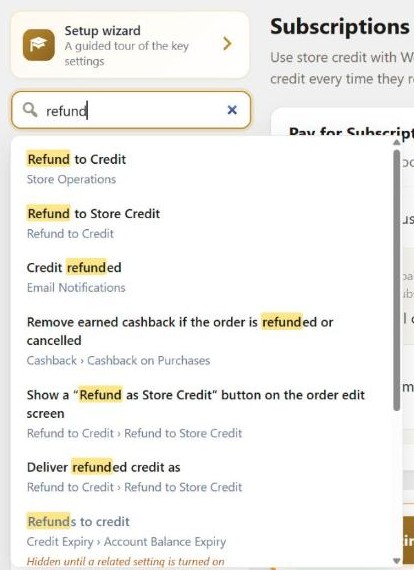
The Settings page also keeps track of changes you haven’t saved. Each tab with unsaved changes gets a marker in the menu, the tabs are listed next to the Save button, and your browser asks you to confirm if you try to leave the page before saving.
Privacy Tools for GDPR Requests
Simple Store Credit now works with the two personal data tools that come with WordPress, under Tools:
- Export Personal Data now includes the customer’s store credit balance, their credit vouchers and their store credit history.
- Erase Personal Data anonymises the customer’s store credit history. The amounts are kept, so your reports and totals still add up.
Unspent credit is money your store owes the customer. So if a customer still has a balance or a voucher they can use, their store credit data is kept when you run the eraser, and the result tells you why. This is the same way WooCommerce keeps orders that are still in progress. Once the credit is spent, running the eraser again anonymises it.
The plugin also adds suggested text for your privacy policy, which you can copy from the policy guide under Settings > Privacy.
Activity Log Changes
The Activity log is easier to use when you are looking into a single customer or order:
- You can filter it to one customer, from the customer filter or the filter icon next to a customer’s name.
- The search box now also finds a customer by their name or email address, and an entry by its order number.
- Entries link to the order or voucher they came from.
- When someone changes a balance from the admin, for example a manual adjustment, the entry records which staff member did it.
- Clicking a customer’s name opens their Customer Overview, which in turn links to their full history.
The Customer Overview links to orders and vouchers in the same way, and the Activity CSV export has new columns for them. On the Customers list, adding or removing credit now asks you to confirm first, showing the customer and the amount. This includes pressing Enter in the amount box.
Fixes
The first fix matters for any store that sells subscriptions, on the free or PRO version.
If a customer used store credit at checkout when buying a subscription product, that credit was also saved on the subscription. Every renewal after that was then discounted by the same amount, even though the credit had only been taken from the customer once. This is now fixed. Subscriptions that were affected are corrected at their next renewal, and renewal orders that are already waiting for payment are corrected automatically the next time a store manager uses the WordPress admin.
The other fixes in this release:
- Store credit held by an unpaid order now goes back to the customer when they retry the checkout for that order, or when the order is trashed or deleted.
- With the FOX (WOOCS) Currency Switcher, completing an order in another currency made the rest of that request treat that currency as the store’s main currency. For example, cashback on a completed £120 order was credited as $12 instead of $15.84. The plugin now reads the main currency from the switcher’s own base currency setting.
- Store credit emails, including the preview email you can send from the settings page, are now sent through WooCommerce’s mailer. They now use the WooCommerce email styles and come from the “From” name and address in your WooCommerce email settings.
- Editing an ordinary product (simple, variable, grouped or external) hid the SKU and stock fields on its Inventory tab, along with fields other plugins add there. The store credit product editor now only loads when store credit products are enabled, or for a product that already is one.
After Updating
You don’t need to do anything after updating. The Subscriptions features are all off until you switch them on, and the setup wizard does not open on stores that already have settings saved.
There are a few things you may notice:
- Store credit emails now look like your other WooCommerce emails and use the sender name and address from WooCommerce > Settings > Emails. Send yourself a preview from the Email Notifications tab to check them.
- If you sell subscriptions and a customer used store credit when they first bought one, the next renewal of that subscription is no longer discounted by that credit, so its total will be higher than earlier renewals.
- If you import the Activity CSV export into another tool, the new columns are added at the end, after the existing ones.
You can find out more on the Simple Store Credit plugin page, and in the documentation.
Full Changelog
- New: (PRO) WooCommerce Subscriptions module, off by default. Customers can pay for subscriptions with their store credit balance, with each renewal charged automatically; store credit can be applied to renewals paid by another method, always or when the customer opts in; subscription products can add store credit on every payment (“credit memberships”); and customers can be emailed before a renewal their balance will not cover.
- New: (PRO) Emails for renewals paid with store credit, store credit renewals that fail, and low balances before a renewal.
- New: (PRO) Option to stop subscription renewals earning cashback.
- New: Setup wizard. A guided walkthrough opens after the plugin is first activated and explains each key decision in plain language with live previews: credit types and naming, ways customers get credit (refunds, top-ups, gift cards, cashback), how they spend it, the look of the checkout tool and Store Credit page, emails and PRO extras. It can create a “Buy Store Credit” page and a first gift card product, then finishes with a summary of your program, one-click test credit to try the checkout yourself, and suggested next steps. Reopen it any time from the Settings page.
- New: GDPR / privacy support. Store credit balances, vouchers and activity history are included in WordPress’s Export Personal Data tool, and the Erase Personal Data tool anonymises a customer’s store credit history (amounts are kept so reports still add up). Customers with an unspent balance or voucher have their data retained until it is spent. Suggested privacy policy text is added under Settings → Privacy.
- New: Settings search. Type in the box above the settings tabs to find a setting by its name or description; choosing a result opens its tab (and sub-tab or email) and highlights it. Settings that are hidden until another setting is turned on are flagged as such.
- New: The settings page marks tabs that have unsaved changes, lists them beside the Save button, and asks before you leave the page without saving.
- New: The Activity log can be filtered to a single customer, and its search now also matches customer names, emails and order numbers.
- New: Activity log and Customer Overview entries link to the order or voucher they belong to, and record which staff member made a manual adjustment or another change from the admin. The Activity CSV export includes these as new columns at the end.
- Tweak: Customer names in the Activity log now open the Customer Overview, and the Customer Overview links to the customer’s full activity history.
- Tweak: Adding or removing credit from the Customers list (including pressing Enter in the amount box) now asks for confirmation, naming the customer and the amount.
- Tweak: Store credit already applied to a subscription renewal is carried over to the checkout when the customer pays for the renewal themselves.
- Tweak: The Store Credit payment method now stays manageable (cancel, suspend, change dates) on subscriptions that use it.
- Fix: Store credit applied at checkout for a subscription product was also saved on the subscription, so every renewal was discounted by credit that had only been deducted once. Existing subscriptions affected by this are corrected at their next renewal, and renewal orders already waiting for payment are corrected automatically when a store manager next uses the WordPress admin.
- Fix: Store credit held by an unpaid order is returned to the customer when checkout is retried for that order, or when the order is trashed or deleted.
- Fix: With FOX / WOOCS Currency Switcher, completing an order in another currency made the rest of that request convert that currency 1:1 (for example cashback on a completed £120 order was credited as $12 instead of $15.84). The shop’s base currency is now read from the switcher’s base-currency setting, which it does not change.
- Fix: Store credit emails, including the preview email from the settings page, are now sent through WooCommerce’s mailer, so the WooCommerce email styles are applied and they come from the store’s “From” name and address in the WooCommerce email settings.
- Fix: Editing an ordinary product (simple, variable, grouped or external) hid the SKU and stock management fields on its Inventory tab, along with Inventory fields added by other plugins. The store credit product editor now also loads only when store credit products are enabled, or for a product that already is one.

Our plugins
Grow your WooCommerce store
Affiliates, loyalty points, store credit, tax exemption and more – trusted on 248,000+ sites.
Comments