






Version 1.12.0 of Simple Points and Rewards is now available!
Points Delay
The main new feature of 1.12.0 is the Points Delay system.
This allows you to delay when earned points are actually credited to a customer’s balance – either globally across all earning methods, or configured per individual earning method for more granular control.
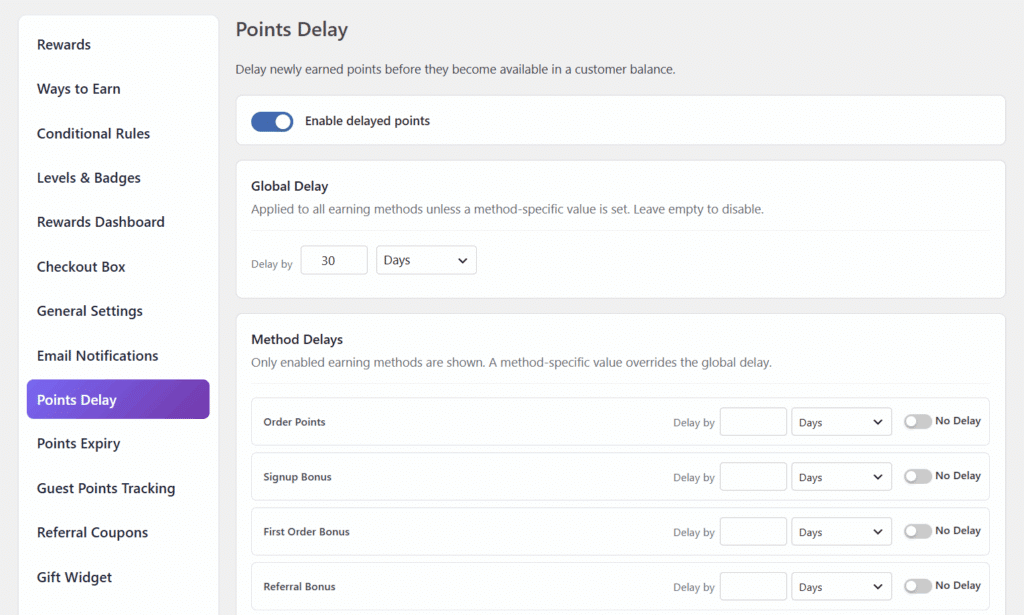
Until the delay period elapses, points are held in a “pending” state.
Automated release runs in the background to credit them once the time is up.
If an order is refunded or cancelled before points are released, the pending points are handled accordingly – so you don’t have to worry about crediting points on orders that never completed.
This is a great way to align your loyalty program with your store’s refund window, giving customers and your business peace of mind.
New “Add New Points” Bulk Tool
A new Add New Points tool has been added to the Customer Points and Points Activity Log admin page.
This tool allows admins to add or remove points for a specific user, or apply the change to all users at once – with an optional role filter to target specific user roles.
This is particularly useful for running promotions, correcting points balances in bulk, or rewarding your entire customer base for a special event.
Include Tax in Points Preview
A new “Include tax in points preview” option has been added to the Points Discount on Checkout settings.
When enabled, tax is included in the discount amount calculation and preview, ensuring the value shown to the customer on the checkout rewards box matches the actual discount applied when taxes are enabled on your store.
This small but important improvement means your customers always see an accurate figure before they apply their points.
Font Awesome Icons for Reward & Level Icons
The reward icon and level icon settings now support Font Awesome icons as an option, alongside the existing emoji and custom image URL options. A new icon color option also lets you customise the color to match your store’s branding.
This makes it much easier to create a polished, on-brand rewards experience.
Referral Gift Widget Improvements
Several improvements have been made to the floating gift widget and referral coupon system:
- A new “Auto-apply coupon when referral link is visited” option lets you automatically add the gift coupon to the customer’s cart when they visit via a referral link – no manual “Apply Coupon” click required (disabled by default).
- The floating gift widget now remains visible after the coupon has been applied, showing a “Gift Applied!” confirmation state rather than disappearing immediately.
- The “Gift Coupon Expiry” setting now directly controls the lifetime of the referral coupon cookie. The expiry is measured from the moment the referral link is first clicked, and the widget is automatically hidden and cookies cleared once the time is up.
Full Changelog
- New: Added PRO Points Delay settings to delay earned points globally or per earning method, with pending point release automation and refund/cancellation handling.
- New: Added a “Include tax in points preview” option to the “Points Discount on Checkout” settings, which when enabled will include tax in the discount amount calculation and preview to match the actual discount applied on checkout when taxes are enabled.
- New: Added an “Add New Points” tool to the Customer Points and Points Activity Log admin page, allowing admins to add or remove points for a specific user or all users (with optional role filter) in bulk.
- Tweak: Added font awesome icons as options for the reward icon and level icon options, as well as an option to customise the icon color.
- Tweak: (PRO) Changed the “Coupon Tracking Mode” option to a dropdown with “Flexible Mode” as the default.
- Tweak: (PRO) The “Gift Coupon Expiry” setting now directly controls the lifetime of the referral coupon cookie. The expiry timestamp is stored at the moment the referral link is clicked, ensuring the countdown and expiry are measured from that point. The offer widget is hidden and cookies are cleared once the time is up.
- Tweak: (PRO) Added an “Auto-apply coupon when referral link is visited” option to the referral gift offer settings. When enabled, the gift coupon is automatically added to the customer’s cart without requiring them to click “Apply Coupon” (disabled by default).
- Tweak: (PRO) The floating gift widget now remains visible after the coupon has been applied to the cart, showing a “Gift Applied!” confirmation state instead of disappearing.
- Tweak: Made a few styling improvements to the admin settings page.
- Fix: Fixed an issue with some websites not being able to save settings due to their database not supporting emoji characters.
- Fix: Improved “Save All Settings” reliability by ensuring the settings admin script uses the plugin version for cache busting, preventing older cached JavaScript from running after plugin updates.
- Fix: Fixed the bulk delete option on the points activity log admin page not working.
- Fix: (PRO) Fixed the floating gift widget not showing on the first page load after a referral link is visited.

Our plugins
Grow your WooCommerce store
Affiliates, loyalty points, store credit, tax exemption and more – trusted on 248,000+ sites.

Comments