






Version 1.11.0 of Simple Points and Rewards is now available!
Guest Customer Points Tracking
The headline new feature of 1.11.0 is Guest Customer Points Tracking for Pro users.
This allows you to track points for guest checkout orders – customers who purchase without being logged in.
When the guest later registers or logs in, their previously earned points are automatically migrated to their account.
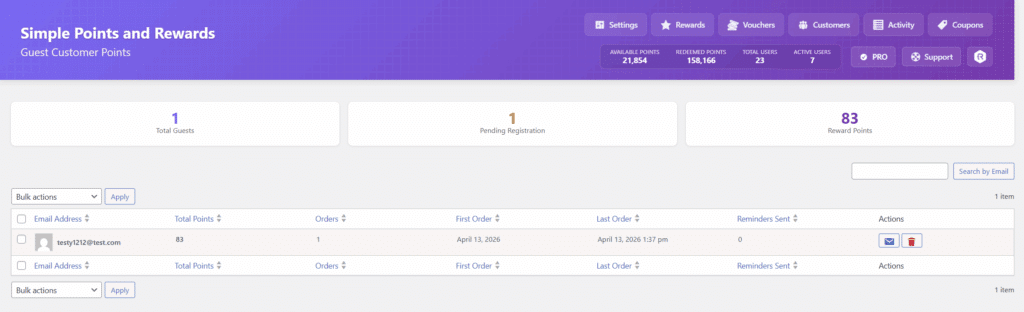
This is a great way to ensure no customer misses out on their reward points, even if they checked out as a guest, and can help incentivise guest customers to create an account.
You can even setup automated reminder emails to remind the customer to come back and register to claim their points.
Level Points Requirement Option
A new “Level Points Requirement” option lets you decide whether a customer’s level is determined by their total points earned (lifetime) or their current available points balance.
This gives you more flexibility in how your loyalty tiers work – for example, lifetime-based progression rewards long-term customers regardless of how many points they’ve spent, while balance-based progression adds an extra layer of strategy for customers.
Custom Level Multipliers per Way to Earn
Levels now support setting custom multipliers for each way to earn, giving you much finer control over how level benefits are applied.
Previously, a level multiplier was applied across all earning methods. Now, you can set a different multiplier for each individual way to earn – for example, a higher multiplier for orders than for writing reviews.
Each level’s benefit section is now also displayed in its own styled box in the settings, making configuration much cleaner and easier to read.
Background Color for Product Points Display
A new “Background Color” option has been added to the Product Points Display settings, for both single product pages and category/shop listing pages.
This lets you customise the background of the points message to better match your store’s design and branding.
New {points_value} Placeholder
A new {points_value} placeholder is now available for the Product Pages: Points Display message fields.
This placeholder displays the monetary value of the points a customer will earn for a product, based on the Points Discount on Checkout conversion rate. For example, if 100 points = $1 and a product earns 500 points, {points_value} will display “$5.00”.
This is available when the Points Discount on Checkout feature is enabled, and makes it much easier to communicate the real-world value of points to your customers directly on the product page.
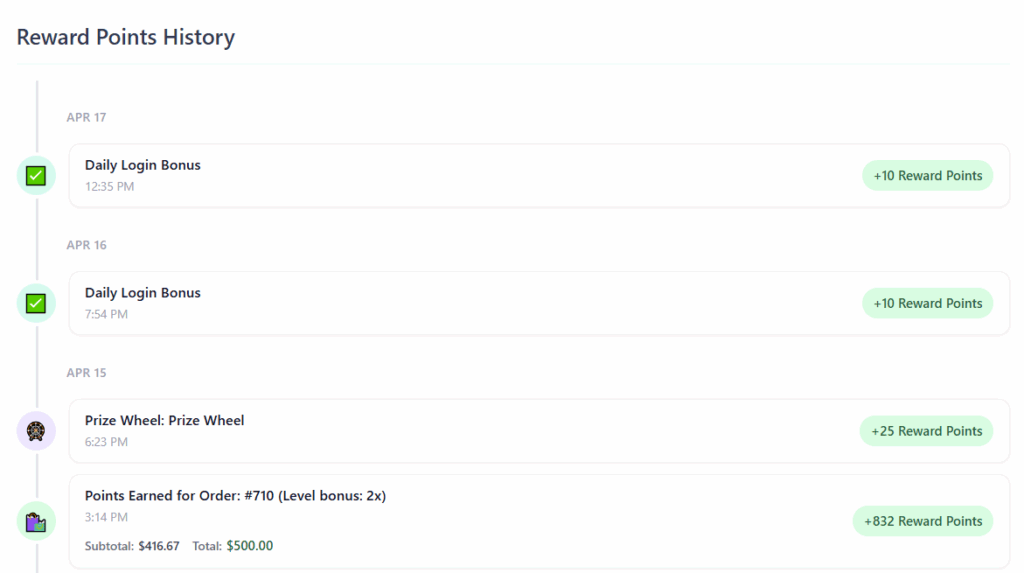
Improved Points History Design
The Reward Points History section on the customer rewards dashboard has been updated with a more modern design, improving the overall look and feel of the rewards experience.
Performance Improvements
Several notable performance improvements have been made in this release:
- Reduced database queries on both the frontend and admin, particularly for stores with large amounts of coupons or order volumes.
- Fixed a critical performance issue where the voucher lookup on cart and checkout pages was performing expensive queries. This was causing slow page loads on stores with large numbers of coupons.
Other Fixes
- Fix: Fixed the “Product” field on the Rewards settings tab not appearing instantly when changing the “Reward Type” to “Free Product” – it now shows immediately via JavaScript without requiring a page refresh.
- Fix: Fixed vouchers in the “My Vouchers” tab on the checkout rewards box not showing “+ Free Shipping” alongside the discount amount (e.g. “$5 Off + Free Shipping”) when the reward had free shipping enabled.
- Fix: On the checkout rewards box, fixed the “Available Rewards” tab not showing the free shipping label for rewards that had free shipping enabled.
- Fix: Tweak to how tax is handled in the points redemption discount fee on checkout to ensure it works correctly with various tax settings.
- Fix: Fixed an issue where checkbox/toggle settings could revert to defaults on save, particularly on new installs. Caused by the save handler forcing unchecked state for checkboxes whose form sections were not rendered (e.g. PRO-only earn types on free installs). The save logic now detects whether each earn type’s form section was actually present before overwriting checkbox values.
- Fix: Fixed the checkout rewards box appearing multiple times on custom checkout pages built with Divi (or other page builders) that use multiple checkout modules, each of which triggered a separate render of the rewards box.
Thanks for using Simple Points and Rewards!

Our plugins
Grow your WooCommerce store
Affiliates, loyalty points, store credit, tax exemption and more – trusted on 248,000+ sites.
Comments