






Version 3.1.0 of Simple Points and Rewards is now available!
Most of this release is about connecting your loyalty program to other software. A new API, Webhooks & AI page lets you switch on a REST API for apps, POS systems and automation tools, send webhooks to other services when points change (PRO), and let AI apps such as Claude, ChatGPT and Cursor look up your customers’ points through the WordPress Abilities API and MCP. Each of these is off until you switch it on.
PRO stores also get a “new customers only” option for the First Order Bonus, grouped Ways to Earn settings and a tidier floating rewards widget. There are fixes for guest points and partial refunds too.
A New “API, Webhooks & AI” Page
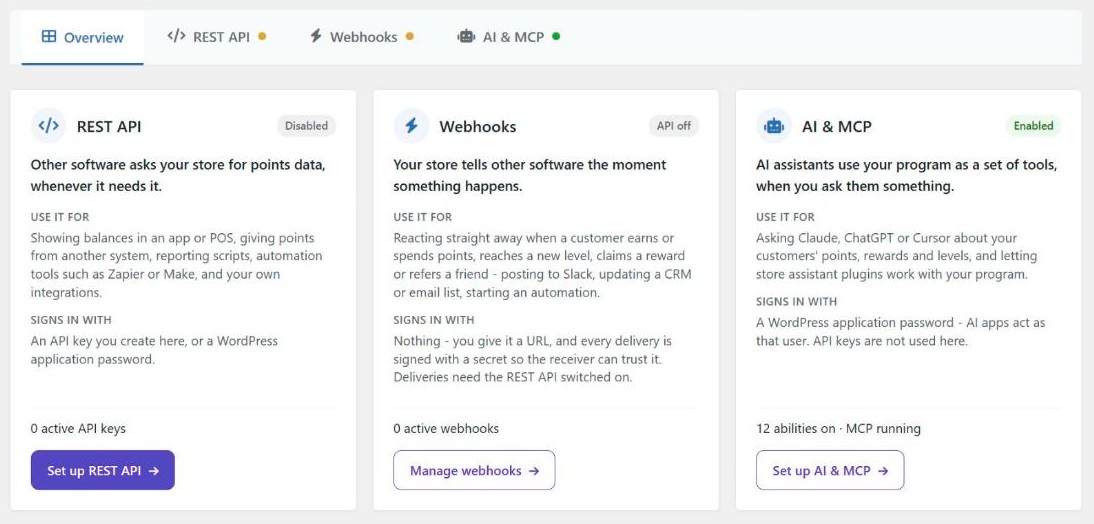
There is a new page under Points & Rewards > API, Webhooks & AI. Its Overview tab compares the three ways to connect other software to your program:
- REST API: another app asks your store for points data whenever it needs it.
- Webhooks (PRO): your store tells another service straight away when something happens, such as a customer earning points.
- AI & MCP: an AI app uses your program as a set of tools when you ask it a question.
They sign in in different ways and each has its own switch, so you can use one without the others.
REST API
The new REST API lets other software read and change points data without anyone logging in to WordPress. For example, a POS system could show a customer’s balance at the till, a script could pull your store-wide points totals every night, or Zapier or Make could give a customer points when something happens in another app.
Software with read access can get customers’ balances, lifetime points, levels, points history, rewards, vouchers and referral stats, plus a summary report for the whole store. With write access it can also add or remove points, set a balance to an exact amount, ban a customer from earning points and claim a reward for a customer. There is also an /events feed of every points change, which another tool can check every few minutes to pick up anything new since its last check.
Requests sign in with an API key you create on the REST API tab, or with a WordPress application password. Each key acts as a WordPress user, so it never has more access than that user. Keys have one or more scopes:
- read for reading data,
- write for changing points, balances, bans and rewards,
- manage for creating API keys and webhooks, which is the same as full access.
You can give a key an expiry date. Only a hash of the key is saved, so copy it when it is created because it can’t be shown again. A key made for a customer’s user ID can only see that customer’s own points.
Every endpoint can be switched off on its own, and the tab links to an OpenAPI description of the API that you can import into tools such as Postman or Insomnia.
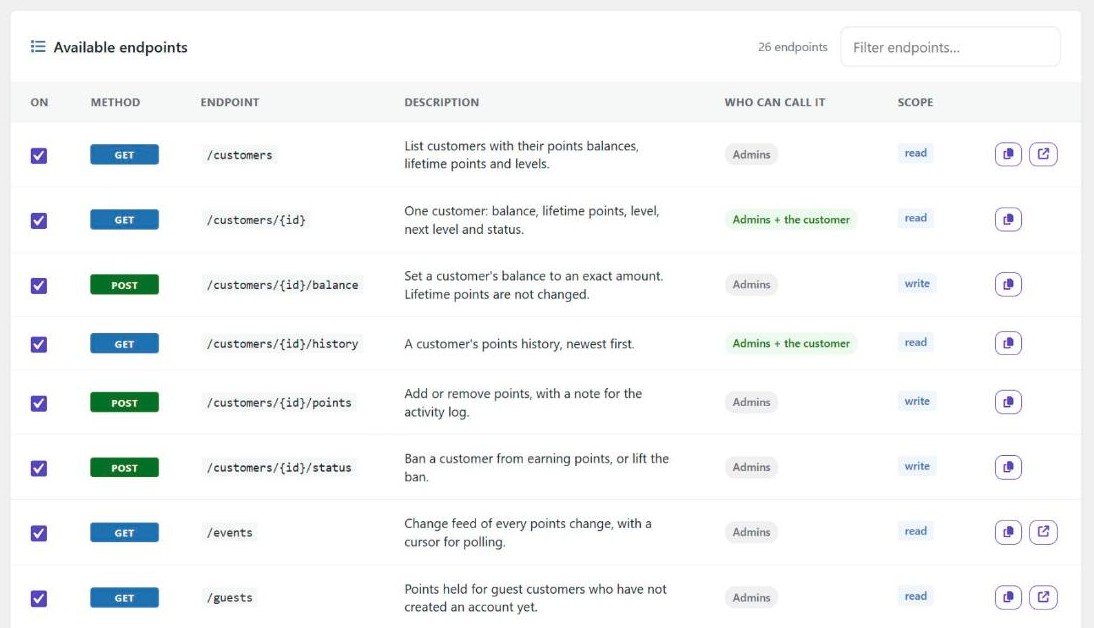
To switch it on, go to the REST API tab and click Enable API. You can create API keys before you enable it.
Webhooks (PRO)
Webhooks are the other way round: instead of another app asking for data, your store sends a notification to a URL you choose as soon as something happens. You could use one to post in Slack when a customer reaches a new level, update a customer’s record in your CRM or email tool, or start an automation.
Each webhook can subscribe to any of these events:
- a customer earns points or is given points
- points are taken from a customer (spent, refunded, expired or removed by an admin)
- a customer moves to a new level
- a customer claims a reward
- a referred friend places an order and the referrer is rewarded, or that referral reward is taken back
- points are held back by the points delay, or expire
- a guest earns points for an order
Every delivery is signed with the webhook’s secret (an HMAC-SHA256 signature in the X-SPAR-Signature header), so the service receiving it can check it came from your store. If a delivery fails, it is tried again up to four more times, waiting longer each time. A webhook that keeps failing (25 times in a row, over at least a day) is switched off.
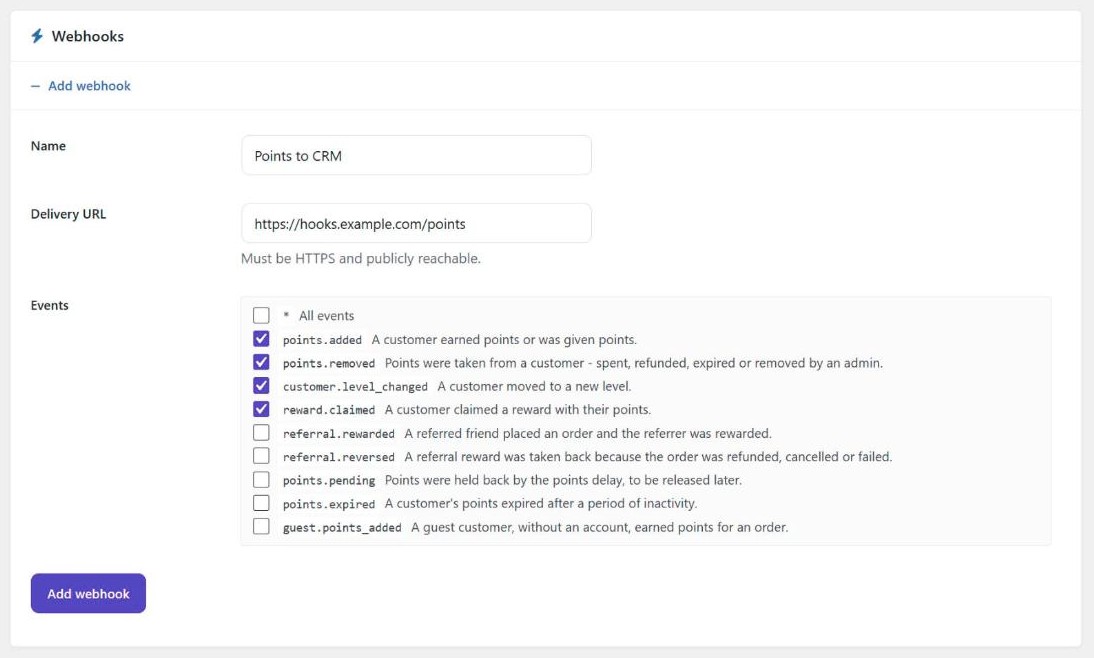
Webhooks are set up on the Webhooks tab. The delivery URL has to use HTTPS, and there is a Test button to send a sample delivery. They are only sent while the REST API is switched on. On the free version, the /events endpoint gives you the same information if you check it on a schedule.
Connect AI Apps with AI & MCP
WordPress 6.9 added the Abilities API, which lets plugins tell AI agents and other plugins what they can do. Simple Points and Rewards now registers its own abilities, so an AI app connected to your site can look up a customer’s balance and history, list your rewards and levels, check referral stats and read the program summary. You can then ask it something like “Who are my 10 customers with the most points?” or “Has [email protected] claimed any rewards?” and it answers from your store’s data.
To connect apps such as Claude Desktop, Claude Code or Cursor over MCP (Model Context Protocol), install the free WordPress MCP Adapter plugin, or switch on WooCommerce’s experimental “WooCommerce MCP” feature, which includes it. Simple Points and Rewards then adds its own MCP server. The AI & MCP tab shows its address and a config you can copy into your AI app. AI apps sign in with a WordPress application password and get the same access as that user.
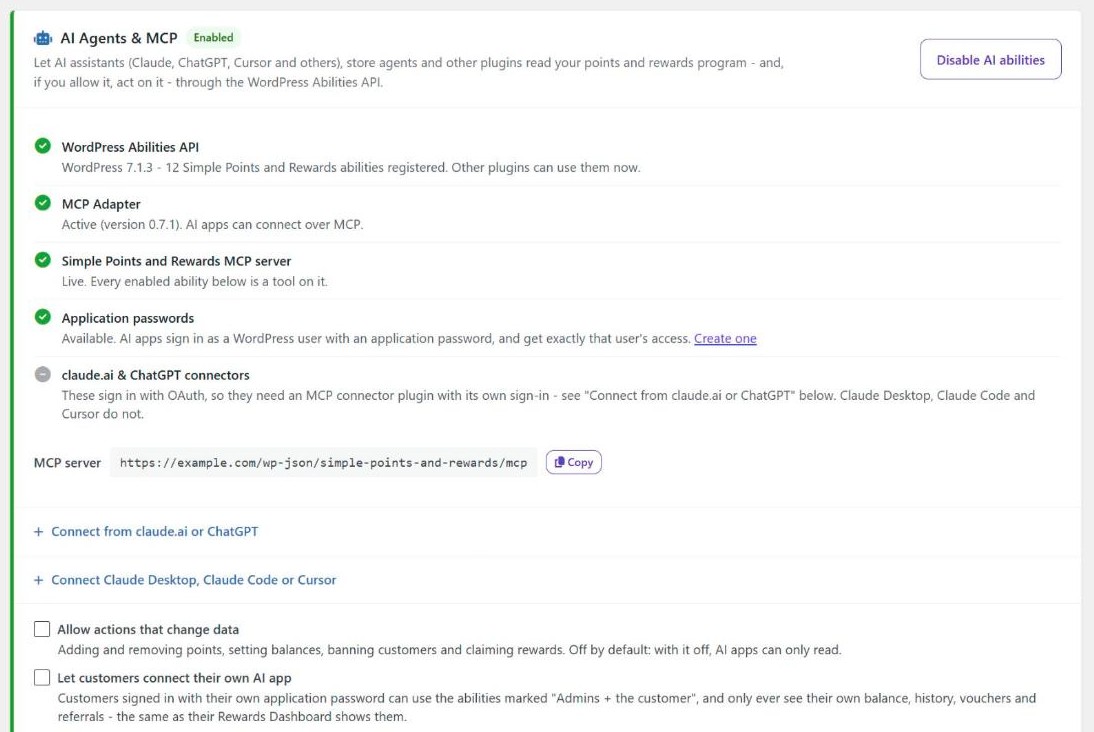
claude.ai and ChatGPT connectors are a bit different. They connect from the AI company’s servers and sign in with OAuth, which the MCP Adapter doesn’t provide. For these, the tab suggests a few third-party MCP connector plugins that have their own sign-in and can pass on the Simple Points and Rewards abilities. Your site also has to be reachable from the internet for this to work.
A few safeguards are built in:
- It is read-only to begin with. Actions that change data (adding or removing points, setting balances, banning customers and claiming rewards) are only offered once you tick Allow actions that change data, and AI apps are asked to confirm with you before each change.
- Only store managers can use it by default. If you tick Let customers connect their own AI app, a customer who signs in with their own application password only sees their own balance, history, vouchers and referrals.
- Each ability can be switched off on its own.
- The most recent calls are listed under Recent AI activity, with the user, the result and whether the call came through MCP, the REST API, WP-CLI or another plugin.
AI & MCP is included in the free version and works whether or not the REST API is switched on. The abilities for pending (delayed) points and guest points need PRO, and so do the matching REST API endpoints.
First Order Bonus for New Customers Only (PRO)
Until now, the First Order Bonus went to any customer who hadn’t had it yet. On a store that had been selling for years before it started a rewards program, that meant an existing customer could get a “first order” bonus on their tenth order.
There is now an Only for customers with no earlier orders option under Settings > Ways to Earn > First Order Bonus. With it ticked, the plugin checks for an earlier completed, processing or on-hold order on the same account or the same billing email, guest orders included. If it finds one, the bonus isn’t given. Subscription renewals never get it either.
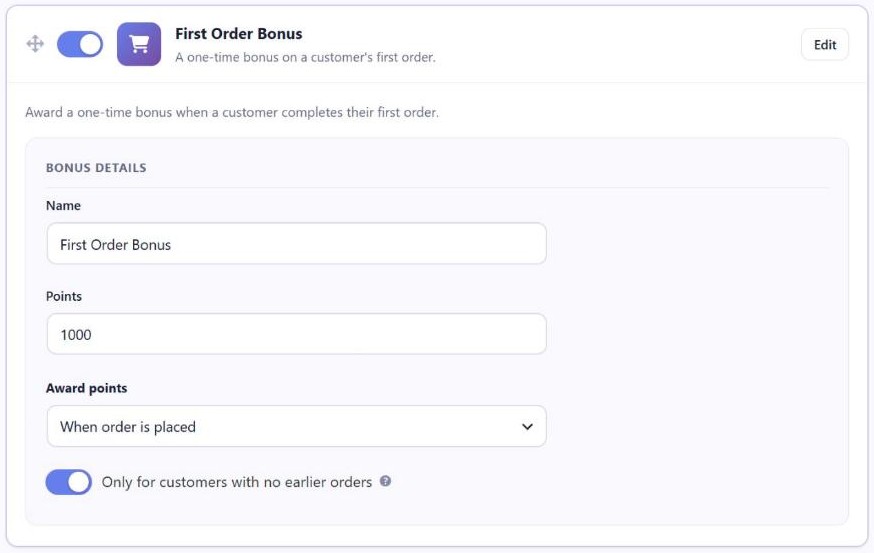
The option is off by default, so nothing changes until you tick it, and bonuses that were already given are not taken back.
Ways to Earn Settings in Groups (PRO)
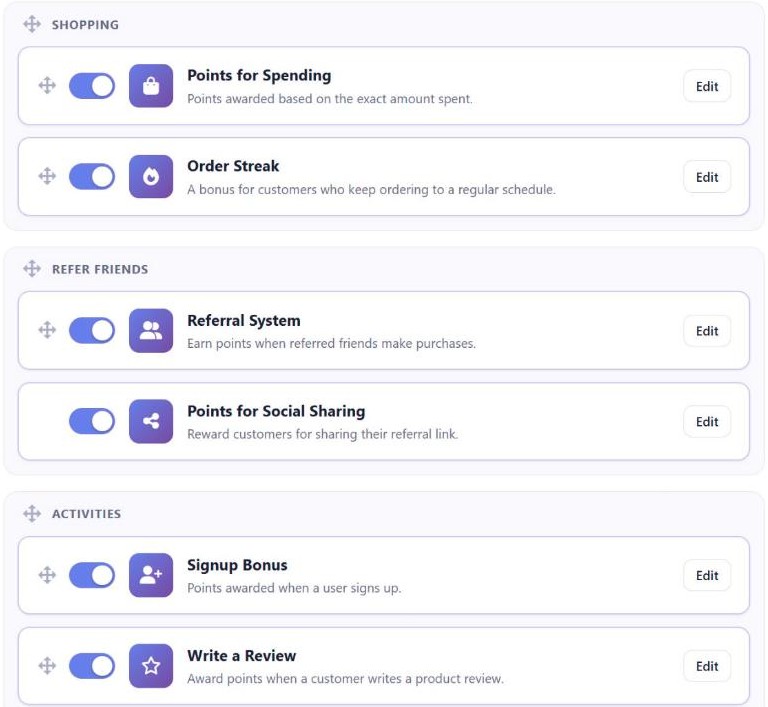
The Ways to Earn tab in the settings is now split into the same groups your customers see on the rewards dashboard: Shopping, Refer friends and Activities. Drag a whole group to change the order the groups appear in on the dashboard, or drag a way to earn to move it within its group.
Floating Rewards Widget Changes (PRO)
The floating rewards widget has had some changes too:
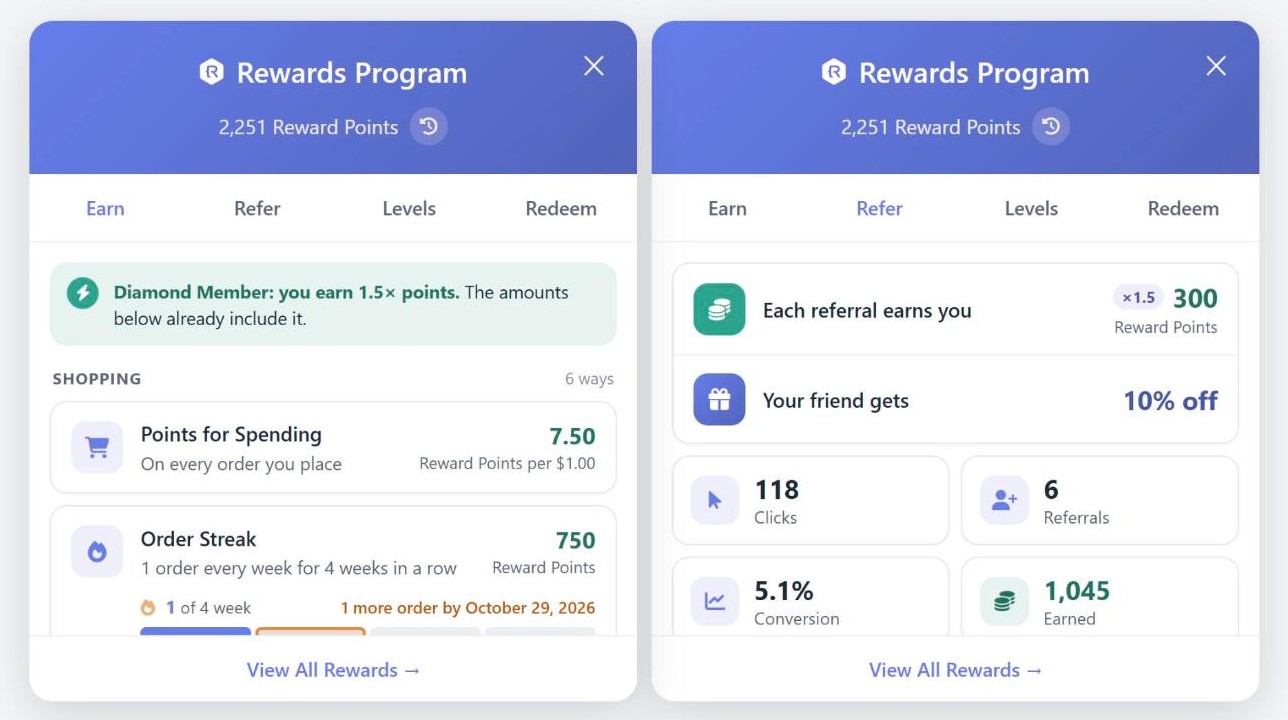
- On the Earn tab, each way to earn now has its own box with the points it earns on the right, grouped under Shopping, Activities and Refer friends as on the rewards dashboard. If the customer’s level gives them a bonus, this is explained once at the top instead of on every way to earn.
- The Refer tab now starts with what the customer earns for each referral and, if the referral offer is switched on, the discount their friend gets.
- The button that opens the widget and the header at the top of the open widget can now have different text, under Settings > Rewards Widget. The header uses the button text until you give it its own.
- “Large” is now the default and recommended size. If you chose a size before, the widget keeps it.
Fixes
This release also fixes a few problems, mostly with guest points (PRO):
- “Also deduct points when part of an order is refunded” did nothing for orders placed as a guest. It now takes back the refunded share of the points, whether they are still held for the guest, waiting for the points delay, or already in the account the guest created. Deleting the refund gives the points back.
- The guest points sync gave older orders the date the sync ran, so the Guest Points list showed that day as the first and last order date and the points delay started again from it. Synced orders now keep the date they were placed.
- When points from a guest order were taken back, “Refunded”, “Cancelled” or “Failed” stayed in English in the points history.
- The floating rewards widget showed custom ways to earn without the customer’s level bonus, and on stores with different points rates per currency it showed the main currency’s points next to the shopper’s currency.
After Updating
You don’t need to do anything after updating. The REST API, webhooks and AI abilities all stay off until you switch them on, and the new First Order Bonus option is off by default.
If the MCP Adapter or WooCommerce MCP is already active on your site, you will see a notice offering to switch on AI & MCP. You can switch it on from the notice, open the AI & MCP tab first, or dismiss it.
If you have run the guest points sync (PRO) before, run it again from Points & Rewards > Guest Points > Sync Points. It corrects the order dates that earlier syncs recorded.
You can find out more on the Simple Points and Rewards plugin page, and in the documentation.
Full Changelog
- New: AI & MCP. Let Claude, ChatGPT, Cursor and other AI apps answer questions about your loyalty program through the WordPress Abilities API (WordPress 6.9+), with a dedicated MCP server when the WordPress MCP Adapter is active. It starts read-only and for store managers only; you can allow actions that change points, and let customers connect their own AI app to see just their own account. Recent AI activity is listed on the page. Off by default.
- New: (PRO) “Only for customers with no earlier orders” option for the First Order Bonus (Settings > Earn > First Order Bonus). Customers with an earlier order on the same account or billing email, guest orders included, don’t get the bonus, and neither do subscription renewals. It’s off by default, and bonuses already given are kept.
- New: (PRO) The “Refer” tab of the floating rewards widget now starts with what the customer earns for each referral and, when the referral offer is on, the discount their friend gets.
- New: (PRO) Separate text for the floating rewards widget’s button and for the header at the top of the open widget (Settings > Rewards Widget). The header uses the button text until you set its own, so nothing changes for stores that leave it empty.
- New: “API, Webhooks & AI” page (Points & Rewards > API, Webhooks & AI). Switch on a REST API to connect apps, POS systems, Zapier, Make and your own tools: read customers’ balances, history, levels, rewards, vouchers, referral stats and store-wide reports, give or take points, set balances, ban customers and claim rewards. Sign in with an API key (read, write or manage, with an optional expiry date) or a WordPress application password. Each endpoint can be switched off, and an OpenAPI description is included. Off by default.
- New: (PRO) Webhooks. Send a signed notification to another service the moment a customer earns or spends points, reaches a new level, claims a reward, refers a friend, has points expire or held back, or a guest earns points. Failed deliveries are retried, and a webhook that keeps failing is switched off.
- New: (PRO) Guest points and pending (delayed) points in the REST API and AI abilities.
- Tweak: (PRO) Cleaner “Earn” tab in the floating rewards widget. Each way to earn is in its own box with what it earns on the right, ways are grouped under Shopping, Activities and Refer friends (as on the rewards dashboard), and a level bonus is explained once at the top instead of on every way.
- Tweak: (PRO) “Large” is now the default and recommended size for the floating rewards widget. Stores that already chose a size keep it.
- Tweak: (PRO) The “Ways to Earn” settings are now grouped under Shopping, Refer friends and Activities, as on the rewards dashboard. Drag a group to change the order the groups appear in on the dashboard, or drag a way to earn to reorder it within its group.
- Fix: (PRO) The floating rewards widget showed custom ways to earn without the customer’s level bonus, although it is added when the points are awarded.
- Fix: (PRO) With different points rates per currency, the floating rewards widget showed the main currency’s points next to the shopper’s currency.
- Fix: (PRO) “Also deduct points when part of an order is refunded” did nothing for orders placed as a guest. It now takes back the refunded share whether the points are still held for the guest, waiting out the points delay, or already in the account the guest created. Deleting the refund gives the points back.
- Fix: (PRO) When points from an order placed as a guest were taken back, “Refunded”, “Cancelled” or “Failed” stayed in English in the points history.
- Fix: (PRO) The guest points sync dated older orders with the day it ran. The Guest Points list showed that day as the first and last order date, and the points delay started again from it. Synced orders now use the date they were placed, and running the sync again corrects orders an earlier sync recorded.

Our plugins
Grow your WooCommerce store
Affiliates, loyalty points, store credit, tax exemption and more – trusted on 248,000+ sites.
Comments