






Most WooCommerce spam comes in through a small number of forms, mainly the checkout, the account registration form, the login and password reset forms, and product reviews.
The quickest way to stop most of it is to put a bot check on those forms.
For most stores I’d use Cloudflare Turnstile, which is free and usually invisible to shoppers. After that, switch on the rate limiting WooCommerce already includes and let your payment gateway’s fraud rules catch whatever still gets through.
If you’re being hit by card testing right now, skip to what to do during an attack.
A quick disclosure first. I build two of the tools in this guide, Simple CAPTCHA with Cloudflare Turnstile and reCAPTCHA for WooCommerce. Both are free and neither has a paid version, so there’s nothing to upsell here. I’ve still listed the real downsides of both, next to the tools I don’t make.
How I put this guide together
I maintain both of my plugins, so a lot of what follows comes from support threads and from checkout bugs I’ve fixed on real stores. For the other tools, I read the current product pages and documentation. Every price, limit and install count below was checked on the live pages on 23 September 2026.
Ways to stop WooCommerce spam
| Method | What it helps with | Cost |
|---|---|---|
| WooCommerce settings | Junk orders from outside your market, review spam | Free |
| Checkout rate limiting | Fast repeat checkout attempts from one IP address | Free, built into WooCommerce |
| Simple CAPTCHA with Cloudflare Turnstile | Bots on checkout, account forms, comments and contact forms | Free |
| reCAPTCHA for WooCommerce | Bots on checkout and account forms | Free plugin; Google charges above 10,000 checks a month |
| Cloudflare rules | Floods of checkout requests before they reach WordPress | Limited rules on the Free plan |
| Payment gateway fraud rules | Card testing that gets past everything else | Depends on your gateway |
| Akismet | Comment and review spam | From $9.95/month for commercial sites |
| CleanTalk Anti-Spam | Spam registrations, orders, reviews and forms | From $12/year |
| OOPSpam | Card testing through the Store API, form spam | Paid API, 40 free checks a month |
| Anti-Fraud for WooCommerce | Risky orders and repeated failed payments | $139/year |
Last checked and updated: 23 September 2026
Where spam gets into a WooCommerce store
Spam on a store is rarely one problem. Bots go after different forms for different reasons, and protecting one form does nothing for the others. Before you install anything, work out which of these you’re dealing with.
| Where | What the bot wants | What you’ll notice |
|---|---|---|
| Checkout (classic or block) | To test stolen card numbers, or to flood your order list | Many failed or cancelled orders for one cheap product, minutes apart |
| Pay for order page | The same, against an order that already exists | Repeated failed payments on a single order |
| Account registration | Accounts to post spam from | New customers with random names and throwaway email addresses |
| Login and password reset | To guess passwords, or to send reset emails in bulk | Failed login spikes, customers asking about reset emails they didn’t request |
| Product reviews and comments | Links back to spam sites | Reviews with links, from people who never bought the product |
| Contact and other forms | Spam messages and links | Your inbox |
Card testing needs its own explanation, because it’s the one that costs money. Someone buys a list of stolen card numbers and uses your checkout to find out which cards still work, usually with small orders for your cheapest product. Each attempt can cost you a gateway fee, and your payment provider will notice the growing number of declines.
Two details are easy to miss. First, WooCommerce can create a customer account during checkout, and that’s a separate route from the registration form on the My Account page. Protect only the registration form and bots can still create accounts through checkout.
Second, the checkout block talks to WooCommerce through the Store API, a set of endpoints under /wp-json/wc/store/. Card testing scripts often skip your pages completely and post straight to those endpoints. WooCommerce’s developer blog has described attacks that target the Store API alone, even on stores that don’t use the checkout block. Whatever protection you choose needs to cover that route too.
Start with the settings WooCommerce already has
None of these need a plugin, and a couple of them take less than a minute.
Decide how you handle guest checkout
Guest checkout is convenient for customers. It’s also where most automated checkout abuse starts. Turning it off won’t stop a determined bot, because bots can register accounts as well. What it does is move the problem to your registration form, which is easier to protect.
Most stores should keep guest checkout on, since forcing people to register loses sales. If you keep it, make sure your bot check covers the checkout itself and not only the account forms. You’ll find these options under WooCommerce > Settings > Accounts & Privacy.
Only sell and ship where you trade
If you only sell in a few countries, set your selling and shipping locations under WooCommerce > Settings > General to match. A bot can type a local address as easily as any other, so this won’t stop card testing. It does remove the laziest junk orders.
Limit reviews to verified owners
Under WooCommerce > Settings > Products you can allow reviews only from “verified owners”, meaning customers who have actually bought the product. Review spam mostly disappears. The cost is that people who bought from you some other way can no longer leave a review.
Turn on checkout rate limiting
WooCommerce has rate limiting built in for checkout, but it’s off by default. You can switch it on at WooCommerce > Settings > Advanced > Features. In WooCommerce 11.1 the option is called “Rate limit Checkout”, and its description says it covers checkout place order requests and the Store API /checkout endpoint. Developers can change the limits with the woocommerce_store_api_rate_limit_options filter, as explained in the WooCommerce developer docs.
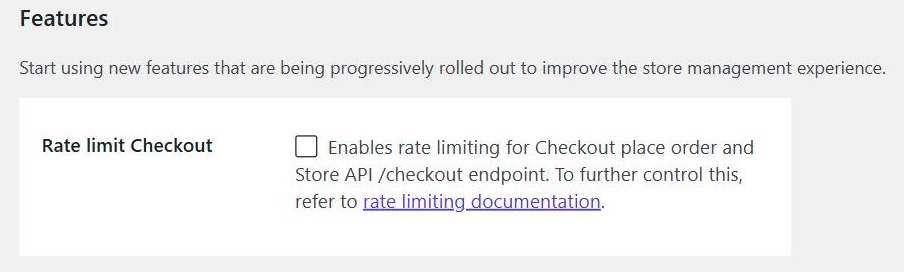
It won’t stop everything. It counts requests per IP address for guests, and per user ID for logged-in customers. Attacks that rotate through hundreds of IP addresses can stay under the limit, so treat it as one layer rather than the whole plan.
If your site sits behind Cloudflare or another proxy, turn on the proxy support option in that same filter. Without it, WooCommerce may see every visitor as the proxy’s IP address and start limiting real customers.
Add a bot check to your forms with Turnstile or reCAPTCHA
A bot check (most people still call it a CAPTCHA) is the most direct fix for automated spam. The widget on the page produces a one-time token. Your server then asks the provider whether that token is valid before the order or account is created. If the token isn’t valid, the order is rejected.
Both of my plugins run this check on the classic checkout, the checkout block and the Store API. A bot that posts straight to the API still needs a valid token.
Simple CAPTCHA with Cloudflare Turnstile
Simple CAPTCHA with Cloudflare Turnstile adds Cloudflare’s Turnstile check to WordPress and WooCommerce forms. It’s active on 200,000+ sites with a 4.7/5 rating on WordPress.org.
On the store side it covers the checkout, the pay for order page, and the login, registration, password reset and account details forms. It also covers the WordPress login, registration and comment forms, plus a long list of form plugins such as Contact Form 7, WPForms, Gravity Forms and Elementor Pro forms. That’s useful if spam is also coming in through your contact form or comments.
Turnstile is a free Cloudflare service. You need a free Cloudflare account to create the keys, but your site doesn’t have to use Cloudflare for anything else. With the appearance mode set to show only when interaction is required, most shoppers never see a widget at all.
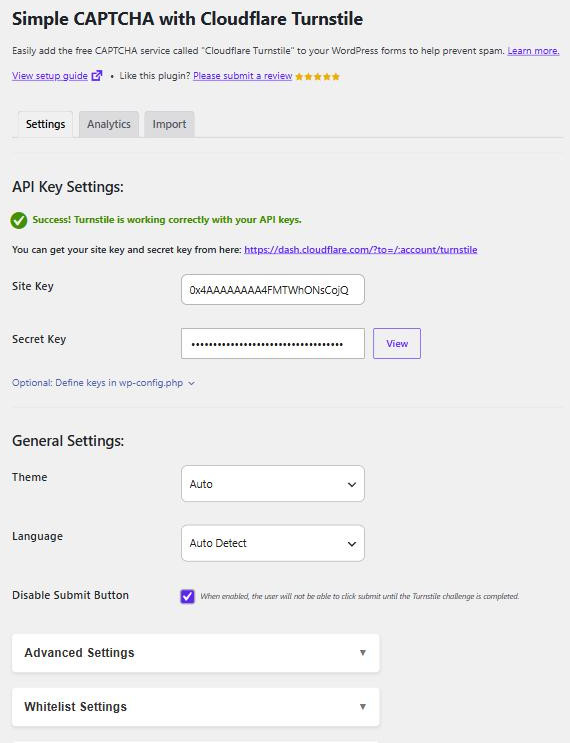
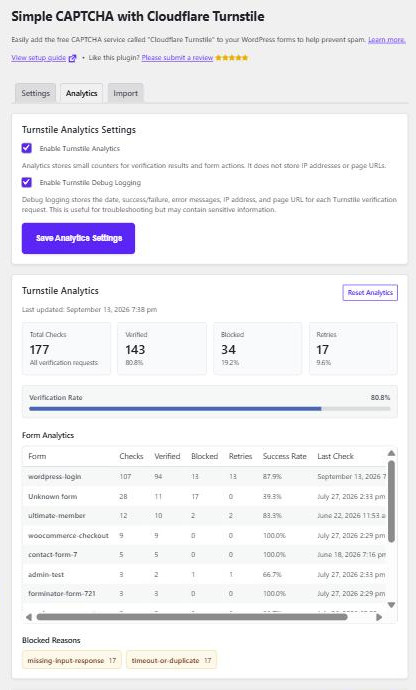
A few settings help when something goes wrong. Failsafe mode decides what happens if Cloudflare can’t be reached. It can let submissions through or fall back to reCAPTCHA. You can skip the check for logged-in customers or for IP ranges you trust, and an analytics tab shows how many submissions passed and failed.
Best for: most stores, especially ones getting spam through contact forms or comments as well as checkout.
Pros:
- Usually invisible to real shoppers
- Covers WooCommerce, WordPress core forms and many form plugins from one settings page
- No usage cap to plan for
Cons:
- Some express payment buttons skip the check, because they don’t submit the normal checkout form. If card testing comes through an express gateway, you’ll need that gateway’s own fraud rules.
- Custom checkouts and forms may not be supported or require extra testing.
Pricing: free, with no paid version. Setup steps are in my guide to adding Cloudflare Turnstile to WordPress forms.
reCAPTCHA for WooCommerce
reCAPTCHA for WooCommerce adds Google’s reCAPTCHA v2 “I’m not a robot” checkbox to seven forms. Four are WooCommerce forms (checkout, login, registration and password reset) and three are the WordPress login, registration and password reset forms. It has 40,000+ active installs and a 4.6/5 rating.
It deliberately does less than the Turnstile plugin. There’s one settings page, a light or dark theme, a choice of where the box sits on the checkout, and an option to skip the check for payment methods you pick.
One thing has changed since I released it. Google has moved reCAPTCHA into Google Cloud, and Google’s own pricing table now puts the free allowance at 10,000 assessments per calendar month. That allowance is shared across every site in your Google Cloud organization, not given to each site separately. Above it you need billing turned on. The next tier is an $8 flat monthly fee for up to 100,000 assessments.
That’s plenty for a small store. It’s tighter for an agency running many client sites under one Google account, or for a store in the middle of an attack, because every blocked bot attempt counts towards the total.
Best for: stores that want a visible checkbox customers recognise, or that already manage their sites in Google Cloud.
Pros:
- The checkbox is familiar to almost every shopper
- Very little to configure
Cons:
- v2 checkbox only. Every shopper has to tick the box and some also get an image puzzle. There’s no invisible v3 option.
- It doesn’t cover contact forms, comments or reviews.
- Google’s monthly allowance means high-traffic stores may end up paying Google.
Pricing: the plugin is free, with no paid version. Google’s side is free up to 10,000 assessments a month. Setup steps are in my guide to adding Google reCAPTCHA to WooCommerce.
Turnstile and reCAPTCHA compared
| Simple CAPTCHA with Cloudflare Turnstile | reCAPTCHA for WooCommerce | |
|---|---|---|
| Active installs | 200,000+ | 40,000+ |
| What shoppers see | Usually nothing, or a single click | A checkbox, sometimes an image puzzle |
| WooCommerce forms | Checkout, pay for order, login, registration, password reset, account details | Checkout, login, registration, password reset |
| Other forms | WordPress core forms, comments, many form plugins | WordPress login, registration, password reset |
| Provider cost | Free | Free up to 10,000 assessments a month |
| If the provider is down | Failsafe mode can allow submissions or fall back to reCAPTCHA | No fallback |
Which one should you use?
For most stores, Turnstile. It covers more forms and most customers never see it. There’s also no monthly allowance to watch. reCAPTCHA for WooCommerce still makes sense if your customers expect a visible checkbox, or if you already run everything through Google Cloud.
Pick one. Running two bot checks on the same form causes conflicts, and often one of the two widgets won’t load at all.
Block checkout floods before they reach WordPress
If your domain already runs through Cloudflare’s proxy, you can stop some abuse before it touches your server. This is separate from Turnstile, and it only works when Cloudflare sits in front of your site.
On the Free plan you get one rate limiting rule and five custom rules. Cloudflare’s documentation sets out the limits of that free rate limiting rule. It can only match on the URL path, it counts requests per IP address over 10 seconds, and it blocks for 10 seconds. That’s enough to rate limit the checkout block’s endpoint, /wp-json/wc/store/v1/checkout.
The classic checkout is harder. It submits to a query string (?wc-ajax=checkout), which a Free plan rate limiting rule can’t match. For that you need the Pro plan or above, or you rely on the WooCommerce and plugin options above.
Custom rules can match more. For example, if you only sell in the UK and Ireland, this custom rule with the Block action should stop checkout submissions from anywhere else:
(http.request.uri.path eq "/wp-json/wc/store/v1/checkout" or http.request.uri.query contains "wc-ajax=checkout") and http.request.method eq "POST" and not (ip.src.country in {"GB" "IE"})The catch is that a real customer on holiday abroad can’t check out either. Test any rule with a real order, and watch Security Events in the Cloudflare dashboard for a day before you rely on it.
Bot Fight Mode is also available on the Free plan, as a single on and off switch. You can’t exclude specific paths from it, so after you turn it on, check that your payment gateway’s notifications still reach your site and orders still update their status.
Use your payment gateway’s fraud rules
Your payment gateway is the last check before money moves, and it’s the one a bot can’t avoid. Express payment buttons that skip the on-page check still go through the gateway.
If you use WooPayments, its fraud protection rules can block suspicious orders before the customer is charged. WooCommerce’s card testing guide gives a useful example. When an attack keeps using the same inexpensive item, a rule aimed at that pattern can shut it down quickly.
On Stripe, PayPal or any other processor, look at what fraud screening your account already includes and whether you can add your own rules. Turn on address and security code checks wherever your gateway supports them.
If fraudulent orders do succeed, refund them straight away. The same WooCommerce guide stresses this. Charges on stolen cards turn into chargebacks, and a run of chargebacks can put your merchant account at risk.
Other anti-spam and anti-fraud tools
A bot check stops automated submissions. It doesn’t read what’s being submitted, and it can’t catch a person typing spam by hand. The tools below fill those gaps in different ways. I don’t make any of them.
Akismet
Akismet is Automattic’s spam filter. It checks comments and supported form submissions against its own spam data, and because WooCommerce product reviews are stored as WordPress comments, it screens those as well. Nothing is shown to the visitor.
Best for: review and comment spam.
Downside: it’s a content filter, so it does nothing about card testing at checkout. Commercial sites also need a paid plan, and the entry plan includes 500 spam checks a month.
Pricing: name-your-price for personal sites. Pro starts at $9.95 a month, billed yearly, for one commercial site.
CleanTalk Anti-Spam
CleanTalk checks submissions in the background against its cloud database, with no challenge for the visitor. It covers WooCommerce orders, registrations and reviews, as well as contact forms.
Best for: stores that want spam filtering across every form without showing customers a widget.
Downside: there’s no free plan, and each submission is checked by CleanTalk’s service, so it belongs in your privacy policy.
Pricing: $12 a year for one site, with unlimited spam checks.
OOPSpam
OOPSpam is an anti-spam API with a WordPress plugin that has a lot of WooCommerce-specific settings. The one most relevant here blocks orders whose origin WooCommerce can’t identify. Those orders show as “Unknown” in the Origin column of your order list, which is a common sign of scripts posting straight to the Store API. It can also limit failed payments per IP address and block repeated orders for the same amount.
Best for: stores already under a card testing attack that other layers haven’t stopped.
Downside: it’s a paid service. The free allowance of 40 checks a month is enough to test it but not to protect a busy store, and at least one WordPress.org reviewer found the paid plans too expensive for a single small site.
Pricing: paid API plans, plus 40 free checks a month for every account.
Anti-Fraud for WooCommerce
Anti-Fraud for WooCommerce, by OPMC, is sold on the WooCommerce Marketplace. It gives each order a risk score based on rules you weight yourself, and it can limit failed payment attempts against the same order. You can also block known bad emails and IP addresses, hold risky orders for review, and stop high-risk checkouts before payment. It can add Turnstile or reCAPTCHA to checkout itself, so if you use that feature, don’t also run a second bot check plugin on the same form.
Best for: stores that need order-level risk scoring on top of a bot check.
Downside: it rates 3.7/5 from 69 reviews. Several recent reviews describe false positives that blocked real customers, and a setup that takes some care to get right.
Pricing: $139 a year.
What a bot check can’t stop
A real person placing fraudulent orders by hand will pass any bot check, because they aren’t a bot. Paid solving services also exist for most challenge types, so a well-funded attacker can get some attempts through.
Express payment buttons may skip the check entirely. The documentation for my reCAPTCHA plugin explains how express checkout interacts with the bot check, and the same principle applies to Turnstile.
Per-IP limits also struggle against attacks spread across hundreds of addresses. Your payment gateway still sees every one of those payments, so its fraud rules can catch what the other layers miss.
If spam keeps arriving after you’ve set everything up, my troubleshooting guide on spam that still gets through covers the usual causes, such as a skipped payment method or a form that isn’t protected.
What to do if you’re under attack right now
If failed orders are piling up as you read this, work through these in order:
- Put a bot check on the checkout. Make sure it covers the checkout you actually use (classic or block) and account creation during checkout.
- Turn on checkout rate limiting. Tick “Rate limit Checkout” under WooCommerce > Settings > Advanced > Features.
- Look for the pattern. The same product, the same amount, or an “Unknown” origin are the usual signs. Add a gateway fraud rule that matches it.
- Take the target off sale. If one cheap product is being used for every attempt, make it unavailable until the attack stops.
- Add a Cloudflare rule on the checkout endpoint if your site runs through Cloudflare.
- Refund any fraudulent orders that went through, and tell your payment provider what happened.
Attacks usually move on once they stop getting results. Keep the protection in place afterwards, because they tend to come back.
Frequently asked questions
What is card testing in WooCommerce?
Card testing is when someone uses your checkout to find out which stolen card numbers still work. It usually shows up as a burst of small orders, mostly failed, often for your cheapest product. The attacker isn’t trying to buy anything from you. Your store is just a free way to check their list.
Will turning off guest checkout stop spam orders?
It reduces them, but it doesn’t stop them. Bots can register accounts too, so the spam moves to your registration form. If you turn guest checkout off, protect the registration form and account creation at checkout as well.
Is Google reCAPTCHA still free?
Up to a point. Google’s free tier now covers 10,000 assessments per calendar month, counted across your whole Google Cloud organization. Above that, you need billing turned on, starting at an $8 flat fee for up to 100,000 assessments a month. Cloudflare Turnstile has no equivalent cap.
Does a CAPTCHA on checkout hurt conversions?
Any extra step at checkout can. That’s the main reason I prefer Turnstile. With the “interaction only” appearance mode, most shoppers never see anything. A reCAPTCHA v2 checkbox is always visible. If you’re unsure, compare your checkout conversion rate for a few weeks before and after adding either one.
Can I use Turnstile and reCAPTCHA at the same time?
Not on the same form. Two bot checks on one form cause conflicts, and one widget often fails to load. The exception is the Turnstile plugin’s failsafe mode, which only switches to reCAPTCHA while Cloudflare can’t be reached.
Why am I still getting spam orders after adding a CAPTCHA?
There are four usual reasons. The orders come through a form or checkout type that isn’t protected, a payment method has been set to skip the check, an express payment button bypasses it, or the orders are placed by people rather than bots. Check the order details for a pattern, then look at your gateway’s fraud rules.
Where to start
I’d start with Simple CAPTCHA with Cloudflare Turnstile on your checkout and account forms. I make it, so weigh that recommendation accordingly, but it’s free and you can try it on your own store before deciding.
Whatever you change, place a real test order afterwards. It’s the quickest way to find out if something has broken checkout for real customers.

Our plugins
Grow your WooCommerce store
Affiliates, loyalty points, store credit, tax exemption and more – trusted on 248,000+ sites.

Comments