for WooCommerce
Control who can use your coupons, and when.
WooCommerce gives you a handful of coupon restrictions. Better Coupon Restrictions adds over 25 more conditions to every coupon, so a discount only ever applies when you actually want it to. No code, no new screens to learn.
Every rule your promotions actually need
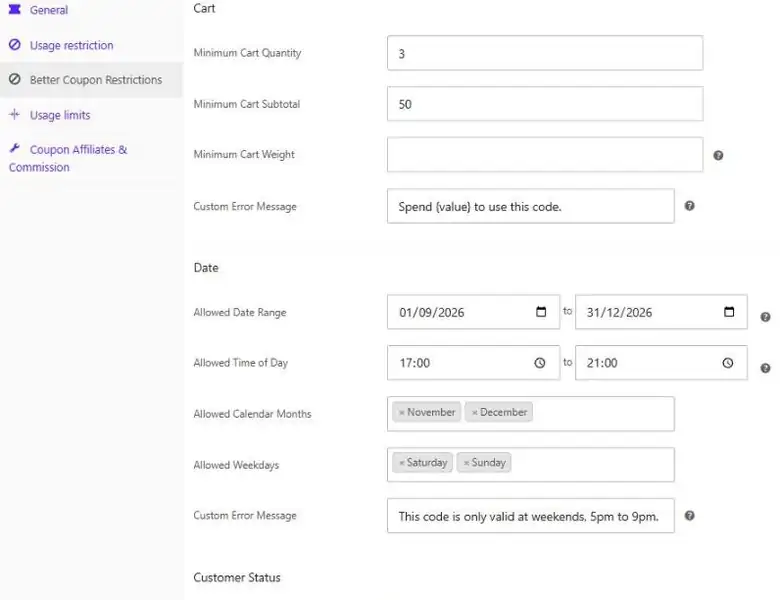
A minimum spend, a product list and an expiry date only get you so far. Better Coupon Restrictions adds product quantity rules, cart rules, dates and times of day, customer status, user roles, payment and shipping methods, addresses, order history, email domains, IP addresses and more – all set per coupon, in a new tab on the normal WooCommerce coupon screen.
Edit any coupon
Open a coupon under Marketing › Coupons, exactly as you always have.
Open the new tab
A Better Coupon Restrictions tab sits alongside the built-in WooCommerce tabs.
Set only what you need
Fill in the rules that matter for this promotion and leave the rest blank.
See what it turns away
Shop managers see the exact rule that rejected a coupon, with full analytics in PRO.
Restriction types
Over 25 restrictions, all in one tab
Set as many or as few as you like on any coupon. All of them must pass for the discount to apply.
Products
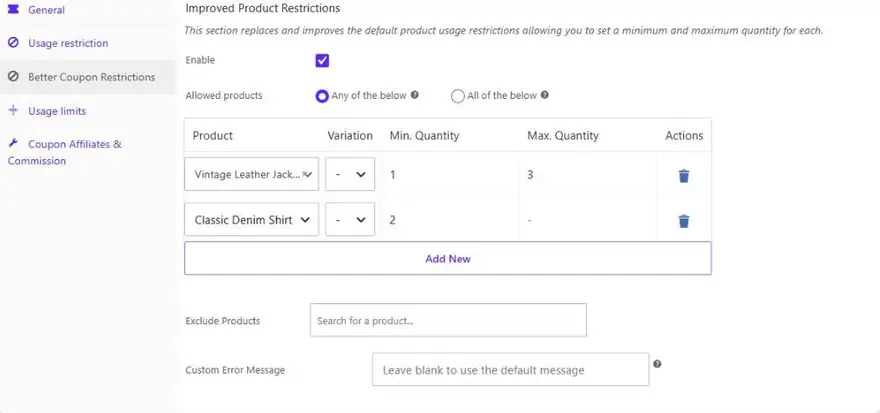
Replaces the default product restriction, adding a minimum and maximum quantity for each product or variation.
Categories
The same minimum and maximum quantities per category, counted per cart line or summed across the whole cart.
Product Attributes
Allow or exclude products by attribute, such as a size or a colour, without listing every product.
Cart
Require a minimum cart quantity, subtotal, or total weight before the coupon can be applied.
Date
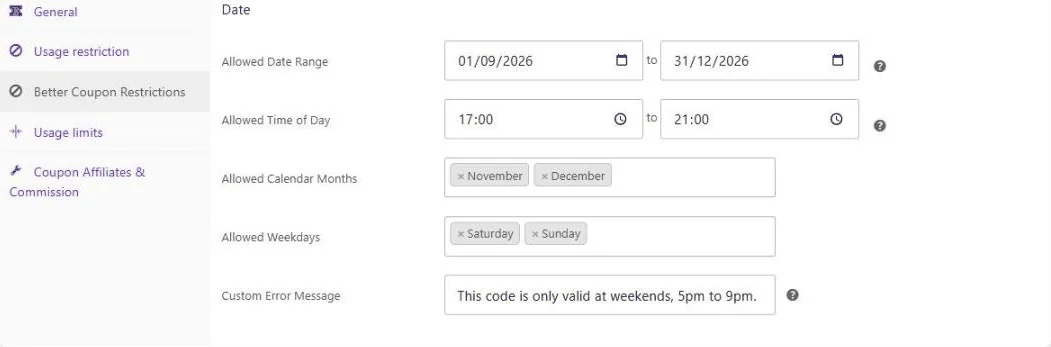
A start and end date, specific calendar months, or specific weekdays – all in your store’s timezone.
Time of Day
Allow a coupon only between two times, including happy-hour windows that run past midnight.
Customer Status
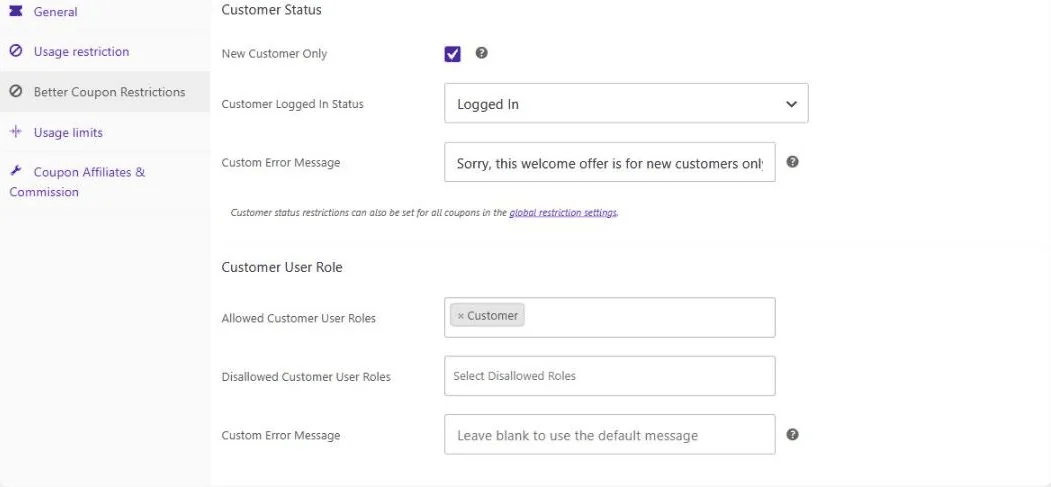
New customers only, logged in only, or guests only – so a welcome offer never goes to a repeat buyer.
User Role
Allow or block specific user roles, so wholesale or trade codes stay with the right accounts.
Payment & Shipping
Allow or block specific payment gateways and shipping methods, checked at the checkout.
Customer AddressPRO
Restrict by billing or shipping country, state, city or postcode, and cap uses per address.
Email DomainPRO
Allow or block whole email domains, ideal for corporate, student and partner perks.
Order HistoryPRO
Require a minimum total spent or a minimum number of past orders before a code works.
Purchase HistoryPRO
Require that a customer has, or has not, bought specific products before. Perfect for reorder and win-back offers.
Usage Limit Per PeriodPRO
Allow a coupon a set number of times per customer per day, per month or per rolling period.
Referring DomainPRO
Only honour a code when the shopper arrived from an approved site, so leaked codes stop working.
IP AddressPRO
Allow or block IP addresses and cap how many times one address can redeem a code.
Coupon LinksPRO
Share a link that applies the coupon automatically, and optionally make the code valid only through that link.
Meta Data & CookiesPRO
Match your own user meta, cart item meta or cookies for fully custom rules no other plugin covers.
Why store owners use it
Better discounts, fewer surprises
A coupon that applies to the wrong order costs you margin. These rules make sure that never happens.
Protect your margins
Stop coupon stacking, block codes that have leaked onto a deals forum, and limit how often one person can reuse an offer.
Target the right shoppers
Restrict an offer to new customers, returning customers, wholesale roles, one country, or one email domain.
Run smarter promotions
Happy hour discounts, weekend-only codes, seasonal offers, and “buy 2 from this category” deals, with no custom code.
Understand what is happening
See which coupons your rules turn away, and why, so you can loosen a rule that is quietly costing you sales.
Products & Categories
“Buy two from this category” deals, without code
WooCommerce lets you list which products a coupon applies to. Better Coupon Restrictions replaces that with a proper table: choose products, variations or categories and give each one a minimum and maximum quantity.
Quantities per product or variation
Require at least two of one product, or cap a discount at three, right down to individual variations.
Categories and attributes
Count category quantities per cart line or across the whole cart, and allow or exclude products by attribute such as size or colour.
Dates & Times
Weekend codes and happy hour discounts
Set a date range, pick the calendar months a seasonal code should run in, choose the weekdays it works on, and add a time window for a happy hour offer. Everything is evaluated in your store’s timezone.
Ranges, months and weekdays
An inclusive start and end date, plus specific months for seasonal codes and specific weekdays for weekend-only offers.
Time of day windows
Run a discount between 5pm and 9pm only. An end time earlier than the start time simply spans midnight.
Who Can Use It
Send the right offer to the right shopper
Restrict a welcome code to customers with no previous orders, keep a trade discount to your wholesale role, or limit an offer to one country, city or postcode. Guests are checked as soon as they enter an email address at checkout.
Status, role and login state
New customers only, logged in only or guests only, plus allowed and disallowed user roles for wholesale and trade pricing.
Address and email domainPRO
Country, state, city and postcode rules with wildcard support, a maximum use per address, and allowed or blocked email domains.
Anti-Abuse
Stop a code being used over and over
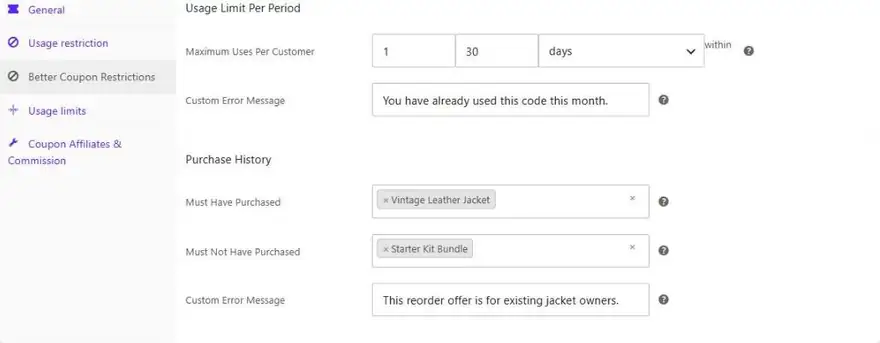
WooCommerce only offers “once per customer, ever”. PRO lets you allow a code a set number of times per customer per day, per month or per rolling period, and cap redemptions per address and per IP address as well.
Usage limit per periodPRO
“Once per customer, per month” or “twice in any 30 days”. Cancelled, failed and refunded orders are never counted.
Purchase and order historyPRO
Require that a customer has, or has not, bought certain products, has spent a minimum amount, or ordered a minimum number of times.
Coupon Links
One link that applies the discount for them
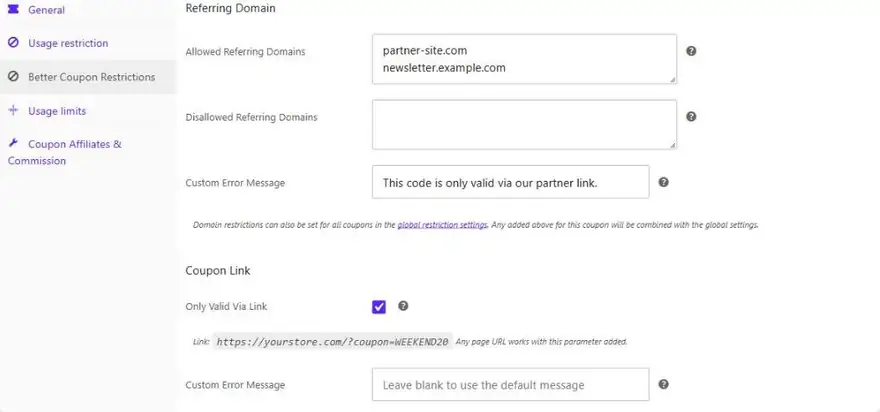
Share a link and the coupon is added to the cart automatically, so nobody has to type a code. Tick one box and the code becomes valid only through that link, which makes a code that leaks onto a deals site useless to everyone else.
Auto-applied from a linkPRO
A ready-made link is shown on the coupon screen. If the cart does not qualify yet, the coupon is retried as the cart changes.
Referring domain and IP rulesPRO
Only honour a code when the shopper arrived from an approved partner site, and block or cap specific IP addresses.
Rejection Analytics
See exactly why a coupon was turned away
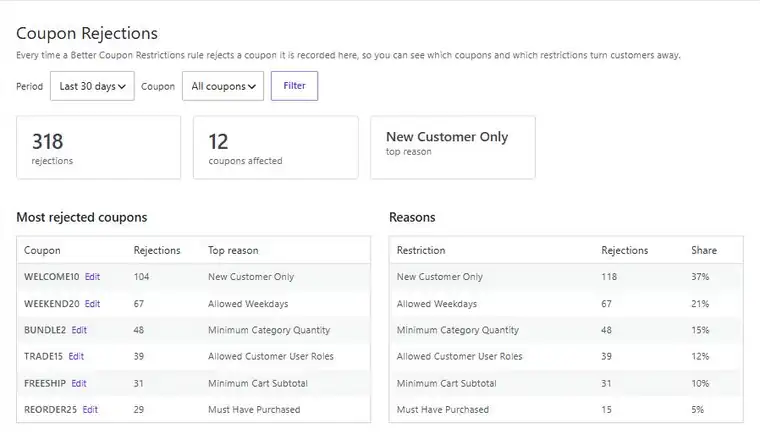
A rule that is a little too strict quietly costs you orders, and nobody tells you. Shop managers now see the exact restriction that rejected a coupon inline in the cart notice – customers never see that line – and PRO adds a full report.
Most rejected coupons and reasonsPRO
A report of which coupons are rejected most and which rule is responsible, filterable by period and coupon.
Custom error messages
Replace the message a shopper sees for any restriction, in your own words. Use {value} to insert the required amount.
Upgrade to PRO
Go further with Better Coupon Restrictions PRO
Unlock customer history, location and anti-abuse rules, store-wide restrictions, and full rejection analytics.
Customer Address Restrictions
Restrict by billing or shipping country, state, city or postcode, with wildcard postcode matching, and limit uses per address.
Email Domain Restrictions
Allow or block whole email domains, including subdomains, for corporate, student and partner perks.
Order History Restrictions
Require a minimum total spent or a minimum number of past orders, so a loyalty code only reaches loyal customers.
Purchase History Restrictions
Require that a customer has, or has not, bought specific products before. Ideal for reorder offers and win-back campaigns.
Usage Limit Per Period
Allow a coupon a set number of times per customer per day, per month or per rolling period, instead of only once for life.
Time Since Last Order
Target customers who ordered recently, or only those who have not ordered in a while, using a simple number of hours.
Time Registered
Reward brand new accounts with a first-week offer, or reserve a code for long-standing customers only.
Referring Domain Restrictions
Only honour a code when the shopper arrived from an approved site, so an affiliate or partner code stays with that partner.
IP Address Restrictions
Allow or block specific IP addresses, and cap how many times a single address can redeem the coupon.
Coupon Links
Share a link that applies the coupon automatically, and optionally make the code valid only when it arrives through that link.
Meta Data & Cookie Restrictions
Match your own user meta, cart item meta or cookies, for rules that are completely specific to your store.
Global Restrictions
Apply rules such as “new customers only” or “no coupon stacking” to every coupon at once, with a per coupon opt out.
Rejection Analytics
A report showing which coupons are rejected most and which rule is responsible, with a filterable log. Off by default.
Priority Support
If you ever need any support, send a message to our expert team any time and we’ll be glad to help out.
And so much more
Built to fit the store you already have
Nothing to migrate, nothing to rebuild. Your existing coupons keep working exactly as they are.
One Familiar Tab
Every setting lives in a new tab on the normal WooCommerce coupon screen. There is nothing new to learn and no code to write.
Custom Error Messages
Every section has its own message field, so you can tell shoppers exactly what to do instead of showing a generic notice.
Shop Manager Diagnostics
Shop managers see an extra line on the cart notice naming the exact restriction that rejected the coupon. Customers never see it.
Adds To What You Have
Existing WooCommerce restrictions keep working exactly as before, and any new rule you set is simply applied on top.
Works With Guest Checkout
Rules that depend on who the shopper is are checked as soon as the email address is entered, and the coupon is re-validated then.
HPOS Compatible
Fully compatible with WooCommerce High Performance Order Storage, so it keeps working on modern, high volume stores.
Block & Classic Checkout
Works with the block cart and checkout, the shortcode cart, and the classic checkout, without any extra configuration.
Fast & Lightweight
Restrictions are only evaluated for coupons that have them set, results are cached per request, and lookups use WooCommerce’s own queries.
Per Coupon Opt Out
Store-wide rules are powerful, so any single coupon can be exempted from every global restriction with one checkbox.
Translation Ready
Every label and customer-facing message can be translated, and the plugin ships with a languages folder ready to go.
Retry-Friendly Rules
Cancelled and failed orders are never counted against a customer, so a shopper retrying after a failed payment is not locked out.
Priority Support
If you ever need any help, send a message to our expert team any time and we’ll be glad to help out.
Pricing
Get started today, risk-free
Pro Yearly
$29
Per year
- 1 website license
- Access all PRO features
- Plugin updates for 1 year
- Premium support for 1 year
Pro Lifetime
$89
One-time payment
- 1 website license
- Access all PRO features
- Plugin updates forever
- Premium support included
Your trust is important to us. We provide clear and fair pricing, and the price you sign up at stays the same for as long as your subscription is active, with no sudden cost hikes after the first year. Easily cancel or switch plan any time. Pricing is in USD and excludes applicable VAT. An active PRO subscription is required for future updates and support.

Protected by our 14-day money-back guarantee
We look forward to helping you run tighter, smarter promotions. But if things don’t work out, simply contact us within 14 days of upgrading and we’ll refund 100% of your money, no questions asked.

Elliot Sowersby
Founder & Lead Developer
Here to help
Questions? We’ve got you covered
Ask a Question
Have a pre-sale question, or already a PRO user? Send us a message directly.
Contact Us →Documentation
Our docs will explain everything you need to know about setting up the plugin.
Coming SoonTake control of your coupons today
Start with the free version on WordPress.org, or upgrade risk-free with a 7-day trial and a 14-day money-back guarantee.