





Analytics and debug logging
Simple CAPTCHA with Cloudflare TurnstileUpdated September 13, 2026
The Analytics tab on Settings › Cloudflare Turnstile holds two separate features with two separate switches. Analytics keeps counters of how verification is going; debug logging records individual events for troubleshooting. Both are off until you enable them, and each has its own reset button.
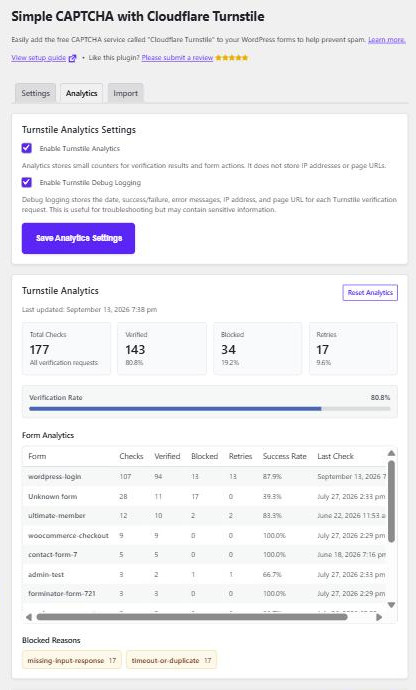
Turnstile Analytics
Tick Enable Turnstile Analytics and save. From then on the plugin counts every verification and shows:
- Overview totals – checks, verified, blocked and retries, with a verification rate bar.
- Form Analytics – a table with one row per form, giving checks, verified, blocked, retries, success rate and the time of the last check.
- Blocked Reasons – a breakdown of the Cloudflare error codes behind the failures.
It stores counters only. No IP addresses and no page URLs are recorded, which makes it the safer of the two to leave running.
The table keeps the 40 busiest forms and the 20 most common error codes, so a site with a great many forms will see the quietest ones drop off. Forms whose widget uses a randomised identifier, such as the WooCommerce account forms, are grouped under a single label rather than appearing as hundreds of separate rows. Submissions the plugin cannot attribute to a form appear as Unknown form, which is normal for tokenless spam.
Reading the numbers
A high blocked count is not automatically a problem – blocking is the point. What matters is which form and which reason. A steady stream of missing-input-response on a public form usually means bots submitting without ever loading the widget, which is Turnstile working. The same code spiking on your checkout after a theme change more likely means the widget stopped rendering.
timeout-or-duplicate is counted separately as a retry, because it normally means a visitor resubmitted with a token that had already been used rather than anything malicious.
Turnstile Debug Log
Tick Enable Turnstile Debug Logging to record individual events. Each entry holds the date, whether it succeeded, the error response, the visitor’s IP address and the page URL. Only the 50 most recent are kept.
Because it stores IP addresses and URLs, this is personal data. Turn it on while you are investigating something, then turn it off and use Reset Log to clear it. Leaving it running indefinitely gives you a rolling log of visitor IPs that your privacy policy probably does not mention.
The log view lists the Cloudflare error codes with plain-English explanations underneath, and a Copy Log button puts the whole thing on your clipboard – useful when you are posting on the support forum.
Resetting
Reset Analytics clears the counters, Reset Log clears the debug log. Neither touches your settings, and neither is reversible.